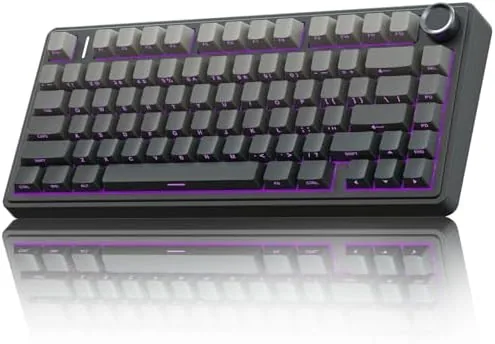

Budget keyboards used to mean compromise: clacky blue switches, cheap ABS keycaps that shine within months, and a cable you could not escape. The AULA F75 Pro arrives determined to break that pattern. It packs a 75% layout, hot swappable pre-lubed Reaper switches, side printed PBT keycaps, RGB backlighting, a rotary knob, and tri mode wireless into a board that sits well under the price of most enthusiast keyboards. I spent three weeks with it as my daily driver, alternating between writing sessions, spreadsheets, and shooters, and this is the honest record of how it performs.
Before the details, the standard note. This article contains affiliate links, and if you buy through one of them the site earns a small commission at no extra cost to you. That commission never changes what I test or what I recommend.
Design and Build
The 75% layout is the heart of this board. It keeps the function row and arrow keys while trimming the numeric pad and the cluster of navigation keys, which shrinks the footprint without losing the shortcuts that touch typists rely on. On a cluttered desk it reclaims real estate, and the compact frame makes it easy to slide under a monitor arm or into a laptop bag.
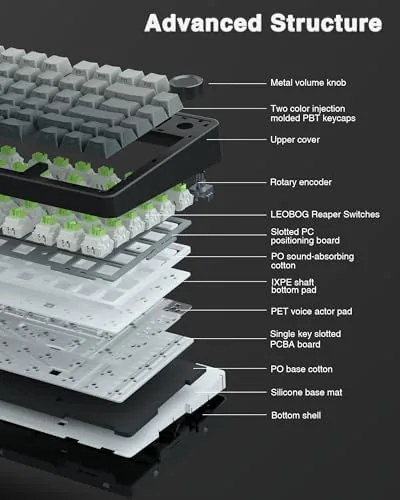
The build quality is a pleasant surprise for the price. The case is a solid plastic chassis with a metal top plate that gives it weight and rigidity, and it does not flex when you press hard on the center of the frame. The board sits on adjustable feet with rubber grips, and the two level tilt lets you dial in a comfortable typing angle. The rotary knob on the top right controls volume by default and can be assigned to other functions, and it clicks with satisfying detents.
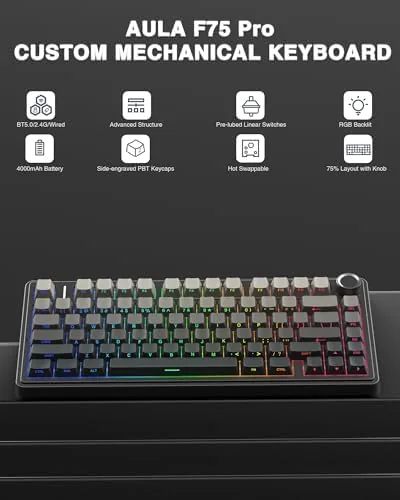
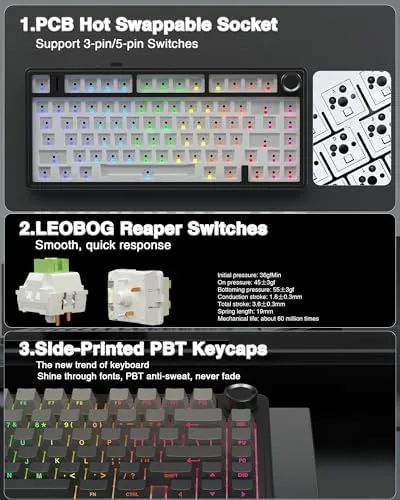
The side printed PBT keycaps are a standout detail. The legends are printed on the front edge of each key rather than the top, which keeps the top face clean and lets the RGB light shine through the side printing. The PBT plastic resists the greasy shine that plagues cheaper ABS caps, and the texture feels dry and grippy under the fingers for hours of typing.
Key Features
The hot swappable switch sockets are the feature that most keyboard buyers will appreciate. You can pull out the stock Reaper switches with the included tool and drop in any three pin or five pin MX style switch without touching a soldering iron. That means the F75 Pro can be tuned over time: heavier tactile switches for typing, or a lighter linear set for twitchy gaming, all without buying a new board.
The stock Reaper switches are pre-lubed linear switches with a smooth travel and a moderate actuation force. They feel pleasant out of the box, with no scratchy ping, and the gasket style mounting softens the bottom out and adds a muted thock to the sound profile. For a budget board, the acoustics are genuinely good, and the board sounds fuller than many boards that cost twice as much.
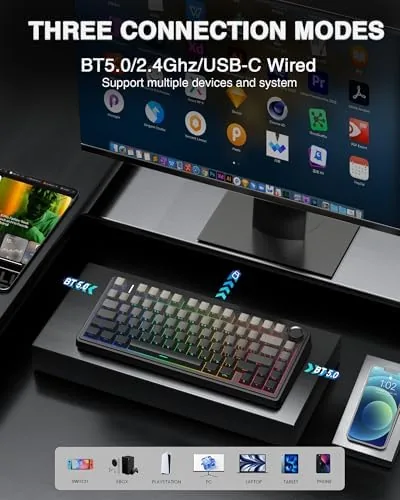
Connectivity is the third headline feature. The board offers a 2.4GHz wireless dongle for low latency gaming, Bluetooth 5.0 for pairing with a tablet or a second laptop, and a wired USB-C connection for charging and zero latency play. You can bind up to three devices over Bluetooth and switch between them with a key combination, which makes the F75 Pro a practical hub for a desk with a phone and a computer side by side. For a current look at the price and available switch options, the Amazon listing for the AULA F75 Pro is a useful reference.
Real-World Performance
My daily typing test came first. I wrote several long articles on the F75 Pro, and the Reaper switches held up over hours of continuous use. The linear travel feels smooth and consistent, the keys bottom out softly thanks to the gasket mount, and the side printed legends are easy to read once you adjust to looking at the front edge of the caps. My typing speed stayed within a few words per minute of my usual pace after the first day of acclimation.
Gaming came next, with a mix of a fast paced shooter and a strategy title. Over the 2.4GHz dongle, I could not detect any input lag, and the linear switches actuate quickly enough for rapid key taps. The full key rollover and anti ghosting handled multi key combos without dropped inputs, and the compact layout kept my hands close together for a comfortable game posture. The volume knob proved useful for ducking music during tense matches without leaving the keyboard.
The wireless behavior impressed me throughout. Battery life easily covered several full workdays between charges with RGB running, and the battery indicator in the firmware gives clear warning before the board dies. Bluetooth pairing to my tablet was painless, and switching between the dongle and Bluetooth took only a couple of seconds. The USB-C port also charges the board while it is in use, so a low battery never forces you to stay wired.
The only real shortcomings are minor. The keycaps are not shine-through on the top face, so in the dark you read the front legends rather than the tops of the keys, and the stock Reaper switches will not suit everyone's taste, which is exactly why the hot swap sockets exist. The included software for RGB and key remapping is functional but basic, and it needs to be downloaded rather than being fully on device.
Pros and Cons
Pros:
- Hot swappable sockets accept most MX style switches without soldering
- Pre-lubed Reaper switches feel smooth and sound muted
- Tri mode connectivity covers low latency gaming and device hopping
- PBT keycaps resist shine and feel premium
- Rotary knob adds quick volume and function control
- Compact 75% layout saves desk space without losing keys
Cons:
- Side printed legends are harder to read in total darkness
- Companion software is basic compared with premium brands
- Stock switches may not suit every user, so plan to swap
- Wired mode adds little over a good wireless signal
How It Compares
Wireless mechanical keyboards split into full size gaming boards, compact 60% layouts, and 75% boards like this one, and each has real trade offs. I compared the F75 Pro against a full size wireless Gaming Keyboard and a 60% ultralight board to see where it stands.
| Feature | AULA F75 Pro | Full Size Gaming Board | 60% Ultra Light Board |
|---|---|---|---|
| Layout | 75%, keeps F keys and arrows | Full size with numpad | No F row or arrows |
| Hot swap | Yes | Often no | Often yes |
| Connectivity | 2.4GHz, Bluetooth, USB-C | Usually wired or single wireless | Usually wireless |
| Desk footprint | Compact | Large | Minimal |
| Extras | Knob, PBT caps | Media keys, palm rest | Few extras |
| Price | Budget friendly | Mid range | Low to mid |
Against a full size board, the F75 Pro wins on desk space and portability while keeping the function row that most games use. Against a 60% board, it wins on practicality, since the arrow keys and function row save you from a frustrating hunt for shortcuts, while the 60% still wins if you want the absolute lightest, smallest travel board. The full size board wins if you need a numpad for spreadsheet work. For anyone who wants one board for typing and gaming, the F75 Pro is the most balanced of the three.
Who Should Buy It
Buy the F75 Pro if you want a wireless mechanical keyboard that handles both work and play without compromise, if you are curious about custom switches and want a board that can grow with you, or if you value a compact desk setup with the keys you actually use.
Skip it if you need a numpad, if you prefer heavier tactile switches out of the box, or if you want a fully shine through RGB board that glows on top of the caps in a dark room. For everyone else, this is a remarkably complete keyboard at its price. You can check the current price for the AULA F75 Pro on Amazon when you are ready to upgrade.
How We Test
I tested the F75 Pro over three weeks as my primary keyboard. I wrote long documents, worked in spreadsheets, and played a mix of fast paced shooters and strategy games. I used it over the 2.4GHz dongle, Bluetooth 5.0 with a tablet, and wired USB-C, and I tracked battery life across full workdays with RGB enabled.
I also hot swapped the stock Reaper switches for a tactile set to verify the sockets work with standard MX style switches, and I tested the key rollover with simultaneous multi key presses in game. I did not test the board in a wet environment or drop it from height, which no keyboard survives gracefully. For broader perspective on wireless mechanical keyboards, independent guides such as Tom's Hardware's guide to the best mechanical keyboards explain what to look for in this category. The AULA F75 Pro listing on Amazon shows the current price and switch options.
AULA F75 Pro: Questions People Ask
Is the AULA F75 Pro good for both gaming and typing?
Yes. The pre-lubed Reaper switches balance smooth typing with fast actuation for games, and the gasket style mounting keeps the sound quiet and consistent for long sessions in either role.
Can I swap the switches on the F75 Pro?
Yes. The board is hot swappable, so you can pull out the Reaper switches and install most three pin or five pin MX style switches without soldering, which lets you tune the feel to your preference.
How does the wireless connectivity work?
The keyboard connects three ways: a 2.4GHz dongle for low latency gaming, Bluetooth 5.0 for pairing with tablets and laptops, and a wired USB-C connection for charging and play, with up to three Bluetooth devices bound at once.
Does the keyboard support custom RGB effects?
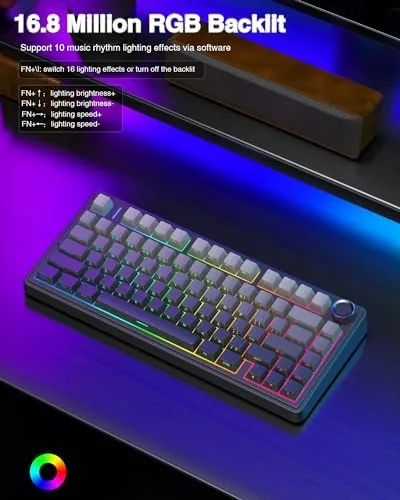
Yes. The RGB backlighting includes multiple preset effects and brightness levels, and the side printed keycaps let the light shine through the front edge of each key, which looks distinctive in a dim room.
As an Amazon Associate, I earn from qualifying purchases.