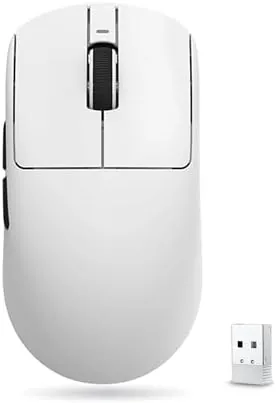

A gaming mouse should disappear in the hand and match the desk it sits on. The ATK VXE Dragonfly R1 SE+ in white does both, and that combination has made the Dragonfly line a favorite among budget conscious players who want flagship style performance without the flagship invoice. This version runs the PAW3395 SE sensor at up to 18,000 DPI, weighs just 55 grams, claims 70 hours of battery life, and connects over 2.4G wireless, Bluetooth, or a wired USB cable, all wrapped in a clean white shell that fits a light themed battlestation.
I used the white Dragonfly R1 SE+ for three weeks as my primary mouse, split between competitive gaming sessions, coding work, and Bluetooth use with a secondary laptop. This article contains affiliate links. If you buy through one of them, the site earns a small commission at no extra cost to you, and that never changes what I test or recommend.
If you are deciding between the Dragonfly R1 SE+ and a pricier Wireless Mouse, this review walks through the build, the sensor, the battery, and the tri-mode connectivity, and the comparison table near the end lays out the trade offs clearly.
Design and Build
The white Dragonfly R1 SE+ is a compact, symmetric mouse with a low profile designed for claw and fingertip grips. The 55 gram weight is the defining spec, and it is striking the first time you lift it: the mouse feels almost weightless, gliding under a flick of the wrist, and that lightness prevents fatigue during long sessions.
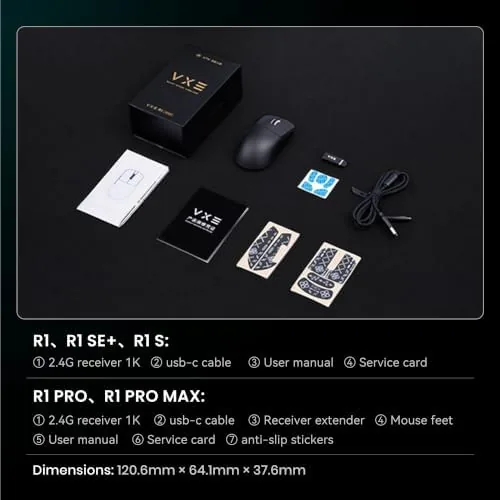
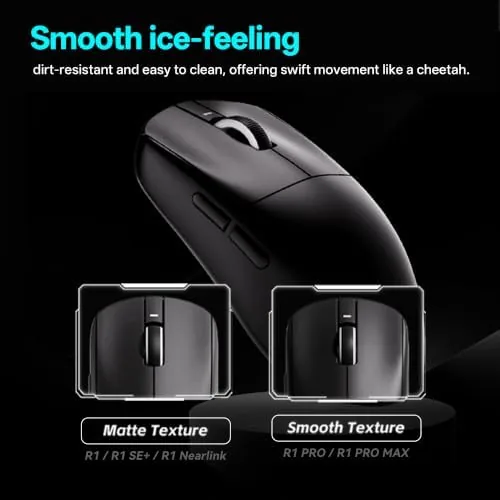
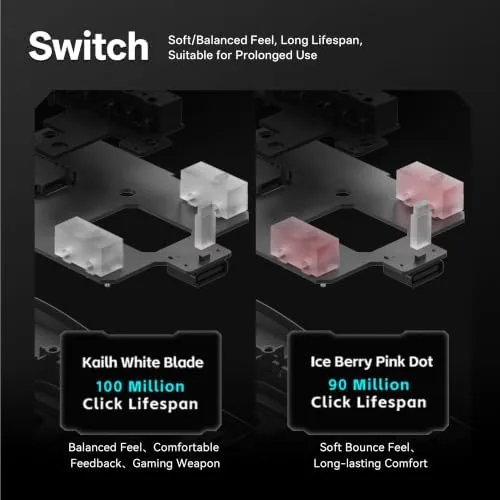
The white shell uses a matte coating with a soft, grippy feel that holds up through sweaty sessions and resists fingerprints better than glossy finishes. The main buttons are crisp with a satisfying click, the scroll wheel has defined tactile steps, and the mouse feet glide smoothly across both cloth and hard pads.
The shape suits small to medium hands well. The side buttons sit under the thumb and are easy to reach, and the USB receiver tucks into a compartment under the mouse for travel. The build is solid for the price, though the plastics and coating do not quite match the refinement of mice that cost two or three times as much.
Key Features
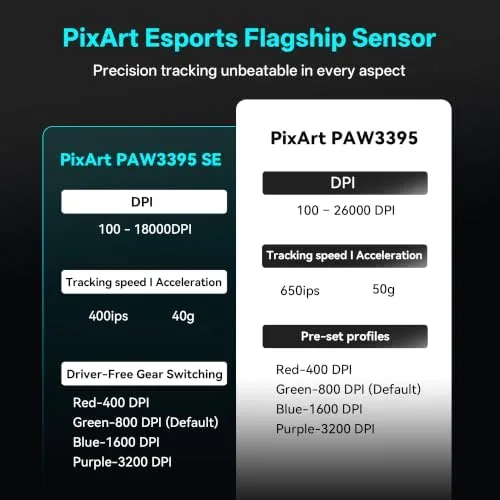
The PAW3395 SE sensor is the performance core. It tracks at up to 18,000 DPI with low latency, and in practice the cursor felt immediate and precise at every setting I tried. The sensor handled fast swipes without spinning out, and tracking stayed accurate across different surface types.
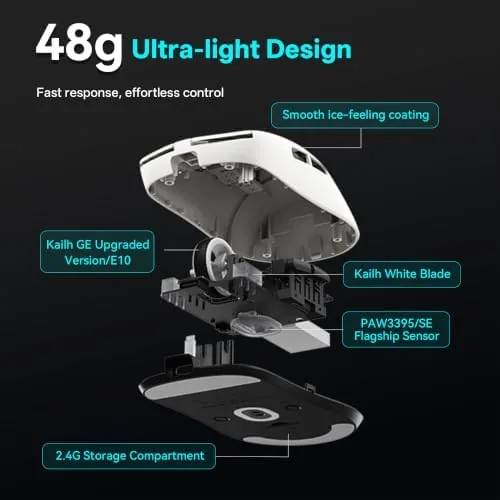
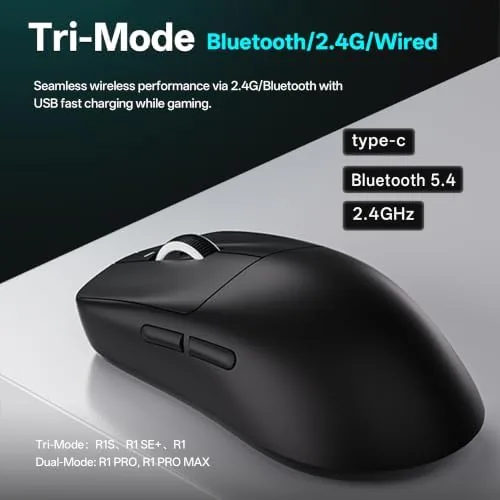
Tri-mode connectivity is the standout practical feature. The 2.4G dongle gives a low latency gaming connection, Bluetooth lets you pair with a laptop, tablet, or phone, and the wired USB mode charges the mouse and provides a fallback. That makes the Dragonfly a true one mouse setup for a desktop PC and a portable laptop.
The 70 hour battery completes the package. In testing the mouse covered a full week of mixed gaming and work on a single charge, and it tops up through a USB-C port while still working, so you never have to stop mid session. For a current look at the price and the exact package contents, the Amazon listing for the Dragonfly R1 SE+ white mouse is a useful reference.
Real-World Performance
In gaming, the Dragonfly delivered the responsiveness expected from modern wireless gear. The 55 gram weight made aim tracking feel effortless, the PAW3395 SE sensor tracked smooth and consistent, and the 2.4G connection held without a single drop or stutter over the review period. In fast paced shooters there was no perceptible difference from a wired connection.
Outside gaming, the mouse proved a capable daily driver. The scroll wheel handled long documents and code files comfortably, the side buttons mapped cleanly to back and forward, and the lightweight body was easy on the wrist over full work days. Bluetooth pairing with a secondary laptop was quick, and the mouse tracked smoothly over the wireless link for productivity tasks. The symmetric shape also worked in either hand, so a left handed member of the household could use it without remapping the buttons, which is a small but welcome flexibility that many esports mice do not offer.
Battery life matched the claim. After a week of heavy gaming and daily work, the software still reported healthy charge, and a USB-C top up restored full capacity without interrupting use. The receiver storage, the wireless range, and the wake from sleep were all reliable in daily use, and the mouse never required a reconnect during the review period.
The limitations are consistent with the price. The compact shape will be small for users with large hands or a palm grip, the companion software is functional but less polished than the big brand apps, and the white finish, while attractive, will show heavy use more readily than black. None of these are deal breakers, but they set expectations. The side buttons also sit close to the top edge of the shell, so a thumb that rests high on the mouse can brush them mid game, a quirk worth a quick remap in the software if you prefer a firm grip.
Pros and Cons
Pros:
- Featherweight 55 gram shell reduces fatigue
- PAW3395 SE sensor tracks up to 18,000 DPI
- Tri-mode connectivity suits gaming and work
- 70 hour battery on a single charge
- Clean white finish for light themed setups
- Aggressive pricing against flagship mice
Cons:
- Compact shape is small for large hands
- White finish shows heavy use more than black
- Companion software is functional but basic
- Build quality trails pricier mice
How It Compares
Wireless gaming mice come in three tiers: budget models like this one, mid range options, and flagship flagships. I compared the white Dragonfly R1 SE+ against a mid range wireless mouse and a flagship wireless mouse to frame the decision.
| Feature | Dragonfly R1 SE+ White | Mid Range Wireless Mouse | Flagship Wireless Mouse |
|---|---|---|---|
| Weight | 55g | 60 to 75g | 55 to 60g |
| Sensor | PAW3395 SE | Mid tier | Flagship |
| DPI | Up to 18,000 | Up to 12,000 | Up to 26,000+ |
| Connectivity | 2.4G, BT, wired | 2.4G, BT, wired | 2.4G, BT, wired |
| Battery | 70 hours | 60 to 80 hours | 70 to 100 hours |
| Price | Low | Mid | High |
Against a mid range wireless mouse, the Dragonfly wins on weight and price while matching wireless performance, and the mid range model gains little for its higher cost. Against a flagship wireless mouse, it gives up some build refinement and raw DPI headroom but delivers the same day to day experience for a fraction of the price. For a budget builder or anyone who wants a light wireless mouse without overspending, this is the clear value pick.
Who Should Buy It
Buy the white Dragonfly R1 SE+ if you are building or upgrading a light themed setup, if you want a 55 gram wireless mouse without flagship pricing, or if you need one mouse that works for both gaming and work through tri-mode connectivity. It suits competitive players who use claw or fingertip grips and anyone moving up from a heavy wired mouse.
Skip it if you have large hands and prefer a palm grip, if you want the most polished software available, or if a premium build matters more than price. For everyone else, this is one of the best value wireless mice you can buy. You can check the current price for the white Dragonfly R1 SE+ on Amazon when you are ready.
How We Test
I used the white Dragonfly R1 SE+ as my primary mouse for three weeks, alternating between competitive gaming over 2.4G, coding and productivity work, and Bluetooth sessions with a secondary laptop. I tested the full DPI range and tracked battery drain across a week of mixed use.
I tested the wireless connection for dropouts across distances and USB ports, verified Bluetooth pairing and switching between devices, and checked button feel and scroll wheel behavior. I did not test the mouse in a competitive LAN environment, and I did not measure the polling rate with dedicated instruments. For independent perspective on wireless gaming mice, PC Gamer's best gaming mice guide is a solid reference. The white Dragonfly R1 SE+ listing on Amazon shows the current price and included accessories.
Questions People Ask
Is the white version different from the black version?
Only the finish and the color of the shell. The performance, sensor, weight, and battery are identical, so the choice comes down to which color matches your setup.
Does the white shell get dirty easily?
The matte white coating resists fingerprints and wipes clean with a damp cloth, though like any light colored device it will show heavy use more readily than black.
What polling rate does the mouse support?
The mouse supports a 1000Hz polling rate in the 2.4G wireless mode, which provides a one millisecond response for competitive gaming.
Is the mouse suitable for small hands?
Yes. The compact, symmetric shape suits small to medium hands and claw and fingertip grips, while users with large hands or a palm grip may find it small.
As an Amazon Associate, I earn from qualifying purchases.