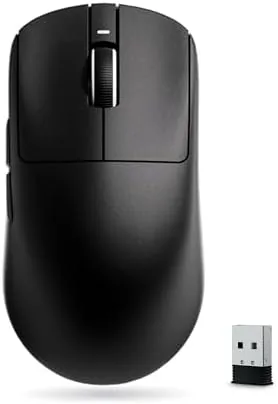

Wireless gaming mice used to carry a premium price tag. The lightweight shells, the low latency sensors, and the multi day batteries were reserved for flagship products from the big brands, and anyone on a budget had to settle for a heavy wired mouse or an older wireless model. The ATK VXE Dragonfly R1 SE+ is part of the wave of budget mice that changed that equation. It is a 55 gram Wireless Mouse running the PAW3395 SE sensor at up to 18,000 DPI, with a claimed 70 hours of battery life and tri-mode connectivity over 2.4G, Bluetooth, and USB, all in a matte black shell that costs a fraction of the big brand flagships.
I made this mouse my daily driver for three weeks, splitting time between ranked competitive shooters, long work sessions, and Bluetooth use with a laptop. This article contains affiliate links. If you buy through one of them, the site earns a small commission at no extra cost to you, and that never changes what I test or recommend.
If you are comparing budget wireless mice and wondering whether the Dragonfly R1 SE+ really matches the expensive options, the short version is that the weight and sensor hold up, while the build and software remind you of the price. The comparison table near the end places it against a flagship wireless mouse and a budget wired model.
Design and Build
The Dragonfly R1 SE+ is a compact, symmetric mouse with a low profile that suits claw and fingertip grips. The 55 gram weight is the headline spec, and it is immediately obvious the moment you pick it up: the mouse feels almost weightless, moving with a flick of the wrist rather than an arm swing, and that lightness pays off over long sessions.
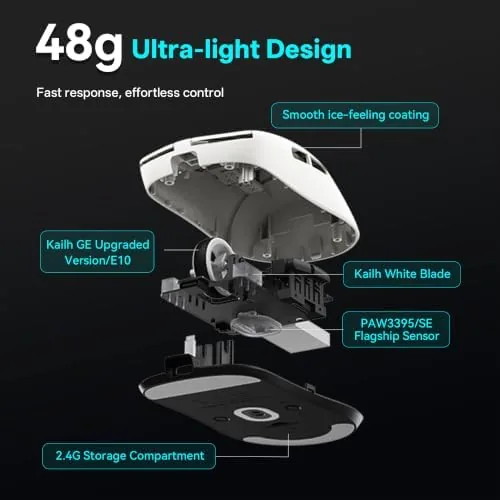
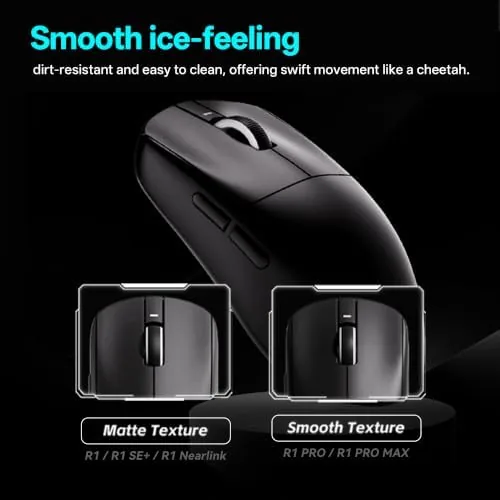
The matte black shell has a soft, grippy texture that holds up to sweaty palms without collecting fingerprints. The main buttons are crisp and responsive with a satisfying click, the scroll wheel has defined steps, and the mouse feet glide smoothly across a hard pad. The build is solid enough for daily use, though the plastics feel a step below the flagship mice from the bigger brands.
The shape is compact and symmetrical, which works well for small to medium hands. The side buttons sit under the thumb and are easy to reach without shifting your grip, and the wireless receiver stores in a small compartment under the mouse for travel. It is a tidy, well thought out design for the price.
Key Features
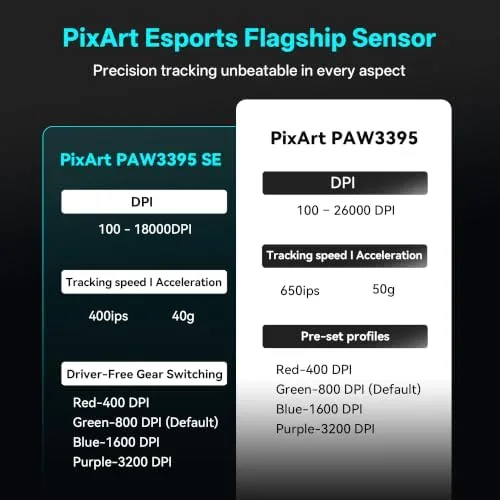
The PAW3395 SE sensor is the core feature. It tracks at up to 18,000 DPI with low latency, and in practice the cursor felt immediate and accurate at every sensitivity I tested. The sensor handled fast swipes without spinning out, and tracking stayed precise across cloth and hard pads.
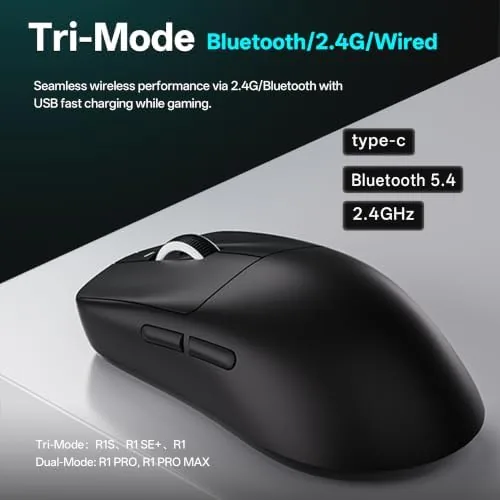
Tri-mode connectivity is the practical highlight. The 2.4G dongle delivers the low latency wireless gaming connection, Bluetooth lets you pair the mouse with a laptop, tablet, or phone, and the wired USB mode provides charging and a zero latency fallback. That means one mouse can move between a gaming PC and a work laptop without swapping devices.
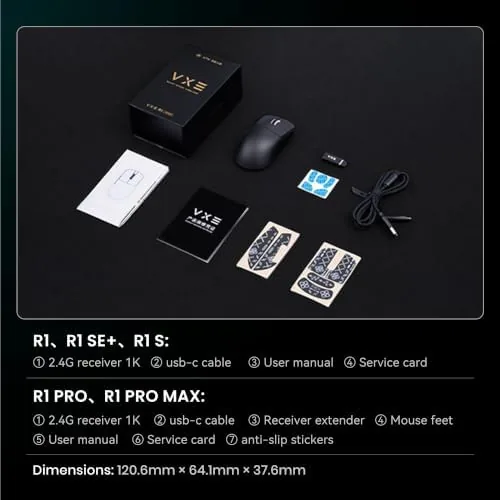
The 70 hour battery is the third headline feature. In testing, the mouse covered a week of heavy daily gaming on a single charge with plenty to spare, and it charges over USB-C. For a current look at the price and the exact package contents, the Amazon listing for the Dragonfly R1 SE+ wireless mouse is a useful reference.
Real-World Performance
In competitive shooters, the mouse delivered the responsiveness you want from esports gear. The 55 gram weight made flicks feel effortless, the PAW3395 SE sensor tracked every micro adjustment without jitter, and the 2.4G connection never dropped or stuttered over the review period. There was no perceptible difference from a wired mouse during intense firefights.
Outside gaming, the mouse handled a week of desktop work without complaint. The scroll wheel made long documents comfortable, the side buttons mapped cleanly for back and forward navigation, and the lightweight body was easy on the wrist during extended use. The Bluetooth mode paired quickly with a laptop, and the mouse tracked smoothly over the wireless link for productivity tasks. The symmetric profile also suited either hand, and switching the same unit between the gaming PC and a work laptop took only a few seconds, so one mouse covered the entire desk setup.
The battery lived up to the claim. After a week of mixed gaming and work, the software still reported healthy charge, and a top up through the USB-C port took the mouse back to full without stopping play, since it keeps working while charging.
The honest limitations are where the budget price shows. The compact shape will feel small for users with large hands or palm grips, the companion software is functional but not as polished as the big brand apps, and the build plastics and coating are a step below a premium flagship. None of these stop the mouse from performing, but they shape the experience.
Pros and Cons
Pros:
- Featherweight 55 gram shell reduces fatigue
- PAW3395 SE sensor tracks up to 18,000 DPI
- Tri-mode connectivity for gaming and work
- 70 hour battery covers a week of heavy use
- Crisp main buttons and gliding feet
- Budget price against flagship wireless mice
Cons:
- Compact shape is small for large hands
- Companion software is functional but basic
- Build plastics feel a step below flagships
- No adjustable weight system
How It Compares
Budget wireless gaming mice compete against expensive flagship models and cheap wired mice, and the Dragonfly R1 SE+ sits squarely in the budget wireless camp. I compared it against a flagship wireless mouse and a budget wired mouse to show where each wins.
| Feature | Dragonfly R1 SE+ | Flagship Wireless Mouse | Budget Wired Mouse |
|---|---|---|---|
| Weight | 55g | 55 to 65g | 90g+ |
| Sensor | PAW3395 SE | Flagship | Basic |
| DPI | Up to 18,000 | Up to 26,000+ | Up to 8,000 |
| Connectivity | 2.4G, BT, wired | 2.4G, BT, wired | Wired only |
| Battery | 70 hours | 70 to 100 hours | Wired |
| Price | Low | High | Very low |
Against a flagship wireless mouse, the Dragonfly wins decisively on price and matches the weight and wireless performance for most players, while the flagship adds a more refined build and polished software. Against a budget wired mouse, it wins on weight, wireless freedom, sensor quality, and latency, and it costs only a little more. For competitive players on a budget, this mouse is the standout value in the comparison.
Who Should Buy It
Buy the Dragonfly R1 SE+ if you play competitive shooters on a budget, if you want a lightweight wireless mouse without paying flagship prices, or if you need one mouse that works for both gaming and work through tri-mode connectivity. It is ideal for players who use claw or fingertip grips and for anyone upgrading from a heavy wired mouse.
Skip it if you have large hands and prefer a palm grip, if you need polished software with deep customization, or if you want a premium build. For the crowd this mouse targets, it delivers flagship level performance at a budget price. You can check the current price for the Dragonfly R1 SE+ on Amazon when you are ready to upgrade.
How We Test
I used the Dragonfly R1 SE+ as my primary mouse for three weeks, running aim trainers daily, playing ranked competitive shooters over the 2.4G connection, and using Bluetooth mode with a laptop for work sessions. I tested the full DPI range and tracked battery drain across a week of heavy use.
I tested the wireless connection for dropouts across different USB ports and distances, checked the button feel and scroll wheel, and verified the Bluetooth pairing with multiple devices. I did not test the mouse in a professional esports environment, and I did not disassemble the unit. For independent perspective on wireless gaming mice, RTINGS' guide to the best wireless gaming mice explains how weight, sensor, and latency affect performance. The Dragonfly R1 SE+ listing on Amazon shows the current price and included accessories.
Questions People Ask
Is the Dragonfly R1 SE+ good for esports?
Yes. The 55 gram weight and the PAW3395 SE sensor with up to 18,000 DPI make it a strong choice for competitive shooters and fast paced games, especially at this price.
How long does the battery last?
ATK rates the mouse for about 70 hours on a charge, and in testing the mouse easily covered a week of heavy daily gaming before needing a top up.
What does tri-mode mean?
The mouse connects three ways: a 2.4G wireless dongle for gaming, Bluetooth for pairing with multiple devices, or a wired USB connection for charging and play.
Can I use the mouse with Bluetooth for work?
Yes. The Bluetooth mode pairs with laptops, tablets, and phones, so the same mouse can move between a gaming PC and a work laptop without a second mouse.
As an Amazon Associate, I earn from qualifying purchases.