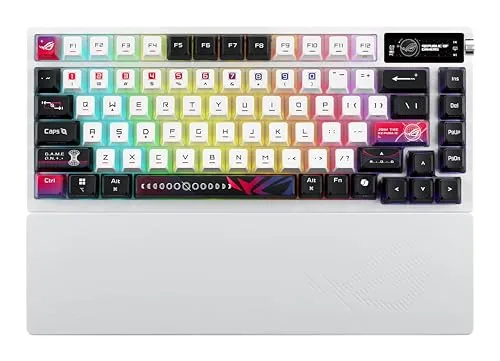

Gaming keyboards have split into two camps: the loud, aggressive boards of a decade ago and the refined, thocky keyboards that modern players and typists actually want on their desk. The ASUS ROG Azoth X lands firmly in the second camp. It is a 75% layout board with a compact frame, tri-mode wireless, hot-swappable pre-lubed ROG NX V2 Snow linear switches, PBT keycaps, and a south-facing PCB for clean RGB. I used it as my daily driver for three weeks of gaming and work, and this is the honest record.
Before the details, the standard note. This article contains affiliate links. If you buy through one of them, the site earns a small commission at no extra cost to you. That never changes what I test or what I recommend.
Design and Build
The Azoth X is a 75% tenkeyless board, which means it keeps the main typing area, the arrow keys, and the function row while dropping the number pad. The result is a compact keyboard that leaves room for a mouse at close range, a layout that has become the default for serious players. The white finish is clean and modern, with a two tone keycap set that looks sharp under RGB lighting.
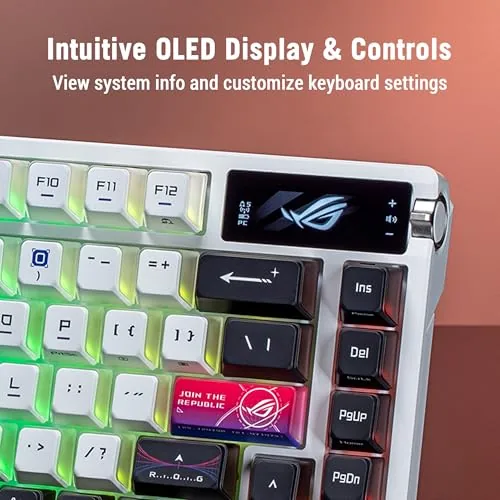
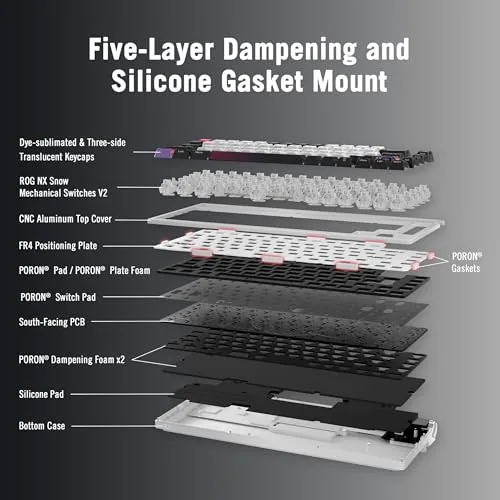
The chassis is aluminum-topped with a solid weight that keeps the board planted during intense sessions. There is no flex when you press, and the gasket-style construction gives the board a soft, cushioned feel that suits both gaming and long typing stretches. A two position flip-out foot on the bottom sets the typing angle, and the build quality overall feels a tier above most wireless boards in this price range. The side mounted indicators and the connection status light sit low and unobtrusive, so the desk stays clean and the RGB remains the visual focus. Every detail, from the spacing of the keys to the angle of the stabilizers, shows the attention to fit and finish that distinguishes a flagship board from a budget one.
Key Features
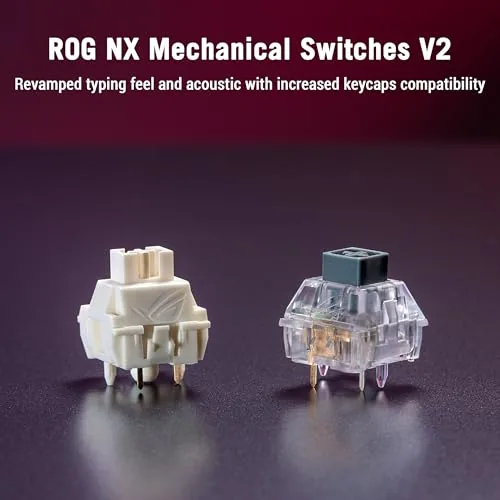
The switches are the heart of the board. ROG NX V2 Snow linear switches are pre-lubed from the factory, which delivers a smooth, consistent keystroke with none of the scratchy feel that plagues unlubed switches. Being linear, they have no tactile bump and no click, so they press straight down and feel fast, which is exactly what competitive gamers want. The pre-lube also quiets the switch travel, giving the board a refined, low pitch sound.
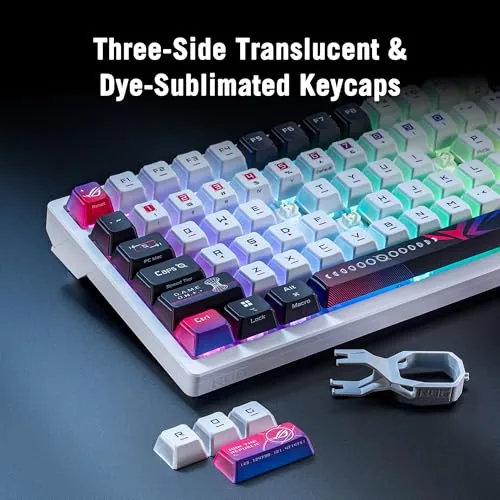
The board is hot-swappable, so you can pull the NX V2 switches out and replace them with any compatible 3-pin or 5-pin switch. That makes the Azoth X a platform you can tune over time instead of a locked-in purchase. The PBT keycaps are thicker and more textured than the cheaper ABS plastic on most boards, and they resist the shiny wear that develops on heavily used keys.
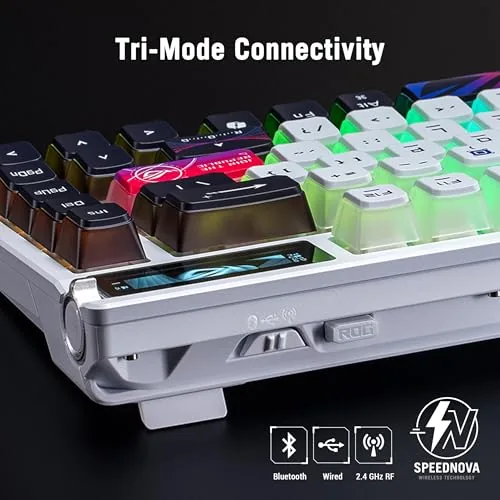
Connectivity is tri-mode. A 2.4GHz dongle delivers the low latency you want for gaming, Bluetooth handles pairing with multiple devices, and a USB cable provides a wired connection for zero-latency play and charging. The south-facing PCB positions the RGB LEDs so the glow shines through the caps rather than washing out, and the whole board works on both PC and Mac. For the current price and switch options, the ASUS ROG Azoth X on Amazon has all the details.
Real-World Performance
In games, the Azoth X felt immediate. Playing fast-paced shooters and battle royales over the 2.4GHz connection, I never noticed latency, and the linear switches rewarded quick, repeated presses with a smoothness that made movement and ability spam effortless. The south-facing RGB also meant the key legends stayed readable in a dark room, which is more than many RGB boards manage.
The typing experience was just as strong. I wrote thousands of words across documents, email, and code over the three weeks, and the pre-lubed switches delivered a comfortable, consistent feel. The sound profile deserves the praise it gets online: a deep, satisfying thock with none of the hollow clack of cheaper boards. The PBT keycaps felt premium under the fingers and held their texture through the review period.
Wireless reliability was a genuine highlight. The 2.4GHz connection never dropped or stuttered during testing, and Bluetooth paired quickly with a laptop and a tablet, switching between them on command. The battery lasted well over a week of mixed gaming and typing with the RGB on, and the USB cable recharged it quickly. The one adjustment was the 75% layout: I had to retrain muscle memory for the cluster of keys near the arrows, which is normal for anyone moving from a full size board. Within a few days the compact reach felt natural, and moving the mouse across the freed-up desk space made the switch feel worthwhile rather than merely acceptable.
Pros and Cons
Pros:
- Pre-lubed NX V2 Snow switches are smooth and quiet
- Hot-swappable switches make the board tunable over time
- PBT keycaps resist wear and feel premium
- Tri-mode connectivity covers gaming and multi-device work
- South-facing RGB keeps legends readable and colors vibrant
- Solid aluminum build with a refined sound profile
Cons:
- 75% layout takes time to learn after a full size board
- Premium price for a non-enthusiast audience
- Software control is heavy for simple customization
- No wrist rest included
How It Compares
The Azoth X competes in a crowded field of 75% wireless boards, and it sits against two common alternatives: a standard gaming keyboard with full size layout and a budget hot-swappable board. The table below shows how the comparison shakes out.
| Feature | ROG Azoth X | Full Size Gaming Board | Budget Hot-Swap Board |
|---|---|---|---|
| Layout | 75% compact | Full with numpad | Varies |
| Switches | Pre-lubed NX V2 | Standard, unlubed | Basic |
| Keycaps | PBT | Often ABS | Often ABS |
| Wireless | Tri-mode | Often wired only | Varies |
| Sound quality | Refined and deep | Hollow clack | Modest |
| Price | Premium | Mid range | Budget |
Against a full size gaming board, the Azoth X wins on sound quality, switch smoothness, and wireless freedom, but it loses the number pad and the lower price. Against a budget hot-swappable board, it wins decisively on build quality, keycaps, and the factory pre-lubing, which saves you the weekend of lubing switches yourself. For players who want a premium feel out of the box, the Azoth X earns its price; for casual buyers, a full size board is the cheaper path.
Who Should Buy It
Buy the Azoth X if you game on a desk where the number pad is wasted space, if you want a wireless board with low latency and long battery life, or if you want a hot-swappable keyboard that sounds great without any modding work. It is also a strong pick for anyone who types as much as they game and wants a board that does both well.
Skip it if you depend on a number pad for spreadsheets and data entry, if your budget is limited and a full size board fits it, or if you prefer the loud, clicky feel of tactile or clicky switches. For players in the market for a premium compact wireless board, this is one of the best options available. You can check the current price for the ASUS ROG Azoth X on Amazon when you are ready to upgrade.
How We Test
I tested the Azoth X as my primary keyboard for three weeks, covering both gaming and daily work. I played fast-paced shooters and battle royales over the 2.4GHz connection to assess latency, typed thousands of words for comfort, and paired the board with a laptop and tablet over Bluetooth to test multi-device switching. I checked battery life with the RGB on full and at lower brightness, and I removed a switch and keycap to confirm the hot-swap sockets worked as advertised.
I did not use the board wired for extended gaming, since the 2.4GHz connection performed well enough on its own, and I did not test it under water or extreme conditions. For broader perspective on gaming keyboards, independent coverage such as Tom's Hardware's guide to the best keyboards explains how switch types and layouts affect performance. The ASUS ROG Azoth X listing on Amazon shows the current price and available switch options.
ASUS ROG Azoth X: Questions People Ask
What are ROG NX V2 Snow linear switches?
They are ASUS branded linear switches that come pre-lubed from the factory. Linear means they press straight down with no bump or click, and the pre-lubing makes them smooth, quiet, and fast for gaming.
Does the Azoth X support tri-mode connectivity?
Yes. The board connects three ways: a low latency 2.4GHz dongle for gaming, Bluetooth for pairing multiple devices, and a wired USB connection for charging and wired play.
Are the keycaps and switches replaceable?
Yes. The keyboard is hot-swappable, so the NX V2 switches and the PBT keycaps can be pulled out and replaced with any compatible 3-pin or 5-pin switch and standard keycaps.
Does the keyboard work with a Mac?
Yes. The Azoth X supports both PC and Mac with switchable layouts and key mapping, so it works across Windows and macOS for gaming and work.
As an Amazon Associate, I earn from qualifying purchases.



