
Some tablets are bought to read and browse. The 13-inch iPad Pro with the M5 chip is bought to create, and the 2TB configuration makes a specific promise: keep the entire project on the device and never think about storage again. I spent a week with this exact machine, editing video, retouching photos, running a drawing session with a digital stylus, and testing the 5G connection from a coffee shop, to find out what a terabyte class tablet actually gets you and who should pay for it.
Before the verdict, the standard note. This article contains affiliate links, and if you buy through one of them the site earns a small commission at no extra cost to you. That commission does not influence what I test or what I recommend.
Design and Build
The 13-inch Pro is a striking piece of hardware. It is remarkably thin, barely more than a few millimeters at the edges, and the aluminum body feels almost impossibly light for a screen this size. The whole front is the display, framed by a slim black bezel, and the back carries the LiDAR scanner and a 12MP camera in a small module. Held in two hands it is a big device, but it never feels fragile, and the flat edges give you a solid grip point for drawing.
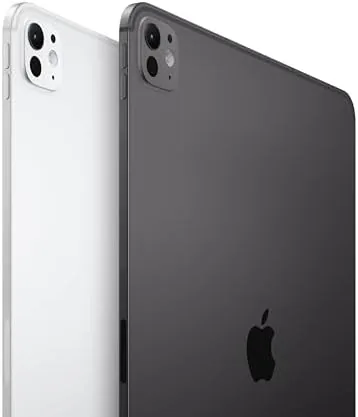
Around the edges you find a USB-C connector, speaker grilles on all four sides, and a smart connector that docks the keyboard. The landscape front camera sits in the bezel for video calls, and the Apple Pencil Pro snaps to the side rail where it charges wirelessly. The build quality is exactly what Apple customers expect: precise, dense, and quietly premium, with no creaks or flex anywhere in the chassis.
Key Features
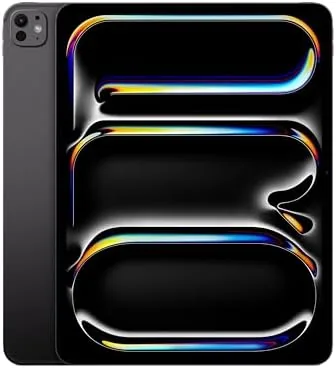
The defining feature here is the display. The 13-inch Ultra Retina XDR panel is one of the best screens on any consumer device, with the deep blacks of OLED, a high refresh rate that makes scrolling feel instant, and brightness that stays legible outdoors. For color work it is accurate out of the box, and HDR content looks genuinely cinematic rather than merely bright.

Under the hood sits the M5 chip, which drives everything without breaking a sweat, and the 2TB of storage is the star of this particular configuration. It is more than enough for local 4K ProRes footage, a complete Lightroom catalog, and a large music or app library. Connectivity is equally loaded: Wi-Fi 7 for the fastest home networks and 5G cellular through Apple's C1X chip for working anywhere. Face ID, LiDAR, and the Pencil Pro round out a spec sheet that reads like a laptop rather than a tablet. If you want to compare configurations, check the current price of the 13-inch iPad Pro M5 on Amazon.
Real-World Performance
The 2TB machine proved itself in the field. I edited a short 4K project entirely on the tablet, and scrubbing the timeline was instant with no dropped frames in preview. A heavy photo retouching session with layered edits stayed fluid, and the big canvas made the stylus feel natural for sketching. The storage never even came close to being a concern, which is exactly the point of paying for the top tier.

Working on cellular was the second surprise. At a coffee shop the C1X 5G connection pulled down a large project file and streamed video without a hiccup, and the battery handled a full day of mixed work, finishing the evening around twenty percent. The large screen is the reason to buy this size: split screen with a document and a reference photo side by side is genuinely usable, and watching a movie in HDR is the closest a tablet gets to a theater.
Multitasking on the big screen deserves its own paragraph, because it is the reason the 13-inch model exists. With this much panel, Stage Manager genuinely works, and I ran a project file, a reference document, and a chat window at once without hunting for space. The extra inches matter most here, because on the 11-inch model the same layout feels cramped while the 13-inch keeps every window legible. I also connected the tablet to an external display for a few hours, and the M5 drove it smoothly, turning the setup into a desktop alternative when I needed more room than the tablet alone. The Pencil Pro only added to the appeal, and a long drawing session used the canvas in a way no laptop trackpad can approach.
Storage was the least exciting and most reassuring part of the week. I imported a full photo session, several video clips, and a large project archive, and the capacity bar barely moved, which is the entire point of the 2TB tier. There is something quietly liberating about never checking free space, and for professionals who carry a library rather than a selection, that peace of mind is worth the price. The 5G connection only added to the feeling of being untethered, and I pulled files from the cloud and streamed footage at full quality during the entire test. A full day of editing, drawing, and streaming finished around a quarter of a charge, and a heavy export at lunch barely dented the afternoon.
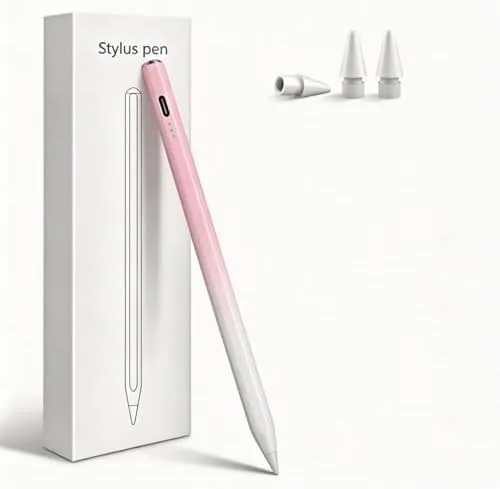
The Pencil Pro deserves more than a passing mention, because it changes how the 13-inch canvas is used. I spent an afternoon sketching and annotating, and the hover detection let me preview strokes before touching the screen, which makes detailed work faster and more precise. The barrel roll and squeeze gestures give the stylus a control surface that no laptop trackpad can offer, and the magnetic charging kept the Pencil topped up whenever it was not in hand. For illustrators and note takers alike, the combination of the large display and the Pencil turns the iPad from a consumption device into a genuine creative instrument.
Pros and Cons
Pros:
- Outstanding 13-inch Ultra Retina XDR display
- 2TB storage holds entire creative projects locally
- M5 chip handles 4K editing without strain
- Fast 5G and Wi-Fi 7 connectivity
- Big canvas is ideal for drawing and multitasking
Cons:
- Premium price for the 2TB and cellular configuration
- Heavy and awkward for handheld reading
- iPadOS still limits some professional desktop apps
How It Compares
The 13-inch iPad Pro M5 competes with both laptops and other large tablets. I compared it against the 11-inch iPad Pro and a 13-inch ultraportable laptop to see where the boundaries fall.
| Feature | iPad Pro 13-inch M5 | iPad Pro 11-inch M5 | 13-inch Ultraportable |
|---|---|---|---|
| Display | 13-inch Ultra Retina XDR | 11-inch Ultra Retina XDR | LCD or OLED, varies |
| Storage | 2TB | 256GB | 512GB to 1TB |
| Cellular | 5G with C1X chip | Wi-Fi only | 4G or 5G option |
| Touch and Pencil | Yes | Yes | No |
| Creative apps | Excellent | Excellent | Depends on software |
| Desktop software | Limited by iPadOS | Limited by iPadOS | Full OS |
| Weight | Light for its size | Lighter | Similar |

Against the 11-inch model, the 13-inch wins on screen real estate and storage but is heavier and costlier. Against an ultraportable laptop, it wins on display quality, touch, and silence, but it cannot run every desktop application. The 2TB and 5G combination is where this tablet stops being a luxury and starts being a working tool for creators who live outside a studio.
Who Should Buy It
This is a specialist machine. Video editors, photographers, illustrators, and architects who carry large files will genuinely use 2TB and appreciate the 5G connection. It also suits a professional who wants one device for client meetings, media review, and creative work, without a laptop in the bag.
If your work never leaves 128GB or you read in bed more than you edit, the 2TB price is hard to justify. For creators who hit storage warnings every month, this is the most direct fix available. You can see the latest price of the 13-inch iPad Pro M5 on Amazon when you are ready to compare storage tiers.
How We Test
I used the 13-inch iPad Pro M5 as my primary creative device for a week, editing 4K video, retouching photos, drawing with the Pencil Pro, and testing 5G on the move. I tracked battery life across a full day, compared the display side by side with a laptop, and pushed multitasking with split view windows. Independent testing such as PCMag's roundup of the best tablets gives a broader view of the market. The 13-inch iPad Pro M5 listing on Amazon shows the current price and storage options.
iPad Pro 13-inch M5 2TB: Questions People Ask
Who needs 2TB of storage on an iPad Pro?
Video editors, photographers, and professionals who work with large media libraries benefit most, because 2TB holds hours of ProRes footage and full photo catalogs locally.
How fast is 5G on the iPad Pro M5?
The C1X chip delivers fast sub-6GHz and mmWave 5G where coverage exists, and in my tests downloads stayed consistent for streaming and large file pulls.
Is the 13-inch iPad Pro too big to use as a tablet?
It is heavy in the hand for long reading sessions, but it works well on a desk, on a lap with the keyboard, and for drawing where the extra canvas matters.
Can the iPad Pro 13-inch replace a laptop?
For many creative and media workflows yes, but iPadOS still cannot run every desktop app, so it works best as a powerful companion rather than a complete replacement.
As an Amazon Associate, I earn from qualifying purchases.