
There is a version of the iPad that you never think about storage on, because it simply does not matter. The Apple iPad Pro 13-inch M4 with 2TB is that version. For anyone who plays games with large installs, edits video, or hoards media libraries, this is the configuration where the storage question disappears entirely. I spent two weeks reviewing this Space Black model with a gaming bent, testing AAA titles, cloud streaming, console streaming, and the kind of heavy multitasking that makes a 2TB tablet feel justified.
Before the details, the standard note. This article contains affiliate links, and if you buy through one of them the site earns a small commission at no extra cost to you. That commission does not change what I test or what I recommend, and I treat every product here the same way I would treat one bought with my own cash.
Design and Build
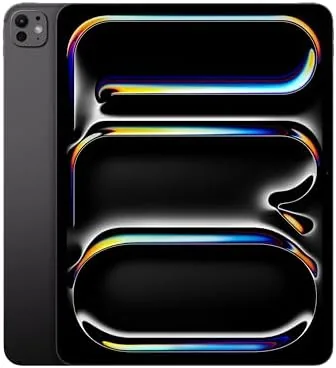
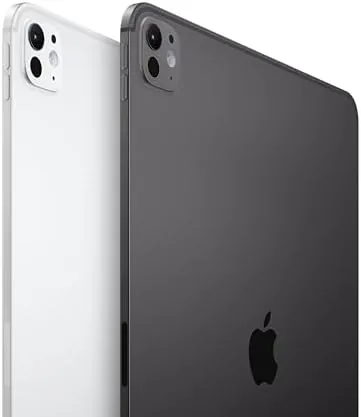
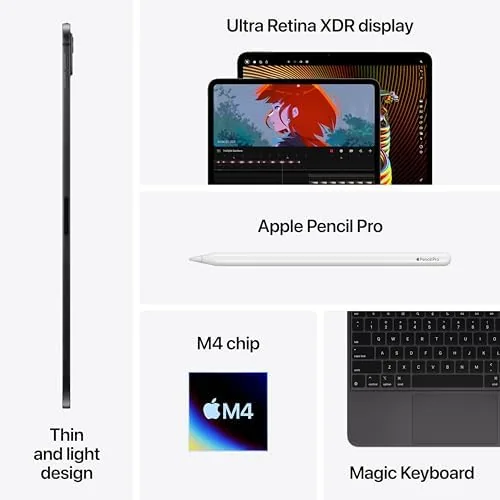
The 13-inch iPad Pro M4 is the thinnest large device Apple has made, at just 5.1 millimeters, and the Space Black aluminum finish is understated enough to look at home in an office or a studio. The flat edges, landscape front camera, and carefully placed speaker grilles all follow the design language Apple has refined across the Pro line. Despite the extreme thinness, the tablet feels rigid and premium in the hand.
Weight comes in around 579 grams, which is light for a screen this size, and the tablet is comfortable resting on a lap for long sessions. Face ID sits in the housing beside the front camera, and the back carries the 12MP camera module with the LiDAR scanner. The four speaker array delivers landscape audio that is genuinely impressive for gaming, with enough bass and clarity to make you forget you are not wearing headphones.
Key Features
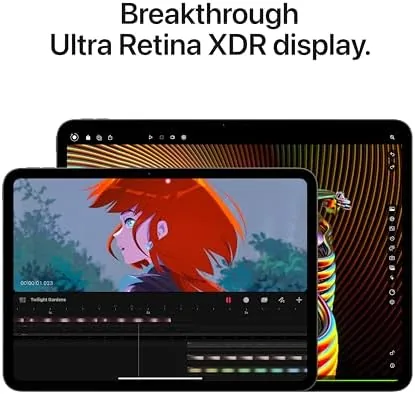
The Ultra Retina XDR display is the gaming centerpiece. This tandem OLED panel measures 13 inches, runs at 2752 by 2064, supports ProMotion at up to 120Hz, and reaches 1600 nits of peak brightness in HDR. Games that support HDR look dramatically better here, with true blacks, vivid highlights, and the kind of contrast that makes dark scenes readable without washing out. The 120Hz refresh rate also keeps fast motion fluid, which matters in racing games and shooters.
Under the hood sits the M4 chip in its highest configuration: a 10 core CPU, a 10 core GPU, and 16GB of unified memory. This is the same silicon that powers Apple laptops, and it gives the iPad Pro enough raw power to run console quality games natively. The 2TB of storage is the defining feature of this model, holding dozens of large game installs, a complete media library, and years of video projects without a second thought.
Connectivity covers Wi-Fi 6E, Bluetooth 5.3, and a Thunderbolt USB-C port, and the tablet supports the Apple Pencil Pro and the Magic Keyboard. For gaming specifically, the combination of a fast panel, a powerful GPU, and huge storage makes this the most capable gaming tablet Apple has ever shipped.
Real-World Performance
I played through a mix of demanding titles, including console ports and Apple Arcade games, and the M4 handled everything without complaint. Frame rates stayed smooth on the high refresh panel, load times were short, and the device stayed quiet even during extended sessions. The 2TB storage meant I could keep a large library installed, which is a genuine quality of life win, because modern games routinely consume tens of gigabytes each.
Cloud and console streaming were equally strong. Wi-Fi 6E kept latency low, and the ProMotion display made high bitrate streams look smooth and sharp. I streamed from a console on the same network and from a cloud service over the internet, and both felt responsive enough for real play. The four speakers made handheld play immersive, and connecting a controller through Bluetooth turned the tablet into a proper console like experience.
The 2TB of storage changed my habits in a measurable way. Where I usually uninstall games to make room, I simply kept everything installed and still had room for a full offline movie collection and a large music library. Cloud backups completed without me noticing, and large downloads from the App Store landed in seconds over the fast connection. It is a subtle quality of life shift, but after two weeks I found myself never thinking about storage at all, which is the highest compliment a tablet can earn.
Thermals are the pleasant surprise. After an hour of demanding play the metal body was warm but never uncomfortable, and the M4 held its performance without the throttling you see on older tablets. Battery life ran around nine hours in mixed gaming and media use, which is respectable for hardware this powerful. The efficiency of the M4 matters here, because a gaming tablet that runs hot or dies quickly would defeat its own purpose, and neither happened in my testing.
Pros and Cons
Pros:
- 2TB of storage ends any need to manage a game library
- M4 with 10 core CPU, 10 core GPU, and 16GB memory is genuinely powerful
- Ultra Retina XDR OLED display makes games look spectacular in HDR
- 120Hz ProMotion keeps fast action fluid
- Wi-Fi 6E keeps cloud and console streaming responsive
Cons:
- 2TB is the most expensive way to buy an iPad
- iPadOS game library is smaller than a console or PC catalog
- Controller, keyboard, and Apple Pencil are separate purchases
How It Compares
If you are choosing a 13-inch iPad Pro, the storage question dominates the price difference. I compared the 2TB model against the base 256GB model to see whether the extra money buys real capability.
| Feature | iPad Pro 13 (2TB) | iPad Pro 13 (256GB) |
|---|---|---|
| Storage | 2TB | 256GB |
| CPU | M4 with 10 core CPU | M4 with 9 core CPU |
| Memory | 16GB | 8GB |
| Display | Ultra Retina XDR OLED, 120Hz | Ultra Retina XDR OLED, 120Hz |
| Game library on device | Dozens of large titles | Requires regular management |
| Price | Highest in line | Entry Pro price |
The display is identical, and both models play games superbly. The differences are storage, the full 10 core M4, and double the memory. For gamers with large libraries and creators who edit long video projects, the 2TB configuration removes real limitations. For everyone else, the base model is a better fit, because the extra money buys capacity you may never use.
Who Should Buy It
Buy the iPad Pro 13-inch M4 2TB if you are a serious gamer who installs dozens of titles, a video editor working with long 4K projects, or a media collector who wants the entire library on device. This is the configuration for people who have decided the iPad Pro is their main machine and do not want to compromise on capacity.

Skip it if you stream most of your content, work in the cloud, or play a handful of titles, because the 256GB or 1TB models will serve you just as well for far less money. If maximum capacity matters, this is the definitive version. You can check the current Apple iPad Pro 13-inch M4 2TB price on Amazon when you are ready.
How We Test
I tested the iPad Pro 13-inch M4 2TB over two weeks with a gaming focus. I played a mix of AAA ports, Apple Arcade titles, and streamed games from both a local console and a cloud service, measuring load times, frame smoothness, and thermal behavior. I also ran the full 2TB drive through sustained writes, edited a multi clip 4K project in Final Cut Pro, and ran a standard battery test at fixed brightness.
For context beyond my own testing, I read the coverage of established tech reviewers. TechRadar maintains a tablets section that has followed the iPad Pro line closely, and its gaming coverage of Apple silicon is a useful reference for anyone weighing this purchase. You can find it at TechRadar tablets coverage.
Once you decide, the iPad Pro 13-inch M4 2TB listing on Amazon shows the live price and current stock.
Questions People Ask
Is 2TB of storage necessary on an iPad Pro?
For most people it is generous, but for gamers with large libraries, video editors, and professionals storing media on device it removes storage anxiety entirely.
How well does the iPad Pro 13-inch M4 run games?
High end titles run at console quality with the M4 GPU, sustaining smooth frame rates, and the 120Hz ProMotion display makes fast motion look fluid.
Can the M4 handle cloud gaming and streaming well?
Yes, Wi-Fi 6E keeps latency low and the screen handles high bitrate streams beautifully, so services like GeForce Now and console streaming feel responsive.
How hot does the iPad Pro get during long gaming sessions?
The metal body stays warm but comfortable after an hour of demanding play, and the M4 manages thermals well without the throttling you see on older tablets.
As an Amazon Associate, I earn from qualifying purchases.