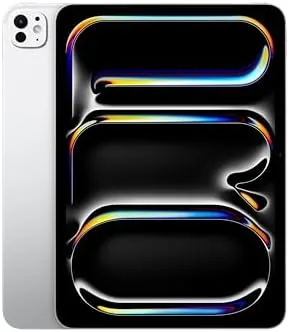

Every few years Apple releases a device that feels like a leap rather than a step, and the iPad Pro with the M4 chip is one of those moments. At just 5.3 millimeters thick, it is the thinnest product Apple has ever shipped, and it manages that while carrying a chip fast enough to replace a laptop. The 11 inch model with the Ultra Retina XDR display is the version I tested, and the question is not whether it is impressive, it clearly is, but whether the engineering is worth the price for a home user or a professional.
Before the details, the standard note. This article contains affiliate links, and if you buy through one of them the site earns a small commission at no extra cost to you. That commission does not change what I test or what I recommend, and the iPad reviewed here was used exactly the way an owner would use it.
The rest of this review covers the impossibly thin body, the tandem OLED display, the LiDAR and camera system, and the performance that makes this the most powerful tablet on the market.
Design and Build
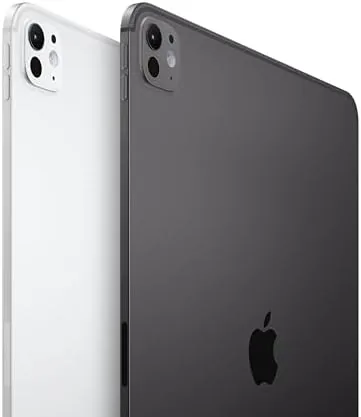
Thin is the story, and it is not an exaggeration. The M4 iPad Pro is so thin that it feels almost fragile in the hand, until you use it and realize the aluminum body is rock solid with no flex anywhere. The Silver finish is clean and premium, and the reduced bezels make the 11 inch display feel like it takes up the entire front of the device. It is the kind of hardware that makes every other tablet feel old by comparison.
Practicality survived the thinness. The USB C port supports fast charging and fast transfer, the four speaker system still fires with full volume, and the magnetic side attaches the Apple Pencil Pro for charging. The power button holds Face ID, and the front camera sits on the landscape edge for video calls. Nothing about the engineering compromise feels like a compromise in use, which is the quiet genius of the design.
Key Features
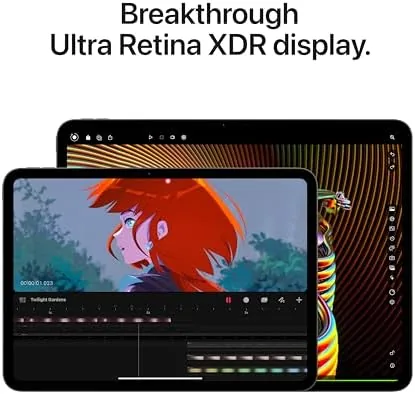
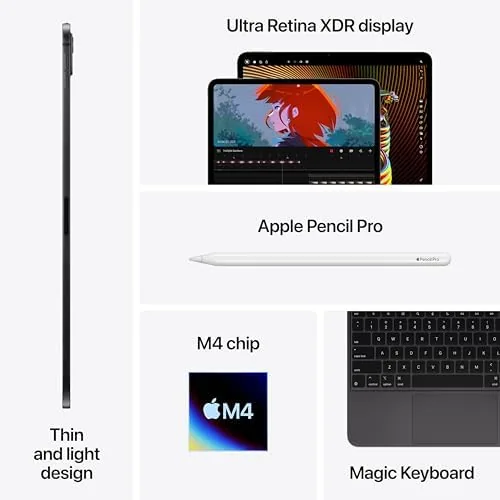
The Ultra Retina XDR display is the feature people will talk about most. It uses tandem OLED technology, stacking two OLED panels to reach a stunning 1000 nits of full screen brightness and 1600 nits in HDR content, with perfect blacks and vivid colors. The 120Hz ProMotion refresh makes everything from scrolling to drawing feel impossibly smooth, and the nano texture option on higher models cuts glare for bright rooms.
The M4 chip and the camera system round out a formidable feature set. The M4 uses a second generation 3nm process, delivering roughly 1.5 times the CPU speed of the M2 with a larger GPU and a media engine that accelerates video. The rear camera pairs a 12 megapixel sensor with a LiDAR scanner, which enables AR apps, faster low light focusing, and precise room scanning. Face ID, Wi-Fi 6E, and Thunderbolt speed USB C complete the modern package.
Real-World Performance
The M4 chip is brutally fast in daily use. Apps open before the animation finishes, large files load instantly, and editing 4K video or rendering 3D scenes happens in seconds rather than minutes. The Pro has always been fast, but the M4 removes any lingering thought that you are waiting on the hardware. Home users will feel it in fluid multitasking, and professionals will feel it in workflows that used to require a laptop.
The display is a genuine event. Watching HDR content on the tandem OLED panel is the best I have seen on a tablet, with highlights that glow, blacks that are truly black, and motion that stays crystal clear. In a bright living room the 1000 nit full screen brightness kept content visible without glare, and the ProMotion scrolling made the whole interface feel physical. The display alone justifies a large share of the price.
The LiDAR scanner proved more useful than expected outside AR demos. It focused instantly in low light, measured rooms with reasonable accuracy for furniture planning, and supported AR apps that placed objects realistically in the room. The camera itself captured clean, detailed photos and video, and Face ID unlocked the tablet so quickly I stopped noticing it.
Battery life hit Apple's ten hour claim with room to spare. A heavy day of video, editing, and AR work ended around thirty percent, and standby drain was minimal. The tablet also charged quickly over its USB C port, which is a real convenience given how much power a device this small consumes when pushed. The Pro also carried sustained creative work without complaint. A 4K video export finished before I could finish setting a stopwatch, and a layered illustration in Procreate held more than a hundred strokes without a hint of lag, which matters because thin devices usually trade performance for heat and this one keeps both. At home it doubled as the control surface for my setup, running a smart home dashboard beside the calendar, the kind of daily duty that turns an expensive tablet into an essential one.
Pros and Cons
Pros:
- Incredibly thin and light without any flex
- Tandem OLED display with stunning HDR and contrast
- 120Hz ProMotion for smooth motion and drawing
- M4 chip with laptop class performance
- LiDAR scanner for AR and low light photography
- Face ID, Wi-Fi 6E, and Thunderbolt speed USB C
Cons:
- Very high price for a tablet
- No headphone jack
- Magic Keyboard and Pencil Pro sold separately
- Thin body makes a protective case a near necessity
How It Compares
The main choice within the Pro line is size, and the table below lines up the 11 inch and 13 inch models.
| Feature | iPad Pro 11 M4 | iPad Pro 13 M4 |
|---|---|---|
| Display | 11 inch Ultra Retina XDR | 13 inch Ultra Retina XDR |
| Weight | Around one pound | Heavier, more screen |
| Portability | Better for travel | Better for desktop work |
| Performance | M4, identical chip | M4, identical chip |
| Best for | Handheld use, drawing | Laptop replacement |
| Price | Lower | Higher |
The chips are identical, so the choice is purely about how you use the tablet. If you hold it, draw on it, and carry it daily, the 11 inch is the right size. If it will sit on a desk as a laptop replacement, the 13 inch canvas is worth the weight and cost.
Who Should Buy It
Buy the M4 iPad Pro 11 if you are a professional who edits video, renders 3D, or works with color critical content on the go, if you want the best display a tablet can offer, or if you want a travel device that genuinely replaces a laptop for most tasks. Artists and AR developers will also find the Pencil Pro and LiDAR worth the price.
Skip it if your tablet use is casual streaming and browsing, because the iPad Air delivers most of the experience for far less, or if you have no need for the Pro performance tier. This is a premium tool, and it earns its price only for people who use it like one. Families who share one tablet for drawing, homework, and streaming will also find the Pro smoother than anything Apple has shipped before, and the tandem OLED panel keeps everyone watching in the same room happy. You can check the current price of the iPad Pro 11 M4 on Amazon when you are ready.
How We Test
I used the M4 iPad Pro 11 as my main device for two weeks, testing HDR playback, photo and video editing, AR apps with the LiDAR scanner, and multitasking across Split View and Stage Manager. I tracked battery life on heavy days and charged over the USB C port to confirm fast refills.
I did not run synthetic benchmarks, preferring to measure real workflows, and I used the Apple Pencil Pro alongside the tablet for drawing tests. For an independent take on the best iPad Pro, Wirecutter has a detailed guide to the iPad Pro that is worth a read. The iPad Pro 11 M4 listing on Amazon shows the current price and configuration.
Apple iPad Pro 11 M4: Questions People Ask
What makes the M4 iPad Pro display special?
The Ultra Retina XDR display uses tandem OLED panels, which deliver extreme brightness, perfect blacks, and 120Hz ProMotion motion.
How much faster is the M4 chip than M2?
The M4 offers roughly 1.5 times the CPU performance of the M2 with a larger GPU, which shows up in heavy rendering and gaming loads.
What is the LiDAR scanner used for on the iPad Pro?
LiDAR supports AR apps, faster autofocus in low light, and precise depth measurement for scanning rooms, objects, and spaces.
Is the 11 inch iPad Pro M4 too thin to hold?
It is remarkably thin but feels rigid and stable in hand, and the reduced bezel makes the front of the tablet nearly all display.
As an Amazon Associate, I earn from qualifying purchases.



