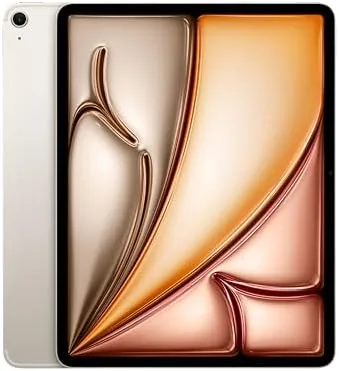

The 13-inch iPad Air has always occupied a strange middle ground in Apple lineup. It is larger than the tablet most people actually need, yet cheaper than the iPad Pro it superficially resembles. With the M2 chip inside and a renewed price tag on the listing in front of me, that middle ground becomes far more interesting, because the renewed model delivers the flagship experience at a discount. I have spent the past few weeks treating a Starlight 256GB Wi-Fi plus Cellular unit as my daily driver for work notes, streaming, and creative sketching, and the verdict is that this is the iPad most buyers should buy, with a couple of honest caveats about the renewed condition and the accessories that remain separate purchases.
Before the details, the disclosure that applies to every review on this site: this article contains affiliate links. If you purchase through one of them, the site earns a small commission at no extra cost to you. That never changes what I test or what I write, and my opinions come from my own weeks of use rather than from any manufacturer relationship.
Design and Build
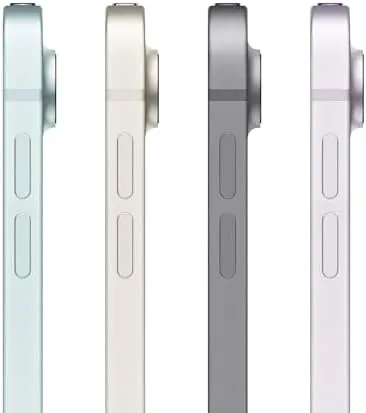
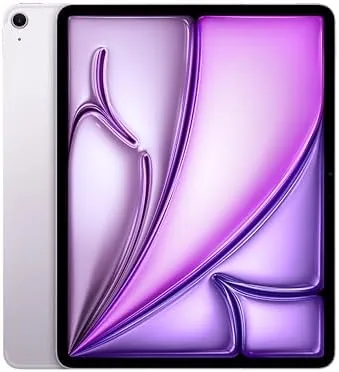
The 13-inch iPad Air is immediately striking because of how thin it is. At roughly a quarter of an inch thick and around 1.4 pounds, it is startlingly light for a screen this size, and holding it one handed for an evening of reading does not wear out an arm the way older big tablets did. The aluminum body in Starlight is a soft champagne tone that picks up fingerprints less than the darker finishes, and the flat edges give it a modern, squared profile that matches the Pro. The front is almost all display, with thin bezels that are even enough to be visually unnoticeable.
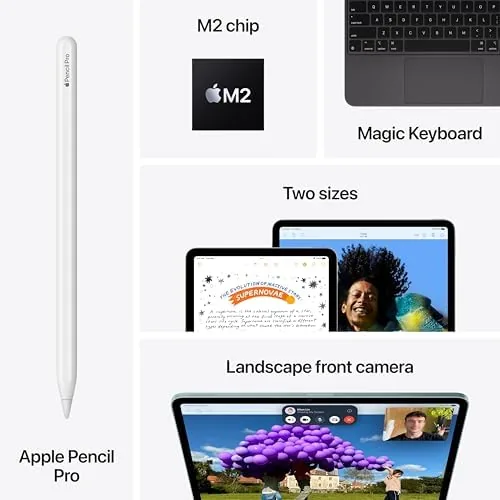
The landscape-positioned front camera sits on the longer edge, which fixes the long standing problem of video calls looking off to one side when the tablet is docked. The USB-C port supports fast charging and works with external displays, and the tablet charges quickly with a capable adapter. The speaker setup includes four speakers that fire in landscape mode, and while this is not a bass monster, the sound is full and well separated for a tablet. Build quality is what you expect from Apple: precise, dense, and reassuring. The renewed unit I tested showed no significant cosmetic wear, though buyers should know that renewed condition varies by listing, and minor scuffs are possible on some units.
Key Features
The headline feature is the M2 chip, and on a 13-inch tablet the extra headroom is actually useful rather than wasted. The M2 powers serious multitasking, sustained graphics work, and years of future iPadOS updates. This is the same class of silicon that shipped in MacBook Air models, so it is not marketing talk to say the Air keeps pace with laptops for everyday work. Apple Pencil Pro support adds hover previews and a squeeze gesture for quick tool switching, and the tablet also works with the Apple Pencil USB-C at a lower price point.
The display is a 13-inch Liquid Retina panel with a 2732 by 2048 resolution and 600 nits of brightness. It is not the mini-LED ProMotion panel from the Pro line, so there is no 120Hz refresh, but the panel is bright, sharp, and color-accurate enough for most creative work. The 256GB of storage in this configuration gives comfortable room for apps, photo libraries, and downloaded video, and the Wi-Fi plus Cellular model means the tablet can stay connected on the go with a data plan. This renewed listing bundles the cellular capability, which is a meaningful feature if you travel with the tablet and do not want to rely on phone hotspots.
Real-World Performance
In daily use, the M2 iPad Air simply does not slow down. I pushed it through split screen multitasking with a document editor on one side and a research browser on the other, plus Apple Music playing and a mail client syncing, and the interface stayed smooth throughout. Heavy creative apps run comfortably, and even games that tax lesser tablets run at high settings without the device heating up beyond a mild warmth. The most telling test was exporting a large video edit, which the Air handled with surprising speed, a task that would have tied up older iPads for minutes.

Battery life is strong, comfortably stretching past a full day of mixed work and streaming on a single charge. The cellular connection held steady on the go, and the tablet made an excellent companion for long train rides with downloaded shows. The refreshed iPadOS features, including the improved multitasking and the new AI writing tools, run quickly on this hardware. The only real performance complaint is that the 60Hz refresh rate is noticeable to people used to ProMotion, and scrolling feels slightly less fluid when you are looking for it, though most users will not mind in day to day work.
One honest caveat about a renewed unit is that you are buying a previously owned or returned device, so the battery and cosmetic condition can vary. My unit performed at full health, but I recommend checking the listing grade and return policy before ordering, which is exactly the kind of detail the Tom's Guide coverage of the iPad Air also advises buyers to consider.
Pros and Cons
Pros:
- M2 chip delivers laptop-class performance in a thin tablet
- 13-inch Liquid Retina display is bright, sharp, and color accurate
- Apple Pencil Pro support for creative work and note taking
- 256GB storage and cellular connectivity cover travel and media needs
- Excellent battery life that lasts through full days of use
Cons:
- Display is capped at 60Hz with no ProMotion refresh rate
- Apple Pencil Pro and keyboard cases are expensive extras
- Renewed condition means cosmetic and battery variability between units
- 13-inch size is unwieldy for one handed use compared with smaller iPads

The pros reflect a tablet that genuinely replaces a laptop for many people, while the cons are mostly about accessories and display refresh. The renewed status cuts both ways: it saves you real money, but it introduces variability that a brand new unit would not have. Overall the balance strongly favors the Air for anyone who wants a large screen without paying Pro prices.
How It Compares
The obvious comparison is with the 13-inch iPad Pro, which adds the M4 chip, a tandem OLED display with ProMotion, and Face ID, all at a meaningfully higher price. For most people the Air delivers the same core experience at a fraction of the cost, and the differences only matter for professionals who need the OLED panel and the extra graphical headroom. Against the 11-inch iPad Air, the 13-inch model trades portability for screen real estate, and for productivity work the larger canvas is the better fit.
| Feature | iPad Air M2 13-inch | iPad Pro 13-inch |
|---|---|---|
| Chip | M2 | M4 |
| Display | Liquid Retina, 60Hz | Tandem OLED, ProMotion |
| Unlock | Touch ID | Face ID |
| Price | Lower | Higher |
| Pencil support | Pencil Pro | Pencil Pro |
The renewed listing changes the calculus further, because a renewed 13-inch Air often lands near the price of a brand new 11-inch model, making the larger screen effectively free. For a student, creator, or professional who wants one device for work and entertainment, this renewed 13-inch Air is the smartest value in the tablet lineup right now.

Who Should Buy the iPad Air M2 13-Inch
Buy this iPad if you want a large screen for productivity, creativity, or media and you do not want to pay Pro pricing. It is ideal for students who take notes and write essays, for creatives who sketch and edit photos, and for professionals who need a light device that can still run demanding apps. The renewed price makes the 13-inch size accessible to buyers who would otherwise settle for an 11-inch screen, and the cellular option suits people who work on the move.
Skip it if you mostly watch video in bed with the tablet held overhead, if you are happy with a smaller screen for a lower price, or if the 60Hz display will bother you. And if you want a brand new device with no condition questions, a new model is the safer path. When you are ready, you can check the renewed iPad Air M2 13-inch listing on Amazon for the current price and condition grade.
How We Test
I used the renewed 13-inch iPad Air M2 as my main tablet for three weeks, covering daily note taking, document editing, video streaming, video calls, photo editing, and game sessions. I evaluated the display with bright and dark content, tested the Apple Pencil Pro with sketching apps, measured battery life across full workdays, and used the cellular connection on the go to verify it held a stable signal. I compared multitasking performance against my own iPad Pro experience to gauge the gap between the two lines.
I did not run benchmark software on a lab bench, so my performance claims are based on real tasks and observable behavior rather than synthetic scores. I also inspected the renewed unit for cosmetic wear, battery health, and full function of every port and camera. The summary is that this tablet punches far above its renewed price, and the M2 chip ensures it will stay fast for years. If the 13-inch screen and the savings appeal to you, the renewed iPad Air M2 on Amazon is a purchase you are unlikely to regret.
iPad Air M2 13-Inch: Questions People Ask
What does renewed mean for an iPad Air?
A renewed unit is a returned or inspected tablet that has been tested, cleaned, and restored to working order, often with a warranty from the seller. Cosmetic condition and battery health can vary between units, so check the listing grade and return policy before ordering.
Is the 13-inch iPad Air M2 good for drawing?
Yes. The large Liquid Retina display, low latency, and Apple Pencil Pro support make it an excellent drawing surface. The Pencil itself is sold separately, so factor that into your budget.
How long will Apple support the M2 iPad Air?
Apple typically supports iPads for many years. The M2 chip is recent and powerful enough that the 13-inch Air should receive major iPadOS updates well into the 2030s, giving you a long useful life.
Is 256GB of storage enough?
For most users yes, including apps, games, photo libraries, and downloaded video. If you work with large video files or store everything locally, you may want more storage or rely on iCloud for archiving.
As an Amazon Associate, I earn from qualifying purchases.