

Amazon sells dozens of Fire HD 10 cases through third-party brands, but the company also makes its own cover, and there is an argument that the official accessory is the safest bet. The Amazon Fire HD 10 Tablet Protective Cover is a first-party case for the 13th generation tablet released in 2023, and it pairs a hard shell With a built-in stand and magnetic sleep and wake support. I used it daily for a month, carrying the tablet to work, on trips, and around the house, and this is the honest record of how it held up.
Before the details, the standard note. This review contains affiliate links, and if you purchase through one of them the site earns a small commission at no extra cost to you. That commission does not change what I test or recommend.
Design and Build
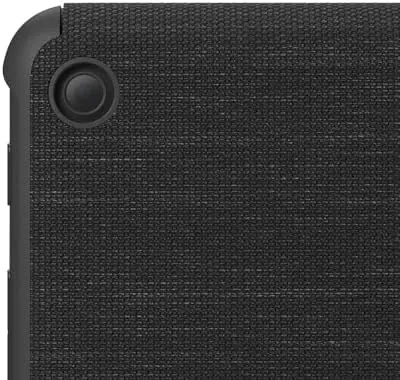
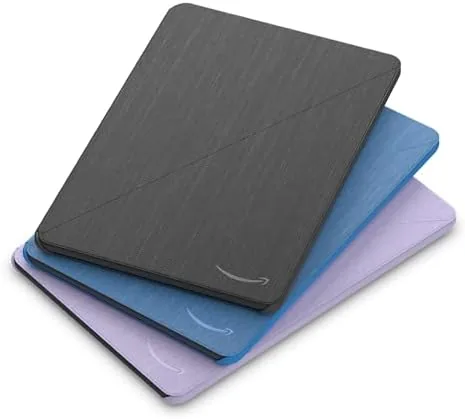
The cover has a two-piece design: a hard shell that grips the back of the tablet and a folding front flap that protects the screen. The exterior is a textured black material that resists fingerprints and provides a small amount of grip, while the interior is lined with a soft material that will not scratch the display. The whole package adds noticeable but acceptable bulk to the tablet, and the added thickness is the price you pay for real protection.
The tablet snaps firmly into the shell, and after a month of daily use it never worked loose or rattled. Every button, port, speaker, and camera stays fully accessible, so there is no compromise on function. The front flap closes securely with a magnetic catch, and the design keeps the flap from flapping open in a bag, which is more than many cheaper cases manage.
One detail I appreciated is how the case distributes weight. The Fire HD 10 is a large tablet, and the cover makes it easier to hold by giving the edges something firm to grip. It will not turn the tablet into a featherweight, but it does make one-handed reading less of an arm workout.
Key Features
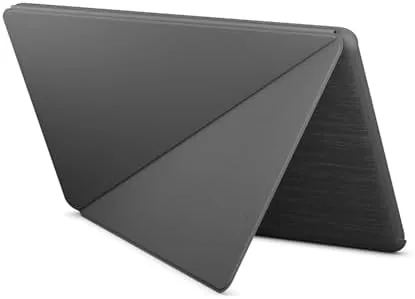
The stand is the feature that earns the cover its place. The front flap folds back to form a kickstand with two distinct positions: a low angle for typing and a higher angle for watching video or following recipes on the kitchen counter. The flap locks into place and holds the tablet steadily, and I never once had it collapse mid-viewing, which is the failure mode of poorly designed budget stands.
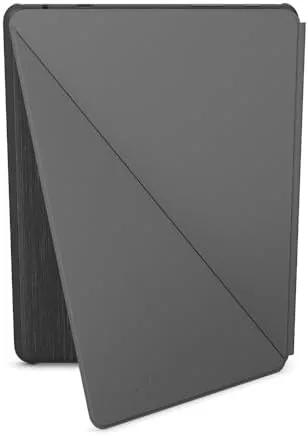
Magnetic sleep and wake is built into the fold. Closing the flap puts the tablet to sleep, and opening it wakes the display instantly, which saves battery and removes the need to press the power button a dozen times a day. The magnets are strong enough to be reliable but not so strong that they interfere with the tablet sensors.
The cover also keeps the tablet cameras and speakers unobstructed, so video calls work without removing the case. The cutouts line up cleanly, and the case adds nothing between the lenses and the world. For an accessory that costs little, the feature set is exactly what a tablet case should deliver.
Real-World Performance
In daily use, the cover did its job without drawing attention to itself, which is the highest compliment a case can earn. I dropped the tablet from lap height onto a wood floor during the first week, and the cover absorbed the impact, leaving both the tablet and the case undamaged. That single test justified the purchase price on its own.

The stand proved its worth across very different settings. On a desk it held the tablet at a comfortable angle for reading documents, in the kitchen it sat upright for following recipes, and on a train tray table it stayed put for a movie. The two-position fold covers the two angles that matter most, and the flap never slid out of position during use.
Sleep and wake worked every time in my month of testing. The flap magnet reliably triggered the display, and battery life stayed healthy because the screen was not left on by accident. The case also handled travel well, with the magnetic closure keeping the screen protected inside a packed bag without any scratch marks appearing.
The honest limitations are size and weight. The cover adds real heft to the tablet, and the fold and shell do make it a chunkier device to carry than a bare tablet or A Slim folio. It is also strictly limited to the 13th generation Fire HD 10, so it is useless with older or newer models, which is something to double check before buying.
Durability across the month deserves a note of its own. I folded and unfolded the front flap dozens of times every day, and the material at the hinge showed no cracking, softening, or creasing, which is the failure point of most budget cases. The magnetic closure never weakened, and the shell kept its snug fit around the tablet even after repeated removals. That kind of long-term consistency is the difference between an accessory you buy once and one you replace every few months, and it is a strong argument for paying a little more for the first-party version.
Pros and Cons
Pros:
- First-party fit and finish that third parties rarely match
- Built-in stand with two solid viewing angles
- Reliable magnetic sleep and wake
- Strong drop protection for everyday bumps
- Full access to ports, buttons, and cameras
- Magnetic closure keeps the screen covered in a bag
Cons:
- Adds noticeable bulk and weight to the tablet
- Only fits the 13th generation 2023 Fire HD 10
- Blocks the dock connector for charging stands
- No hand strap or shoulder attachment option
How It Compares
The Fire HD 10 cover competes with a range of third-party cases, and the comparison below is based on models I have handled.
| Feature | Official Fire HD 10 cover | Cheap folio case | Slim TPU case |
|---|---|---|---|
| Fit | First-party precision | Variable | Generic |
| Stand | Two-position built-in | Flap folding only | None |
| Sleep and wake | Yes, magnetic | Sometimes | No |
| Drop protection | High | Low | Medium |
| Cover for screen | Yes | Yes | No |
| Bulk added | Moderate | Low | Minimal |
Against a cheap folio, the official cover wins on fit, stand stability, and drop protection, and the price difference is small enough that the official version is the better value. Against a slim TPU case, it loses on bulk but gains screen coverage, a stand, and sleep and wake. For most Fire HD 10 owners, the official cover is the more complete accessory.
Who Should Buy It
Buy the Amazon Fire HD 10 Protective Cover if you own the 13th generation 2023 tablet, if you use the tablet on a stand for video and video calls, or if you want a first-party guarantee of fit and durability. It is especially suited to families and kitchens, where tablets get dropped, splashed, and propped up for recipes.
Skip it if you already use a charging dock, since the cover blocks the connector, or if you want the lightest possible case. For anyone who wants protection and a stand without gambling on third-party quality, the official cover is the obvious choice. You can check the current Amazon Fire HD 10 cover price on Amazon when you are ready.
How We Test
I used the Fire HD 10 cover daily for a month, carrying the tablet in a bag, standing it on desks and kitchen counters, and using it for reading, video, and calls. I deliberately dropped the tablet from lap height to test impact absorption, and I checked the sleep and wake magnets every day.
I also verified the stand at both angles under real use, confirmed that all cutouts lined up with ports and cameras, and compared the fit against a couple of third-party cases. Coverage such as the TechRadar review of the Fire HD 10 2023 notes the value of first-party accessories for the tablet, which matches my experience. The verdict is based on a month of daily use.
The Amazon Fire HD 10 cover listing on Amazon shows the current price and availability.
Questions People Ask
Is the Amazon Fire HD 10 cover compatible with my tablet?
The cover only fits the 13th generation Fire HD 10 released in 2023, and it will not fit earlier generations or the newer models with different dimensions.
Does the Fire HD 10 cover have a stand?
Yes, the folding flap forms a built-in stand with two positions, one suited to typing and one suited to watching video or reading.
Does the cover support sleep and wake?
Yes, magnets in the cover put the tablet to sleep when the flap closes and wake it when the flap opens, which also protects battery life.
Can I use a Fire HD 10 charging dock with this cover?
No, the cover blocks the dock connector at the bottom of the tablet, so you need to remove the case before using an official charging dock.
As an Amazon Associate, I earn from qualifying purchases.