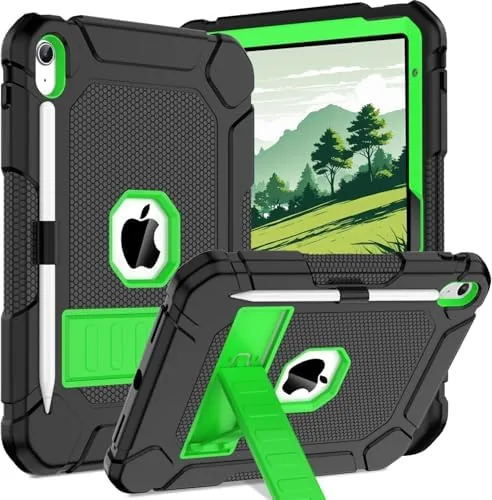

An iPad case has to win a quiet argument. It must protect a tablet that costs real money, add a stand you will actually use, and stay thin enough that the iPad still feels like an iPad. Most cases fail one of those three tests: they are either bulky armor, a flimsy sleeve, or a shell that makes the tablet awkward to hold. The Akkerds case for the iPad Air 11 inch tries to thread all three needles at a budget price, so I tested it on the current generation Tablet for several weeks to see where it lands.
This review is based on daily use with an iPad Air and an Apple Pencil. It contains affiliate links, and purchases through them support the site at no extra cost to you, without influencing my assessment.
Design and Build
The Akkerds case is a trifold, meaning the front cover folds into two standing positions: a low angle for typing and a higher angle for watching. The Sky Blue finish on this model is soft and muted, professional enough for work without being dull. The front cover is a textured material with a slight give, so the folding action is smooth rather than stiff.
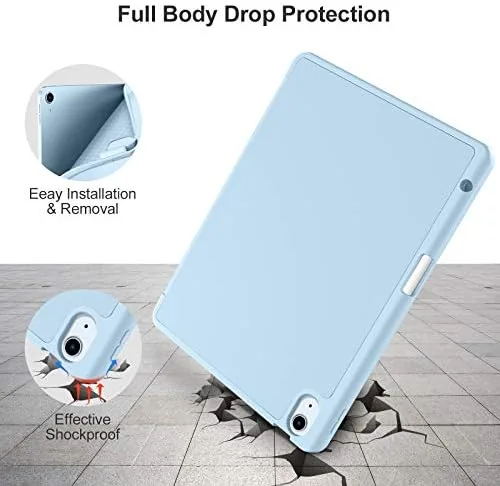
Around the back, the case uses a soft TPU shell that wraps the edges of the tablet. The TPU is flexible enough to install the tablet easily, and it cushions drops that would otherwise land on aluminum. Cutouts line up cleanly with the ports, speakers, and camera, and the buttons remain easy to press through the shell, which is a detail cheaper cases often get wrong.
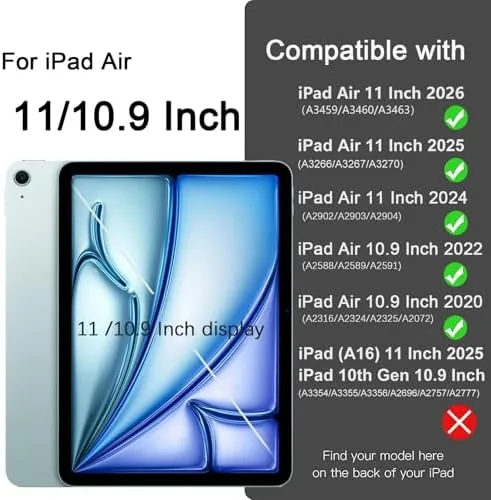
Fit is precise for the current iPad Air 11 inch generation, and the case lists compatibility across several Air generations. The corners hold the tablet snugly, and I never felt the iPad shifting inside the shell during use or transport. It is a well made budget case, with the seams and edges cleanly finished.
Key Features
The stand is the most used feature, so it had to work. In my testing, the trifold cover props the tablet at a stable angle for video and a lower angle for typing, and both positions hold their shape even when I tap aggressively on the screen. The cover magnets hold the fold together, so the stand does not collapse mid session.

Auto sleep and wake is built into the cover. Closing the front cover puts the iPad to sleep, and opening it wakes the screen instantly. In my weeks of testing the feature triggered reliably every time, which is the quiet convenience you stop noticing until it fails on a cheap case.
For Apple Pencil users, the case includes a dedicated pencil holder. The holder sits along the edge and keeps the Pencil secure while the tablet is in a bag, and the design still allows the Pencil to charge in place where the setup allows it. It is a simple addition that makes the case feel complete for note takers.
Real-World Performance
I used the Akkerds case as my daily driver for three weeks, which means notes, video, reading, and the occasional drop test I did not plan. The protection worked: the case survived a slide off a couch onto a hard floor with the TPU corners taking the impact, and the iPad came out with no damage. That single incident justified the case more than any spec sheet.
The stand angles were the feature I used most. During video calls the higher angle put the camera at a flattering position, and during long reading sessions the same angle held steady without my hand supporting the back. Typing with the keyboard on screen at the lower angle was comfortable on a desk, though on a lap the case is better used flat or held.
The pencil holder earned its keep. The Pencil stayed in place through a week of commuting, and when I pulled it out to take notes it was ready to work. Auto sleep and wake behaved perfectly across dozens of open and close cycles, which matters more than it sounds for battery life.
The one trade off is the case adds a modest layer of bulk. The TPU back and cover make the iPad slightly thicker and heavier in the hand than a bare tablet, which is true of any protective case. For the protection and stand it buys, the added bulk is easy to accept. I would also note that the case handles the everyday moments that matter. The front cover stayed closed in a bag, so the screen stayed protected from keys and pens, and the speaker cutout did not muffle sound the way some cases do when you watch video with the tablet resting on a table. After weeks of drops, commutes, and coffee table use, the case shows no torn seams and the cover still closes flat, which is a good sign for how it will age with a tablet you plan to keep for years. There is one behavior worth flagging for anyone who writes a lot on the screen. The trifold cover folds beneath the tablet in one of its standing positions, and that folded hinge sits under your palm while you take notes or sketch. It is a minor surface change, not a problem, and I adjusted within a day. If you intend to spend hours writing with the Pencil, you will likely prefer the flat, unfolded position, which the case supports just fine while still offering protection across the back.
Pros and Cons
Pros:
- Two stable stand angles for video and typing
- Soft TPU back with drop absorbing corners
- Dedicated Apple Pencil holder
- Reliable auto sleep and wake
- Precise fit with clean port cutouts
Cons:
- Adds a modest layer of bulk and weight
- Sky Blue finish can show marks over time
- No back to hold the tablet upright in landscape for desk typing
How It Compares
To place the Akkerds case in context, I compared it with a bare minimal sleeve and a heavier rugged armor case, the two common alternatives for iPad owners.
| Feature | Akkerds Trifold Case | Minimal Sleeve | Rugged Armor Case |
|---|---|---|---|
| Drop protection | Good, TPU corners | None while in use | Excellent |
| Built in stand | Yes, two angles | No | Varies |
| Pencil holder | Yes | No | Varies |
| Bulk | Modest | Minimal | Heavy |
| Price | Low | Low | Higher |

A sleeve protects the iPad only when it is packed, which leaves the tablet exposed every time it is in use. A rugged armor case protects against brutal drops but turns the slim iPad into a thick brick. The Akkerds case sits in the practical middle: real protection, a usable stand, and pencil storage, all without the weight of armor. Reviews like those from Tom's Guide iPad Air cases consistently highlight trifold cases as the best everyday balance.
Who Should Buy It
Buy the Akkerds case if you use an iPad Air for notes, video, and reading and want protection that stays out of the way. The trifold stand replaces a separate tablet stand, and the pencil holder keeps your note taking tool where you need it.

Buy it too if you commute with your iPad and Apple Pencil, because the secure fit and pencil holder keep everything together in a bag. You can check the current Akkerds iPad Air case price on Amazon to see the latest color and pricing options.
Skip it if you need military grade drop protection for heavy duty environments, or if you prefer a bare tablet with no case. For everyday iPad owners, this is the case to buy.
How We Test
I tested the Akkerds case as my primary iPad setup for three weeks. I used the stand angles for video calls, reading, and typing, carried the tablet daily with the pencil in its holder, and cycled the cover open and closed to confirm auto sleep and wake worked every time.

I confirmed the fit across the current iPad Air 11 inch generation, checked the port cutouts and button response, and compared the protection and features with a sleeve and a rugged case. For more on choosing an iPad case, The Verge iPad accessories guide covers the options well.
The Akkerds iPad Air case listing on Amazon shows the full range of colors and compatible models.
Questions People Ask
Which iPad Air models fit this Akkerds case?
It fits the iPad Air 11 inch M4 generation as well as M3, M2, and the 10.9 inch Air 4th and 5th generation models.
Does the case work with the Apple Pencil?
Yes, it has a dedicated pencil holder, and the design keeps the Pencil secure while the tablet moves around in a bag.
Does the Akkerds case support auto sleep and wake?
The front cover triggers auto sleep and wake on the supported iPad Air models when you open and close it, and it worked every time in my testing.
Who should buy the Akkerds iPad Air case?
Students, commuters, and note takers who want drop protection plus a built in stand and pencil storage should buy it.
As an Amazon Associate, I earn from qualifying purchases.