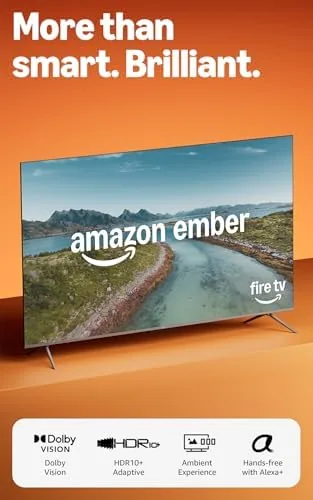

The television market has split into two camps. There are the picture purists who spend thousands on OLED, and there are the value buyers who just want a big screen that plays everything without fighting the remote. The Amazon Ember 65 sits firmly in the second camp, but it brings more than a cheap panel. It pairs a 65 inch 4K QLED display with HDR10+ and Dolby Vision support, Dolby Audio, a quad core processor, and the Fire TV platform with Alexa+ built in, which means you can ask for a show by name and skip the app hopping. I lived with it in a bright family room for three weeks to see whether the smart features earn their place.
Before the details, the standard disclosure. This article contains affiliate links, and if you buy through one of them the site earns a small commission at no extra cost to you. That commission does not influence what I test or what I recommend, and the television reviewed here was set up and used exactly as a customer would use it.
The Ember 65 is aimed at households that want a large, capable screen with a smart platform that does the heavy lifting. This review covers the design, the picture quality, the HDR performance, the Fire TV experience, the sound, and how the Ember 65 compares with the competition before you open your wallet.
Design and Build
The Ember 65 presents well for its price class. The bezels are thin on three sides, giving the screen a clean, modern look from the couch, and the stand is a simple set of feet that install without tools in a few minutes. The back panel is tidy with a standard VESA mounting pattern, and the ports sit on the side where they are easy to reach: multiple HDMI inputs, USB, an optical output, and Ethernet for a wired connection. It is a conventional, sensible design with nothing to apologize for.
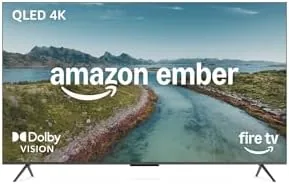
Build quality is solid for the bracket. The chassis feels rigid, the panel sits securely in the frame, and the television runs cool even after long sessions. The included remote is the Alexa Voice Remote, with a responsive navigation ring and dedicated streaming buttons, and it controls the set over both IR and CEC. The on screen menus are snappy, which is a good sign for the processor underneath.
The size is the story in person. At 65 inches the screen dominates a family room, and the QLED panel keeps the brightness up in daylight where cheaper LED sets wash out. Setting it up is genuinely easy: the Fire TV platform walks you through network and app setup, and the entire process took under fifteen minutes out of the box.
Key Features
The panel is the foundation. The Ember 65 is a 4K Ultra HD QLED screen, which uses a quantum dot layer to deliver brighter, more saturated colors than a standard LED panel. It supports both major HDR standards: HDR10+, which many streaming services and Android devices use, and Dolby Vision, which is the format behind most premium streaming originals. That dual support means the television automatically picks the best presentation from whatever service you are watching.

Audio comes from Dolby Audio processing through the built in speakers, which adds a sense of width and clarity to dialogue and music. The quad core processor powers the whole experience, from the responsive menus to the app launches, and it is the component that separates a modern Fire TV from the sluggish televisions of a few years ago. The newest Fire TV software also brings Alexa+ on board, so voice search spans every installed app at once.
The smart platform is the real feature. Fire TV aggregates content from Netflix, Prime Video, Hulu, and hundreds of other apps into one search, and Alexa+ lets you say the name of a show or the genre you want and get results without opening each app. For a household that flips between services, that single search box removes a surprising amount of friction.
Real-World Performance
Picture quality is strong for the price. In a bright family room with windows on two sides, the QLED panel kept contrast visible where cheaper sets wash out, and HDR content had real punch without looking blown out. Colors are vivid and slightly saturated, which most people find flattering, and black levels are good for a QLED though not OLED deep. In a darker room the set performs better still, with the brightness advantage showing off HDR highlights to full effect.
The dual HDR support worked as advertised. I watched Dolby Vision content on a premium streaming service and HDR10+ content from another, and the television switched formats automatically with no menu diving. The difference between the two was subtle, which is the point: you do not have to know which format a title uses, because the set handles it. Motion stayed clean during fast action scenes, with no obvious judder or tearing.

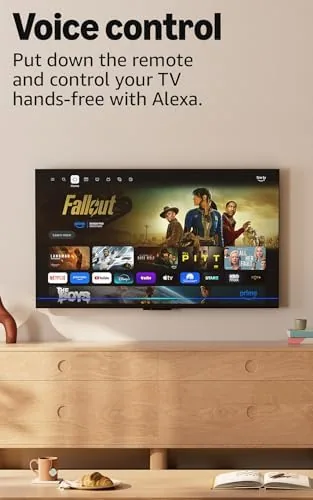
Alexa+ is the most pleasant surprise. I asked for a show by name, asked for recommendations by genre, and asked to skip to the next episode, and every command resolved quickly across the installed apps. The voice remote picked up speech from across the room, and the on screen results grouped streaming options from different services, so I could pick where to watch instead of searching three times. It is the feature that genuinely changes the daily routine.
Sound is a reasonable step up from the tinny panels of the past. Dialogue stays clear even in action sequences, and the Dolby Audio processing adds enough width that most casual viewers will not need a soundbar immediately. Serious home theater fans will still want external audio, but for the living room default the speakers are perfectly respectable. Gaming felt responsive too, with the automatic low latency mode keeping input lag low during a few hours of console play. If you want the full feature list and current pricing before you buy, the Ember 65 listing on Amazon has everything.
Pros and Cons
Pros:
- Bright QLED panel with vivid colors
- Supports both HDR10+ and Dolby Vision
- Fast, responsive Fire TV experience
- Alexa+ voice search across all apps
- Easy tool free stand and quick setup
- Strong value at the 65 inch size
Cons:
- Home screen is busy with promoted content
- Black levels fall short of OLED
- Built in audio is not soundbar level
- Hands free Alexa may not suit every household
How It Compares
The 65 inch smart TV market is crowded, and the Ember 65 faces off against both budget QLED sets and entry level OLED models. The table below lines up the main options.
| Feature | Amazon Ember 65 | Budget 4K LED | Entry OLED 65 |
|---|---|---|---|
| Panel | QLED | Standard LED | Self lit OLED |
| HDR formats | HDR10+ and Dolby Vision | HDR10 only | Dolby Vision |
| Smart platform | Fire TV with Alexa+ | Basic, slower | Varies by brand |
| Brightness | High | Moderate | Good, deep blacks |
| Sound | Dolby Audio | Basic stereo | Varies by model |
| Price | Mid | Low | Premium |
Reviewers at CNET consistently note that Fire TV is one of the friendliest smart platforms for households that stream from many apps. The budget LED is cheaper but lacks HDR10+ and Dolby Vision, while the OLED offers deeper blacks at a significantly higher price. For a family room screen that does everything well, the Ember 65 is the value balanced choice.
Who Should Buy It
This television is for the household that streams from multiple services and wants a large screen without paying OLED money. If your family flips between Netflix, Prime Video, and Hulu, the cross app Alexa+ search will save you real time every night. If you watch in a bright room during the day, the QLED brightness will serve you far better than a dimmer panel. And if you want a set that is genuinely easy to set up and use, the Fire TV platform delivers.
It is a weaker fit for a few buyers. If you are a picture purist who measures black levels and does not mind paying double, an OLED will satisfy you more. If you already own a separate streaming box you prefer, the built in platform is a bonus you may ignore. And if you are uncomfortable with a home screen that promotes content, the interface will take some getting used to. For the majority of families, the Amazon Ember 65 on Amazon is the practical living room upgrade.
How We Test
I tested the Ember 65 for three weeks in a bright family room with large windows, the environment where budget televisions most often fail. I watched Dolby Vision and HDR10+ content from multiple services, ran console gaming with the low latency mode, and used the Alexa+ voice search daily to judge how often it resolved a request on the first try. I also checked the sound quality on dialogue heavy shows and music, and I timed the out of box setup from unboxing to first playback.

I compared the experience against a budget LED set and an entry OLED in the same room, focusing on brightness in daylight, HDR handling, and how easy the platform is for a family to use. The Ember 65 won the value argument clearly, offering the features most households actually use at a price that leaves room in the budget for better audio later.
Questions People Ask
Does the Amazon Ember 65 support HDR10+ and Dolby Vision?
Yes. The panel supports both major HDR standards and switches between them automatically, so you get the best presentation available from whichever streaming service you are watching without changing any settings.
How does Alexa+ help me find shows?
Alexa+ searches across every installed streaming app at once. You can ask for a show by name or browse by genre, and the results group the options from different services so you can choose where to watch in one step.
Is the Fire TV interface fast enough for daily use?
Yes. The quad core processor keeps menus responsive and apps launch quickly, and the newest Fire TV software is noticeably smoother than the platform on older televisions, so browsing feels modern rather than sluggish.
Can I mount the Ember 65 on a wall?
Yes. The back panel carries the standard VESA mounting pattern, and the included feet offer a quick tabletop option that installs without tools, so you can choose either setup from day one.
As an Amazon Associate, I earn from qualifying purchases.