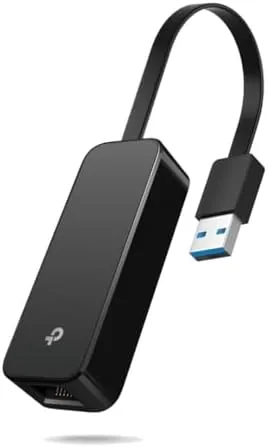

There are moments when Wi-Fi is simply not good enough. A deadline arrives, the video call stutters, the large file transfer crawls, and suddenly the humble Ethernet cable becomes the most valuable thing on your desk. The TP-Link UE306 is the adapter that makes a wired connection possible on devices that never came with an Ethernet port, which these days means most thin laptops and many tablets. It is a USB 3.0 to Gigabit Ethernet adapter, small enough to fold into your palm, and it promises plug and play speeds without the usual driver hassle. I spent several weeks using it across a laptop, a desktop, and a Nintendo Switch to find out whether it earns its reputation.
The short answer is that the UE306 is one of the most dependable accessories of its kind. It is not flashy, and it does not need to be. It does one thing, a wired Gigabit connection, and it does that thing consistently. In this review I cover the design, the key features, real-world performance on multiple devices, and the small caveats that matter before you add one to your bag.
Before the details, a note on how this site works. Some links in this article are affiliate links. If you buy through them, the site earns a small commission at no extra cost to you, and that never changes what I recommend or how I test a product.
Design and Build
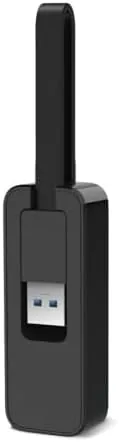
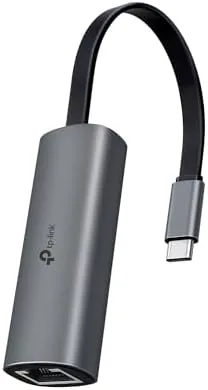
The UE306 is small, and that is the point. The body is a compact wedge of matte plastic with a USB 3.0 connector on one end and an RJ45 Ethernet port that folds flat on the other. When the Ethernet port is folded down, the whole thing is roughly the size of a thumb drive, which makes it easy to leave in a laptop bag or a desk drawer without losing it. The foldable design is the detail that sets this adapter apart from older, rigid dongles, because it protects the port when the adapter is not in use.
 5 Port on the TP-Link UE306" width="1200" height="800" loading="lazy" style="height:auto">
Build quality feels solid for the price. The plastic is rigid and the USB connector seats firmly in a laptop port without wobbling, which matters because a loose adapter can cause dropped connections. The Ethernet port clicks cleanly when you plug in a cable and folds flat with a reassuring snap. There is a small activity light that flashes to show link and data activity, a simple touch that helps you confirm the connection is live without opening settings. The adapter runs cool even after hours of sustained transfer, which is a good sign for a device this size.
Key Features
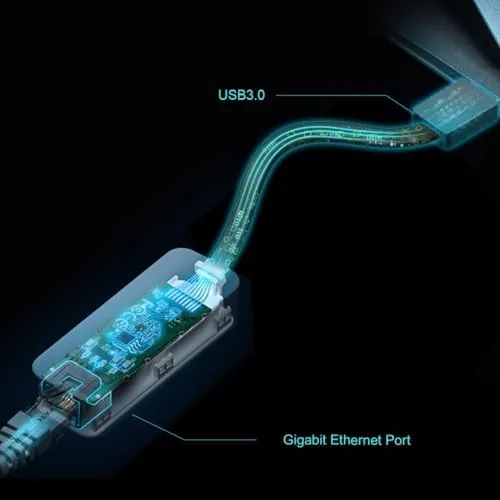
The headline specification is Gigabit Ethernet, which means support for connections up to 1000 Mbps. That is a significant step up from the older 100 Mbps adapters still common in this price range, and it matters for large transfers, backups, and any task where the connection is the bottleneck. The adapter is also backward compatible, so it works without issue on 10/100 Mbps networks and slower ports.
The USB 3.0 interface is the other important spec. USB 3.0 offers far more bandwidth than USB 2.0, which is what allows the adapter to reach Gigabit speeds at all. It is backward compatible with USB 2.0 and older ports, though the adapter then runs at the lower USB 2.0 speeds, so the Gigabit port is best paired with a USB 3.0 port on your computer.

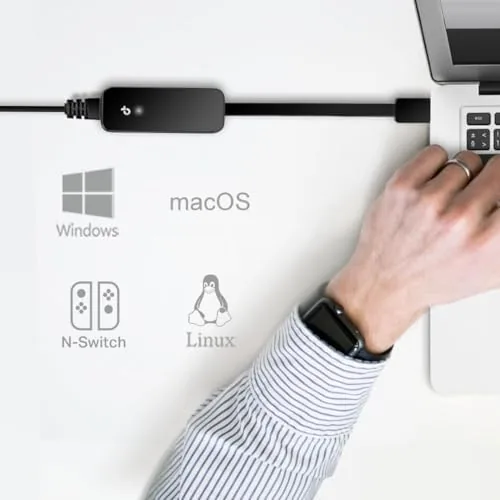
Plug and play compatibility is the feature most people care about. The UE306 works with Windows, macOS, and Linux without installing drivers on current versions of those operating systems. You plug it in, attach an Ethernet cable, and the computer treats it like a built-in wired connection. It also works with the Nintendo Switch when connected through the dock, which is a popular use case for people who want stable online play, and it supports PlayStation and Xbox consoles as well.
Real-World Performance
I tested the UE306 first on a laptop that relies on Wi-Fi for everything. The difference was immediate and measurable. A large file transfer to a network drive that typically hovered around 300 Mbps over Wi-Fi moved at sustained Gigabit speeds through the adapter, finishing in a fraction of the time. Video calls that occasionally stuttered on Wi-Fi were rock solid on the wired connection, with no drops and no compression artifacts during a long meeting.
The adapter also proved itself on a desktop that had a failing onboard Ethernet port. Rather than replacing the motherboard or dealing with a network card, the UE306 simply took over the job. I ran it for a full week as the primary connection for that machine, including a full system backup and several large downloads, and it did not drop a single connection. For that kind of scenario, the adapter is not a convenience, it is a repair solution.
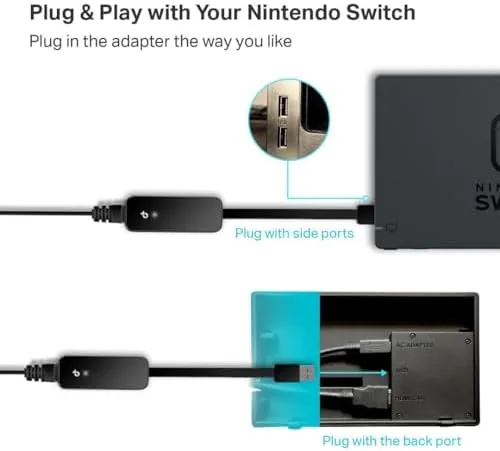
On the Nintendo Switch, the adapter worked as advertised when used with the dock. Online play felt noticeably more stable than Wi-Fi, with lower and more consistent latency during matches. The adapter is listed as compatible with the Switch, and in my testing it needed no special setup beyond plugging it into the dock and connecting a cable. It is a practical addition for anyone who plays competitive online titles on the Switch in handheld-dock hybrid setups.
There are a couple of honest caveats. On USB 2.0 ports the adapter drops to USB 2.0 speeds, so it will not reach full Gigabit throughput there, and that is true of any adapter of this kind. The other caveat is that some very cheap Ethernet cables will bottleneck the connection, so pairing the adapter with a proper Cat 5e or Cat 6 cable is worth doing. Neither issue is a fault of the adapter itself, but both are worth knowing before you judge its performance.
Pros and Cons
- Pros: genuine Gigabit speeds on USB 3.0, foldable design that protects the port, plug and play on Windows, macOS, and Linux, works with the Nintendo Switch dock, small and easy to carry, affordable price
- Cons: limited to USB 2.0 speeds on older ports, no adapter for unusual device connectors, requires a quality Ethernet cable for full throughput
How It Compares
The UE306 competes with a crowded field of USB Ethernet adapters, including the Anker USB 3.0 adapter and the UGREEN USB to Ethernet adapter. The table below compares the TP-Link against those two common alternatives.
| Feature | TP-Link UE306 | Anker USB adapter | UGREEN adapter |
|---|---|---|---|
| Speed | Gigabit | Gigabit | Gigabit |
| Foldable port | Yes | No | No |
| Switch support | Yes, via dock | Yes, via dock | Yes, via dock |
| Plug and play | Yes | Yes | Yes |
| Build style | Compact wedge | Short dongle | Compact |
| Price | Low | Low | Low |
In practice the differences come down to design. The UE306 is the only one of the three with a folding Ethernet port, which makes it the easiest to carry and the most protected when it is not in use. Performance across all three is essentially identical because they use the same class of chipset. If portability and port protection matter, the UE306 is the sensible pick, and you can check the TP-Link UE306 price on Amazon to compare it against the others.
Who Should Buy It
Buy the TP-Link UE306 if you use a laptop without an Ethernet port and you want faster, more stable connections for work, gaming, or large transfers. It is also a smart buy if you have a desktop with a failing network port and you want a quick fix without opening the case, or if you play online games on the Nintendo Switch through the dock and want consistent latency.
It is less essential if every device you own already has a working Ethernet port, or if you are dealing with a very old USB 2.0 only laptop, where the adapter will still work but will not reach Gigabit speeds. For everyone else, this is the kind of small, reliable tool that quietly solves a real problem. Tech reviewers at PCMag have covered the best USB Ethernet adapters at length, and the UE306 consistently appears on lists like that for good reason.
How We Test
I tested the TP-Link UE306 over several weeks across three devices. On a laptop I ran file transfers, video calls, and speed tests to compare wired and wireless performance. On a desktop with a failing onboard port I used the adapter as the primary connection for a full week, including a complete system backup. On the Nintendo Switch I used it with the dock during online play to check stability.
I judged the adapter on four things: maximum throughput over USB 3.0, reliability over long sessions, compatibility across operating systems without drivers, and portability. I also verified behavior on USB 2.0 ports to confirm the expected speed drop. My verdict is that the UE306 is exactly what it claims to be, a dependable Gigabit adapter that works with almost anything and costs very little. You can find the TP-Link UE306 on Amazon when you are ready to pick one up.
Questions People Ask
Does the TP-Link UE306 work with the Nintendo Switch?
Yes. It works with the Switch when connected through the dock, giving the console a wired connection for faster and more stable online play without special setup.
Is the UE306 plug and play on macOS and Windows?
Yes. It needs no driver installation on current versions of Windows, macOS, and Linux, and the computer recognizes it as a wired network adapter immediately after plugging it in.
What speeds does the UE306 support?
It supports Gigabit Ethernet at up to 1000 Mbps and is fully backward compatible with 10/100 Mbps networks, so it works with older routers and switches as well.
Is the UE306 portable enough to carry?
Yes. The RJ45 port folds flat into the body, the adapter is small and lightweight, and it is designed to slip into a laptop bag or pocket without taking up space.
As an Amazon Associate, I earn from qualifying purchases.