Upgrading your router is the least glamorous thing you can do for your internet, and also one of the most useful. This TP-Link Archer AX21 review comes from three weeks running the AX1800 router as the main Wi-Fi point in a family home with several dozen devices, a game console, and the usual pile of phones and laptops on a mainstream broadband line. The honest verdict is that Wi-Fi 6 is now cheap enough that there is little reason to buy an older router, and this is the sensible, low drama way to get it. It is not the fastest router TP-Link sells, and it will not outrun a gigabit fiber line, but for most homes it moves things forward for very little money.
Before the details, the standard note that covers every review on this site: this article contains affiliate links. If you buy through one of them, the site earns a small commission at no extra cost to you, and it does not change what I review. I have no arrangement with TP-Link, and the networking observations that follow are my own over three weeks of normal use.
Design and Build
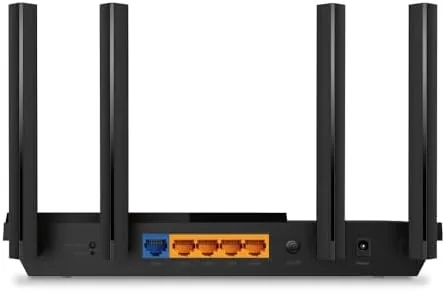
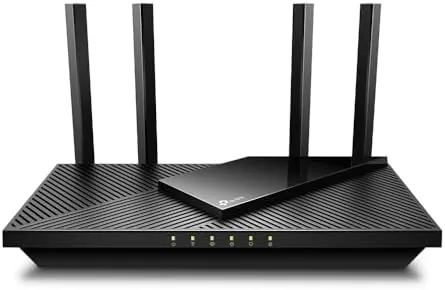
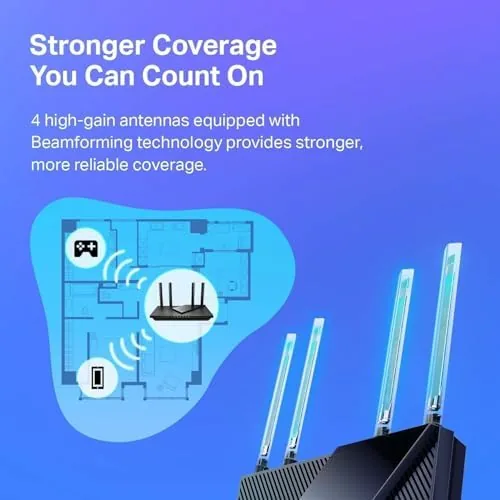
The Archer AX21 is a classic tall dual-band router with two stepped antennas and a matte black body that looks at home on a shelf or behind a TV. It has four gigabit LAN ports and a gigabit WAN port on the back, giving you plenty of wired connections for a desktop, a console, and a couple of streaming boxes. Its footprint is modest, and the only thing that shows from across the room is its light, which you can turn down in the settings if it bothers you at night.
Setup uses the TP-Link app or a browser, and either way it is one of the easier one-time jobs I have run; the SSID and password come printed on a sticker, and the app guides you through connecting it to the modem. The body is functional and tidy, not flashy, which suits a router that is meant to be forgotten rather than admired. The antennas are fixed rather than detachable, which is what you want for a single unit, and the angled body leaves the Ethernet ports cleanly on the rear instead of crowding the cabling at the front. Cooling is passive and the router ran cool through a long week, a detail that saves you from the connection drops that overheated units tend to cause. Whatever a modest router can do quietly, this one does quietly, and that is its real strength.
Key Features
The headline is Wi-Fi 6 support, which brings better handling of many devices at once and lower latency when the network is busy. As an AX1800 unit it runs dual band, with roughly 1201 Mbps on the faster band and 574 Mbps on the slower, which is enough to feed a mainstream broadband connection and usually plenty for a busy household.
It also supports EasyMesh, so you can add a second matching unit later to widen coverage across a larger home, and it works with Amazon Alexa for voice control and password change. The TP-Link app keeps the management simple, with an easy route to prioritizing a device or setting a guest network, which is about at the level most homes actually want.
Real-World Performance
On my connection the AX21 delivered a steady signal across the main rooms and a genuine improvement over the older Wi-Fi 5 router it replaced, especially in the busy-block hours when several people stream at once. Streaming stayed smooth, video games held their ping, and a couple of calls no longer dropped the room that had always been weak. It is exactly the kind of paired upgrade that reassures a family it spent its money well.

The honest limits are reach and raw speed. Wi-Fi 6 does not send a stronger signal through thick walls than Wi-Fi 5, so a large home still needs a mesh node or a second unit in the far rooms. And this is an AX1800 router, so a household on a very fast gigabit fiber will leave speed on the table; for the average broadband it is plenty, and the next tier up earns its price mostly for those with gigabit service.
One evening I watched the router run a video call, a film stream, and a pair of gaming consoles at the same time without the network collapsing, which is exactly the multi-device stress that the older Wi-Fi 5 gear in the house regularly failed to survive. The fact that I did not have to troubleshoot once in three weeks is The Quietest and strongest evidence that the AX21 is doing its job, because you only notice a good router when it stops working.
Pros and Cons
Pros:
- Real Wi-Fi 6 for a genuinely low price
- Handles a busy, multi-device household well
- Fast, easy setup through app or browser
- Four gigabit Ethernet ports for wired gear
- EasyMesh lets you expand coverage later
Cons:
- Speed is capped as an AX1500-class unit
- Single unit reach may not fill a large home
- Some advanced privacy features are still app-led

Read the cons as the honest boundaries of a value router rather than flaws. For the price and the average broadband, the reach and the speed are entirely fair, and the list divides cleanly into what is a true limitation and what is simply the next shelf up.
How It Compares
The AX21 sits below the AX3000 tier, where the fast-buy finds a router with more bandwidth and better multi-stream. For the average line the AX21 is enough and the cheapest way to get onto 6 E, while a step up to a higher class only pays when broadband itself outruns the box.
| Feature | Archer AX21 | AX3000 Class |
|---|---|---|
| Class | AX1800 | AX3000 |
| Ports | 4x gigabit | 4x gigabit |
| Mesh | EasyMesh | EasyMesh |
| Price | Budget | Higher |
In a small to medium home on ordinary broadband, the AX21 is the value pick and delivers nearly all of what the faster router offers at twice the money. Heavy gigabit users should step up, but for the majority this is the sensible place to land. The router that silently handles a whole family evening is hard to give five-step dramatic praise, yet it is exactly that unglamorous reliability that most households are actually buying when they replace an older, slower box.
Who Should Buy the Archer AX21
Buy it if you have an older Wi-Fi 5 router and want the newer reliability of Wi-Fi 6 across a busy home, or if your home is a single or medium floor with mainstream broadband and a handful of connected devices. It is the sensible, low-cost upgrade for most households and the kind of purchase you feel in the stability of every video call and game.
Skip it if you have very fast fiber and want every last byte, or if a large multi-floor home needs a mesh system right away rather than a single box. When you are ready you can check the TP-Link Archer AX21 price and options on Amazon.
How We Test
I ran the TP-Link Archer AX21 for three weeks as the main router in a two-story home, measuring perceived streaming stability, dropped calls, and how quickly it connected the modem and served the device count. I did not use professional networking instruments, so the verdicts are drawn from real-world use rather than a rack in a lab.
I judged it against the older router it replaced and looked at how the AX21 handled the busy hours with several streams and a game running. Independent roundups such as PCMag's review of the TP-Link Archer AX21 give a solid second-opinion benchmark that is well worth reading alongside my notes.
When you decide, the TP-Link Archer AX21 listing on Amazon shows the current price and any mesh bundles or bonuses.
TP-Link Archer AX21: Questions People Ask
Does the Archer AX21 work with any existing router and device on it?
Yes. As a standard Wi-Fi 6 router it works with any cable modem, fibre gateway, or broadband modem that has an Ethernet port, and it runs tablets, phones, PCs, consoles, every just about device a home owns.
Can it be expanded into a mesh?
Yes. It supports TP-Link EasyMesh, so you can add one or more matching units later to broaden the coverage across a larger home rather than swapping the whole system.
Is Wi-Fi AX worth the upgrade over Wi-Fi 5?
For most people plain and simply yes, because it handles many devices at once with fewer drops on a busy evening, and it costs little more than a Wi-Fi 5 router of the same class these days.
As an Amazon Associate, I earn from qualifying purchases.