
A good computer mouse is one of those quiet purchases that shapes every hour you spend at a desk. After using the TECKNET Wireless Mouse in purple for a full month across work, web browsing, and evening gaming sessions, I have a clear sense of what this budget friendly peripheral does well and where it cuts corners. The short version is that for the money, this is one of the most comfortable wireless mice you can plug in and forget about.
Before the details, the standard note. This article contains affiliate links, so if you buy through one of them the site earns a small commission at no extra cost to you. That does not change what I test or what I write.
Design and Build
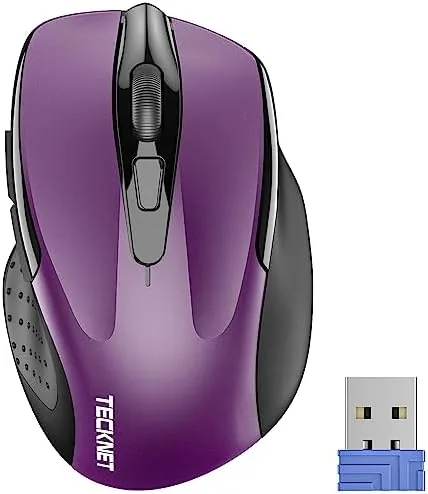
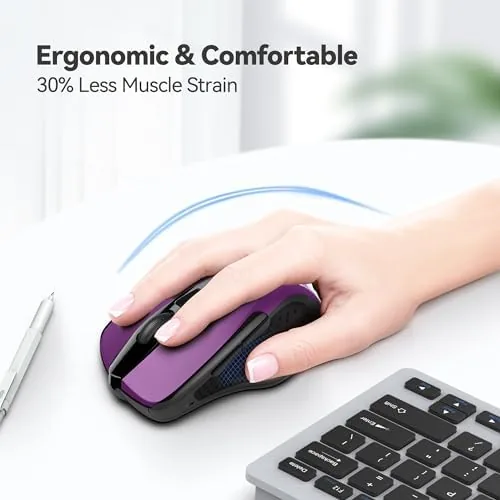
The first thing you notice is the shape. The TECKNET mouse is sculpted for the right hand, with a raised hump at the back that fills the palm and a gentle contour that keeps the fingers in a natural relaxed position. It is not an enormous mouse, but it is long enough that even larger hands can rest comfortably without cramping, and the compact size makes it easy to throw into a laptop bag.
The side grips deserve a mention because they are easy to overlook. Both sides carry a soft textured rubber that gives you something to hold onto during longer sessions, and after a month of daily use the material shows no signs of wear or peeling. The matte finish on the top shell resists fingerprints well, which keeps the mouse looking clean even in a busy home office.
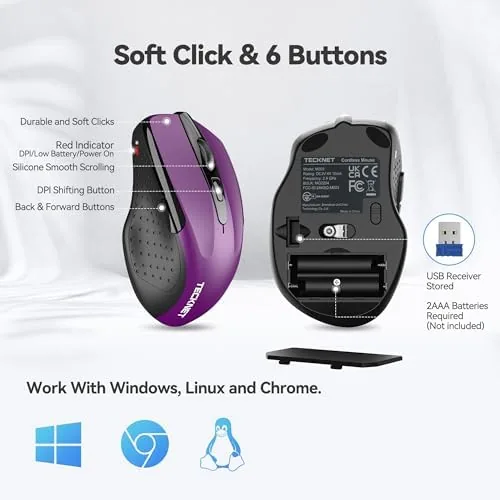
The build quality is respectable for the price point. The buttons feel solid with a crisp click and minimal wobble, and the scroll wheel has distinct detents rather than the loose free spinning feel of cheaper mice. The USB-A receiver is tiny and stores in a compartment in the battery bay, which is a small feature that saves a lot of lost dongle frustration over the life of the mouse.
Key Features
The headline feature is the adjustable DPI, which runs through several sensitivity levels with a button placed just behind the scroll wheel. A quick press cycles through the presets, and an LED indicator gives you a visual cue for the current setting. For office work the lower settings feel precise and controlled, while the top 2600 DPI setting covers fast cursor movement across large monitors and even some light gaming.
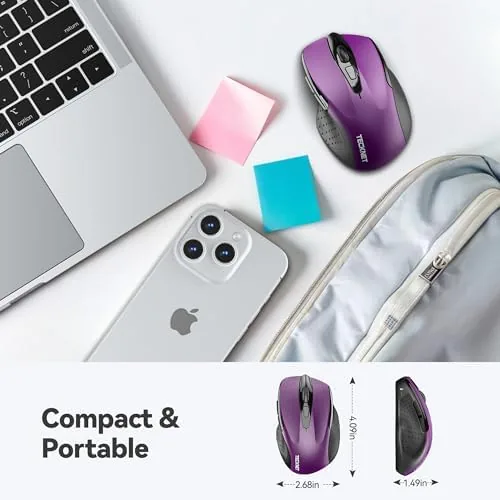
Battery life is the other headline number, and TECKNET claims up to two years from a single AA battery. The mouse automatically enters a sleep state after a period of inactivity, which is what makes that figure possible, and in my month of testing the included battery never dropped below what appeared to be full capacity. This is the kind of peripheral you buy and genuinely forget about in the best way.
Compatibility is broad and simple. The USB-A receiver is true plug and play, with no software installation required, and the mouse works across Windows, macOS, ChromeOS, and Linux. That makes it an easy recommendation for someone with a desktop PC, a work laptop, or a mix of both. The receiver also pairs with just one mouse, so there is no interference risk in a busy workspace.
Real-World Performance
Over a month of daily use, the TECKNET mouse proved dependable in a way that rarely makes it into the spec sheet. The wireless connection held steady without any of the random dropouts or stutter that plague cheap wireless peripherals, and there was no perceptible lag while moving the cursor or clicking through work. For typical office work, this mouse feels essentially identical to a wired mouse in responsiveness.
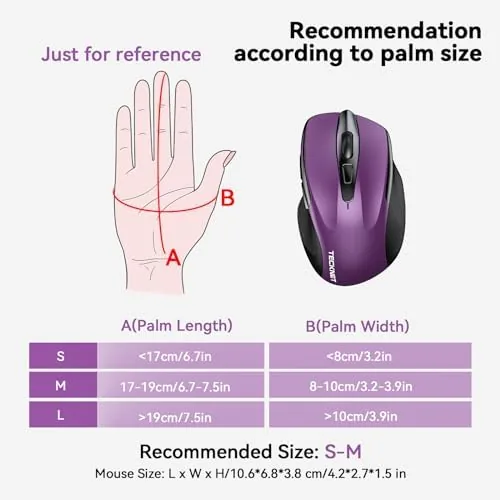
Comfort is where the TECKNET earns its keep. I ran through long work sessions, several hours of web browsing, and even a few evenings of light gaming, and the ergonomic shape never caused the wrist or hand fatigue that comes with flat, generic mice. The rubber side grips and the raised back combine into a genuinely comfortable daily driver, which is the most important thing a budget mouse can deliver.
The DPI button placement does take a small adjustment. It sits just behind the scroll wheel where an enthusiastic thumb can hit it by accident during fast scrolling, dropping the sensitivity mid session. I learned to avoid it, but it is worth knowing before you buy, and it is the most notable quirk of the design. The purple color also stands out on a desk, which is either a feature or a drawback depending on your taste.
One thing I appreciated through the month was how little upkeep the mouse required. The power switch on the underside lets you cut power completely when traveling, the receiver tucks away in its storage slot, and the battery indicator behavior stayed predictable from the first day. Small details like these are what separate a thoughtful budget mouse from one that simply exists to be cheap, and the TECKNET clearly falls into the thoughtful camp. You can check the TECKNET wireless mouse price on Amazon if you are ready to decide.
Pros and Cons
Pros:
- Comfortable ergonomic shape for long sessions
- Adjustable DPI with a clear indicator light
- Impressive two year battery life from one AA
- Reliable 2.4G connection with no dropouts
- Plug and play across Windows, Mac, ChromeOS, and Linux
Cons:
- Right handed shape only, not for left handed users
- DPI button can be pressed by accident during use
- Not a true gaming mouse despite the high DPI range
How It Compares
Against the Logitech M310, the TECKNET offers more features for a similar price. Both mice share a comfortable right handed shape, but the TECKNET adds an adjustable DPI button and a lower price, while the Logitech counters with a slightly more premium scroll wheel and a longer track record. It is a close race that usually comes down to price on any given day.
| Feature | TECKNET Wireless Mouse | Logitech M310 |
|---|---|---|
| Connectivity | 2.4G USB-A receiver | 2.4G USB receiver |
| DPI range | Adjustable up to 2600 | Fixed 1000 |
| Battery life | Up to 2 years | Up to 18 months |
| Shape | Right handed ergonomic | Right handed ergonomic |
| Price | Budget friendly | Budget friendly |
The TechRadar best wireless mouse guide is a useful second opinion if you want to survey the wider field before buying.
Who Should Buy It
The TECKNET wireless mouse is the right pick for anyone who spends long hours at a computer and wants an affordable upgrade over a flat laptop touchpad or a generic wired mouse. Office workers, students, and home users will all get genuine value from the comfortable shape, the reliable wireless link, and the battery life that removes charging from the equation.

Skip it if you are left handed, because the sculpted shape is firmly right handed, or if you need a true competitive gaming mouse with extra buttons, higher polling rates, and software configuration. For those users this is simply not the right tool, and spending more on a dedicated gaming mouse makes sense.
How We Test
I used the TECKNET wireless mouse as my primary daily input device for a full month, covering office work, web browsing, video watching, and light gaming. I judged it on comfort across long sessions, wireless reliability, battery behavior, DPI switching, and how it compares with other budget mice in the same class. I also left the mouse idle overnight to confirm the sleep state woke instantly the next morning, and I tested it on both a laptop and a desktop to make sure the receiver behaved the same way on each.
For an independent take on what makes a good budget mouse, the PCMag best wireless mice roundup is a worthwhile read. The TECKNET wireless mouse listing on Amazon has the current price and available colors.
TECKNET Wireless Mouse: Questions People Ask
How long does the TECKNET wireless mouse battery last?
TECKNET advertises up to two years of battery life on a single AA battery, which held up over my month of daily use without needing a swap.
Is the TECKNET mouse good for right-handed users?
Yes, the shape is sculpted for the right hand with soft side grips, though left-handed users should look for a symmetric model.
How do I adjust the DPI on the TECKNET mouse?
A button behind the scroll wheel cycles through the preset DPI levels, which is handy for moving between office work and faster cursor speeds.
Does the TECKNET wireless mouse work with Mac and Linux?
Yes, the USB-A receiver is plug and play on Windows, macOS, ChromeOS, and most Linux systems without installing drivers.
As an Amazon Associate, I earn from qualifying purchases.