
The soundbar market has a size problem. The bars that sound great are usually too long for the TV they are meant to sit under, and the bars that fit a small screen often sound like an upgraded laptop speaker. The Sonos Ray attacks that gap from both sides. It is a compact soundbar, small enough to sit under a 32 or 43 inch TV without overhanging, but it carries the full Sonos experience, including WiFi streaming, AirPlay 2, and the voice of the Sonos app. I ran one in a small living room for two weeks, pairing it with a modest TV, to find out whether the smallest Sonos soundbar delivers the Sonos promise or just the Sonos logo.
Before the details, the disclosure. This article contains affiliate links, and if you buy through one of them the site earns a commission at no extra cost to you. That never changes how I test or what I recommend.
The Ray is the entry point to Sonos soundbars, which means it makes deliberate choices to hit its price. It trades the HDMI input of its bigger siblings for a single optical connection, it drops the subwoofer support of the Beam, and it keeps the sound profile honest for a small room rather than pretending to be a home theater. The result is a product that knows exactly what it is: a clean, simple upgrade for a television whose built in speakers are holding it back.
Design and Build
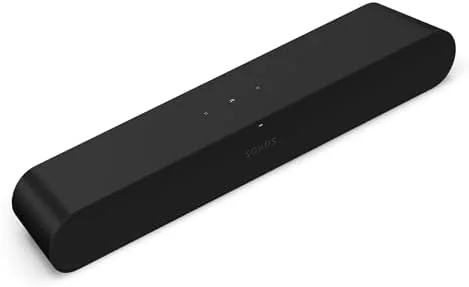
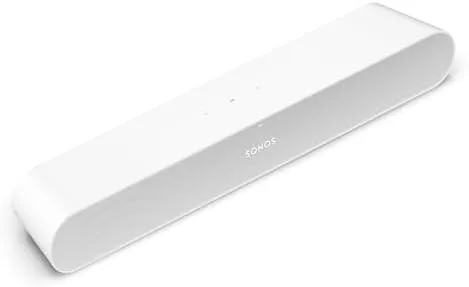
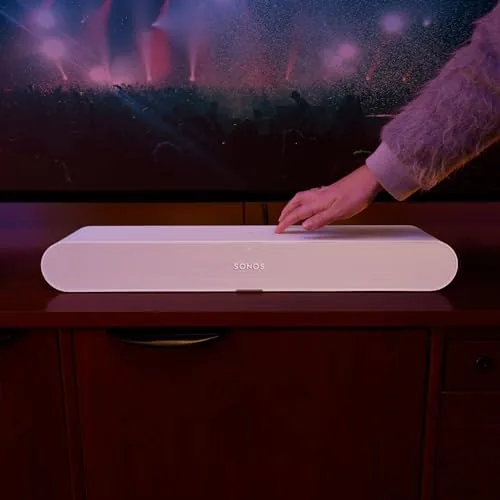
The Ray is a rounded white bar wrapped in a soft touch fabric, and it looks more like a piece of furniture than a speaker. The compact footprint is the whole point, at roughly the width of a large book, and it sits neatly in front of a small TV without blocking the remote sensor or looking like a soundbar that wandered into the wrong room.

Build quality is classic Sonos. The fabric is taut and clean, the chassis feels dense, and the top mounted touch controls respond instantly. The white finish picks up less dust than you might fear, and the understated design means it disappears into the room rather than announcing itself.
Setup is where the Ray shows its Sonos DNA. The app walks you through the process in minutes, the bar connects over WiFi, and Trueplay tuning automatically adjusts the sound for the room using the microphone in your phone. It is the kind of setup that makes cheaper soundbars feel fiddly by comparison.
Key Features
The Ray packs a real audio setup into its small frame, with two full range woofers, two tweeters, and a bass port working together to fill a small room. It will not rattle the walls, but it does not need to, because its job is to make a small TV sound dramatically better.
Connectivity is where the Ray makes its compromises. There is a single optical input and no HDMI, which means the bar needs a TV with an optical output. Most modern TVs have one, but older or budget models sometimes do not, and that is the compatibility check to make before buying.

On the wireless side, the Ray is fully loaded. It streams over WiFi, supports AirPlay 2 for direct playback from Apple devices, and joins the Sonos system, so it can play in sync with other Sonos speakers around the house. It also integrates with the Sonos app for music services, radio, and cross room control.
Speech enhancement is the setting that matters most for TV. It boosts dialogue above the soundtrack, which turns late night viewing from a constant volume dance into something you can actually follow at a whisper.
Real-World Performance
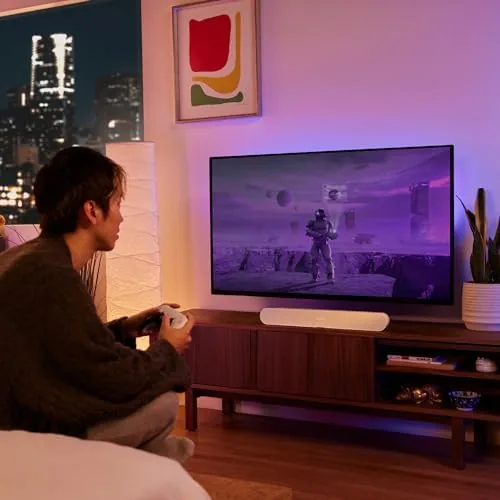
I tested the Ray with a 43 inch TV in a small living room, the exact setup the bar is designed for. The first evening of viewing made the difference obvious. Dialogue that had been thin and hollow through the TV speakers gained weight and clarity, and music during shows had a presence the built in speakers never managed.

Speech enhancement was the quiet hero. With it on, I could follow news programs and dialogue heavy films at a low volume, which is exactly what a soundbar in a shared living space needs to do. The bar also handled action scenes respectably, with enough low end to give explosions weight without overwhelming the room.
As a music speaker, the Ray punches above its size. Streaming through AirPlay 2 sounded clean and full, and the Sonos app made switching between services effortless. It is not a replacement for a dedicated bookshelf speaker, but it is a genuinely good music speaker for a room where a separate system would be overkill.
The optical connection worked reliably with my TV, and the bar turned on and off with the television through the audio signal. The one frustration was the lack of HDMI, since it rules out the Ray for TVs that only carry an HDMI ARC port and no optical socket.
Pros and Cons
Pros:
- Compact footprint fits small TVs perfectly
- Clear dialogue with effective speech enhancement
- AirPlay 2 and WiFi streaming for music
- Simple Sonos app setup with Trueplay tuning
- Clean white design that blends into the room
Cons:
- Optical only connection limits TV compatibility
- No HDMI ARC or subwoofer support
- Limited low end for action movie fans
How It Compares
The Ray sits below the Sonos Beam and competes with budget soundbars from Vizio and Roku. The comparison is really about whether the Sonos ecosystem premium is worth it for a small room.
| Feature | Sonos Ray | Sonos Beam | Budget Soundbar |
|---|---|---|---|
| Connection | Optical only | HDMI eARC | Optical and HDMI |
| Subwoofer support | No | Yes | Often yes |
| AirPlay 2 | Yes | Yes | Rare |
| Multi room | Full Sonos | Full Sonos | No |
| Dialogue clarity | Excellent | Excellent | Variable |
| Price | Lower | Higher | Lowest |

Against the Beam, the Ray gives up HDMI, subwoofer support, and some output, but it keeps the essential Sonos experience and costs less. Against a budget soundbar, the Ray wins decisively on sound quality, setup, and ecosystem, though it loses on connection flexibility. The Ray is the right pick for a small TV in a Sonos household.
Who Should Buy It
Buy the Sonos Ray if you have a small TV with weak speakers, if you already use Sonos speakers elsewhere in the house, or if you want one bar that handles both TV and music without a second device. It is also a strong pick for a bedroom or office setup where a full soundbar would be overkill.
Skip it if your TV has no optical output, if you want a subwoofer for real home theater rumble, or if you do not plan to use the WiFi and AirPlay features, because a cheaper bar would do the basic job. For the right setup, the Ray is excellent. You can check the current Sonos Ray price on Amazon.
How We Test
I tested the Sonos Ray for two weeks in a small living room with a 43 inch TV. I watched dialogue heavy content, action films, and music shows, and I compared the sound directly against the TV speakers and a budget soundbar.
I streamed music over AirPlay 2 and through the Sonos app, tested the speech enhancement at low volumes, and checked the optical connection against the TV in my setup. For broader soundbar guidance, TechRadar soundbar reviews provide useful independent context.
The verdict is that the Ray is the right soundbar for a small room that wants the Sonos experience without the Sonos bulk. You can order the Sonos Ray from Amazon to see the current deal.
Questions People Ask
Does the Sonos Ray connect with an HDMI cable?
No, the Ray connects to a TV through a single optical audio cable, so it needs a TV with an optical output rather than a standard HDMI ARC port.
Does the Sonos Ray work with Apple AirPlay?
Yes, the Ray supports AirPlay 2, so you can stream music directly from an iPhone, iPad, or Mac to the soundbar without opening the Sonos app.
Is the Sonos Ray good for TV dialogue?
Yes, the dedicated speech enhancement setting lifts dialogue above the soundtrack, and in my testing voices stayed clear at low volumes.
Can the Sonos Ray be used without a TV?
Yes, it works as a standalone music speaker over WiFi and AirPlay 2, which makes it useful in a room even before you add it to a television.
As an Amazon Associate, I earn from qualifying purchases.