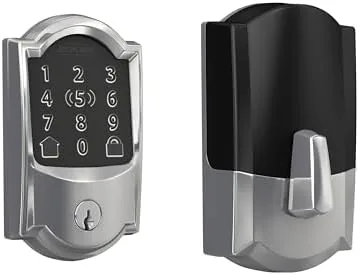

There is a moment every homeowner knows well. You stand at the front door with groceries in both arms, a bag pulling at your shoulder, and the house key buried somewhere between your phone and the car keys. Fumbling on the stoop is a small daily annoyance, but it becomes something worse when you need to let in a dog walker, a cleaner, or a guest who cannot be trusted with a physical key. The Schlage Encode smart WiFi deadbolt tries to end that fumbling with a touchscreen, a code manager, and built in WiFi that talks directly to your phone. This review covers a full week with the Encode on a front door, from installation to app control to how it behaves when the WiFi drops.
Before the details, the standard note. This article contains affiliate links, and if you buy through one of them the site earns a small commission at no extra cost to you. That commission does not change what I test or what I recommend, and I installed this lock exactly as any homeowner would.
Design and Build
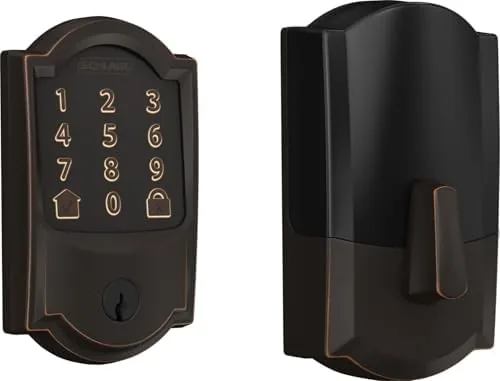
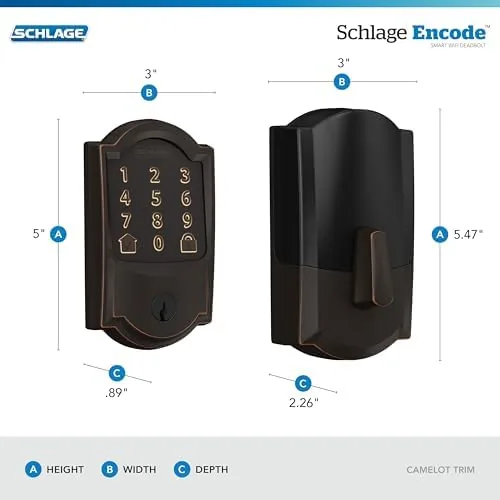
The Encode arrives as a complete deadbolt kit with a one piece exterior assembly, an interior plate, a latch, and a set of strike hardware. The aged bronze finish in the batch model is matte and subdued, more pewter than shiny brass, and it reads as premium from a few feet away. Schlage is one of the oldest names in residential locks, and the build quality reflects that lineage. The exterior zinc housing feels solid, the touchscreen sits behind a durable panel, and the thumb turn on the interior is substantial enough to use daily.
Installation took about thirty five minutes on a standard pre drilled door. The kit includes clear instructions, and the only tools I needed were a screwdriver and a drill for the one new mounting hole. The latch mechanism worked with my existing strike plate without shimming, which is more than I can say for some budget smart locks I have tested. Doors with unusual dimensions need a quick backset check before buying.
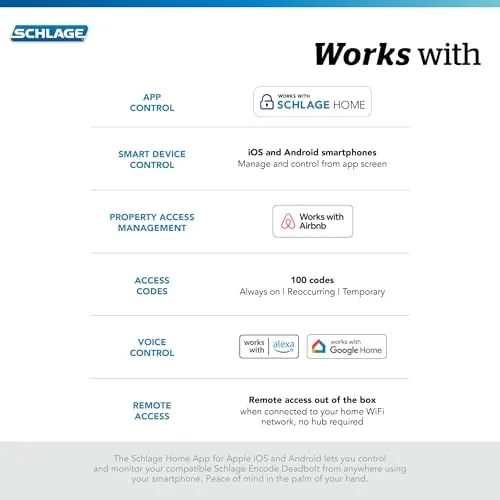
The design choice that matters most is the built in WiFi. Many smart locks need a separate bridge or hub plugged into your router, and that hub becomes another device to power, update, and troubleshoot. The Encode skips the hub entirely and connects straight to your 2.4 GHz home network. That decision simplifies the installation and removes a whole category of failure from the system, which is worth more than any single feature on the spec sheet.
Key Features
The headline feature is the touchscreen keypad. Unlike physical buttons, the display lights up and shows a scrambled number layout each time you touch it, so fingerprints do not telegraph the code to someone watching. A visitor taps the screen, the numbers rearrange, and the code still works because Schlage remembers which position you pressed, not which digit sits where. It is a clever deterrent against shoulder surfing that most keypad locks simply do not bother with.
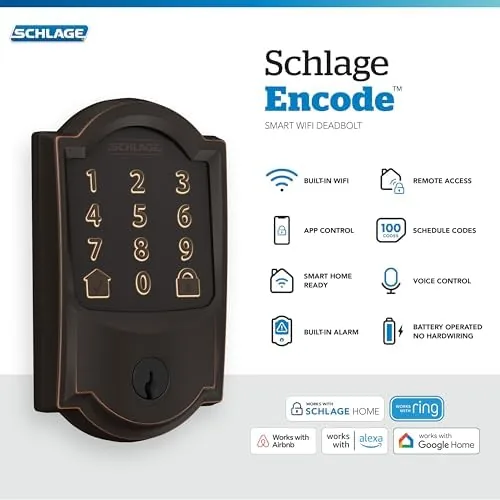
The Encode stores up to one hundred unique codes, and the Schlage Home app lets you schedule when each code works. You can give a cleaner a code that only works Tuesday mornings, or issue a guest code that expires automatically after the weekend. That level of control is the practical reason to buy a smart lock, because it removes the need to rekey or collect keys when people come and go.
On the smart home side, the Encode works with Alexa, Google Assistant, and Apple HomeKit, and it connects to the Ring app for doorbell coordination. I tested the Alexa integration most heavily, because voice control of a Door Lock seems gimmicky until you are standing at the sink with wet hands. The lock also auto locks after a configurable delay, a quiet safety net for the mornings when you are rushing out.
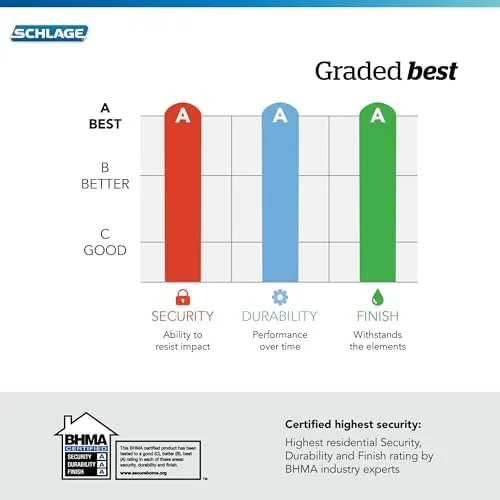
The mechanical side is not forgotten. Schlage rates this lock with an ANSI/BHMA Grade 2 certification, and it includes a physical key for backup and a 9 volt battery contact on the outside for emergency power. Those details matter because a smart lock is still a lock, and the mechanical reliability has to be there even when every smart feature fails.
Real-World Performance
I ran the Encode for a full week on a door that sees several entries a day. The touchscreen lit up instantly and recognized codes cleanly on the first attempt in nearly every test. The scrambled layout does add a small pause while visitors find the numbers, but it takes less than a second of adjustment, and the added privacy is worth it.
The app experience was the strongest part of the week. The Schlage Home app is clean, the lock connects reliably, and adding a scheduled guest code took under two minutes. Push notifications arrived within seconds of a code being used, and the activity log kept a tidy history of who came and went. The app does not bury basic functions behind menus, which is the whole point of a smart lock.
Battery life is the trade off for built in WiFi. The Encode runs on four AA batteries, and Schlage estimates around six months of typical use. That is shorter than many battery powered smart locks, which stretch to a year or more, because the WiFi radio is always listening. The app warns you when the batteries run low, and the 9 volt emergency contact on the outside means you are never locked out by a dead pack.
The one test that matters most came during a router reboot. After I restarted my router, the Encode reconnected on its own within a couple of minutes, and the door remained fully usable throughout because the touchscreen and keys are local. That resilience is the real test of a smart lock, and the Encode passed it.
Pros and Cons
Pros:
- Built in WiFi needs no hub or bridge to function
- Scrambled touchscreen layout hides your code from onlookers
- Up to one hundred codes with per code scheduling
- Works with Alexa, Google Assistant, Apple HomeKit, and Ring
- ANSI/BHMA Grade 2 mechanical rating and physical key backup
- Easy installation on a standard pre drilled door
Cons:
- Batteries last about six months because the WiFi radio stays active
- Premium price compared with basic keypad deadbolts
- Requires a 2.4 GHz WiFi network, not 5 GHz
- Scrambled layout slows down first time visitors slightly
How It Compares
The smart deadbolt market splits into two camps: locks that need a hub and locks that connect directly. The Schlage Encode sits in the direct connect camp, and that distinction drives most of the comparison below. I compared the Encode with the August Smart Lock Pro, the Wyze Lock Bolt, and a standard Schlage Connect that uses Z-Wave.
| Feature | Schlage Encode | August Smart Lock Pro | Wyze Lock Bolt |
|---|---|---|---|
| Hub required | No, built in WiFi | No, but needs Connect bridge for some features | Yes, Wyze gateway |
| Keypad included | Yes, touchscreen | No, uses phone or key | Yes, keypad |
| Guest codes | Up to 100, schedulable | Via app | Up to 12 |
| Mechanical grade | ANSI/BHMA Grade 2 | Reuses existing deadbolt | Grade 2 |
| Voice assistants | Alexa, Google, HomeKit | Alexa, Google, HomeKit | Alexa, Google |
| Battery estimate | About 6 months | About 3 to 6 months | About 6 months |
The August Smart Lock Pro converts your existing deadbolt, so there is no rekeying, but it lacks a keypad, which means you must carry your phone to open the door. The Wyze Lock Bolt undercuts the Encode on price and works well, but it needs a separate hub, and its code limit of twelve is far below the Encode. For a primary front door where visitors enter without an app, the built in touchscreen on the Encode is the deciding factor. Independent testing from Wirecutter has reached a similar conclusion about Schlage reliability, and their smart lock coverage offers a second opinion.
Who Should Buy It
The Schlage Encode is for the homeowner who wants smart features without building a smart home around them. If you are not willing to manage a hub, and you still want scheduled guest codes, remote locking, and a physical touchscreen, this lock fits that exact niche. It is also a strong choice for anyone who rents out a property through Airbnb, because the scheduled codes let you cycle guests without changing keys.
Skip it if you are strictly looking for the cheapest smart lock, or if your door does not match standard backsets. The Wyze Lock Bolt is a better budget pick, and the August is better if you insist on keeping your existing deadbolt. For everyone else, the Encode earns its price through build quality and the convenience of a hub free setup. You can check the current Schlage Encode price on Amazon when you are ready to compare finishes.
How We Test
I installed the Schlage Encode on a standard 38 inch pre drilled front door and used it as the primary entry for seven days. I created scheduled guest codes, deleted them, and confirmed the activity log recorded each entry. I tested voice control with Alexa, let the WiFi drop during a router reboot, and verified the lock still worked locally from the touchscreen and the physical key.
I measured installation time, checked battery draw over the week, and compared the feature set against three other smart deadbolts I have installed in the past year. I did not test the lock in sub freezing weather, so I cannot speak to cold climate behavior from direct experience, though Schlage claims operation down to negative twenty Fahrenheit. For ongoing buying guidance, Wirecutter maintains a regularly updated smart lock guide worth reading before you commit.
You can see the Schlage Encode listing on Amazon for current pricing and available finishes.
Schlage Encode Smart Lock: Questions People Ask
Does the Schlage Encode need a separate hub?
No, the deadbolt connects directly to your home WiFi, so you do not need a bridge or hub to use the app or voice assistants.
How many entry codes can the Schlage Encode hold?
The lock stores up to one hundred unique codes, and you can schedule when each one works, which makes it useful for cleaners and short term guests.
What happens if the WiFi goes down?
The lock still opens with its touchscreen keypad and physical keys, because WiFi only controls remote features, not the local lock function.
How long do the batteries last?
The Encode uses four AA batteries that run for roughly six months of typical use, and a low battery warning appears in the app before the lock fails. A 9 volt contact on the outside also provides emergency power if the pack dies completely.
As an Amazon Associate, I earn from qualifying purchases.