
The hardest part of starting a podcast is not finding something to say; it is spending the right amount on a microphone. Most beginners buy a cheap USB condenser, and then within a year they outgrow it and spend again on an interface and an XLR microphone. The Samson Q2U exists to close that gap. This review is the record of a month using the microphone for voice over, podcasting, and streams, and the honest conclusion is that its dual USB and XLR connection makes it a genuinely rare bargain.
Before the details, the standard note. This article contains affiliate links. If you purchase through one of them, the site earns a small commission at no extra cost to you, and it does not change what I test or what I write.
Design and Build
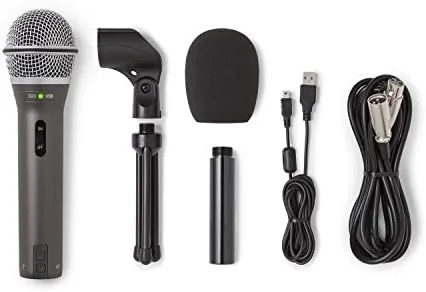
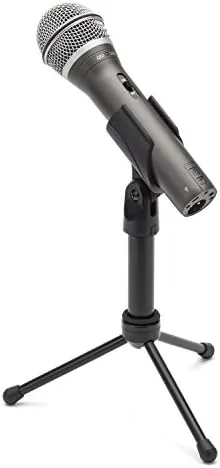
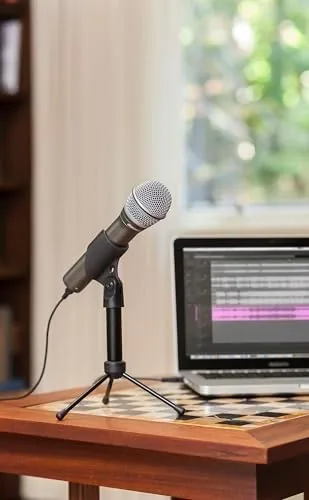
The Q2U is a handheld style dynamic microphone built on a dense metal body, and it feels reassuringly solid in the hand. It ships inside a large cloth windscreen that doubles as a protective cap, and when it sits in the included desktop stand it reads as a proper broadcast tool rather than a toy. The base of the stand is heavy enough to keep the whole assembly stable on a busy desk.
The connectivity is the story. On the bottom of the microphone are two outputs: a USB port and a standard XLR socket. A pull-out desk stand swings the microphone up or down, and a threaded mount clips onto any standard boom arm. The package also includes the cable, a microphone clip, a carrying pouch, and the windscreen, which is an unusually complete set of accessories at this price.
The build feels honest for the money. Nothing rattles, the switch on the side clicks cleanly between on and off, and the grille is well attached. The microphone is not heavy enough to feel premium, but it clears the bar of a daily work microphone with room to spare.
Key Features
The headline feature is the dual connection. The Q2U works as a plain plug-and-play USB microphone over the USB port, which makes it trivial to use with a laptop, and it also works as a proper XLR dynamic microphone for anyone who owns or plans to buy an Audio Interface. You choose which path to run it over, and because it is a class-compliant device it appears automatically on any modern computer with no driver installation.
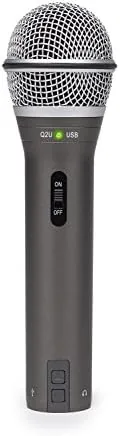
Behind the grille is a dynamic capsule, the same design used in broadcast and stage microphones. A dynamic microphone is not as sensitive as a condenser, and that is its advantage for speech: it picks up far less of the surrounding room and less of the hum of a laptop fan or the traffic behind you. It does not bloom into a rich vocal tone the way a condenser might, but it captures a clean, present voice that is ideal for the spoken word.
There is also a real-time monitoring path built in, and the package includes a windscreen and a carrying case. The bundled kit is generous, aimed firmly at the person who wants to hit record tonight rather than shop for parts separately.
Real-World Performance
A month of use as a daily voice microphone was a fair test. On a recording made straight to a laptop over USB, the Q2U captured a clear, neutral voice with no background hiss from the room, and it rewards the close microphone position a podcaster naturally adopts. The sound is not as instantly flattering or as smooth as some studio classics, but it is clean enough to need only light processing before it is ready for the mic.
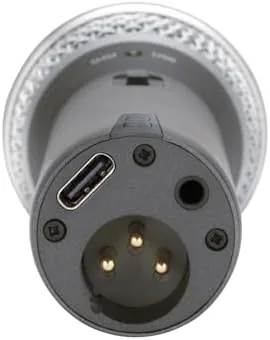
The XLR path is genuinely the point. When I switched the same microphone across my desk to a modest audio interface, the tone brightened a little and the low end gained weight, and the dynamic void of my room meant the recording stayed remarkably free of echo. The ability to keep the same good-sounding capsule when you later upgrade your interface is the real reason a beginner should not buy a disposable USB only microphone.
The profile is neutral with a slight presence push on the voice. It is nothing special for instrument work, but as a spoken word microphone it sits close to a broadcast voice. With the correct distance, about a fist and a half away, the tone is full and the noise is kept under control. In a quiet room with the microphone held near the mouth it captures a smooth, warm voice with no weakness in the low range.
Pros and Cons
Pros:
- Both USB and XLR connections, so it works now and still works after an upgrade
- Dynamic design captures far less room noise than most USB condensers
- Plug and play on Mac, Windows, and common apps with no drivers
- Full bundle, stand, case, windscreen, and cable at a budget price
- Solid, durable metal build for a busy desk
Cons:
- Tone is neutral, not as rich or flattering as some condenser rivals
- Needs to be spoken into closely for the strongest signal
- Large body can crowd a small desk until you add a boom arm
- Output runs only one bus at a time, either USB or XLR
How It Compares
The most direct rivals are the mainstream USB condenser microphone and the cheapest USB-only dynamic. Against a typical USB condenser, the Q2U trades a little warmth for a far cleaner recording in an untreated room, and it avoids the need to fight background chatter. Against an even cheaper USB dynamic in the same lane, the Q2U stands out for its fuller sound and the genuinely secure connector that holds a boom.
| Feature | Samson Q2U | Typical USB Condenser |
|---|---|---|
| Connection | USB and XLR | USB only |
| Pickup | Dynamic | Condenser |
| Room noise resistance | Good | Poor |
| Upgrade path | Yes, to an interface | No, replace the mic |
| Drivers | None | None or minimal |
Who Should Buy
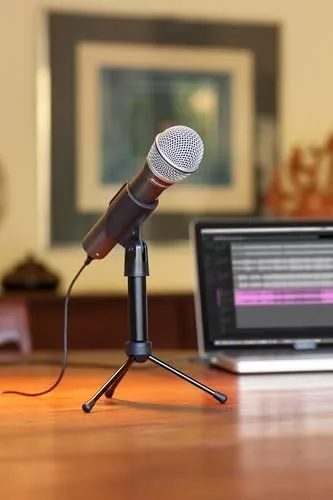
Buy the Samson Q2U if you are starting a podcast with a laptop and no interface and you want your first microphone to last more than a single season. It is the right choice for a creator who knows they will grow, because the same body gives you an XLR path later. If you podcast, do voice over, or stream from a desk that carries a fair amount of room sound, this is an honest pick.
Skip it if you want the most produced vocal the moment it opens, or if you plan to stay entirely on USB and spend instead on room acoustics. You can check the Samson Q2U price and bundle on Amazon when you are ready.
How We Test
I used the Q2U daily for a month across quiet voice recordings, calls, and a comparison against a cardioid condenser. I recorded the same takes over USB and XLR through a basic audio interface, checked the level meter, and judged the voice against the room. I did not add processing in the field, so treat my takes as a raw read of the microphone at a normal desk.
Independent testing, such as the long-term run in PCMag review of the Samson Q2U, offers a useful second opinion on the same capsule. My conclusion comes from a month of living with the mic, so treat it as the record of an ordinary creator rather than a studio.
The Samson Q2U recording pack listing on Amazon has the current price and the bundled accessories.
Questions People Ask
Is the Samson Q2U good for podcasting?
Yes. The dynamic capsule rejects room noise and the USB output is plug and play, which makes it a strong first podcasting microphone.
Can the Samson Q2U use both USB and XLR at the same time?
You can connect both cables, but the microphone outputs over only one path at a time, so you use USB for a computer and XLR when you plug in an audio interface.
Do I need an audio interface with the Samson Q2U?
Not at first. The built-in USB output works on its own, and you can add an interface later and keep using the same microphone through its XLR connection.
Is the Samson Q2U better than a USB condenser microphone?
In a normal, untreated, reasonably quiet room, yes for speech. The dynamic design picks up less room echo and background noise than a condenser microphone.
As an Amazon Associate, I earn from qualifying purchases.