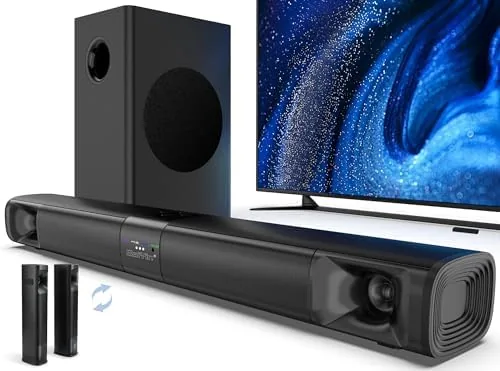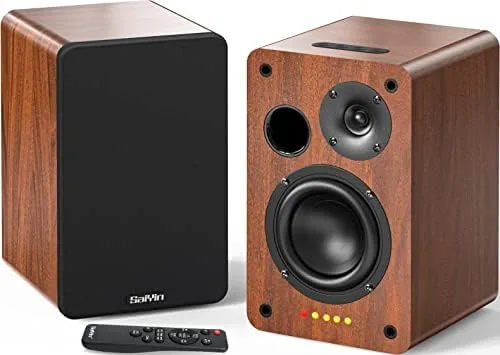

A television's built in speakers are the least loved component in most living rooms. They are thin, directionless, and hopeless at bass, which is why so many TV buyers end up shopping for a sound bar. The Saiyin Sound Bar with Subwoofer is a two piece home theater system aimed squarely at that buyer, pairing a slim sound bar with a 5 inch subwoofer, dual bass reflex ports, and support for optical, AUX, and Bluetooth 5.3 input. I ran it with a television, a PC, and a phone over two weeks to find out whether it delivers the sound upgrade it promises without the setup headaches. This is the full record of that testing.
Before anything else, the disclosure. This article contains affiliate links, and purchases through them earn this site a small commission at no extra cost to you. That never changes what I recommend or how I test.
Design and Build
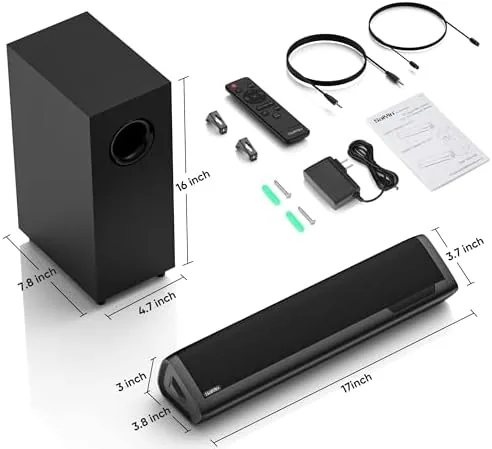
The system is a deliberate two piece layout. The sound bar itself is a slim, low profile unit built to sit in front of a television stand without blocking the bottom of the screen, and the subwoofer is a separate cabinet that handles the low end. The pairing keeps the center channel clear of the stand while pushing the bass off to the side, where it is felt more than it is seen. The two pieces connect with a cable, so there is no pairing procedure and no dropped connection to troubleshoot.
The sound bar has a clean, understated look with a dark mesh grille and a subtle LED volume indicator along the front. The indicator is a thoughtful touch, because it shows the current volume level at a glance instead of leaving you guessing. The controls on the bar cover power, volume, source selection, and bass adjustment, and a compact remote duplicates those functions from the couch. The construction feels sturdy for the price class, with no rattling panels and a solid weight that keeps the bar from sliding.
The subwoofer houses a 5 inch driver and a pair of bass reflex ports. Bass reflex ports are the key detail here. They vent air out of the cabinet to reinforce the low frequencies, which means a relatively small subwoofer can produce deeper bass than a sealed box of the same size. The ported design is exactly why this budget system can shake a room the way it does, and the placement of the ports means the cabinet works best with a little breathing room around it.

Key Features
The feature list is built around input flexibility. The sound bar accepts optical, AUX, and Bluetooth 5.3, which covers just about every source in a modern home. The optical input handles a television and delivers the cleanest digital signal, the AUX input works for a PC, a game console, or any older device, and Bluetooth 5.3 handles phone and tablet streaming with a stable connection and decent range. That combination means the bar can serve as both a TV audio system and a music speaker without rewiring anything.
The adjustable bass control is more useful than it sounds. Most budget sound bars treat bass as a fixed setting, which either booms or disappears depending on the room. Here you can dial the low end up for movies and games or down for late night viewing, and the LED indicator confirms the level you have selected. The volume indicator deserves another mention, because it is a feature that is almost never found at this price and it genuinely improves day to day use.
For a PC connection, the AUX input works with virtually any motherboard or laptop, and the system adds real low end to games and music that tiny desktop speakers cannot reproduce. The optical input is the right choice for a TV, because it bypasses the television's internal DAC in most cases. Between the inputs and the subwoofer, the Saiyin system does not need an AV receiver to sound full. To see the current price and what is in the box, check the Saiyin sound bar listing on Amazon.

Real-World Performance
My first test was movies, because that is what most sound bar buyers care about most. I ran an action film through the optical input, and the difference from the TV speakers was immediate. Dialogue became clear and centered, explosions and score dropped into the subwoofer, and the overall sound field felt dramatically larger than the physical size of the bar. The bass reflex ports did their job, producing room filling low end from the compact subwoofer that genuinely surprised me on the first action scene.
Music over Bluetooth 5.3 sounded better than I expected for a home theater oriented system. The bar reproduced vocals cleanly and the subwoofer added warmth to bass heavy tracks without the muddy boom that cheap subwoofers produce. Pairing was quick and the connection stayed stable across the room, which is the practical benefit of Bluetooth 5.3 over older versions. On a desktop PC over AUX, the system turned flat game audio into something with actual body, and the bass control let me tune the level to avoid rattling my desk.
Volume performance was a highlight. The system got loud enough to fill a large living room without audible distortion, and the volume indicator made it easy to match levels between sources. The one real weakness showed up in dialogue-heavy content at low volume, where the center sound is clear but lacks the vocal clarity of a dedicated center channel in a true surround system. That is the honest limit of a two piece setup, and it only matters if you watch a lot of quiet dramas late at night.

Pros and Cons
Pros:
- 5 inch ported subwoofer delivers genuinely deep bass
- Optical, AUX, and Bluetooth 5.3 cover every common source
- Adjustable bass control suits different rooms and moods
- Volume indicator is a rare and welcome feature at this price
- Simple two piece setup with no receiver required
- Loud and clean at living room volumes
Cons:
- Simulated surround, not true 5.1 channel audio
- Dialogue can lose clarity at very low volume
- Subwoofer connects by cable, so placement is limited
- No HDMI input for the newest TVs or ARC support
How It Compares
A budget sound bar buyer usually weighs three options: a sound bar with a subwoofer like this one, a single bar without a sub, and a more expensive unit with HDMI ARC and true surround. I compared the Saiyin against those two alternatives to make the trade offs clear.
| Feature | Saiyin Bar and Sub | Single Sound Bar | Premium Bar with Sub |
|---|---|---|---|
| Bass | Deep, ported 5 inch | Limited | Deep |
| Inputs | Optical, AUX, BT 5.3 | Varies | HDMI ARC plus more |
| Surround effect | Simulated | Minimal | True surround |
| Setup | Two cables | One cable | Simple to complex |
| Dialogue clarity | Good | Fair | Excellent |
| Price | Budget | Very low | High |
| Best for | TV and PC upgrade | Small rooms | Home theater fans |

Against a single sound bar, the Saiyin wins on bass and fullness by a wide margin, because the subwoofer is what makes TV audio feel like theater audio. Against a premium bar with HDMI ARC, the Saiyin loses on convenience and true surround, but it costs a fraction of the price and still delivers most of the everyday benefit. If your TV has an optical output and you want a big audio upgrade on a budget, the Saiyin is the strongest value of the three.
Who Should Buy It
Buy this system if you are still listening to your TV's built in speakers, or if you want a simple way to add real bass to a PC setup without a receiver and a tangle of cables. It is ideal for apartments and living rooms where a full 5.1 system is overkill, and for anyone who wants to connect a TV, a computer, and a phone to one audio system without swapping cables.

Skip it if you demand true 5.1 surround for movie marathons, if you need HDMI ARC to keep your TV remote in full control, or if you simply do not have room for a subwoofer cabinet. For everyone else, the Saiyin system is one of the easiest big audio upgrades available, and it does not punish you with complicated setup. You can check the current price for the Saiyin sound bar on Amazon to see if it fits your budget.
How We Test
I tested the Saiyin system over two weeks across three sources: a television connected by optical cable, a desktop PC over AUX, and a phone streaming over Bluetooth 5.3. I watched action films, played games, and listened to a mix of music genres, and I used the bass control and volume indicator to tune the system for different content and room conditions.
I measured the practical maximum volume for distortion, checked Bluetooth range and stability across a room, and compared the system side by side with a single bar and a premium surround unit to establish the differences in the table above. I did not perform laboratory frequency sweeps, so these are listening based impressions rather than instrumented measurements. For independent testing of budget sound bars, RTINGS' sound bar reviews provide a useful technical reference alongside this hands on review.
Saiyin Sound Bar: Questions People Ask
How do I connect the sound bar to my TV?
Use the optical cable for the cleanest connection if your TV has an optical output, or use the AUX cable if it does not, then select the matching input with the remote or the source button.
Is the subwoofer wired or wireless?
The subwoofer connects to the sound bar with a cable, so it needs to sit within cable reach of the bar, though it does not need any separate pairing or setup.
Can I stream music from my phone?
Yes, the sound bar supports Bluetooth 5.3, so you can pair a phone or tablet and stream music directly without any additional hardware or cables.
Does the system really produce Surround Sound?
It produces a wide, room filling sound field with strong bass, but it is simulated surround rather than true 5.1 channel audio, which is the normal result for a two piece system.
As an Amazon Associate, I earn from qualifying purchases.