 Vertically on the cooling and charging stand with RGB lighting" width="1200" height="800" loading="lazy" style="height:auto">
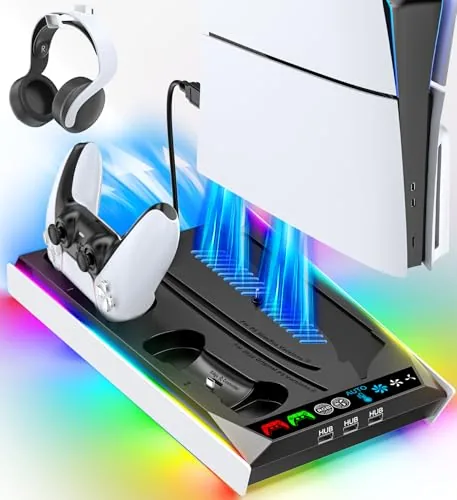
Every PS5 owner eventually hits the same wall: the console takes up a full shelf, the controllers are never where you left them, and the top of the machine gets hot enough to worry about. The PS5/Slim/Pro Stand tries to solve all three problems at once, with a cradle for the console, a cooling fan with three manual speeds and an auto mode, a built-in dual controller Charger, and RGB lighting across the base. I ran it for three weeks with a PS5 Slim, a standard PS5, and two DualSense controllers, and this review records what it actually does.
The standard note first. This article contains affiliate links, and if you buy through one of them the site earns a small commission at no extra cost to you. That commission does not change my findings. The stand I tested is the one in the current listing, and the PS5 stand listing on Amazon has the live price and compatibility details.
The premise is that one dock should replace the pile of accessories that grows around a console. Instead of a separate stand, a separate charger, and a separate fan, this unit merges them into a single base that the console sits on. Whether that consolidation works depends entirely on the details, so this review breaks down the design, the cooling performance, the charging behavior, and the RGB effects.
Design and Build
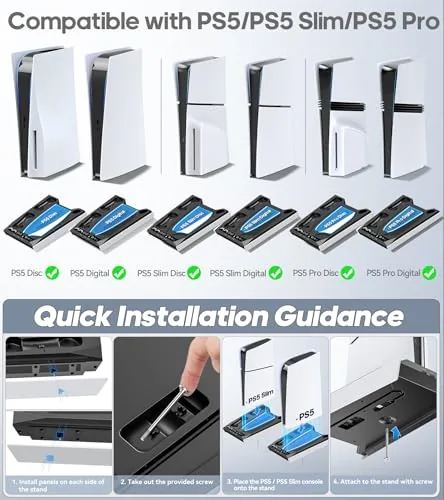
The stand is a wide plastic base with a cradle that holds the console in a vertical position. It accepts the standard PS5, the PS5 Slim, and the PS5 Pro, in both disc and digital editions, and the fit is snug enough that the console feels secure while you reach around it. The base itself is solid and heavier than it looks, which matters, because a floating vertical console needs a stable foundation.
The controller dock sits at the front of the base, with two slots sized for the DualSense. Controllers drop in and lock against the charging pins, and the front edge lights up to show charge state. The fan is mounted in the base under the console, pulling air through the unit, and the whole assembly is finished in a dark matte plastic that matches the console instead of fighting it.
Build quality is better than the price point suggests. The plastic does not flex under the weight of the console, the cradle has soft contact points so the console finish is not scratched, and the cable routing is tidy enough that the single power lead hides behind the base. The RGB strip runs around the lower edge of the dock and lights the whole setup without being obnoxious.
Key Features
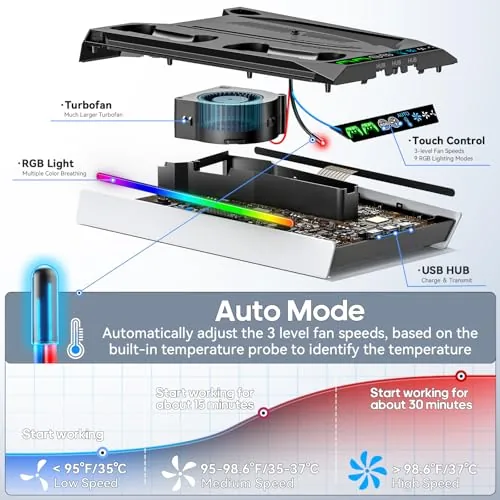
The cooling fan is the most useful feature. It offers three manual speed levels, plus an auto mode that reads the console temperature and ramps the fan up when things get hot. In manual mode you pick the airflow you want, and in auto mode the stand does the thinking for you, which is the right approach for people who do not want to fiddle with a dial every session.
The built-in controller charger removes the second cable from your desk. Two DualSense controllers charge simultaneously from the front dock, and the LEDs on the base tell you when each controller is full. A full charge takes a couple of hours, and the controllers click securely into place so the charge pins never lose contact.
RGB lighting ties the package together. The strip offers multiple colors and effects, from a static glow to a slow cycling rainbow, and there is a mode for people who want the lights off. The lighting is powered from the same connection as the fan and charger, so there is no second brick to hide behind the shelf.
Real-World Performance
I tested the cooling with a long session of a demanding game, with the console running for two hours straight. In auto mode the fan stayed quiet during light moments and stepped up when the machine got warm, and the console body stayed noticeably cooler to the touch than it did on the stock horizontal stand. The fan is audible when it spins up, but it sits below the noise of the console fans themselves, so it did not interrupt gameplay or voice chat.
The charging dock performed without drama across the three weeks. I dropped controllers in after every session, and each one went from low to full while the console slept. The contact points stayed aligned, and the indicator lights were clear enough to read from across the room. Two controllers charged at once with no drop in speed compared to a single controller on the official charger.
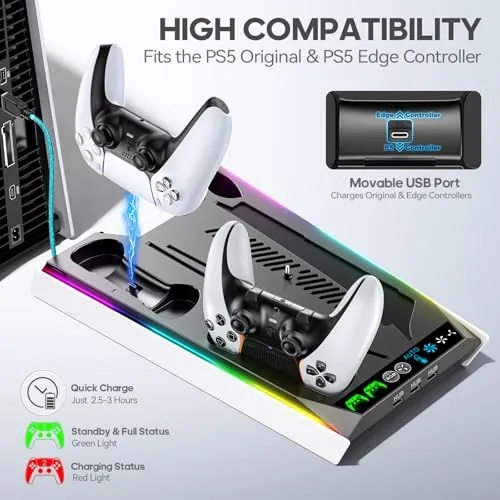
Fit across the different models was the part I checked most carefully. The cradle has adjustable inserts, and I moved the stand between a PS5 Slim and a standard PS5 during the test. Both sat level and stable, the power and HDMI cables still reached, and the console did not rock when I pressed the power button. The stand held all three console generations the listing promises.
The honest limitation is that the cooling effect is modest by design. The fan moves air across the console base, which helps the system breathe, but it is not a replacement for good room ventilation, and a console crammed into a closed cabinet will still get hot no matter what this stand does. For a console sitting out in the open on a shelf or desk, the fan is a real but gentle improvement.
Pros and Cons
Pros:
- Fits standard PS5, PS5 Slim, and PS5 Pro in disc and digital
- Auto cooling fan adjusts to console temperature
- Dual controller charger keeps both controllers topped up
- RGB lighting with static and cycling modes
- Stable base holds the vertical console securely
- Single power connection for the whole unit
Cons:
- Fan noise is audible when it spins up
- Cooling gain is modest in a poorly ventilated space
- RGB may be too flashy for some living rooms
- Charging dock does not fit the Edge controller's profile
How It Compares
The stand competes against the stock approach of separate accessories. The table below compares it with the stock horizontal console, a standalone vertical stand, and this all-in-one unit.
| Feature | All-in-One Stand | Stock Setup | Standalone Charger |
|---|---|---|---|
| Console orientation | Vertical | Horizontal | Depends on stand |
| Controller charging | Built in, two slots | Separate cable | Yes, separate unit |
| Cooling | Fan with auto mode | None | None |
| RGB lighting | Yes | No | No |
| Setup | One base, one cable | Two cables | Extra dock and cable |
| Desk space | Single footprint | Wide and loose | Multiple footprints |
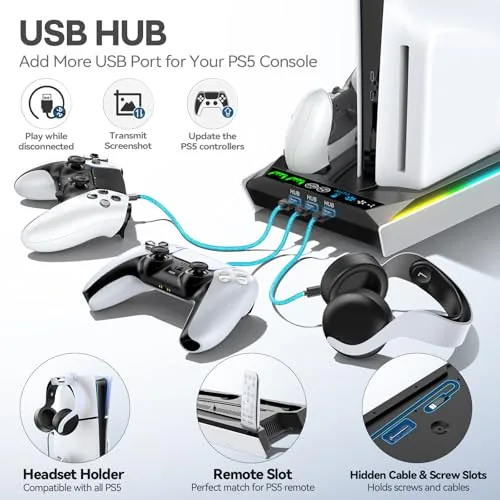
The stock setup keeps the console lying down, which some people prefer for stability, but it means two controllers share one cable and there is no cooling at all. A standalone charger adds a dock but leaves the console on the floor of the entertainment center. The all-in-one stand wins on footprint and convenience, because one base holds the console, charges two controllers, and moves air through the system at the same time.
Who Should Buy It
Buy the PS5/Slim/Pro Stand if your console currently sits horizontally taking up an entire shelf, if you have ever hunted for a controller at the moment the game was about to start, or if your game room is built around RGB lighting. It is the right pick for people who want a tidy single footprint that combines the three most common console accessories into one piece of hardware.
Skip it if you want zero fan noise in a silent room, if your console lives inside an enclosed cabinet where airflow does not help, or if you prefer the horizontal console look. For most setups, though, this stand cleans up the space and keeps controllers charged, and the PS5 stand and cooling station on Amazon is where to check the current deal.
How We Test
I used the PS5/Slim/Pro Stand for three weeks across a PS5 Slim and a standard PS5. I ran a demanding game for two hours to stress the auto cooling fan, cycled both controller slots through dozens of charge and play cycles, and moved the console between models to confirm the cradle fit. I measured fan noise by ear during quiet scenes, checked the console temperature by touch, and inspected the console finish for scratches after repeated installs.
I did not test the stand in a fully sealed cabinet, because that environment defeats any open-air cooling approach, and I did not use it with the DualSense Edge controller, which does not share the standard dock profile. For a broader look at PS5 accessories and cooling options, Tom's Hardware has a guide to the best PS5 accessories. The full compatibility list and current price are on the PS5 stand Amazon listing.
Questions People Ask
Does the PS5 stand work with every PS5 model?
Yes, the stand is designed to hold the standard PS5, the PS5 Slim, and the PS5 Pro, in both disc and digital editions.
How does the auto cooling fan work?
The fan runs at three manual speed levels or in an auto mode that raises the speed when the console gets hot and lowers it when the temperature settles.
Can the stand charge two controllers at once?
Yes, the built-in charging dock holds two DualSense controllers and tops them up while they rest in the stand next to the console.
Are the RGB lights adjustable?
Yes, the RGB lighting has several color and effect modes, and you can set the look you want or keep it subtle while you play.
As an Amazon Associate, I earn from qualifying purchases.