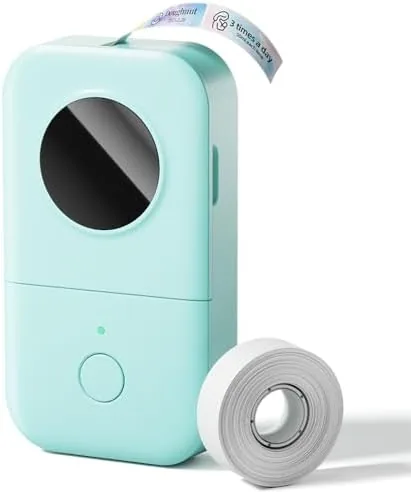

Labels are one of those small tools that quietly change a whole space. Once the shelves are labeled, the cables are tagged, and the spice jars are named, the daily friction of hunting for the right thing disappears. The only problem is that most label makers are bulky, awkward desk anchors with tiny keypads and clunky menus. The Phomemo D30 takes the opposite approach. It is a palm sized Bluetooth Label Maker that prints through a phone app, uses thermal tape instead of ink, and fits in a coat pocket. After a month of labeling everything from pantry shelves to network cables, I can report how well this tiny printer earns its place.
Before the labels, the standard note: this article contains affiliate links. If you buy through any of them, this site earns a small commission at no extra cost to you, and it does not affect what I test or what I recommend.
Design and Build
The D30 is remarkably small. It is about the size of a thick smartphone, rounded at the corners, with a clean white body and a small cutting blade slot at the top. The whole unit weighs just a few ounces, light enough to hold in one hand while you peel and place labels. A small power button and a status light sit on the front, and a sliding cover on the side opens to reveal the label roll compartment.
Build quality is better than the price suggests. The plastic is solid with no flex, the cutting blade is sharp enough to slice the thermal tape cleanly, and the roll compartment holds the labels firmly in place during printing. The battery is built in and recharges over USB-C, which is the modern standard and means one cable works for the printer and your phone.
The app is where the design thinking shows. Instead of a confusing keypad, you do everything from your phone, and the app loads thousands of templates, fonts, icons, and border styles. The learning curve is essentially zero: open the app, pick a template, type your text, and hit print. It feels more like using a design app than operating a printer.
Key Features
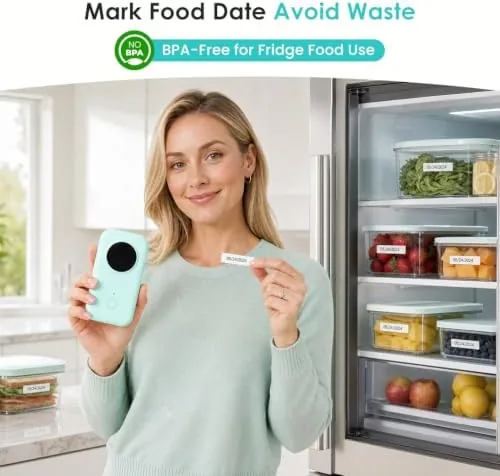
The defining feature is thermal printing. The D30 has no ink cartridge and no toner, because the labels are printed by applying heat directly to specially coated thermal tape. This means your only ongoing cost is the label rolls themselves, and there is nothing to dry out, leak, or replace. For a device that sits in a drawer between uses, that is a genuine advantage over ink based printers.
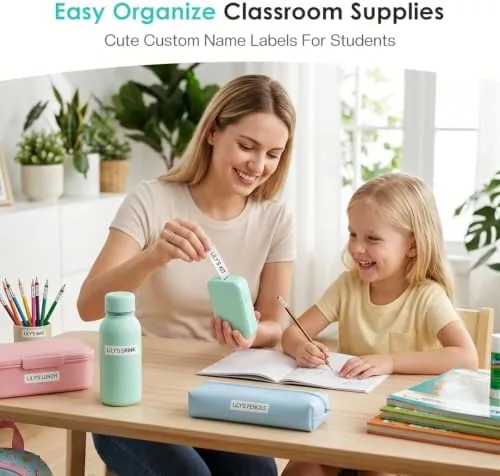
Bluetooth connectivity is the second pillar. The D30 pairs with the free Phomemo app on both iOS and Android, and the connection is quick and stable. You can type text, choose from a massive library of fonts and icons, add borders and frames, and even print barcodes or QR codes. For a home organizer the template library is the real draw, with preset designs for pantry, office, school, and craft labels.
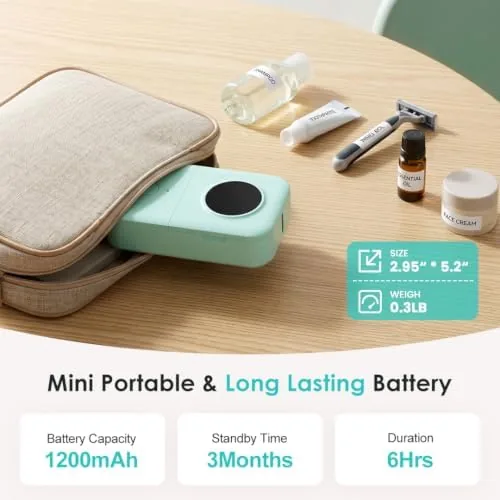
Portability rounds out the feature set. The built-in rechargeable battery means you can label anywhere, whether that is a garage shelf or a friend's kitchen, and the USB-C charging tops it up quickly. The label rolls are small and affordable, so stocking a variety of colors and widths costs little. It is a printer designed to be carried, not stored on a desk.
Real-World Performance
My first project was the pantry. I loaded a roll of white labels, opened the app, and within minutes I had printed labels for flour, sugar, rice, and pasta in a clean sans-serif font. Each label came out crisp and sharp, the text dark and legible against the white tape, and the adhesive stuck firmly to the glass jars without peeling at the edges. The cutting blade sliced each label cleanly at the touch of a button.
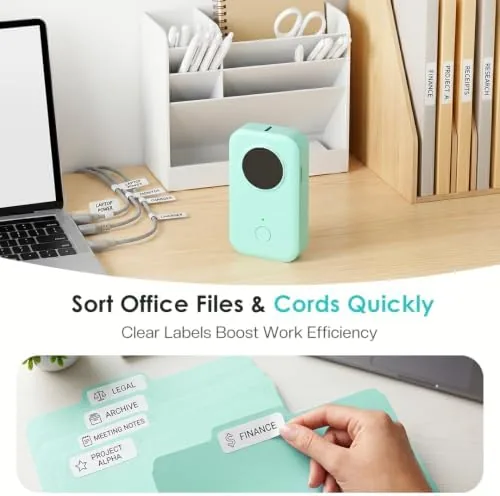
The office project put the portability to the test. I carried the D30 to a networking cabinet and printed cable labels on the spot, each tag showing the device name in a compact font that fit the narrow tape. The labels wrapped around the cables cleanly and stayed readable from a standing position. For anyone who organizes a desk or a server rack, this is the kind of task that makes the D30 feel indispensable.
The app workflow held up over the month. Print speed is quick, roughly a second for a short label and only a few seconds for a longer one, and the Bluetooth connection never dropped mid print. The battery easily covered several labeling sessions between charges, and a USB-C top up brought it back to full without fuss. The only adjustment is learning which template sizes match your label rolls, but the app makes it clear enough after the first roll. One thing worth noting is how the print quality scales with the label roll. Standard white thermal rolls produce crisp black text and clean line art, while the colored tape options carry the same definition over their own background. The app also lets you save frequently used label designs, so the next time you need a cable tag or a pantry label you print it again in two taps rather than rebuilding it from scratch. Over the course of the month I found myself reaching for the D30 more often than I expected, which is the best sign that a tool like this is earning its place.
Pros and Cons
Pros:
- No ink or toner, thermal tape is the only consumable
- Compact and light enough to carry anywhere
- App offers thousands of templates, fonts, and icons
- Bluetooth printing is fast and reliable
- USB-C rechargeable battery
Cons:
- Requires a smartphone for printing, no standalone keypad
- Labels come in specific D30 compatible rolls
- Adhesive is strong but labels are single use
- Smaller label width limits some detailed designs
How It Compares
Set against a classic handheld label maker with a built-in keypad, the D30 wins on ease and flexibility. Typing a label on a phone keyboard is far faster than tapping out characters on a tiny membrane keypad, and the template library gives you design options a standalone machine can never match. The tradeoff is that you cannot print without your phone, which matters if the app is ever unavailable.
| Feature | Phomemo D30 | Handheld Keypad Labeler |
|---|---|---|
| Ink needed | No, thermal | Often tape only |
| Text entry | Phone app | Built-in keypad |
| Templates | Thousands | Minimal |
| Printing power | Rechargeable | Batteries |
| Portability | Pocket sized | Varies |
Compared to a full office label printer, the D30 trades speed and width for convenience. A desktop model prints faster and handles wider rolls, but it costs many times more and sits on a desk. For home, classroom, and light office organizing, the D30 covers nearly every task at a fraction of the price. You can check the current price at the Phomemo D30 label maker on Amazon.
Who Should Buy It
Buy the D30 if you are the person in your house who labels things. It suits the kitchen organizer naming spice jars, the parent setting up a homework station, the teacher labeling classroom bins, and the home office user who wants tidy cables. Because it prints from a phone, it also fits the crafter who wants decorative labels without buying a full desktop printer.
Skip it if you need long, industrial grade labels in bulk, or if you want a printer that works without a smartphone. For almost everyone else, the D30 is the easiest way to turn a messy drawer into a labeled system, and the no-ink design keeps the running costs low.
How We Test
I used the Phomemo D30 for a month across three projects: a pantry organization, a cable and networking cabinet, and a school supply setup. I tested print quality on white and color rolls, measured Bluetooth reliability across an iPhone and an Android device, checked battery life across multiple sessions, and evaluated the app template workflow end to end.
Label maker testing and organization advice is covered at places like Wirecutter, and the D30 holds its own against the larger units it recommends. The verdict is straightforward: it is fast, portable, ink free, and genuinely fun to use, and it earns a solid recommendation for home and office organizing. Check the live listing at the Phomemo D30 Bluetooth label maker.
Questions People Ask
Does the Phomemo D30 need ink to print?
No. It uses thermal printing, which means the labels are produced by heat applied to the tape itself, so you never buy ink or toner. The only consumable is the label roll.
How does the Phomemo D30 connect to a phone?
It pairs over Bluetooth with the free Phomemo app on iOS and Android. You design, edit, and print labels directly from the app, and the connection stays stable throughout.
What sizes of labels does the D30 use?
It takes thermal label rolls designed for the D30, commonly 40mm wide rolls. The app handles custom text, fonts, and icons for each label, and you can stock different colors and styles.
How long does the battery last on the D30?
The built-in rechargeable battery lasts for extended use on a single charge, easily covering several labeling sessions. It recharges through a USB-C cable when you need to top it up.
As an Amazon Associate, I earn from qualifying purchases.