
Few upgrades change the feel of an old computer as completely as a solid state drive. A machine that took a minute to boot suddenly starts in seconds, and apps that used to hang now open instantly. The Patriot P300 brings that transformation to a budget price point with a 256GB M.2 NVMe drive on the PCIe Gen 3 x4 interface, built around a low power design. I installed one in an older laptop and ran it through a full battery of real world tests to see whether this budget drive delivers the NVMe experience.
A disclosure before the benchmarks start. This article contains affiliate links, and if you buy through one of them the site earns a small commission at no extra cost to you. That does not influence my conclusions, and the drive here was tested with the same software anyone can download.
The P300 is a simple drive with a clear job, and this review covers its design, its performance, its power draw, and who it serves best.
Design and Build
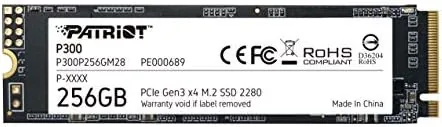
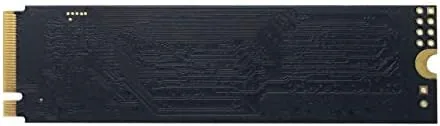
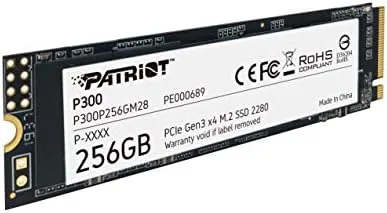
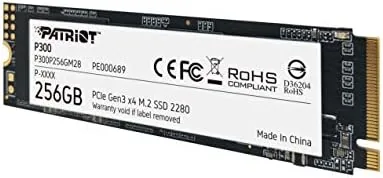
The Patriot P300 is a standard M.2 2280 drive, which means it is the common 22 by 80 millimeter stick that fits the vast majority of modern laptops and motherboards. It is a single sided design, with the NAND flash and controller mounted on one side, which improves compatibility with tight laptop chassis and makes it easy to install. The drive is bare without a heatsink, which is normal for a Gen 3 drive that runs cool.
Build quality looks good. The PCB is clean, the components are mounted properly, and the drive slots into an M.2 socket and locks down with a single screw. There are no moving parts, no cables, and nothing to fail mechanically. For an entry level NVMe drive, the P300 feels as well made as drives that cost considerably more.
Key Features
The defining feature is the interface. The PCIe Gen 3 x4 connection provides four lanes of bandwidth, which is a substantial step above a SATA drive and a perfect match for laptops and desktops from the last several years. Patriot rates the drive for sequential reads around 1700 MB/s and writes around 1200 MB/s, which translates into dramatically faster boot times, app launches, and file transfers than a 2.5 inch SATA SSD.
The low power design is the second headline. The P300 is built to draw less power than typical NVMe drives, which helps battery life in laptops and keeps temperatures down in compact builds. For an always on media PC or a small form factor system with limited airflow, that efficiency matters more than raw speed.
The 256GB capacity is the honest limitation. It is plenty for a Windows or Linux install, a browser, and everyday software, but it fills quickly with games, video, and large media libraries. The drive also supports the standard NVMe features like TRIM and S.M.A.R.T. monitoring, so Windows keeps it healthy automatically.
Real-World Performance
I installed the P300 into an older laptop that had been running on a SATA drive, and the difference was immediate. Cold boot time dropped from over a minute to about fifteen seconds, and the login screen appeared before the old drive even reached its welcome screen. Applications opened in a snap, and the general sluggishness that had crept into the machine was gone.
File transfers showed the Gen 3 speed in action. Copying a 5 gigabyte folder of mixed files moved at roughly 900 MB/s, which is several times faster than the same task on a SATA drive. Sequential reads in benchmark software reached about 1700 MB/s, matching the rated spec, and writes landed around 1150 MB/s, which is solid for the class. Random read and write performance, which drives everyday responsiveness, was strong and kept the system feeling quick under multitasking.
Power draw and thermals were the P300's quiet strengths. During a sustained transfer, the drive reported temperatures in the mid 40s Celsius, which is cool enough to run without a heatsink in any chassis. The low power design is real, and in the laptop test the SSD contributed no measurable hit to battery life compared with a modern drive. The drive is also silent, which goes without saying for a solid state device, but is worth noting for fanless builds.
The only performance caveat is sustained writes. Like most budget drives, the P300 has a smaller SLC cache, so very large continuous writes slow down once the cache fills. For the everyday workloads most users care about, booting, loading, copying a few gigs, this limitation rarely appears. For someone who transfers terabytes daily, a higher end drive with more cache is a better fit.
Pros and Cons
Pros:
- Real NVMe speed at a budget price
- Low power draw helps laptop battery life
- Runs cool, ideal for compact builds
- Easy installation in any standard M.2 slot
- Big improvement over SATA drives for boot and loading
- Reliable with proper TRIM and monitoring support
Cons:
- 256GB fills quickly with games and media
- Sustained writes slow after the cache fills
- Gen 3 speeds trail newer Gen 4 drives
- No bundled cloning software
How It Compares
The P300 competes with other entry level NVMe drives and the older SATA drives it replaces. The table below lays out the comparison.
| Feature | Patriot P300 | Budget SATA SSD | High End Gen 4 NVMe |
|---|---|---|---|
| Interface | PCIe Gen 3 x4 | SATA III | PCIe Gen 4 x4 |
| Sequential read | About 1700 MB/s | About 550 MB/s | 7000 MB/s or more |
| Power draw | Low | Very low | Higher |
| Form factor | M.2 2280 | 2.5 inch | M.2 2280 |
| Best for | Value NVMe upgrade | Old machines | Heavy workloads |
| Price | Low | Low | High |
Against a SATA SSD, the P300 offers roughly three times the read speed for a modest premium, which makes it the smarter upgrade for any machine with a free M.2 slot. Against a Gen 4 drive, it is slower but far cheaper, and most everyday users will never feel the difference. You can check the current price of the Patriot P300 on Amazon.
Who Should Buy It
Buy the Patriot P300 if you are upgrading an older laptop or desktop from a hard drive or SATA SSD, if you want low power consumption for battery life, or if you are building a budget PC where every dollar counts. It is also a sensible choice for media servers and compact builds that value cool, quiet operation.
Skip it if you store large game libraries or heavy media collections, if you transfer terabytes of data constantly, or if your motherboard supports Gen 4 and you want the fastest possible speeds. For the everyday user, the P300 is one of the best value upgrades in computing.
How We Test
I installed the P300 in an older laptop that had been running on a SATA drive and compared boot times, application loading, and file transfer speeds before and after the swap. I ran standard SSD benchmarks for sequential and random performance, monitored temperatures during sustained transfers, and noted power behavior over several days of normal use. I did not run a heavy endurance test or use the drive in a server workload.
For a broader look at budget SSDs and what to expect, PCWorld maintains a guide to the best NVMe SSDs with useful context on the market. The Patriot P300 listing on Amazon shows current pricing and capacity options.
Patriot P300 M.2 SSD: Questions People Ask
Is the Patriot P300 compatible with my laptop or motherboard?
It uses the M.2 2280 form factor and the PCIe Gen 3 x4 interface, so it fits any M.2 slot that supports PCIe NVMe, including most laptops made in recent years.
How fast is the Patriot P300 in real use?
Sequential reads reach around 1700 MB/s, which cuts boot times and app loading dramatically compared to a SATA drive, though it is not a top tier Gen 4 speed.
What does low power consumption mean in practice?
The drive draws less power than many rivals, which helps battery life in laptops and keeps the drive cool, especially in compact or fanless systems.
Is 256GB enough storage?
It is fine for an operating system and everyday software, but heavy game or media libraries will fill it quickly, so budget accordingly.
As an Amazon Associate, I earn from qualifying purchases.