
Some tools earn their reputation so completely that the review almost writes itself. The Logitech MX Master line has been the default recommendation for productivity mice for years, and the 3S version takes the formula and refines it in two important directions: a faster sensor and nearly silent clicks. It is a mouse built for people who spend their whole day in documents, spreadsheets, and timelines, and it treats that work with a seriousness that budget mice never approach. This review is the record of a month of daily use in the graphite finish, with the included Bolt receiver and the wireless freedom that comes with it.
Before the details, the standard note. This article contains affiliate links, and if you buy through one of them the site earns a small commission at no extra cost to you. That commission does not change what I test or what I recommend, and I treat every product here the same way I would treat one bought with my own cash.
Design and Build
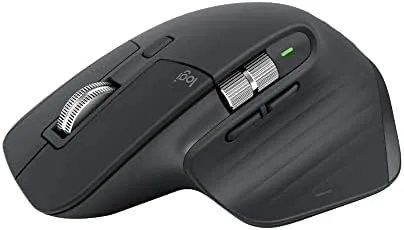
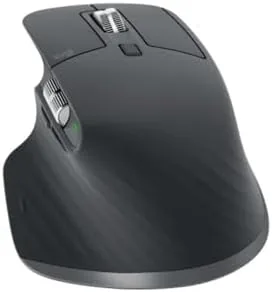
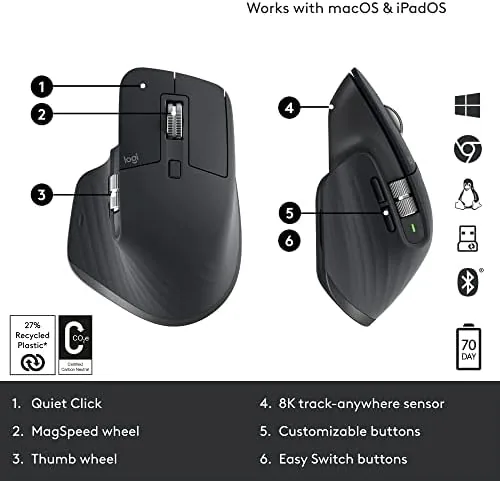
The MX Master 3S is sculpted for the right hand, and that shape is the first thing anyone notices. The body arches high to fill a relaxed palm, the thumb rests in a deep recessed shelf, and the whole form encourages a natural grip that stays comfortable through an eight hour day. The graphite finish is soft to the touch, with a matte texture that stays grippy without collecting fingerprints.
Every surface has a purpose. The primary buttons sit under a satisfying curve, the vertical scroll wheel is machined metal with a fine knurled texture, and a second horizontal scroll wheel hides behind the thumb. A gesture button sits below that thumb, and the battery indicator and device buttons round out a control layout that is dense but intuitive.
Build quality is exactly what the price promises. There is no rattle, no flex, and no cheap plastic feel anywhere on the body. The mouse glides on smooth feet and feels planted on any surface, from a bare desk to a mouse pad, which matters more than any spec sheet number.
Key Features
The headline upgrade on the 3S is the 8K DPI sensor. That resolution is far more than a typical screen needs, but the benefit is not raw speed. The high resolution sensor makes cursor tracking feel effortless and precise at any DPI you actually set, and it works flawlessly on nearly any surface, including glass, which is a genuine convenience for people who work on glass desks.

Silent clicks are the second defining feature. The 3S uses low noise switches that cut click sound by roughly ninety percent, so the left and right buttons produce a soft, muffled thump instead of a sharp clack. In an office, on a video call, or in a shared room, the quiet is genuinely noticeable, and it is the feature that converts people who never thought about click noise.
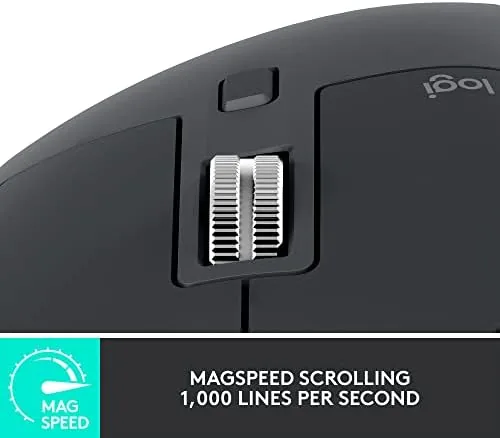
The MagSpeed electromagnetic scroll wheel rounds out the package. It scrolls at up to one thousand lines per second in free spin mode and switches automatically to ratchet mode for precise line by line scrolling. Flick the wheel and a long spreadsheet flies past; nudge it and you land exactly on the row you want. It is the best scroll wheel in the business, full stop.
Real-World Performance
I used the MX Master 3S as my only mouse for a month across a laptop and a desktop, switching between them with the press of the device button. Connection was rock solid through both Bluetooth and the included Logi Bolt receiver, and the mouse never dropped, stuttered, or required a reconnect during the entire review period.
The sensor was a joy to live with. Cursor movement tracked my hand exactly, with no acceleration surprises and no dead zones, and the pointer glided across a glass desk without hesitation. The silent clicks took a day to adjust to, because the brain expects a click sound, and then they simply became a comfort. Working late at night stopped announcing itself to the rest of the house.
The scroll wheel did its famous work. Spreadsheets flew, timelines scrubbed, and long articles scrolled in one smooth flick. The automatic switching between free spin and ratchet modes felt natural, and the horizontal wheel behind the thumb made horizontal scrolling in spreadsheets and editors effortless.
Battery life met the claim with room to spare. After a full month of daily use the charge meter still showed plenty of headroom toward the advertised 70 days, and the USB-C port on the front charges the mouse quickly when you finally need it. In practice, battery anxiety simply does not exist with this mouse.
The Logi Options+ software turned the gesture button and side controls into real time savers. I assigned the thumb gesture button to application switching, mapped the horizontal wheel to timeline scrubbing, and set per application profiles so the wheel behaved differently in a browser than in a spreadsheet. Setup took a few minutes, and the profiles followed the mouse reliably across both computers without reconfiguration. Those are the small conveniences that make the MX Master 3S feel less like a pointing device and more like a partner in getting the work done, and they are exactly the reason this mouse has earned its long reputation.
The honest caveats are small but real. The ergonomic shape is unashamedly right handed, so left handed users are left out. And the price sits well above a standard mouse, which is justified by the build and features but still worth acknowledging.
Pros and Cons
Pros:
- 8K DPI sensor tracks precisely on nearly any surface
- Near silent clicks that are genuinely quiet
- MagSpeed wheel scrolls a thousand lines per second
- 70 day battery life with fast USB-C charging
- Pairs with three devices over Bluetooth or Bolt
Cons:
- Right handed shape only
- Premium price over standard mice
- Full customization requires the Logi Options+ software
How It Compares
The MX Master 3S faces the original MX Master and the lighter MX Anywhere 3S. Each serves a different hand, but for desktop work the comparison is revealing. The table below lays out the three.
| Feature | MX Master 3S | MX Master 3 | MX Anywhere 3S |
|---|---|---|---|
| Sensor resolution | 8K DPI | 4K DPI | 8K DPI |
| Silent clicks | Yes | No | Yes |
| MagSpeed scroll | Yes | Yes | Yes |
| Best suited to | Desk work | Desk work | Travel |
| Battery life | 70 days | 70 days | 70 days |
The original MX Master 3 is cheaper but keeps the louder clicks and a lower resolution sensor. The MX Anywhere 3S is smaller and lighter for travel but never fills the palm the way the Master does. For a dedicated desk, the MX Master 3S is the most refined of the three, and the silent clicks alone justify the step up.
Who Should Buy It
Buy the MX Master 3S if you spend your workday in a mouse, if you share a room and want to stop clicking through it, or if you work across multiple computers and want one device that switches between them instantly. You can check the current price of the Logitech MX Master 3S on Amazon and see the graphite finish for yourself.

Skip it if you are left handed and need a symmetrical shape, or if you only need a basic mouse for light use, where the price will not pay for itself. For anyone who lives in documents and spreadsheets, the MX Master 3S is the rare peripheral that makes work feel a little easier every single day.
How We Test
I used the MX Master 3S as my daily mouse for a month, connecting it to a laptop and a desktop through both Bluetooth and the included Logi Bolt receiver. I tested the sensor across surfaces including glass, ran long documents and spreadsheets through the MagSpeed wheel, and measured the click noise against a standard mouse. I checked the battery across the full review period and used the Logi Options+ software to customize buttons and test the horizontal wheel. Independent coverage such as PCMag mouse reviews is a good place to follow comparisons before you spend.
The Logitech MX Master 3S listing on Amazon shows the current price and the included Bolt receiver, so you know exactly what arrives in the box.
Logitech MX Master 3S: Questions People Ask
How does the MX Master 3S connect to a computer?
It connects over Bluetooth or through the included Logi Bolt receiver, and it can pair with up to three devices that you switch between with one button.
How long does the MX Master 3S battery last?
The battery runs for up to 70 days on a full charge, and a one minute USB-C charge restores about three hours of use.
Are the clicks on the MX Master 3S really silent?
Yes. The 3S uses low noise switches that reduce click sound by roughly ninety percent compared to the standard MX Master.
What is the MagSpeed scroll wheel on the MX Master 3S?
It is an electromagnetic wheel that scrolls at up to one thousand lines per second, and it automatically switches between ratchet and free spin modes.
As an Amazon Associate, I earn from qualifying purchases.