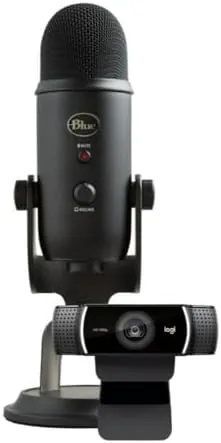

Starting a podcast or a stream used to mean a shopping list: a microphone, an interface, a webcam, lighting, and the patience to make it all work together. The Logitech Blue Yeti and C922 Pro Streamer Pack tries to shrink that list into a single box, and after two weeks of recording, streaming, and video calls, this Blue Yeti and C922 review can confirm the bundle delivers on its promise for anyone getting started.
The standard disclosure before the details. This article contains affiliate links. If you buy through one of them, the site earns a commission at no extra cost to you, and that commission never changes what I test or how I rate it.
Design and Build
The centerpiece is the Blue Yeti USB microphone in the Blackout finish, and it is as iconic as ever. The matte black body sits in a sturdy metal base with an adjustable tilt arm, so the capsule angles toward your mouth whether you sit tall or slouch. The build is heavy and solid, which is exactly what you want from a desk microphone: it stays where you put it, and the substantial weight keeps vibration from ruining a take.
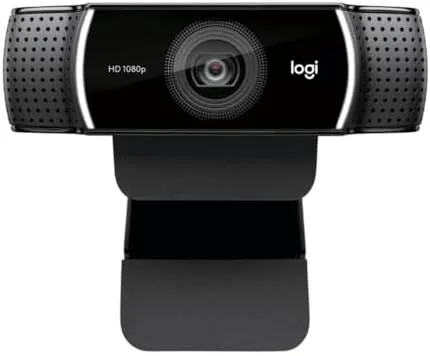
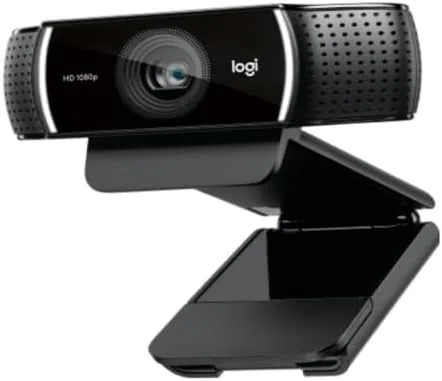
The C922 Pro Stream webcam is a compact unit that mounts on top of a monitor with its fold out clip, or on the included mini tripod for a lower angle. It is a well built camera for its class, with a solid feel and a mount that holds its position. The bundle also includes a USB cable for the Yeti, the necessary cables for the webcam, and the desktop clip and tripod, so the unboxing experience is genuinely complete.
Everything in the box is designed for a single purpose: getting you on air without a trip to a second store. The Yeti connects over USB and appears instantly in any app, and the C922 does the same. For a beginner, that absence of setup friction is the feature that matters most, because the first night of a new hobby should be about the content, not about drivers and adapters.
Key Features
The Yeti carries three 14mm condenser capsules that unlock four polar patterns: cardioid for a single voice, stereo for music, omnidirectional for a whole room, and bidirectional for a two person interview. That last one is rare at this price, and it turns the Yeti into a serviceable interview mic without any extra hardware. A mute button, a volume knob for headphones, and a gain dial live on the front of the body, so you can adjust everything during a session without touching the software.
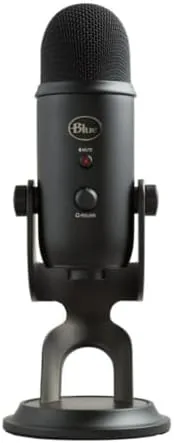
The Yeti includes a headphone output with zero latency monitoring, which means you hear yourself in real time as you record, a small detail that makes a big difference in podcasting. The capsule handles a frequency range of 20Hz to 20kHz, and the unit records at 48kHz with 16 bit depth, more than enough resolution for voice work. On the desktop it runs plug and play on both Windows and Mac, with no driver installation required.
The C922 Pro handles the visual side. It records at 1080p at 30 frames per second, or 720p at 60 frames per second for smoother motion, with autofocus and automatic light correction that brightens a dim room without washing out your face. The included software adds background replacement and adjustable color settings, and the camera works in every major streaming and video platform out of the box.
Real-World Performance
I used the bundle for two weeks of podcast recordings, a handful of livestreams, and regular video calls. The Yeti earned its reputation. In cardioid mode my voice came through rich, clear, and close, with none of the tinny thinness that plagues budget microphones, and the mute button saved me more than once during a live session when a doorbell rang mid sentence.
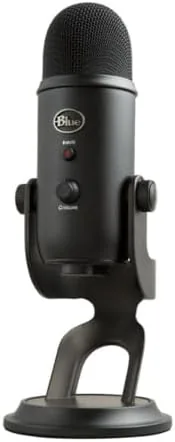
The bidirectional pattern handled a two person interview cleanly, with both voices landing on separate sides of the capsule. The omnidirectional pattern is passable for a small roundtable, though voices farther from the mic get quieter, which is physics rather than a flaw. The headphone monitoring kept me on pitch and on level throughout, and the gain dial gave me room to adjust on the fly.
The C922 delivered clean 1080p video with accurate colors and smooth 30 frames per second motion. In a dim room the light correction did real work, lifting the image enough that I did not need a dedicated light for a casual stream, and the autofocus tracked me reliably when I leaned in or sat back. On a 720p 60 frames per second stream the motion was noticeably smoother for quick movement, and the camera never dropped the connection across a full session. The bundle simply worked, which is the highest compliment a starter kit can earn.
Pros and Cons
Pros:
- Rich, clear voice capture in every pattern
- Zero latency headphone monitoring
- Clean 1080p video with light correction
- Complete bundle with tripod and mounts
- Plug and play on Windows and Mac
Cons:
- Yeti picks up desk noise without care
- Bidirectional pattern limits larger groups
- C922 light correction is modest in dark rooms
- Microphone and webcam need separate USB ports
How It Compares
Against a gaming headset microphone, the Yeti is on a different level: richer tone, multiple patterns, and proper gain control, with the obvious tradeoff that it stays on your desk instead of your head. Against a professional XLR microphone and interface, the Yeti concedes some headroom and upgrade paths but wins on price, simplicity, and zero additional hardware. For a beginner, the bundle occupies the sweet spot.
| Feature | Yeti plus C922 | Gaming Headset Mic | XLR Studio Setup |
|---|---|---|---|
| Audio quality | High | Basic | Highest |
| Setup | Plug and play | Plug and play | Interface and cables |
| Video | 1080p 30fps | None | Separate camera |
| Price | Mid | Low | High |
| Upgrade path | Limited | None | Excellent |
If the bundle sounds like the right first step, you can check the current price of the Blue Yeti and C922 Streamer Pack on Amazon. Buying the two together in this bundle usually costs less than sourcing the microphone and webcam separately.
Who Should Buy the Blue Yeti and C922 Streamer Pack
Buy it if you are starting a podcast, a Twitch or YouTube channel, or a work from home routine that needs a professional sound and picture. It suits solo hosts, interviewers, and streamers who want everything to work on the first night, and it is a genuinely thoughtful gift for someone starting a creative channel. The bundle removes the guesswork from a hobby that usually involves a lot of it.
Skip it if you already own a decent USB microphone or webcam, because the upgrade would be marginal, or if you plan to build a serious studio with interchangeable gear, in which case XLR is the eventual destination. If the bundle fits your plan, the Blue Yeti and C922 listing on Amazon shows current availability. For most creators, it is the fastest route from idea to on air.
How We Test
I used the Blue Yeti and C922 bundle for two weeks across podcast recordings, livestreams, and video calls. I tested all four polar patterns, the headphone monitoring and gain control, and the mute behavior, then evaluated the webcam in bright, normal, and dim rooms at both 1080p 30 and 720p 60. I also confirmed plug and play behavior on both Windows and Mac. For independent guidance on USB microphones, Wirecutter USB microphone testing is a reliable reference.
Blue Yeti and C922: Questions People Ask
What polar patterns does the Blue Yeti offer?
The Yeti has four selectable patterns: cardioid for solo voice, stereo for music, omnidirectional for roundtables, and bidirectional for two person interviews.
Does the Yeti work without extra software?
Yes. The Yeti is plug and play on Windows and Mac, and the C922 works with the included capture software plus any standard webcam app.
What video quality does the C922 Pro deliver?
The C922 records at 1080p at 30 frames per second or 720p at 60 frames per second, with autofocus and automatic light correction.
Is this bundle good for podcasting?
Yes. The Yeti microphone handles solo and two person recording with its patterns and headphone monitoring, and the C922 adds a clean video feed for podcast video.
As an Amazon Associate, I earn from qualifying purchases.