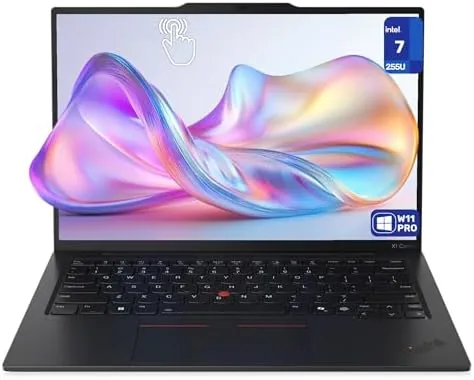

Business laptops live and die by the details that nobody puts on the spec sheet. The keyboard you type on for eight hours, the weight that stops being a thought halfway through a terminal, the hinge that holds up to a hundred openings a week. The ThinkPad X1 Carbon has built its reputation on those details, and the Gen 13 carries the legacy forward with an Intel Ultra 7-255U processor, 32GB of RAM, a 1TB drive, and a WUXGA Touchscreen. I took one through a week of airports, hotels, and client offices, and this review is the record of how the details held up in the field.
Before the travel log, the standard note. This article contains affiliate links, and if you buy through one of them the site earns a small commission at no extra cost to you. That commission does not change what I test or what I recommend, and the laptop reviewed here was used the way a professional would use it.
The rest of the review covers the build and weight, the keyboard and display, the Ultra 7 performance, the battery, and whether the X1 Carbon still earns its premium over cheaper laptops.
Design and Build
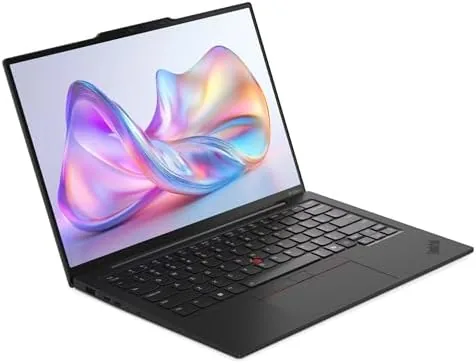
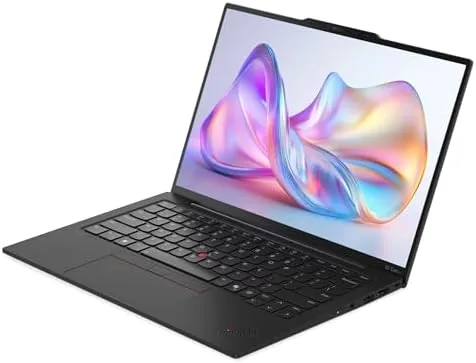
The X1 Carbon is the benchmark for what a light laptop should feel like. The carbon fiber chassis keeps the weight down near two and a half pounds, and the machine disappears into a bag in a way that heavier laptops cannot match. The black finish is matte, the lid resists fingerprints, and the whole unit flexes about as much as a good business laptop should, which is almost none where it matters.
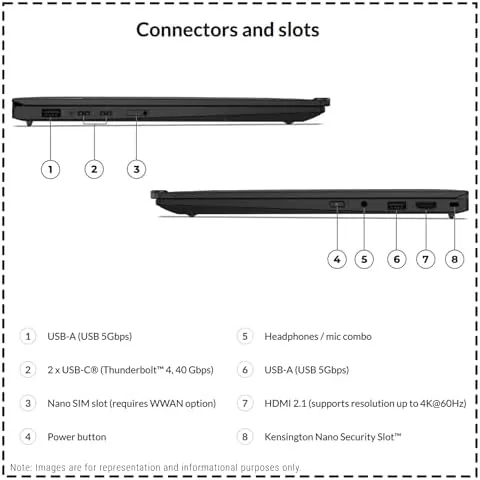
The build is where the X1 earns its reputation. The hinge opens one handed and holds the screen firm at any angle, the ports are laid out for travel with the essentials on each side, and the overall stiffness is the kind that survives years of hotel room desks and economy class tray tables. The fingerprint reader sits flush on the palm rest, and Windows Hello logs you in with a touch instead of a password.

The design is deliberately unremarkable, and that is the point. There is no RGB, no flashy hinge, no angled cuts. The X1 looks like a serious tool, which is exactly what a professional traveling into a client meeting wants it to look like.
Key Features
The keyboard is the feature that has no rival. The key travel is deep for a laptop this thin, the action is crisp, and the layout is full sized with the trackpoint still sitting in the middle of the keyboard where ThinkPad users expect it. Typing for hours produces none of the bottoming out that thinner laptops cause, and the backlight handles dark hotel rooms without glare.
The WUXGA touchscreen is the second feature. The 1920x1200 panel has the extra vertical space that document work loves, the touch layer makes scrolling and zooming natural, and the brightness is enough for the brighter side of a conference room. The display folds back for presentations, and the 16 to 10 aspect ratio fits more of a spreadsheet on screen than a 16 to 9 panel.

Under the hood, the Intel Ultra 7-255U pairs with 32GB of LPDDR5x RAM and a 1TB PCIe SSD. That combination covers heavy multitasking, dozens of browser tabs, virtual meetings, and the local AI work the Ultra series is built for, and the 1TB drive means the machine rarely asks you to choose which files to keep.
Real-World Performance
In daily work the machine is quietly fast. Spinning up a presentation while a video call runs and a database queries in the background produced no stutter, and the 32GB of RAM meant no tab reloads even after a full day of browsing. The SSD kept everything instant, from boot to wake, and Windows 11 Pro stayed responsive under the mixed load that real work creates.
The keyboard held up to the week's typing, and it is the reason people buy these machines. Long sessions left no fatigue, the trackpoint let me keep my hands on the home row, and the touchscreen got real use for quick zooms and scrolls when the trackpad was out of reach. The fingerprint reader and the camera handled logins and calls without fuss.
The battery carried the workday. From a morning of writing and calls through an afternoon of spreadsheets, the machine reached the evening with charge to spare, and the fast charging topped it up in the gaps between meetings. The lightweight charger adds almost nothing to the bag, which keeps the whole travel kit light enough to walk a terminal with.
The honest limits are the price and the soldered memory. The X1 Carbon costs more than laptops with similar specs, and the 32GB of RAM is fixed to the board, so there is no upgrading later. For those who keep a business laptop for years, the buy once and keep it decision is part of the value, but it is a real consideration at checkout.
Pros and Cons
Pros:
- Best in class keyboard with deep travel and a trackpoint
- Ultra light carbon fiber build near two and a half pounds
- 32GB RAM and a 1TB SSD handle heavy multitasking
- WUXGA touchscreen adds vertical space and flexible input
- All day battery with fast charging for travel
- Fingerprint and camera login keep the workflow fast
Cons:
- Premium price for the pedigree and the carbon chassis
- RAM is soldered and cannot be upgraded later
- Integrated graphics limit gaming and heavy GPU work
How It Compares
The X1 Carbon competes with the other premium business laptops, and the comparison below shows where its strengths and tradeoffs land.
| Feature | X1 Carbon Gen 13 | Main Business Rival | Budget Business Laptop |
|---|---|---|---|
| Weight | Near 2.5 pounds | Similar light class | Heavier |
| Keyboard | Best in class | Good | Adequate |
| RAM | 32GB, soldered | Configurable, often upgradeable | 8 to 16GB |
| Storage | 1TB PCIe SSD | Configurable | 256 to 512GB |
| Price | Premium | Premium | Much lower |
 A Budget laptop" width="1200" height="800" loading="lazy" style="height:auto">
Against its main business rival, the X1 wins on weight and keyboard feel while trading a bit of port flexibility. Against a budget business laptop, the X1 costs far more but buys the light chassis, the keyboard, and the 32GB of memory that a professional keeps for years. Choose the X1 for the daily feel, and the cheaper machine if the spec list is all you care about.
Who Should Buy It
Buy the X1 Carbon Gen 13 if you type for a living, if you travel with your laptop and the weight stops being a thought, or if you keep one machine for years and want it to hold up to daily professional use. It is the laptop for consultants, writers, executives, and anyone whose workday is measured in keystrokes and meetings rather than benchmarks.
Skip it if you need discrete graphics for rendering or gaming, if you want to upgrade the RAM later, or if a budget spec list matters more than the feel of the machine, because those needs point to different hardware. For the professional who lives in the keyboard, the X1 is still the reference point. You can check the current price of the ThinkPad X1 Carbon Gen 13 on Amazon when you are ready.
How We Test
I used the X1 Carbon Gen 13 as my only machine for a week of travel, flying with it in a backpack, working from a hotel room, an airport lounge, and two client offices. I ran it through long typing sessions, video calls, heavy browser multitasking, and document and spreadsheet work, and I tracked the battery across the full workdays and the charging in between. I also evaluated the keyboard, trackpoint, touchscreen, and fingerprint reader in daily rotation.
I did not run synthetic benchmarks or controlled battery tests, and my verdict reflects real field use rather than a lab. For a broader look at the best business laptops, PCMag has a business laptop guide that places the X1 Carbon among the leaders. The ThinkPad X1 Carbon Gen 13 listing on Amazon has the full configuration options and current pricing.
ThinkPad X1 Carbon Gen 13: Questions People Ask
How long does the X1 Carbon Gen 13 battery last?
The battery carries through a full workday of mixed tasks comfortably, and with lighter use the machine reaches the evening with charge to spare, so you can leave the charger at home.
Is the touchscreen useful on a business laptop?
The WUXGA touchscreen adds speed for scrolling, zooming in documents, and navigating Windows 11, and it works alongside the keyboard and trackpoint rather than replacing them.
How much does the X1 Carbon Gen 13 weigh?
The Carbon chassis keeps the machine around two and a half pounds, which makes it one of the lightest 14 Inch Business Laptops you can carry every day.
Can the RAM be upgraded later?
The 32GB of LPDDR5x memory is soldered to the board, so choose your configuration at purchase, because the RAM cannot be changed after the fact.
As an Amazon Associate, I earn from qualifying purchases.