
The budget Chromebook market is crowded with machines that promise the same three things: enough screen, enough speed, and a battery that survives A Full day away from a wall outlet. The Lenovo IdeaPad 3i Chromebook tries to stand out by pairing a genuinely large 15.6 inch Full HD display with a generous 8GB of RAM, which is more memory than most laptops in this price bracket carry. I used the Abyss Blue model as my primary machine for three weeks, mixing writing, research, streaming, and video calls, and this is an honest record of where the big screen wins and where the budget hardware sets limits.
Before the details, the standard note. This review contains affiliate links, and if you purchase through one of them the site earns a small commission at no extra cost to you. That commission never changes what I test or recommend, and this Chromebook was used exactly as a student or a home user would use it.
Design and Build
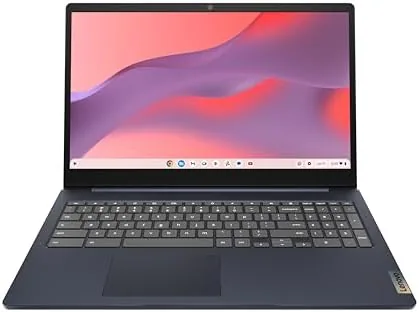
Lenovo has dressed the IdeaPad 3i in an Abyss Blue finish that looks more expensive than the price suggests. The lid is metal, which gives the machine a cool touch and a firm feel, while the base is a solid plastic that flexes only under deliberate pressure. The hinge holds the display at any angle without wobble, and the rounded edges make the laptop comfortable to carry under one arm even though it weighs about four pounds. For a 15.6 inch machine, that weight is entirely reasonable.
The keyboard is a full-size layout with a proper number pad on the right, which is a real advantage for data entry and spreadsheet work, and the keys offer decent travel with a quiet action. The trackpad is plastic but accurate, with no dead zones and reliable palm rejection. Above the screen sits a 720p webcam with a physical privacy shutter, a small touch that matters more in a world of video calls than it did a few years ago.
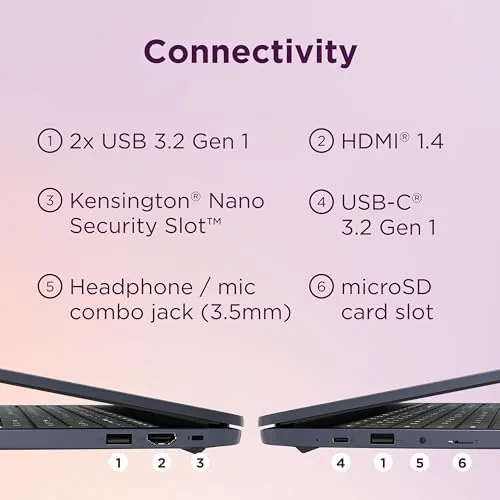
Port selection is better than most competitors at this price. You get two USB Type-C ports that handle charging and display output, one USB Type-A port, a microSD card slot, and a headphone jack. That mix means you can charge, connect a mouse, and read a memory card without carrying a dongle, which is exactly what a student or remote worker wants from a daily laptop.
Key Features
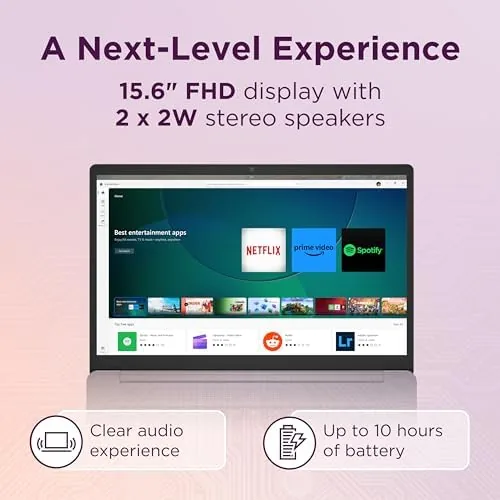
The headline feature is the 15.6 inch Full HD IPS panel. Many budget Chromebooks still ship with 1366 by 768 screens, so the 1920 by 1080 resolution here is a clear step up, and the IPS technology keeps colors stable when you tilt the screen or share it with someone beside you. Documents read crisply, video looks sharp, and two browser windows sit side by side without feeling cramped.
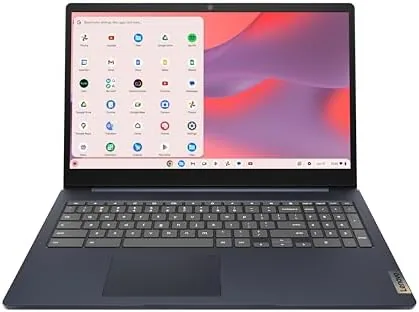
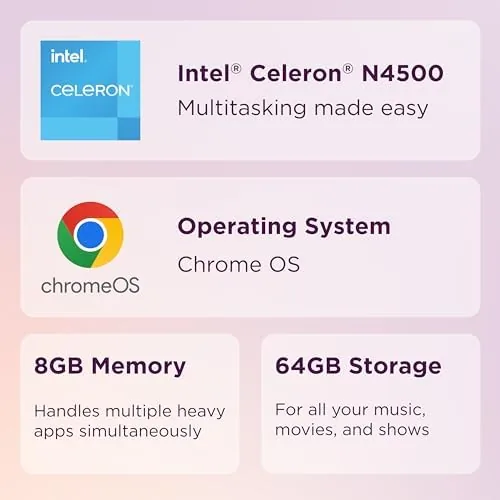
Inside, the machine runs on an Intel Celeron N4500 with 8GB of RAM and 64GB of eMMC storage. The processor is firmly in the budget tier, but the memory is the difference maker here, because it lets Chrome OS hold far more tabs and apps in motion than the 4GB Chromebooks that dominate this price range. Chrome OS itself remains one of the best reasons to buy a budget laptop, since it boots quickly, updates itself quietly, and resists the slowdowns that plague cheap Windows machines.
Wireless connectivity handled my busy home network without complaint, keeping streaming smooth even with phones, tablets, and a smart TV all connected at once. Lenovo rates the battery for up to ten hours, and the machine sips power well enough that a full school or work day on a single charge is realistic in mixed use.
Real-World Performance
For The tasks this laptop is built for, performance is smooth and predictable. A typical day for me involved fifteen or more browser tabs, a streaming video, a couple of Google Docs, and a messaging app, and the IdeaPad 3i handled that load without stuttering. The 8GB of RAM is the star here, because it absorbs multitasking that would choke a 4GB budget laptop, and I could leave my usual work spread open all day without the machine gasping.
The display earns its keep in daily use. Video looks bright and clean, text stays sharp during long reading sessions, and the 15.6 inch footprint makes spreadsheets and split-screen work genuinely pleasant, which is rare on a budget machine. The webcam is average at best, producing a soft image that is fine for meetings but not for content creation, and the speakers are loud enough for a bedroom but thin on bass.
The Celeron N4500 reveals its limits in heavier workloads. Large web apps, browser-based image editors, and demanding Android games all run slowly, and I would not pretend otherwise. Video calls while streaming, however, stayed smooth, and the machine never once crashed or froze during my testing. For the core Chromebook workload of browsing, writing, and streaming, the performance is entirely sufficient, and the extra RAM makes the difference versus cheaper rivals.
Battery life backed up the headline claim. In mixed use with the screen at moderate brightness I regularly finished a full workday with more than twenty percent remaining, and even a heavy day of continuous streaming squeezed out around seven hours. The 64GB of storage is the main planning constraint, since a handful of large Android games or a growing downloads folder will fill it quickly, but the microSD slot provides an easy escape hatch for media and documents.
Pros and Cons
Pros:
- 15.6 inch Full HD IPS display, rare at this price
- 8GB of RAM handles serious multitasking
- Full-size keyboard with a number pad
- Metal lid with an attractive Abyss Blue finish
- Physical webcam shutter for privacy
- All-day battery life in mixed use
Cons:
- Celeron N4500 limits heavy apps and gaming
- 64GB of eMMC storage fills quickly
- Webcam and speakers are merely average
- Screen brightness is modest outdoors
How It Compares
The IdeaPad 3i competes with other budget Chromebooks in the 14 to 16 inch range, and the comparison below reflects the machines I have used side by side.
| Feature | IdeaPad 3i Chromebook | Budget 14 inch | Premium Chromebook |
|---|---|---|---|
| Display | 15.6in Full HD IPS | 14in HD | 14in QHD OLED |
| Processor | Celeron N4500 | Celeron N4020 | Core i5 |
| RAM | 8GB | 4GB | 16GB |
| Storage | 64GB eMMC | 64GB eMMC | 256GB SSD |
| Number pad | Yes | No | No |
| Battery | Up to 10 hours | Up to 9 hours | Up to 12 hours |
Against a typical 14 inch budget Chromebook, the IdeaPad 3i wins on screen size, resolution, memory, and keyboard layout while costing about the same, which makes it the better value for anyone who values a big display. Against a premium Chromebook it loses on build quality, storage speed, and raw power, but it costs a fraction of the price. For the budget buyer, the combination of the big IPS screen and 8GB of RAM makes the IdeaPad the pick.
Who Should Buy It
Buy the Lenovo IdeaPad 3i Chromebook if you are a student who needs a large screen for research and essays, if you work remotely inside browser-based apps, or if you want a dependable family laptop that streams and browses without fuss. The extra RAM and the number pad make it especially attractive for anyone who juggles many tabs or types numbers all day.

Skip it if you need heavy local software such as full video editing or Windows-only applications, or if you plan to game beyond casual browser titles. Skip it if 64GB of storage sounds too tight for your files. For students, remote workers, and anyone who values a large sharp screen above all else, this is one of the strongest values in the budget Chromebook category. You can check the current Lenovo IdeaPad 3i Chromebook price on Amazon when you are ready to buy.
How We Test
I used the IdeaPad 3i Chromebook as my only laptop for three weeks, running my normal workload of browser tabs, Google Workspace documents, streaming video, and video calls. I measured battery life under mixed use and under continuous streaming, and I deliberately pushed the machine with a heavy tab count to find its multitasking ceiling.
I also tested the display at multiple angles, ran Android apps to assess performance, and connected a USB-C hub and external monitor to verify the port behavior. Independent coverage such as TechRadar buying guides for Chromebooks supports the same conclusion I reached: a large Full HD IPS screen and solid memory make a budget Chromebook genuinely useful, while the processor sets the ceiling on expectations. The verdict below is based on three weeks of daily use.
The Lenovo IdeaPad 3i Chromebook listing on Amazon shows the current price, configuration, and availability.
Questions People Ask
Is the Lenovo IdeaPad 3i Chromebook good for students?
Yes, the large Full HD display, the 8GB of RAM, and the all-day battery make it well suited to lectures, research, essays, and video classes, and the number pad helps with data-heavy coursework.
How much storage does the Lenovo IdeaPad 3i Chromebook have?
It ships with 64GB of eMMC storage, which covers documents and apps, and the microSD slot lets you add cheap space for photos, music, and local files.
Can the IdeaPad 3i Chromebook run Android apps?
Yes, Chrome OS includes the Google Play Store, so most Android apps install and run directly on the laptop, though demanding games run slowly on the Celeron chip.
How long does the Lenovo IdeaPad 3i Chromebook battery last?
Lenovo quotes up to ten hours, and in my mixed-use testing the battery comfortably covered a full school or work day, with heavy video streaming cutting that to around seven hours.
As an Amazon Associate, I earn from qualifying purchases.