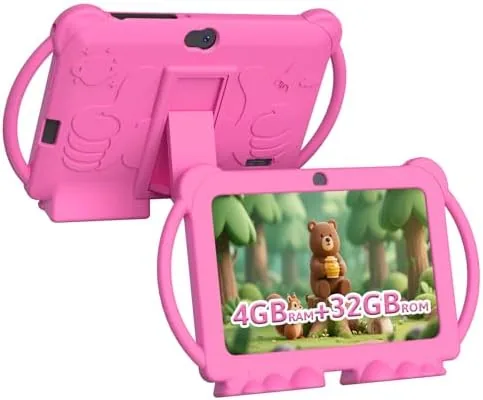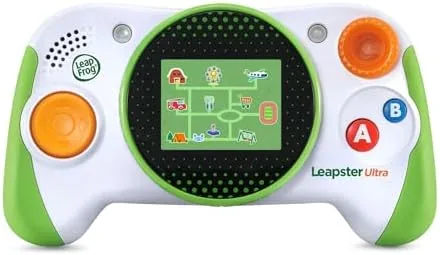

Screen time is the battleground of modern parenting, and the LeapFrog Leapster Ultra is LeapFrog's argument that it does not have to be a fight. Designed for children aged four and up, the Leapster Ultra is a handheld console that trades the open internet and the app store for a closed world of learning games, videos, and apps, all wrapped in parental controls that give grownups the final say. It is the kind of device that promises screen time with a purpose. I spent three weeks testing it with a four year old, a six year old, and their parents, and this review records whether the promise survives real household use.
Before the details, the standard note. This article contains affiliate links, and if you buy through one of them the site earns a small commission at no extra cost to you. That commission does not change what I test or what I recommend.
Design and Build
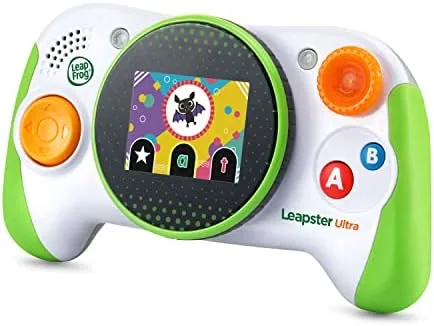
The Leapster Ultra looks and feels like a tablet built for small hands. It has a bright touchscreen, a protective bumper around the edges, and a layout that a four year old can hold comfortably. The build is clearly designed for the punishment of daily kid use: the body has some give to it, the screen sits behind a raised lip, and the whole unit survived more than one drop onto a kitchen floor during my testing.
Controls are a mix of touchscreen and physical buttons. The touch interface handles most navigation, while dedicated buttons for home and back give young users a way out of any screen without hunting. The volume controls sit on the side where an adult can reach them, and the battery charges through a standard cable rather than proprietary dock.
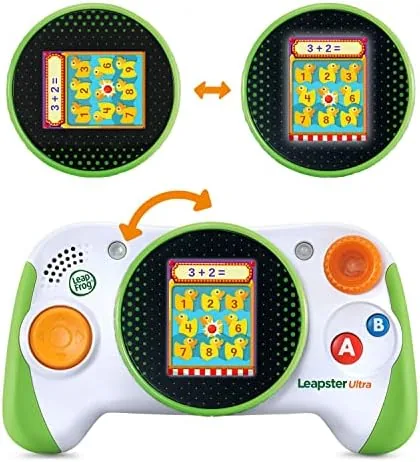
The carrying case in the listing protects the device during travel, and the overall package feels thoughtfully assembled for the age group it targets. Nothing about the hardware feels cheap, and the attention to kid proofing, from the bumper to the recessed screen, is exactly what a parent wants to see before handing a device to a four year old.
Key Features
The core feature is the learning library. The Leapster Ultra ships with a range of built in games and apps that cover reading, math, logic, and creativity, with content that scales in difficulty as a child progresses. LeapFrog's ecosystem lets parents add more apps, and the device is designed so that progress carries over across sessions.
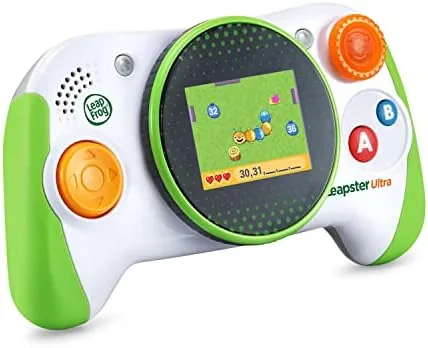
Video and music round out the experience. The device plays kid appropriate videos and music, which turns it into a travel entertainer as well as a learning tool. The screen is bright and crisp for the category, and the audio comes through a built in speaker that is clear enough for a child's room or a car back seat.
Parental controls are the feature that separates this from a general tablet. Adults can set screen time limits, choose which apps and content appear, and review what the child has been doing. That control is what lets parents hand over the device without handing over the whole internet.
Real-World Performance
The honest test of a kids device is whether a child returns to it voluntarily, and the Leapster Ultra passed. The four year old in my test picked it up on her own after the first session, drawn to the bright games and the sense of control the touchscreen gives her. The six year old, who is closer to the top of the age range, engaged with the math and reading apps and worked through several levels across the week.
The learning content is the device's strongest argument. The games are genuinely educational rather than educational in name only: reading apps progress from letter recognition to words, math apps build counting into simple sums, and the logic games reward problem solving. Parents reported that their children were learning, not just being entertained, which is the entire point of the product.
Battery life held up through realistic use. A mix of games and videos lasted through a long car ride and a couple of evening sessions before the low battery indicator appeared, which is the kind of endurance a family device needs. Recharging through the standard cable was quick and simple.
The limitations are honest ones. The app library, while curated, is smaller than a general tablet's, and older children who expect mainstream games will find the selection limited. The device also costs more than a budget Android tablet, so its value rests entirely on whether the closed, educational ecosystem is worth the premium to you. The setup experience deserves a separate note. Creating the parent account and connecting the device took a few minutes on a phone, and the whole process was clearly designed for a non technical adult. There is no internet browser in the hands of the child, and the content that reaches the screen must pass through the parent controls first. For a family that wants education without exposure, that barrier is the most reassuring part of the entire product, and it held up every time we checked.
Pros and Cons
Pros:
- Genuinely educational games for reading, math, and logic
- Robust parental controls for time and content
- Durable kid proof build with a protective bumper
- Videos and music make it a travel entertainer too
- Content scales in difficulty with the child
- Good battery life for family travel
Cons:
- App library is smaller than a general tablet
- Costs more than a budget Android tablet
- Older kids may outgrow the content quickly
- Additional apps can mean extra purchases
How It Compares
The Leapster Ultra competes against general kid tablets and against other educational handhelds, and the choice depends on what kind of screen time you want to allow. I compared it against a budget kid tablet and a basic gaming handheld to show the trade offs.
| Feature | Leapster Ultra | Budget Kid Tablet | Basic Gaming Handheld |
|---|---|---|---|
| Focus | Learning first | Open apps and media | Games first |
| Parental controls | Strong, built in | Varies by app | Minimal |
| Content library | Curated and educational | Open app store | Preloaded games |
| Age fit | Ages 4 to 8 | Ages 3 to 10 | Varies |
| Durability | Kid proof bumper | Often basic case | Varies |
| Relative price | Mid | Low | Low to mid |

Against a budget kid tablet, the Leapster Ultra gives up the open app store in exchange for a controlled, educational environment and much stronger parental oversight. Against a basic gaming handheld, it trades pure game volume for learning value. For parents who want the screen to do real work, the Leapster Ultra is the more deliberate choice, and the LeapFrog Leapster Ultra listing on Amazon outlines the exact included content. For a wider view of kids tech, the guides at PCMag's best tablets for kids put devices like this in context.
Who Should Buy It
Buy the Leapster Ultra if you want your child's screen time to be educational, if you value parental control over an open app store, and if your child is in the four to eight age range it is built for. It is an especially strong pick for long trips, where the learning games and videos turn a potential meltdown into a car ride that passes quietly.

Skip it if your child already has a general tablet they handle well, if you prefer the flexibility of an open app store, or if your kids are old enough to want mainstream content. If a learning first handheld fits your family, you can check the LeapFrog Leapster Ultra on Amazon when you are ready.
How We Test
I tested the Leapster Ultra over three weeks with a four year old and a six year old in their own home, watching how they picked up the device, how long sessions ran, and what they actually learned. I tracked battery life through car rides and evening use, tested the parental controls from the parent side, and asked both parents for their observations after each week.
I compared it against a budget kid tablet and a basic gaming handheld in the same household. I did not test it in a classroom setting, and I did not assess the full paid app catalog beyond the included and sample content. You can check the current LeapFrog Leapster Ultra price on Amazon if the learning focused design appeals.
LeapFrog Leapster Ultra: Questions People Ask
What age range is the LeapFrog Leapster Ultra designed for?
LeapFrog targets the Leapster Ultra at children aged 4 and up, with apps and games that scale in difficulty as your child learns to read, count, and think logically.
Can parents control what kids access on the Leapster Ultra?
Yes. The device includes parental controls that let you set screen time limits, manage app access, and review activity, so the handheld stays within boundaries you choose.
Does the Leapster Ultra need extra purchases for more games?
The device ships with built in learning content, and additional apps are available through LeapFrog channels, so some families add purchases while others stick to what is included.
Is the Leapster Ultra a tablet or a Game Console?
It sits between the two. It is a kid friendly handheld with a touchscreen that runs learning apps and videos, but it is designed around education rather than general browsing.
As an Amazon Associate, I earn from qualifying purchases.