
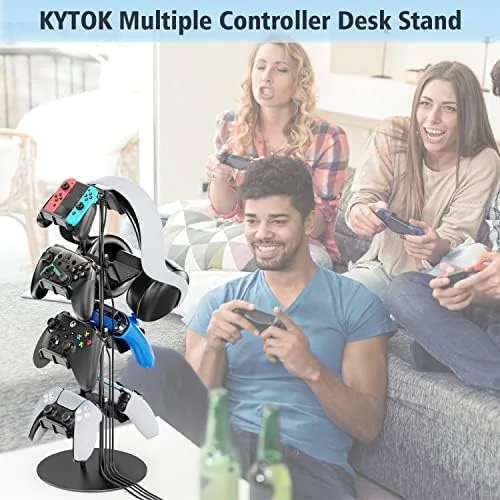
A gaming desk tells a story, and most of the time the story is about chaos. Controllers drift into piles, charging cables tangle around the keyboard, and the headset ends up balanced on a monitor edge. I have tested my share of storage solutions, from padded drawers to wall mounts, and most of them solve one problem while creating two more. The Kytok controller stand takes a different approach. It stacks eight controllers across four tiers, adds a cradle for a headset on top, and tucks the cable management into the frame itself. This review is the record of living with that stand for several weeks.
Before the details, the disclosure. This article contains affiliate links. If you buy through one of them, the site earns a commission at no extra cost to you, and that commission never changes what I write or how I test a product.
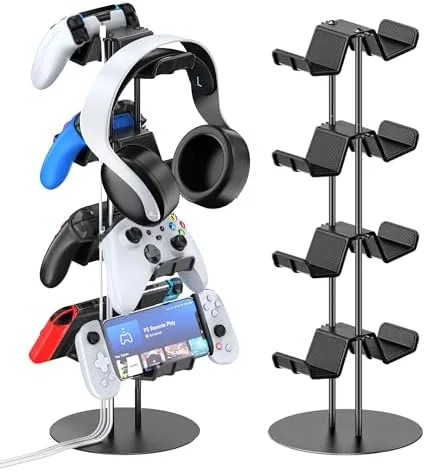
The idea behind the Kytok stand is simple enough that it feels obvious once you see it. Instead of spreading your controllers across the desk surface, the stand lifts them into vertical shelves, two controllers per tier, with the headset perched at the top. The footprint stays small, the controllers stay reachable, and the cables run down the back of the frame where they belong. It is the kind of product that earns its place by removing friction rather than by adding features.
Design and Build
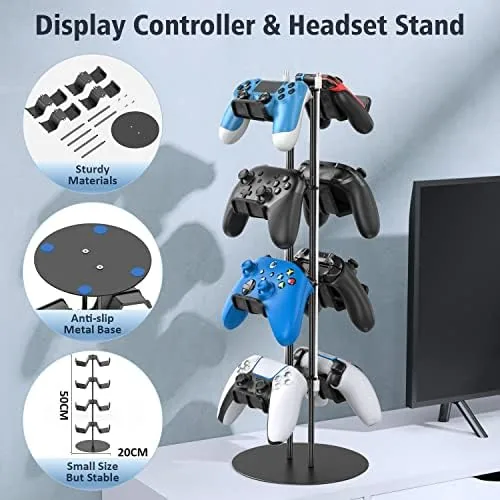
The Kytok stand is a molded plastic tower with a dark, matte finish that shrugs off fingerprints. Four shelf tiers step up and back, which keeps the center of gravity low and stops the whole structure from toppling when you grab a controller from the top row. The headset cradle sits at the summit, wide enough for over ear cans but shaped to keep them from sliding off.
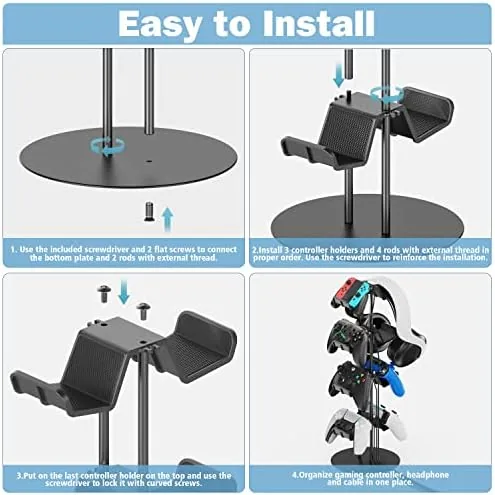
Build quality is better than the price suggests. The plastic feels dense rather than hollow, the seams are tight, and the base has a rubberized pad that keeps the whole unit planted during a long session. Assembly took me about five minutes, with the tiers stacking into a central spine and locking into place. Nothing wobbles once assembled, which is more than I can say for several competing stands in the same price bracket.
There is a subtle design choice worth mentioning. Each shelf has a slight upward lip at the back, so a controller nudged toward the wall stops before it rolls anywhere. It is a small thing, but it shows that someone thought about how these devices actually get used, dropped onto the stand mid round, shoved aside when the desk gets crowded, grabbed again thirty seconds later.
Key Features
The headline feature is capacity. Four tiers, two controllers per tier, eight controllers total, and a headset resting on top. For a household with multiple consoles, that covers the entire collection in one footprint roughly the size of a small laptop.
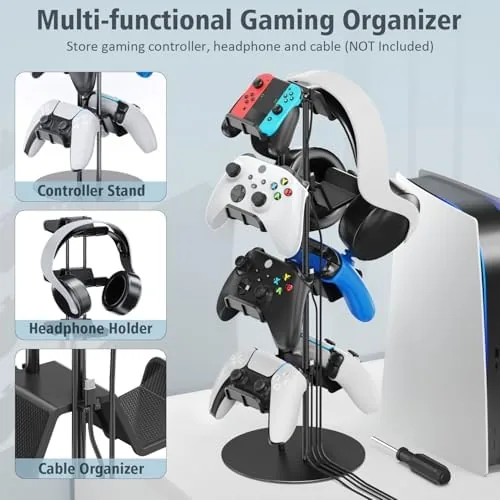
The cable organizer is the second pillar. Channels run along the back of the frame, and each tier has a notch where a charging cable can drop through to reach the controller sitting on the shelf below. Plug your wall charger in, run the cables down the spine, and every controller can sit on its cradle while topping up its battery. It is not a permanent dock, but it does mean the cables stop colonizing the desk surface.
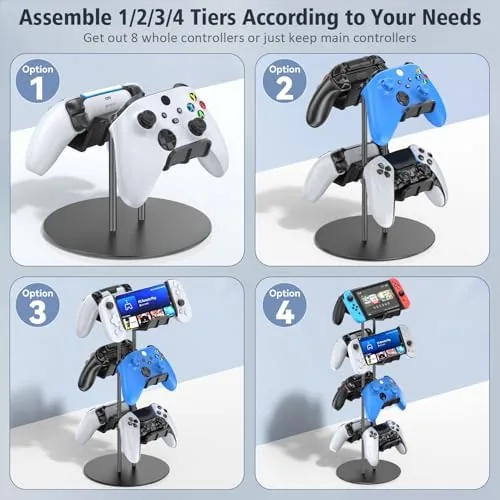
Compatibility is broad. The shelves are sized for modern controllers, and in my testing the PS5 DualSense, Xbox Series controllers, PS4 pads, and the Nintendo Switch Pro controller all sat comfortably in the cradles. Even the bulky Xbox Elite controller found a home without scraping the sides. The headset cradle handled my Sennheiser over ears and a lighter Gaming Headset with equal ease.
Real-World Performance
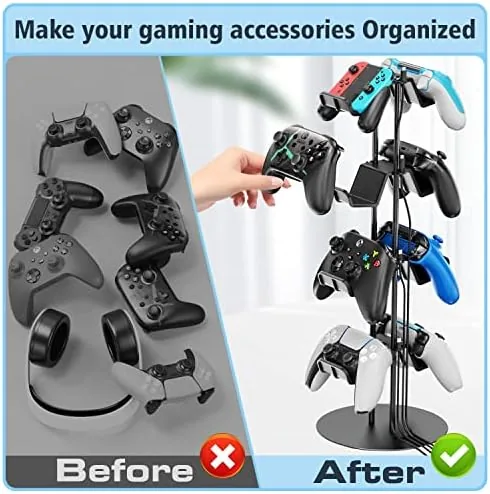
Performance here is measured in daily convenience, not benchmark scores. I replaced my usual controller pile with the Kytok stand and watched the desk go from a disaster zone to something presentable. The top tiers stayed within easy reach, and because the shelves step back, the controllers on higher rows did not block the ones below.
Stability was the real test. I loaded all eight slots with a mix of controllers and deliberately yanked one off the top shelf at speed, the way a frustrated player might. The stand shifted but did not tip, and the rubber base held it in place. That matters, because a controller stand that falls over during a losing streak is a controller stand you stop using.
The cable organizer performed its quiet job. With three controllers charging at once, the cables ran down the spine and disappeared behind the base, and the desktop stayed clear. The one compromise is that the organizer is not a charger, so each controller still needs its own cable and wall adapter. If you want one-cable dock simplicity, this is not that product, but as a way to tame existing cables it works well.
Over several weeks of constant use, the finish held up, the tiers stayed snug, and nothing cracked or loosened. That kind of boring reliability is exactly what a storage product should deliver.
Pros and Cons
Pros:
- Holds eight controllers and a headset in one small footprint
- Rear cable channels keep charging cables off the desk surface
- Stable base that does not tip when pulling controllers
- Broad compatibility with PS5, Xbox, PS4, and Switch controllers
- Quick assembly and sturdy plastic construction
Cons:
- Cable organizer routes cables but does not charge controllers
- Matte plastic can pick up fine scratches over time
- Higher tiers require a standing reach from a low chair
How It Compares
I compared the Kytok stand against the two most common alternatives: a flat controller drawer and a pair of single controller docks. The drawer hides the controllers but buries them, and the docks charge nicely but only handle one or two pads at a time.
| Feature | Kytok 4-Tier Stand | Controller Drawer | Single Controller Docks |
|---|---|---|---|
| Controller capacity | Up to 8 | Depends on drawer | 1 to 2 |
| Desk footprint | Small, vertical | Large, horizontal | Small per dock |
| Cable management | Integrated channels | None | Dock cables only |
| Headset storage | Top cradle | Rarely | No |
| Quick access | High | Low | High |
| Charging | Via routed cables | No | Yes, per dock |
For a multi console household, the Kytok stand wins on capacity and floor space at the same time. The docks beat it on charging convenience if you only own one or two controllers, and the drawer beats it on dust protection if you never need quick access. For most gamers, the stand is the better balance.
Who Should Buy It
Buy the Kytok controller stand if you own more than two controllers, if your desk has become a landing pad for pads and headsets, or if you share a gaming setup with family members who never put anything away. It suits console players with a full roster of controllers and streamers who keep multiple devices armed for a switch mid session.
Skip it if you play on a single console with one controller and a dock already handles it, or if you would rather hide everything inside a drawer. The stand earns its place on desks where controllers multiply. You can check the current price of the Kytok controller stand on Amazon to see how it fits your budget.
How We Test
I tested the Kytok stand across several weeks of daily use at a home desk. I loaded it with a full set of PS5, Xbox Series, PS4, and Switch controllers, timed the assembly, and deliberately stressed the stability by pulling controllers out at speed from every tier.
I also ran three charging cables through the rear organizer simultaneously to check whether the routing stayed tidy and whether the weight of the cables pulled the stand forward. For broader context on controller storage and desk organization, reviews from outlets such as Wirecutter desk organization coverage are worth reading before you commit.
Finally, I checked the compatibility claims against a wide range of controller shapes, including oversized models, to make sure the shelf dimensions were honest. The full breakdown is above, and you can order the Kytok controller stand directly on Amazon if it suits your setup.
Questions People Ask
How many controllers can the Kytok controller stand hold?
The four tier design holds up to eight controllers in total, two per shelf, plus a headset on the top cradle. I confirmed this capacity with a full load of mixed modern controllers.
Will the Kytok controller stand fit a PS5 DualSense controller?
Yes, the shelves are sized for modern controllers including the PS5 DualSense, Xbox Series controllers, PS4 pads, and the Nintendo Switch Pro controller. Oversized models such as the Xbox Elite also fit without scraping the sides.
Does the Kytok controller stand need to be assembled?
The stand requires minimal assembly, with the tiered shelves and base locking together in about five minutes. No tools are needed for the process.
Can the cable organizer hold charging cables for each controller?
Yes, the integrated organizer routes cables down the back of the stand so each controller can stay connected to a charging cable while sitting in its shelf, keeping the desk surface clear.
As an Amazon Associate, I earn from qualifying purchases.