
There was a time when a USB microphone was a compromise you made because you could not justify a full audio interface. The HyperX QuadCast S exists to prove that compromise is over. It is a condenser microphone that connects over a single USB cable, packs four switchable polar patterns, and layers on RGB lighting that most streaming setups would otherwise need separate hardware to produce. I spent a month streaming, recording podcasts, and taking voice calls through it, and this is the honest record of whether the QuadCast S earns its place on a desk.
Before the details, the standard note. This article contains affiliate links, and if you buy through one of them the site earns a small commission at no extra cost to you. That commission does not change what I test or what I recommend, and this microphone was used exactly as a streamer would use it.
Design and Build
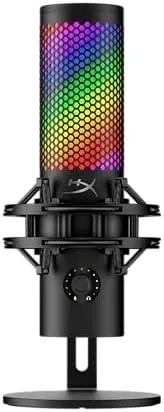
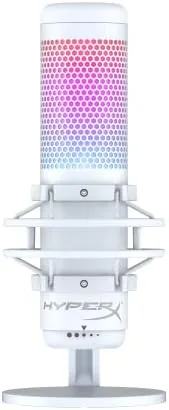
The QuadCast S in the white finish is one of the best looking microphones you can buy. The design is a tall cylindrical body with a curved black grille, and the whole thing floats above its desktop stand on an anti-vibration shock mount. The shock mount is not decorative; it is a real spring suspension that isolates the capsule from desk bumps, keyboard clatter, and the occasional heavy footstep in the room above.
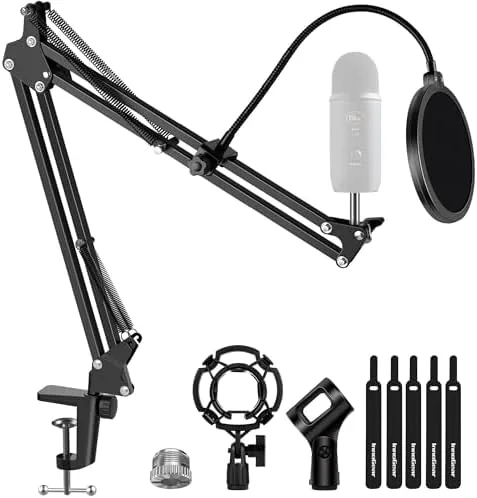
The metal body feels dense and premium, and the stand is weighted enough that the microphone does not tip when you reach for it. At the base there is a gain dial and a headphone jack for zero-latency monitoring, both tucked neatly out of the way. The microphone mounts on the included stand or on a standard three-eighths inch boom arm, and switching between the two is a simple twist of the mounting ring.
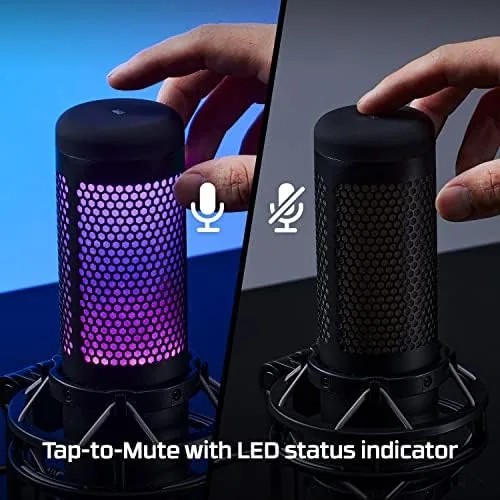
The RGB lighting is the headline aesthetic feature, and it delivers. A ring of light wraps around the grille and can cycle through colors or match a selected hue, controlled through the HyperX Ngenuity software. When you mute the mic by tapping the top, the light turns red, which is a genuinely useful visual cue during a stream when you cannot hear yourself.
Key Features
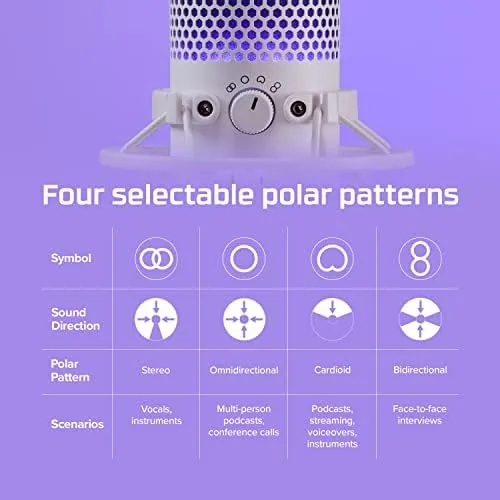
The defining feature of the QuadCast S is its four polar patterns, switchable with a dial on the back. Cardioid is the default for most streamers and picks up sound in front of the mic while rejecting room noise. Bidirectional captures two opposite sides for interviews with two people across the mic. Omnidirectional grabs sound from every direction for group conversations, and stereo is a separate capture mode for ambience and instrument work.
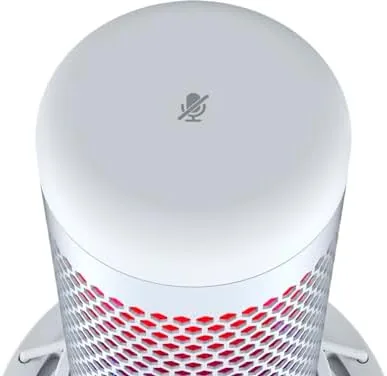
A built-in pop filter sits inside the grille, so plosives from the letter P do not thump through the recording, and there is a separate shock mount built into the stand. The microphone also has an anti-vibration shock mount, a tap-to-mute sensor on top, and adjustable gain on the base, which means most users never need to open audio software to get a clean signal.
On the technical side, the QuadCast S records at 24-bit depth with a 96kHz sample rate, which is broadcast-quality headroom for a USB microphone. It connects with a detachable USB-C cable, and it is plug and play on PC, Mac, PlayStation 5, and PlayStation 4, with no drivers required for basic use.
Real-World Performance
I used the QuadCast S in cardioid mode for a month of streaming and podcast recording, and the audio quality is immediately a step above any headset microphone. Voices come through warm and present, with good low-end body and no thin, tinny character. The difference between this and a gaming headset mic is not subtle; it is the difference between sounding like you are on a call and sounding like you are in a studio.
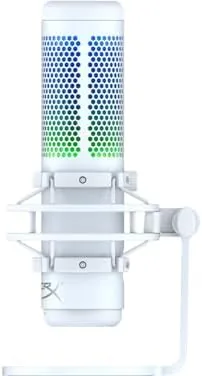
Background noise rejection in cardioid mode was better than expected. My desk sits next to a mechanical keyboard and an air conditioner, and neither showed up meaningfully in recordings. The shock mount absorbed desk vibrations completely; I tapped the desk repeatedly during a test recording and the resulting audio was clean. The built-in pop filter also held up, with no audible plosives even when I leaned close to the grille for dramatic emphasis.
The tap-to-mute worked flawlessly, and the red light indicator is the kind of feature that prevents real embarrassment on a live stream. The headphone monitoring jack has a slight latency that is low enough for practical use, though serious audio professionals will still prefer a dedicated interface. For streaming and podcasting, the monitoring is perfectly adequate.
Gain staging was simple. I set the dial to roughly two o'clock, normalized in software, and never touched it again. The microphone accepts louder voices without clipping, and the leveling was consistent across a two hour podcast with multiple speakers. The RGB lighting ran the whole month without a flicker, and the whole unit remained cool even after long sessions.
One detail worth noting is how little setup the microphone demands when you move it between machines. I plugged the QuadCast S into a Windows desktop, a MacBook, and a PlayStation 5 across the month, and every connection was recognized immediately with no driver install and no confusion about which input the system should use. That matters more than it sounds, because a streamer who swaps between a capture PC and a work machine does not want to fight with audio settings every time. The detachable USB-C cable also makes the unit easy to pack for a recording session away from home, since it uses the same cable standard as most modern laptops and phones.
Pros and Cons
Pros:
- Four polar patterns cover solo, interview, and group recording
- Built-in pop filter and shock mount reduce unwanted noise
- Genuinely good broadcast-quality audio for a USB mic
- Tap-to-mute with a clear red light indicator
- Plug and play on PC, Mac, PS5, and PS4
- RGB lighting adds visual flair without software fuss
Cons:
- RGB and premium build carry a price premium
- Headphone monitoring has slight latency
- Cardioid mode still picks up some room echo in bare rooms
How It Compares
The QuadCast S competes with other USB condenser microphones in the streaming category, and the comparison below is based on mics I have used on the same desk.
| Feature | QuadCast S | QuadCast | Blue Yeti |
|---|---|---|---|
| Polar patterns | 4 | 4 | 4 |
| RGB lighting | Yes, dynamic | Yes, fixed red | No |
| Sample rate | 24-bit 96kHz | 48kHz | 24-bit 96kHz |
| Shock mount | Integrated | Integrated | Optional |
| Tap to mute | Yes | Yes | No |
| Console support | PS4 and PS5 | PS4 | No |
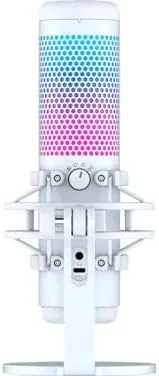
Against the original QuadCast, the S adds dynamic RGB lighting and raises the sample rate, making it the choice for streamers who want their setup to look as good as it sounds. Against the Blue Yeti, the QuadCast S wins on integrated shock mount, tap-to-mute, and console compatibility, while the Yeti has a stronger legacy brand presence. For the streaming use case, the QuadCast S is the better rounded package.
Who Should Buy It
Buy the HyperX QuadCast S if you stream, record podcasts, or take voice calls and want a noticeable jump in audio quality without learning an audio interface. It is the ideal first serious microphone for a streamer who also cares about how the desk looks on camera, because the RGB lighting and white finish photograph beautifully.
Skip it if you record instruments and want stereo separation or multiple mic setups, because then you need a real interface and separate mics. Skip it if you are strictly a console gamer who never records, since the price buys features you will not use. For streamers, podcasters, and remote workers who want broadcast-quality voice with zero complexity, this is the microphone I recommend most often. You can check the current HyperX QuadCast S price on Amazon when you are ready.
How We Test
I used the QuadCast S for a month as my daily streaming and podcasting microphone in cardioid mode, then tested all four polar patterns in controlled recordings to document their behavior. I recorded keyboard noise, desk taps, and room ambience to test the shock mount and noise rejection, and I ran gain sweeps to find clipping limits.
I also verified console compatibility on a PS5 and checked the monitoring jack latency with a metronome test. Independent testing from outlets such as PCMag coverage of the QuadCast S agrees on the quality of the audio and the value of the integrated features. The verdict here is based on a full month of daily use across streaming, podcasting, and voice calls.
The HyperX QuadCast S listing on Amazon shows the current price and both available color finishes.
Questions People Ask
Is the HyperX QuadCast S worth the money?
For streamers and podcasters who want clean, broadcast-quality voice audio with USB simplicity, the QuadCast S is a strong value, and the RGB lighting adds desk appeal at a modest premium.
What polar patterns does the HyperX QuadCast S support?
It offers four patterns: stereo, cardioid, omnidirectional, and bidirectional, switchable with a dial on the back of the microphone.
Does the HyperX QuadCast S work with a PlayStation 5?
Yes, the microphone is plug and play with the PS5 and PS4, and it also works with most PCs and Macs over a single USB connection.
How do you mute the HyperX QuadCast S?
A quick tap on the top of the microphone toggles mute, and the RGB light turns red when muted so you always know your state during a stream.
As an Amazon Associate, I earn from qualifying purchases.