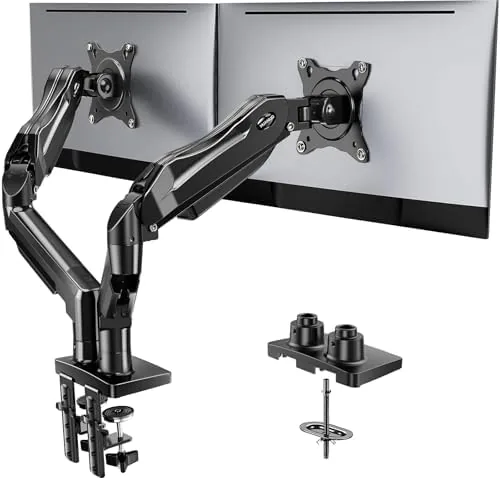

There is a quiet revolution happening on office desks, and it involves removing the plastic stands that ship with every monitor. A good monitor arm frees up the desk surface, angles the screen to eye level, and turns a fixed panel into something you can move like a limb. The HUANUO FlowLift is a dual monitor version of that idea, with two gas spring arms that each carry a screen on a full range of motion.
I reviewed the FlowLift with two monitors of different sizes and weights to see whether a budget priced dual arm could deliver the smoothness that expensive brands advertise. A note before the details: this review contains affiliate links, and purchases through them support the site at no extra cost to you.
A dual monitor arm promises a lot on paper. The real test is whether it holds both screens steady, moves them smoothly, and survives daily adjustment without sagging or drifting. Here is what weeks of desk use showed.
Design and Build
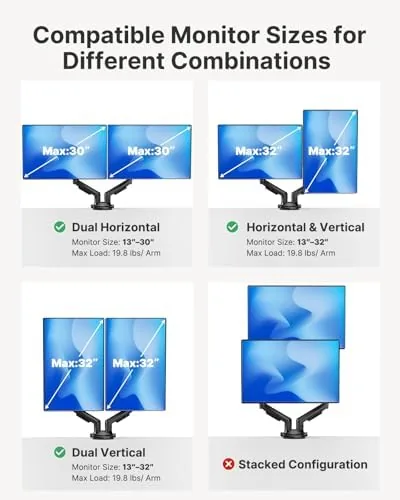
The FlowLift is built around two aluminum gas spring arms mounted on a single central post. The construction feels genuinely solid, with sturdy joints and a clean matte finish that suits both office and gaming desks. The arms are designed to hold screens from 13 to 32 inches, with VESA 75 by 75 and 100 by 100 mounting patterns covered by the included plates.
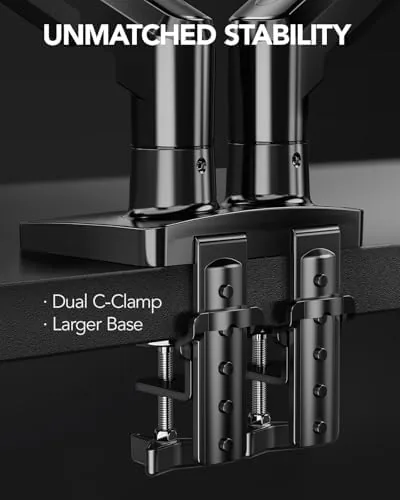
Two mounting bases ship in the box: a C clamp for the edge of a desk and a grommet base for a desk with a cable hole. The C clamp grips firmly and includes protective padding so it does not mar the desk edge, and the grommet option is ideal for desks where clamping is awkward. Both bases feel engineered for a solid fit rather than an afterthought.
Cable management is built into the arms with channels that run along each section, so the video cables from each monitor tuck away and leave the setup looking clean. It is the kind of detail that separates a considered design from a simple metal pole with a screw.
Key Features
The headline feature is full motion on both arms. Each arm adjusts for height, tilt, swivel, and rotation, so you can position each monitor independently instead of being locked into the fixed angles of a stock stand. Raising one screen for a video call while the other stays at work height is the kind of flexibility that makes a dual arm genuinely useful.
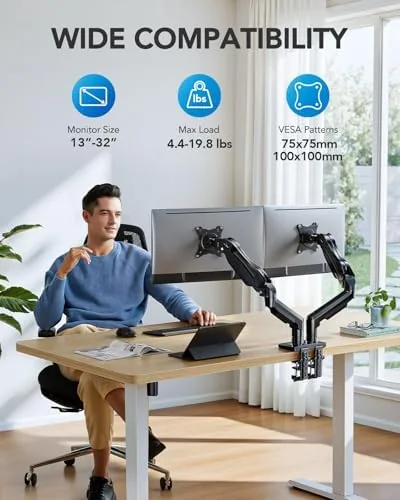
The gas spring mechanism is what carries the load. Each arm is rated to hold between 4.4 and 19.8 pounds, which covers most modern monitors, and the gas spring tension is adjustable so you can match it to the weight of your screen. A properly tuned arm holds its position at any height, which is the difference between a useful mount and a floppy one.
Independent positioning rounds out the feature set. Because the two arms move separately, you can push one monitor back, tilt the other toward you, or rotate a screen into portrait mode for documents and code. The central post does not force the two screens to mirror each other, which is exactly what dual monitor work demands.
The included hardware also covers most desks in the range. The C clamp opens wide enough for a solid desk edge, and the grommet base suits desks with a cable port, while the interchangeable plates accept both VESA patterns so older and newer monitors mount the same way. The only real planning decision is where the central post goes, because that spot decides how the two arms share the space.
Real-World Performance
I mounted a larger monitor on one arm and a lighter one on the other, then spent several weeks adjusting the setup through the working day. The gas springs held both screens at their set heights with no drift, and the arms stayed exactly where I left them after hours of typing and occasional nudges.
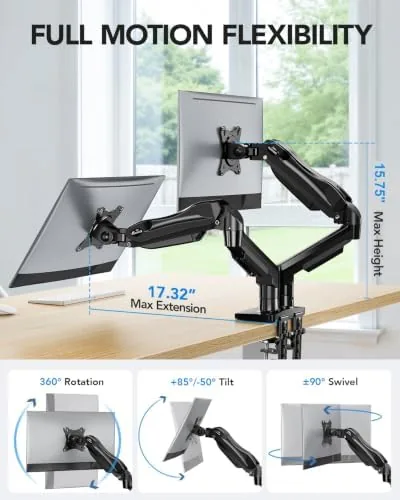
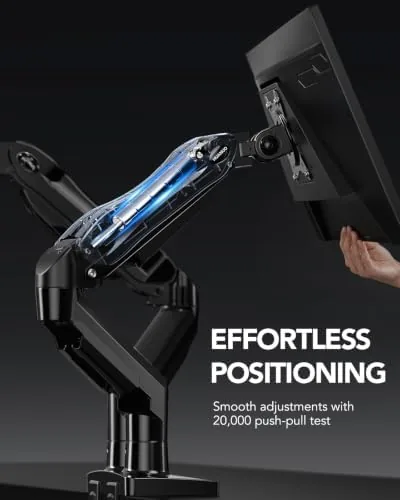
The motion was smooth and controllable. Moving a screen up, down, or sideways required a light push, and the gas springs caught the weight so nothing slammed or bounced. Tuning the tension took a couple of minutes with the included tools, and once set, both arms behaved consistently through the entire test.
The freed desk space was the biggest practical win. Removing the two stock stands opened up a full strip of the desk surface, which turned a cramped workspace into one with room for a notebook, a lamp, and a coffee cup. The C clamp held the whole assembly steady through the test, and the cable channels kept the wires from becoming a new tangle.
The ergonomic payoff was real too. With both screens raised to eye level, the hunching that used to creep in by mid afternoon simply did not happen, and tilting one screen slightly toward the desk made reading long documents noticeably more comfortable. It is difficult to put a number on that kind of improvement, but it is the reason so many offices now buy monitor arms by the dozen.
Pros and Cons
Pros:
- Full independent motion on both arms for height, tilt, swivel, and rotation
- Gas springs hold position reliably once tension is set
- Supports screens from 13 to 32 inches with common VESA patterns
- Reclaims a significant amount of desk surface
- Built in cable management keeps the setup tidy
Cons:
- Setup is involved and takes patience to tune both arms
- Each arm tops out at 19.8 pounds, so heavy ultrawide panels may exceed it
- C clamp and grommet bases need a solid desk edge
- Some cable routing requires a screwdriver and careful feeding
How It Compares
Dual monitor arms vary widely in price and capability, and the table below shows where the FlowLift lands against the competition.
| Feature | HUANUO FlowLift | Fixed Dual Stand | Premium Gas Arm |
|---|---|---|---|
| Motion per arm | Full, independent | Limited or none | Full |
| Weight per arm | 4.4 to 19.8 lbs | Varies | Higher capacity |
| Gas spring | Yes, adjustable | No | Yes |
| Setup effort | Moderate | Low | Similar |
| Price | Mid | Low | High |
A fixed dual stand costs less and sets up faster, but it locks the screens in place and defeats the purpose of a desk that adapts to you. A premium gas arm adds capacity and smoother bearings, but it costs significantly more for a gain most setups will not feel. The FlowLift delivers the full motion experience at a price that makes sense, which is why Wirecutter's monitor arm testing emphasizes gas spring capability as the feature that actually matters.
Who Should Buy It
Buy the FlowLift if you work at a desk with two monitors and want the flexibility to move them, or if you want to reclaim the surface space that two stock stands eat up. It suits coders, traders, video editors, and anyone who spends the day switching between screens, and it is equally at home on a gaming setup. You can check the current HUANUO FlowLift price on Amazon to see how it fits your budget.
Skip it if your monitors are heavier than the arm rating, if your desk is glass or too thin for a clamp, or if you never adjust your screens and just want a simple stand. For anyone who actually moves their monitors, this arm is a worthwhile upgrade.
How We Test
I tested the FlowLift with two monitors of different sizes and weights over several weeks of daily use. I set up the arms, tuned the gas spring tension, and adjusted the screens through the working day to check stability, smoothness, and drift.
I also checked the clamp on a standard desk edge and confirmed the assembly held firm through the test period, and I left one arm fully extended for a full day to see whether any sag developed in the joints. The verdict is based on that sustained daily use, because a monitor arm is only as good as its behaviour in week two.
Questions People Ask
What monitor sizes does the HUANUO FlowLift support?
It fits screens from 13 to 32 inches with standard VESA 75 by 75 or 100 by 100 mounting holes on the back of the display.
How much weight can each arm hold?
Each arm is rated for 4.4 to 19.8 pounds, so check your monitor weight before buying, because a display over that limit will sag.
Does the mount work on glass or fragile desks?
The C clamp and grommet base need a solid desk edge, so glass tops and thin particle board are not recommended for this mount.
Can I move each monitor independently?
Yes, both arms move separately with full motion range for height, tilt, swivel, and rotation, which makes dual monitor positioning very flexible.
When your desk deserves to breathe, the HUANUO FlowLift dual monitor arm on Amazon puts both screens exactly where you want them and frees up the surface.
As an Amazon Associate, I earn from qualifying purchases.