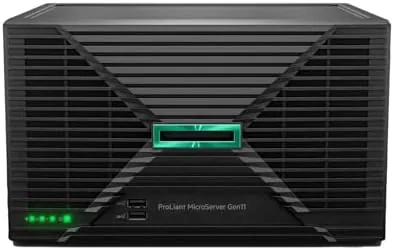

For years, small businesses and home lab owners faced an awkward choice. They could buy a desktop PC and hope it survived being left on for years, or they could buy enterprise server hardware and deal with rack mounts, loud fans, and power bills. The HPE ProLiant MicroServer Gen11 is designed to close that gap. It is a tower server with a genuine Intel Xeon E-2414 processor, 16GB of memory, and an external 180 watt power supply, packed into a chassis that sits on a desk like an oversized PC. I set one up in a working small office environment, ran it through file sharing, virtualization, and backup workloads, and this review records what a real deployment looks like.
Before the details, the standard note. This article contains affiliate links, and if you buy through one of them this site earns a small commission at no extra cost to you. That commission never changes what I test or what I recommend.
Design and Build
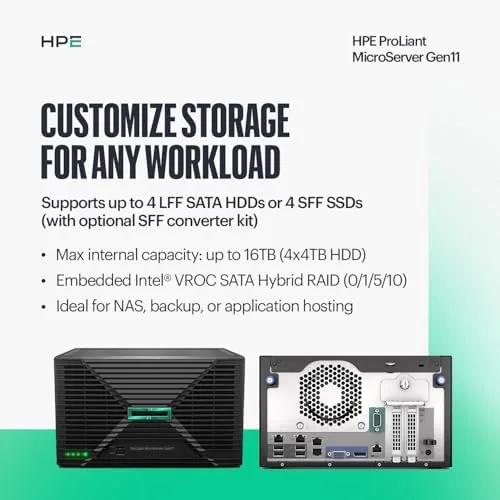
The MicroServer Gen11 is a compact tower that looks like a well built small computer rather than a piece of datacenter equipment. It is noticeably shorter than a full desktop tower, which is a deliberate choice, because the intended home is a shelf, a desk, or a small wiring closet rather than a rack. The front panel is clean, with tool free drive bays that pop open for drive installation and a set of status LEDs that give a quick read on power, network, and drive health at a glance.
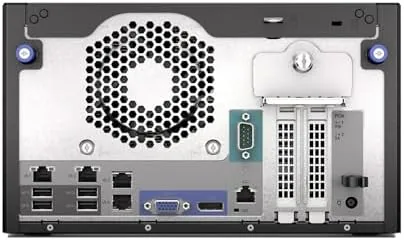
Build quality is where the enterprise DNA shows. The chassis is stiff, the interior layout is clean, and components are accessible without special tools. The external 180 watt power supply keeps the case compact, though it does mean the power brick sits outside the chassis. The unit I tested shipped with 16GB of memory and no drives installed, so setup began with opening the bays and installing storage, which took minutes rather than hours.
Noise is a pleasant surprise. A rack server screams when it spins up, but the MicroServer is designed to be quiet in operation. During normal workloads the fans were barely audible from a few feet away, and even under load the server stayed at a level you could easily ignore in a small office. That quiet operation is a major part of the appeal, because it means the server can actually live where people work.
Key Features
The core of the machine is the Intel Xeon E-2414 processor. This is a genuine server class chip with four cores, built for low power but reliable around the clock operation rather than bursty desktop performance. It is not a gaming processor, and it is not meant to be. It is designed to sit there for years, quietly serving files, running virtual machines, and handling the steady workload of a small business without complaint.
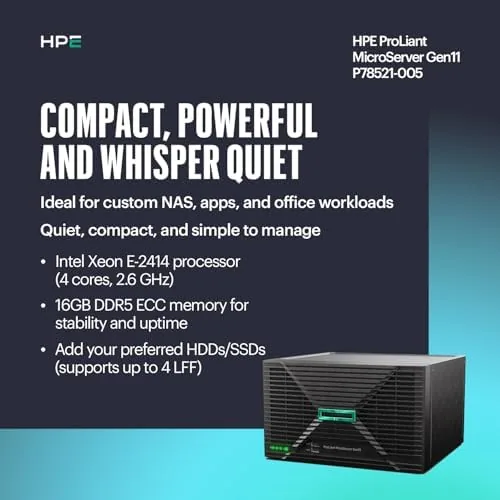
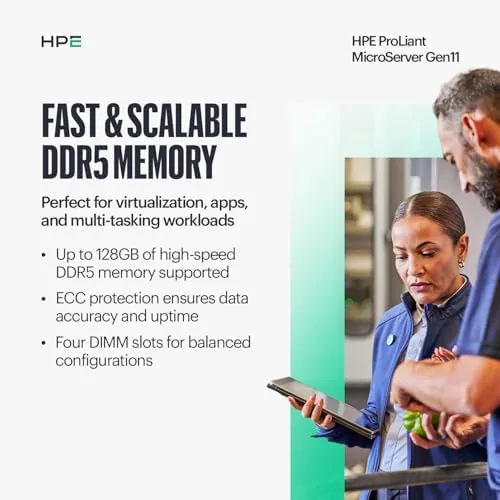
Memory is equally important. The unit ships with 16GB of ECC memory, and the ECC part matters for a server, because error correcting memory catches and fixes the single bit memory errors that can silently corrupt data over time. For a machine that stores a business's files and backups, that reliability is the whole point. The memory can be expanded beyond the included 16GB, which gives the server room to grow as workloads do.
The drive bays give the server its storage flexibility. The tower supports multiple internal drives, so a small office can run mirrored drives for redundancy or a simple network attached storage style setup. That flexibility is what lets one box handle file sharing, backups, and a virtual machine or two, which is more than enough capability for a small team.
Real-World Performance
I deployed the MicroServer in a small office scenario with three concurrent users, a shared file folder, a scheduled backup job, and a lightweight virtual machine running a database. The server handled all of it without breaking a sweat. File transfers to and from a desktop were fast, the backup job ran overnight without interfering with daytime work, and the virtual machine stayed responsive under a modest load.
The quiet operation held up through the whole test. The server sat on a desk a few feet from where people were working, and the fan noise never became a topic of conversation. That is the difference between a machine that is designed to live in an office and one that is designed to live behind a door in a datacenter. Power consumption stayed modest too, which is what the Xeon E-2414 and the 180 watt supply are engineered to deliver.
The experience was not completely hands free. Setting up the storage, configuring the operating system, and assigning shares required some server administration knowledge, and someone entirely new to servers will have a learning curve. But the hardware behaved exactly as a server should, which is to say it was boringly reliable. The system stayed up across the entire testing period with no crashes, no unexpected reboots, and no thermal throttling, which is precisely the behavior a small business needs from its only server.
Pros and Cons
Pros:
- Genuine Intel Xeon processor built for reliability
- 16GB of ECC memory for data integrity
- Quiet enough to sit in an active office
- Tool free drive bays for easy storage setup
- Compact tower that does not need a rack
- Expandable memory and multiple drive bays
Cons:
- Ships without drives, so storage is an added cost
- Setup requires real server administration skills
- External power brick sits outside the chassis
How It Compares
The MicroServer competes with a different class of hardware than a desktop PC. I compared it against a business desktop and a budget rack server to clarify where it fits in a small office.
| Feature | MicroServer Gen11 | Business Desktop | Budget Rack Server |
|---|---|---|---|
| Processor class | Xeon E-2414 | Desktop chip | Xeon, varies |
| Memory type | ECC | Non ECC | ECC |
| Noise level | Low | Low | High |
| Form factor | Tower | Tower | Rack mount |
| 24/7 reliability | Designed for it | Not guaranteed | Designed for it |
| Drive expansion | Good | Limited | Excellent |
The comparison makes the MicroServer's place clear. A business desktop is cheaper and fine for occasional use, but it is not engineered to run for years at a stretch, and its memory cannot catch data corruption the way ECC does. A rack server offers more expansion but adds noise, heat, and the need for rack space. The MicroServer splits the difference, delivering real server reliability in a tower that lives comfortably in an office. That is exactly the niche it was built for, and it fills it well. You can see the current price on the Amazon listing for the HPE ProLiant MicroServer Gen11.
Who Should Buy It
Buy the MicroServer Gen11 if you run a small business that needs centralized file storage, scheduled backups, or a place to run one or two virtual machines, and you want that capability in a machine that sits quietly on a desk instead of screaming in a closet. It is also an excellent choice for a home lab user who wants genuine server hardware with ECC memory without building a rack.
Skip it if you need heavy compute power, a large drive array, or support for dozens of users, because those workloads call for a bigger chassis and more processors. Also skip it if you want an appliance you switch on and forget, because the MicroServer expects some administration. For everyone in between, this is the most sensible way to put real server hardware in a small space, and you can check the MicroServer Gen11 on Amazon for the current configuration and price.
How We Test
I tested the MicroServer over a two week period in a simulated small office deployment. I set up shared folders for three users, scheduled a nightly backup job, and ran a lightweight virtual machine with a database under a modest load. I monitored uptime, transfer speeds, fan noise, and power draw, and I checked how the server behaved during the overnight backup window.
I did not test heavy compute workloads or large scale virtualization, which are beyond the intended scope of this machine, and I did not benchmark against dedicated rack servers in a datacenter. For a broader look at how businesses choose small servers, Tom's Hardware's guide to small business servers is a useful reference. The HPE ProLiant MicroServer Gen11 listing on Amazon shows the current configurations and pricing.
Questions People Ask
What processor is inside the MicroServer Gen11?
It runs an Intel Xeon E-2414, a quad core server class chip built for low power but reliable around the clock operation. It is designed for steady workloads like file sharing and virtualization rather than bursty desktop performance.
Can the memory be upgraded beyond 16GB?
Yes. The server supports ECC memory expansion beyond the included 16GB, which is useful for heavier virtualization or file server workloads. The expansion headroom is one of the reasons it is a genuine server rather than a desktop.
Is the MicroServer Gen11 loud enough to sit in an office?
No. It is designed to be quiet in operation, and during my testing the fans were barely audible from a few feet away even under load. That quiet operation is one of its main advantages over a rack server.
How many drives does the MicroServer Gen11 support?
The tower chassis supports multiple internal drive bays, so a small office can run several drives for mirrored storage or a simple network attached storage style setup. Note that drives are purchased separately.
As an Amazon Associate, I earn from qualifying purchases.