
The usual note first. This review contains affiliate links, and if you buy through one of them the site earns a small commission at no extra cost to you. That commission never changes what I recommend.
Design and Build
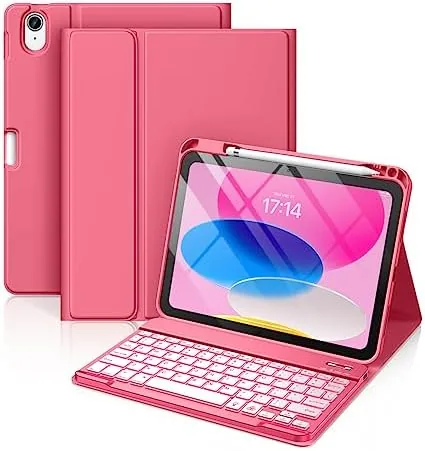
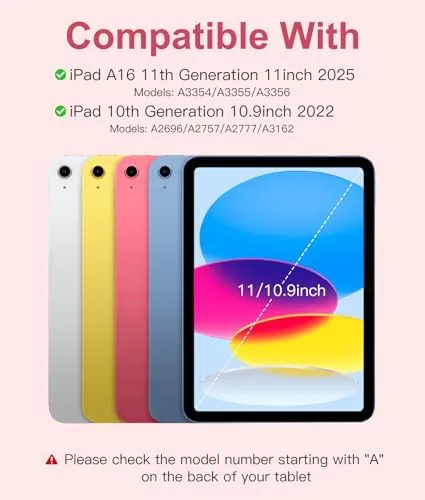
The Hamile case is a folio-style cover with the keyboard built into the lower flap. The exterior is a soft-touch plastic with a pink finish, and the interior has a raised lip on one side that holds the pencil. The case is sized for the iPad A16 released in 2025 and the 10th generation 10.9 inch model released in 2022, and the fit is specific to those two devices, so it will not suit an 11 inch iPad Pro or iPad Air.
The overall build is better than the price suggests, though it is clearly a budget product. The plastic is rigid enough to protect the corners and back, and the folio closes with a magnetic flap that stays shut in a bag. The hinge where the keyboard folds is the most stressed point, and after three weeks it remains tight, but it flexes noticeably when you push the stand past its limits, so there is a ceiling on how far you can tilt the screen.
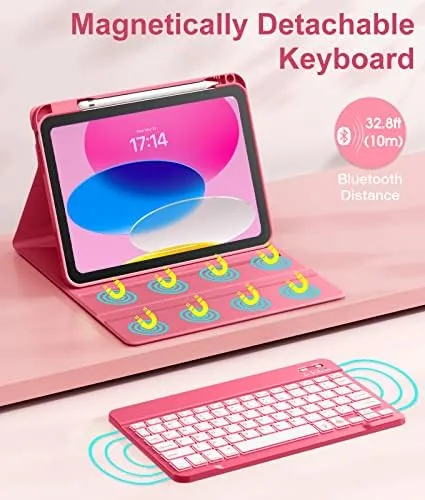
The keyboard itself is the highlight of the physical package. It is detachable, so it magnetically separates from the folio when you want to set it aside or hold the tablet in hand. The keys are compact but well spaced, and the pink backlight can be toggled through brightness levels, which is a feature that most budget keyboard cases skip entirely.
Key Features
The headline feature is the backlit Bluetooth keyboard. It connects over Bluetooth rather than through the iPad's smart connector, which has one clear trade off: the keyboard needs its own battery and its own pairing routine. In exchange, you get a keyboard that works even when detached from the case, backlighting that Apple's own folio lacks, and compatibility across the two iPad generations the case supports.
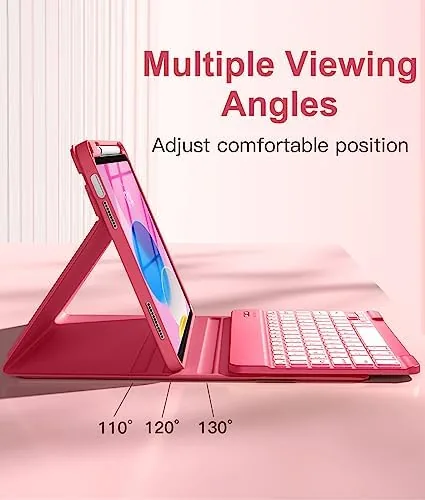
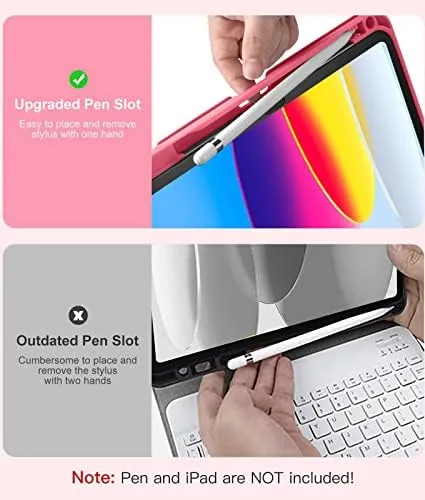
The folio doubles as a stand with multiple viewing angles. The keyboard flap folds back to prop the iPad up for typing, and the back panel adjusts to raise the screen for watching video. There is a groove near the keyboard that holds a pencil, and a dedicated cutout in the case keeps the Apple Pencil aligned for charging on the iPad's side edge.
Connectivity and control are straightforward. The keyboard wakes from sleep when you start typing, pairing is remembered across uses, and the battery reportedly lasts for weeks of typical use before a charge. On the software side there are shortcut keys for volume, media, and home, which are small conveniences that make the case feel more like a laptop than a tablet accessory.
Real-World Performance
Typing on the Hamile keyboard is the make-or-break test, and the results are mixed in a predictable way. The keys have decent travel for a budget folio and a tactile click that makes long writing sessions comfortable. I wrote most of this review's notes on it, and my typing speed dipped only slightly from a laptop keyboard. The key layout is a condensed version of a standard layout, so punctuation marks sit in slightly different places, and it took about two days to stop hunting for the apostrophe.
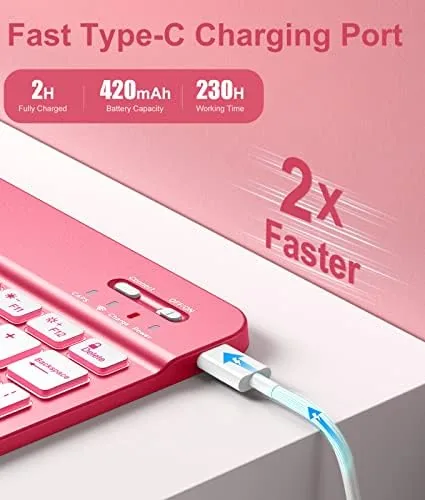
The backlight is genuinely useful. In a dim room or on an evening flight, the pink glow keeps the keys legible, and there are a few brightness levels to choose from. Battery life on the keyboard held up through the entire test period without a recharge, which is exactly what a wireless keyboard should do.
Bluetooth pairing was painless after the initial setup. The keyboard connects quickly when the iPad wakes, and the detachable design means you can move the keyboard to your lap while the screen stays on the desk. There is a small amount of input lag that is typical of budget Bluetooth keyboards, but it is not enough to bother anyone who is not doing fast gaming on an iPad.
The weaknesses show up when you push the design. The stand angles are limited, and the folio will not hold the iPad upright for drawing or in the steep position that some video watching prefers. The plastic exterior picks up scuffs more readily than a fabric case, and the pink finish, while attractive, will not appeal to everyone.
Pros and Cons
Pros:
- Backlit keys, rare in budget iPad keyboard cases
- Detachable keyboard works even when set aside
- Long wireless battery life
- Pencil holder and charging cutout built in
- Protective folio cover doubles as a stand
- Much cheaper than Apple's keyboard folio
Cons:
- Limited stand angles for the screen
- Bluetooth pairing instead of smart connector
- Condensed key layout takes time to learn
- Plastic exterior scuffs easily
- Pink color will not suit every taste
How It Compares
The Hamile case sits between Apple's own keyboard folio and other third party budget options. The table below compares it with the official Apple Smart Keyboard Folio and a typical generic folio keyboard case.
| Feature | Hamile case | Apple Keyboard Folio | Generic budget folio |
|---|---|---|---|
| Backlight | Yes, pink | No | Rarely |
| Connection | Bluetooth | Smart connector | Bluetooth |
| Keyboard detachable | Yes | No | Usually no |
| Pencil holder | Yes | No | Varies |
| Price | Budget | Premium | Lowest |
| Back protection | Yes, full folio | No | Yes |
Against Apple's keyboard folio, the Hamile wins on backlighting, detachable keyboard, and full back protection, while losing on key layout polish and the seamless smart connector. For the price difference, most people will find the Hamile the more sensible choice, and reviews such as Tom's Guide's best iPad keyboards consistently recommend budget Bluetooth folios for most users.
Who Should Buy It
Buy the Hamile case if you own an iPad A16 or 10th generation, if you type a lot on the go and want backlighting, or if you want a keyboard case without paying Apple's premium. It is a strong pick for students, writers, and anyone who wants the iPad to pull double duty as a laptop stand-in. You can check the current price at Amazon to see how it lines up with the alternatives.
Skip it if you need steep stand angles for drawing, if you want the cleanest possible key layout, or if the pink finish is not for you. For everyone else, this is one of the more complete budget keyboard cases for the 10.9 inch iPad.
How We Test
I used the Hamile case as my primary iPad Keyboard for three weeks, writing daily notes and longer drafts on it. I typed at normal speed to judge layout comfort and travel, used the backlight in a dark room, and left the keyboard uncharged to confirm the battery claim. I detached and reattached the keyboard repeatedly, carried the case in a backpack, and folded the stand into every position it would hold.
I also verified the pencil holder with a compatible stylus, checked the charging cutout alignment, and compared the case directly with an Apple Smart Keyboard Folio on the same iPad. The verdict comes from that side-by-side time and the three weeks of daily use.
Questions People Ask
Which iPad models does the Hamile keyboard case fit?
It is made for the iPad A16 11 inch released in 2025 and the 10th generation 10.9 inch iPad released in 2022. It does not fit the 11 inch iPad Pro or iPad Air, which use different dimensions and connector layouts.
Is the Hamile keyboard backlit?
Yes. The detachable Bluetooth keyboard has a pink backlight with multiple brightness levels, which makes it much easier to type in dim rooms or on flights than most budget keyboard cases.
How does the keyboard connect to the iPad?
The keyboard pairs over Bluetooth rather than through the iPad's smart connector. It works whether the keyboard is attached to the folio or set aside, and it remembers the pairing after the first setup.
Does the case hold an Apple Pencil?
Yes. There is a built in holder on the folio that keeps a compatible stylus secure during travel, and a cutout on the side keeps the pencil aligned for charging.
The Hamile case delivers the two things that matter most in a budget iPad keyboard: a genuinely useful backlit keyboard and a protective folio, all at a fraction of Apple's price. It has rough edges, but for everyday typing it outperforms its price tag. If you want a keyboard folio that does not break the bank, the Hamile is worth a close look. You can find the current listing at Amazon.
As an Amazon Associate, I earn from qualifying purchases.