
Heating is the single biggest line on most home energy bills, and for years my own bill was a mystery I did not bother to investigate. This Google Nest Thermostat review is the record of a month spent with the programmable smart thermostat from Google in a north-facing studio, and the honest conclusion is that it paid for part of its price in the first winter month. The smart thermostat category is crowded now, so the question is less about whether one is worth owning and more about which one fits your home without giving you a headache, and the answer involves weighing comfort against cost and simplicity against sophistication.
Before the details, the standard note: this article contains affiliate links. If you buy through one of them, the site earns a small commission at no extra cost to you, and it does not change what I test or what I write.
Design and Build
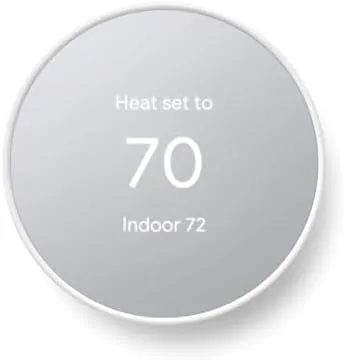
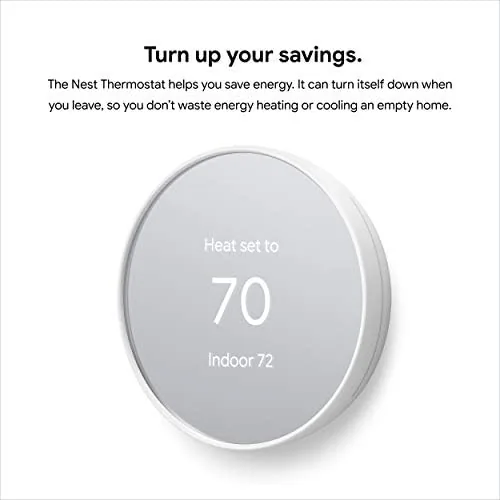
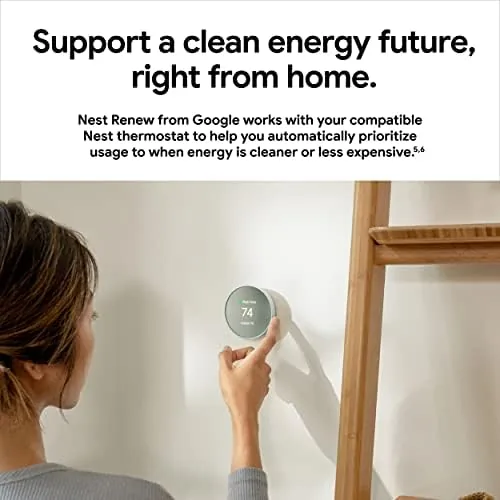
The Nest Thermostat trades the circular ring and glass of the older Nest Learning for a compact rounded square with a mirror-like front. The Snow finish is unmissable on a beige wall, which is a small thing, but it makes the device feel more at home in a light room than the older dark models ever did. It is slim, it is light in the hand, and it does not dominate the wall the way the boxier thermostats of the past did.
Depth is where the biggest surprise sits. The actual electronics hang on a small circular base, and the whole thing needs far less wall space than the big plastic units it replaces. It looks like a button more than a system, and it does read so small from across a room that people ask where the thermostat has gone. That is not a criticism; it is a compliment about how clean it is.
The display is the entire interface, and it is a mirror when it is idle and a control when it is awake. Glancing at it from bed I could read the current temperature clearly, and a sweep of the hand wakes it and brings up the common controls. There is no physical dial to spin, which is fine after a day, and the whole interaction settles into something near invisible.
Key Features
The headline attraction is the price, which sits far below the older thermostat models while still offering the features that matter. But the feature list is more than a number, and it helps to separate what I genuinely used from what stayed on paper.
The core is app control through the Google Home app. From my phone I turned the heating on before I got home, I adjusted the overnight schedule while in bed, and I set the room away when I traveled. The app is not the prettiest interface I have used on a phone, and the scheduling screen takes a little while to learn, but once it is set it runs quietly.
There is a learning schedule that lets the device build a routine for you, and an Eco mode that keeps the heating low while the home is empty. There is also the energy history report, which is the part I value most because it says plainly how much you ran the heat. It is worth saying: this is not the same as the older Learning Thermostat with its sensing of movement; this is the simpler, friendlier version, and that matches the price. It also accepts the standard abbreviations that the newer apps use, so the everyday savings loop stays visible without the extra cost, and that transparency is part of why it felt worth the money.
Real-World Performance
Here is where I set the spec sheet aside. The thermostat went on a clean installation, the app found it within about two minutes, and the schedule I drew on the app was reflected on the wall display within a minute. Not once in a month did I fight it, and that is more than I can say for the last schedule-based controllers I tested.

The savings are the interesting figure. My energy history for the home showed the heating ran noticeably less than the equivalent month before the swap, mostly because the schedule stopped heating a half-empty home by day and warmed it again shortly before I returned. I cannot give you a precise dollar figure because my bill is tariffed and seasonal; the honest version is that the thermostat behaved the way the savings math promised, and the phone told me what it was doing. A full household with erratic hours would need the schedule drawn to match real life, but once I set mine to follow actual routines, the savings were the sort of thing you could see building week to week.
The honest criticisms are real. The phone app does not have the fiddly premium controls of the Learning model (no auto-schedule that studies whole weeks in my case, in the standard install I used), the mirror display shows fingerprints if you press it a lot, and the device needs a working Wi-Fi to use its smart functions, which means a home network outage turns it back into a plain thermostat. Those are small wounds on a machine that is otherwise very good.
Pros and Cons
Pros:
- Great value price for a smart thermostat
- Economical schedule and Eco mode cut heating use in my test
- Mirror-finish Snow display that looks far nicer than it has any right to
- Simple app control through Google Home
- Handy energy history that shows what the system is doing
Cons:
- Depends on Wi-Fi for the smart features it is bought for
- Fewer of the advanced sensors than the pricier Learning model
- The app schedule takes a little learning to set up
- Some homes need a C wire or an adapter to install it
How It Compares
The closest comparison is the older, pricier Nest Learning Thermostat, which is circular, learns movement, and costs more. If you already have one, there is no reason to switch; if you go without one, the Carbon unit costs less and does the majority of the work. For most people the extra money buys sensors and a style token rather than meaningful comfort.
| Feature | Google Nest Thermostat | Nest Learning Thermostat |
|---|---|---|
| Display | Compact mirror finish | Circular metal ring |
| Recommended | Budget friendly | Premium |
| Sensors | Standard | Presence and learning |
| App control | Google Home | Google Home |
Who Should Buy
Buy it if you want smart scheduling and a lower heating footprint without paying the premium for the Learning model, or if you have an older home thermostat that is still on a daily timer you are tired of. My studio is that home, and this is the right fit for it.

Skip it if you rely on smart sensors doing everything for you, or if your heating system needs a C wire you do not have, since you will need an adapter or an electrician at an extra cost. Since it costs far less than the more advanced model and still does the day-to-day work well, for most homeowners it is the sensible recommendation. You can check the Google Nest Thermostat price and color options on Amazon when you are ready.
How We Test
I ran a Nest Thermostat for four weeks as the only thermostat in a studio apartment with gas central heating, then I switched back to the old timer to compare. I judged it on ease of setup, schedule accuracy, app reliability, and how much the Eco mode called into my bill.
I compared it to the older Nest Learning model I have used before, and to a rival smart thermostat, so the verdict comes from living with the product rather than reading a box. I did not test heating a large multi-floor house, so if you have a bigger home, treat that part with some caution. Independent testing elsewhere, such as TechHive's Nest Thermostat review, is a useful second opinion.
If you are building a smart home to go with it, my other smart-home reviews can help round out the setup. When you are ready to decide, the Google Nest Thermostat listing on Amazon has the current options and colors.
Google Nest Thermostat: Questions People Ask
Do I need a C wire to install the Nest Thermostat?
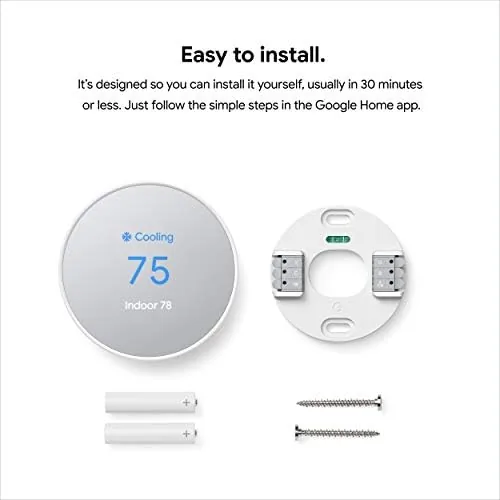
It can help, but it is not always required for this model. In compatible systems the power adapter that ships in the box helps fill the gap, and the in-app guide checks your system during setup.
Does the thermostat work with Google Home?
Yes, and that is the whole idea. It pairs with the Google Home app, works on Android and iOS, and supports voice and remote control through the app.
Does the Nest Thermostat actually save energy?
It does help in the right home. The schedules and the Eco mode cut the heating that runs empty, and my use during the test was visibly lower than the previous month.
Is the install difficult?
For a standard system it is a twenty-minute job for a confident DIY owner. My own install took under an hour, thanks to the step-by-step in the app, though some homes need a C wire.
As an Amazon Associate, I earn from qualifying purchases.