
Most thermostats are forgetful. You set a schedule once, it holds it blindly, and then life changes the schedule for you, a late night at the office, a kid home sick, a long weekend away, and the thermostat keeps burning the same energy as if nothing happened. The Google Nest Learning thermostat approaches the problem differently. Instead of asking you to program it, it watches the temperatures you actually choose and builds its own schedule from your habits. This review covers a month with the copper finish Nest on my own wall, including how well the learning worked, what it saved, and how it played with the rest of my smart home.
Before the details, the standard note. This article contains affiliate links, and if you buy through one of them the site earns a small commission at no extra cost to you. That commission does not change what I test or what I recommend.
Design and Build
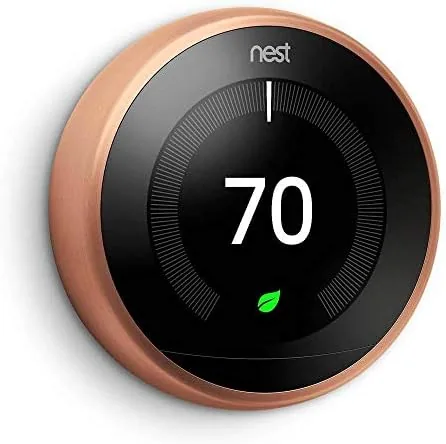
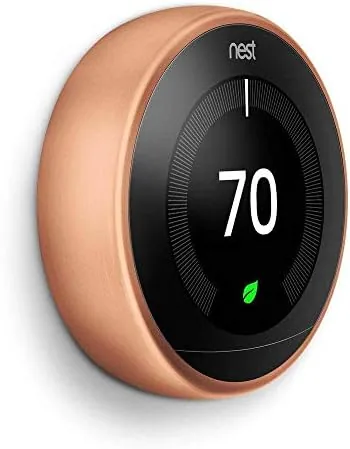
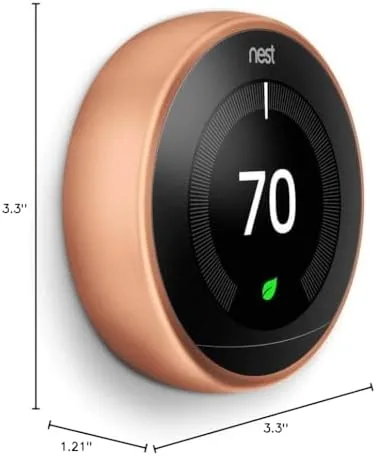
The Nest Learning thermostat is a design icon for good reason. A polished ring surrounds a circular display, and the copper finish catches the light in a way that feels more like jewelry than a wall controller. The metal ring rotates with a satisfying detent, and the display shows a bright readout that is easy to read from across a room.
Installation is genuinely approachable. The Nest ships with a base plate that fits over a standard thermostat box, and the color coded labels make matching the wiring simple for most 24 volt systems. I installed mine in about forty minutes, with most of that time spent double checking the wiring diagram on my phone. The unit mounts with two screws and clicks onto the plate with a firm magnetic feel.
The build quality matches the appearance. The ring is solid, the display stays bright, and after a month the copper finish shows no marks or discoloration. It is a product that still looks new long after a cheaper thermostat would show its age.
Key Features
The headline feature is self learning. The thermostat builds a heating and cooling schedule by observing when you adjust the temperature and how long you leave it there, then it starts making those adjustments for you. Over the first week it began warming the house before my usual alarm and cooling it down at night without being told.
Smart wifi connectivity is the connective tissue. The thermostat links to the Google Home app, which gives you remote control from anywhere, monthly energy reports, and a history view of exactly when your system ran. You can adjust the temperature from the couch, from work, or from another country, and the app reflects changes almost instantly.
Auto away rounds out the package. The Nest senses when no one is home using its activity sensors and shifts to an eco temperature that wastes less energy, then returns to comfort when you walk back in. The display also supports multiple languages, shows the weather, and works as a small glanceable clock when you are close to it.
Compatibility is broad. The Nest handles gas, electric, oil, and heat pump systems, including multi stage units, and the app runs a compatibility check against your wiring before you commit. That pre check saves a lot of heartache for people with older systems.
Real-World Performance
The learning behavior is the part that either wins you over or leaves you skeptical, so I watched it closely. In the first two days the Nest was passive, mirroring my manual adjustments and logging the times. By day five it started acting ahead of me, warming the house at 6:30 in the morning because that is when I had turned it up all week.
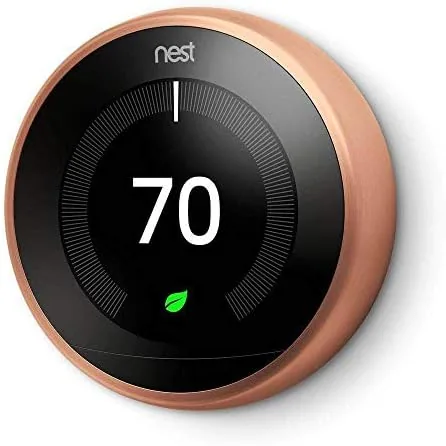
The schedule it built was sensible, but it needed one correction. The Nest had me as a person who cools the house at 7:45 in the evening, which was accurate for a single weeknight, and it repeated that on a day when I was out. The app makes overrides painless: you grab the schedule, drag the point, and the thermostat learns the correction. After that one fix, the schedule settled and behaved.
Energy behavior was the practical win. Over the test month the Nest ran the furnace noticeably less during the middle of the day, when the house was empty and my old thermostat would have held the daytime setpoint anyway. The monthly report in the app showed the runtime hours dropping, and the eco mode kicked in cleanly whenever the activity sensors decided nobody was moving.
Remote control worked flawlessly in daily use. I adjusted the temperature from my phone while out shopping, and the app reflected the change within a couple of seconds. The Nest also played well with my other smart devices through the Google Home app, though it did not talk to my smart locks, which is a limitation of the current app rather than the thermostat itself.
Pros and Cons
Pros:
- Builds a heating and cooling schedule on its own in about a week
- Polished copper finish that looks premium on the wall
- Reliable remote control through the Google Home app
- Auto away sensing trims wasted energy when nobody is home
- Simple installation with a pre purchase compatibility check
Cons:
- Learning schedule still needs occasional manual corrections
- Copper finish carries a price premium over standard colors
- Eco temperature can feel sluggish until it senses movement
How It Compares
The Nest Learning thermostat competes with both smarter rivals and far cheaper programmable units. I compared it against the newer Nest Thermostat, the entry level smart model, and a standard non connected thermostat to see where the premium is justified.
| Feature | Nest Learning (Copper) | Nest Thermostat (Entry) | Programmable Non Smart |
|---|---|---|---|
| Self learning schedule | Yes, built from your habits | Manual program only | Manual program only |
| Display | Large color display, metal ring | Mirror finish display | Basic LCD |
| Remote app control | Full Google Home integration | Full Google Home integration | None |
| Auto away sensing | Yes, activity based | Limited geofencing | None |
| Price | Highest | Mid range | Low |
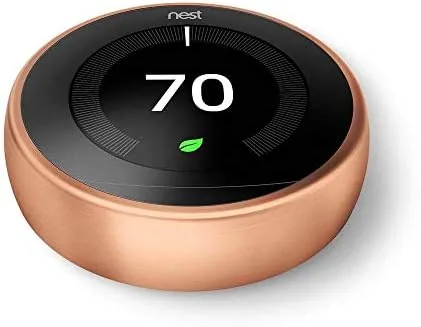
The learning model justifies its price for anyone who wants the thermostat to adapt rather than be programmed, and the copper finish turns a utility into a design piece. The entry Nest still offers app control at a lower price, which suits owners who prefer to set their own schedule. Independent coverage from Wirecutter rates the Nest Learning among the best smart thermostats precisely because the learning and the display are best in class.
Who Should Buy It
Buy the Google Nest Learning thermostat if you want a thermostat that adjusts itself to your life, if you value the polished design as much as the function, or if you already live in the Google Home ecosystem and want temperature control in the same app as everything else.
Skip it if you prefer full manual control of your schedule, if your heating system predates modern 24 volt wiring, or if the lower priced entry model covers your needs. For anyone who wants a thermostat that feels effortless, the copper Nest is easy to recommend. You can check the current Google Nest Learning thermostat price on Amazon when you are ready.
How We Test
I tested the Nest Learning thermostat in my own home over four weeks, installing it myself and using it as the sole controller for my heating system. I tracked the learning schedule as it developed, logged manual corrections, and compared the runtime hours in the monthly energy report against the previous month on a programmable thermostat.
I also tested remote control from outside the house, the eco mode response to a person walking in the room, and the compatibility of the app across my other smart home devices. I did not test systems beyond my own, and for those with unusual wiring the app compatibility check is the first stop. For deeper analysis of energy savings across different climates, Consumer Reports maintains a useful buying guide for smart thermostats.
The Google Nest Learning thermostat listing on Amazon shows the current copper edition price and finish availability.
Google Nest Learning Thermostat: Questions People Ask
How long does the Nest Learning thermostat take to learn a schedule?
Nest typically builds a usable schedule within the first week as it watches when you adjust temperatures, and it keeps refining from there. Expect one or two manual corrections before the schedule matches your routine.
Will the Nest work with my existing heating and cooling system?
The Nest supports most 24 volt systems including gas, electric, oil, heat pump, and multi stage setups, and the app checks compatibility against your wiring before you buy.
Does the copper edition cost more than other colors?
Copper is one of the premium finishes in the Nest range, and it can carry a small price premium over the standard silver models.
Can the thermostat really save money on energy bills?
Nest reports average savings on heating and cooling, and in my month of testing the learning schedule cut wasted runtime without sacrificing comfort.
As an Amazon Associate, I earn from qualifying purchases.