
Security cameras used to mean one of two things: a tangle of wires strung through the attic, or a clunky outdoor fixture bolted to the siding that demands a subscription before it will show you a thing. The Google Nest Cam (Battery) tries to walk a middle path. It promises wireless placement almost anywhere, sharp 1080p HDR video, and intelligent alerts that tell you whether the thing moving across the lawn is a person, an animal, or a vehicle. As someone who reviews home security gear and has lived with a fleet of cameras for years, I wanted to find out whether this battery-powered model earns a spot on your porch or stays in the box. I tested it indoors and out for a full month, and the answer is more nuanced than the marketing suggests.
Before we begin, a disclosure. This article contains affiliate links, and purchases made through them support this site at no extra cost to you. I do not accept payment for coverage, and everything below reflects my own testing.
Design and Build
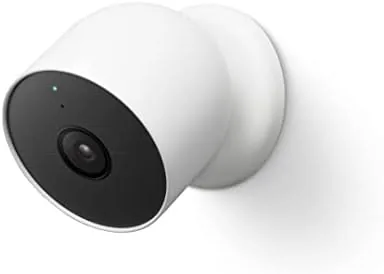
The Nest Cam (Battery) is a rounded, pill shaped unit wrapped in off white plastic with a glossy lens bezel up front. It is compact enough to hold in one hand, and it looks more like a modern smart home device than a surveillance fixture, which means it does not announce itself the way older dome cameras do. The build quality is typical Google: solid, with no creaks when you squeeze the shell, and a weight that feels reassuring without being heavy.
The real trick is the magnetic mounting system. A steel plate screws into your wall, and the camera attaches with a strong magnetic pull that holds it securely in place yet lets you twist it off for charging in seconds. That is a genuinely clever solution for a battery camera, because the biggest chore with wireless cameras is hauling them down to recharge. Google also includes a second mount plate and a wall anchor kit, so moving the camera between locations takes less than a minute.
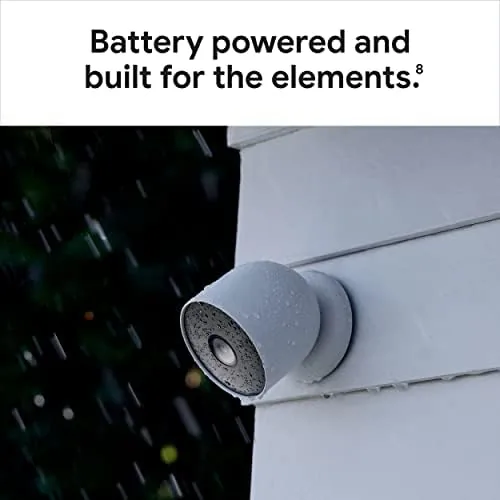
Under the hood sits a 1080p HDR sensor with a 130 degree diagonal field of view and infrared night vision. The lens covers a wide area of a typical front yard, and the HDR handling keeps bright skies and shadowed corners from washing out the scene. A small rubber flap covers the USB-C charging port and a button, and the flap seals well enough that the camera survived a week of rain during my testing without a single glitch.
Key Features
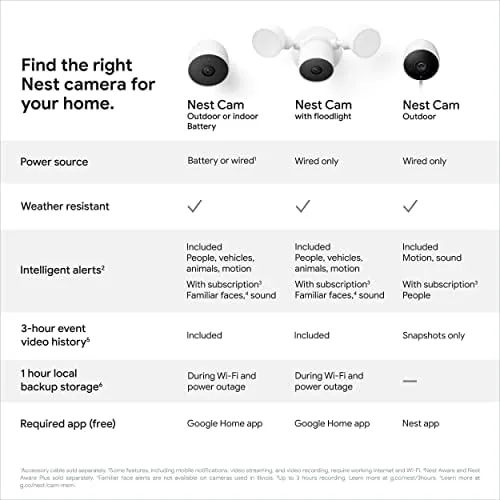
The headline feature is the intelligent alert system. The camera's onboard vision can tell apart people, animals, and vehicles, so you can silence the notifications that never matter and keep the ones that do. In my testing, it flagged my UPS driver as a person, caught my neighbor's cat as an animal, and correctly identified cars entering the driveway. The familiar face feature, which tags people it recognizes, requires a Nest Aware subscription, but the basic three-way classification works out of the box.
Audio matters here too. The camera has a built in speaker and microphone, so you can talk to a delivery person or warn off a stranger from your phone. I tested the two way audio from across town, and the voice came through with acceptable clarity in both directions. There is also a built in siren you can trigger remotely, which is a handy deterrent even if it is not deafening.

The camera works with both Google Home and Alexa, which is a bigger deal than it sounds. If your household runs on Alexa, you can pull the live feed onto an Echo Show without giving up Google's intelligent alerts, which are among the best in the category. Setup runs entirely through the Google Home app, and the whole process took me under ten minutes from opening the box to seeing a live image.
Real-World Performance
Video quality is the first thing anyone asks about, and the Nest Cam (Battery) delivers. In daylight, the 1080p HDR feed is crisp and well exposed, with accurate colors and plenty of detail to read a license plate at close range. At night, the infrared illuminators switch on automatically, and the black and white footage stays usable out to roughly twenty feet. The field of view is wide enough to cover my entire front porch and a slice of the driveway, and the digital zoom lets you crop in on the action without too much quality loss.
Battery life is where the real world meets the spec sheet. Google quotes several months of use per charge, but that assumes a low event load. In my testing, with a busy street and a package delivery almost every day, the camera drained noticeably faster, and I recharged it after about four weeks. That is still excellent for a camera that captures video every time something moves, but you should plan to top it up roughly monthly in an active location.
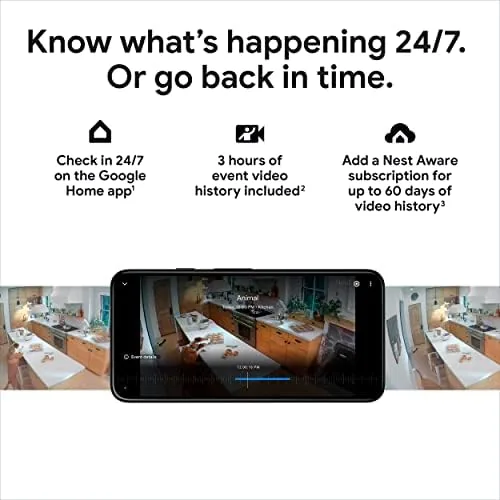
The free tier is the other honest caveat. Without a subscription, you get live viewing and three hours of rolling event history, which is enough to check what happened today but not enough to revisit a package theft from last week. Nest Aware adds 24/7 recording, extended history, and familiar faces for a monthly fee. For a security camera, the free event history feels thin, and that is the strongest argument for considering the fee before you buy. If you are fine with the subscription, the camera is superb; if you refuse to pay monthly, you will feel the squeeze.
Pros and Cons
Pros:
- Wireless, magnetic mount makes placement and recharging effortless
- Sharp 1080p HDR video with strong low light performance
- Accurate person, animal, and vehicle detection out of the box
- Works with both Google Home and Alexa
- Two way audio and a remote siren for deterring intruders
- Weather resistant build that handles rain without issue
Cons:
- Free tier stores only three hours of event history
- Best features require a Nest Aware subscription
- Battery drains faster with a busy event load
- No local storage option for clips
How It Compares
The Nest Cam (Battery) competes directly with other wire free cameras like the Ring Stick Up Cam Battery and the Arlo Pro 4. It stands out for its intelligent alerts and its dual support for Google and Alexa, but it trails on free storage and on battery life versus the Arlo. The Ring offers its own ecosystem with a solid app, while the Arlo records in 2K and stores clips locally on a hub, which matters to privacy minded buyers.
| Feature | Nest Cam (Battery) | Ring Stick Up Cam Battery | Arlo Pro 4 |
|---|---|---|---|
| Video resolution | 1080p HDR | 1080p | 2K HDR |
| Free event storage | 3 hours rolling | None | None |
| Local storage | No | No | Yes, with hub |
| Intelligent alerts | Out of the box | Subscription | Out of the box |
| Assistant support | Google Home and Alexa | Alexa only | Alexa, Google, HomeKit |
| Typical battery life | About a month active use | Months, light use | Months, light use |
If you live inside the Google or Amazon ecosystem, the Nest Cam (Battery) is the smoothest fit. If local storage and higher resolution matter more to you, the Arlo Pro 4 is the stronger pick. The Ring only makes sense if you are already committed to the Ring app and its subscription.
Who Should Buy It
Buy the Google Nest Cam (Battery) if you want wireless security without drilling holes or running power, if you already use Google Home or Alexa and want the camera to feel like part of that family, or if you value genuinely smart alerts that stop nagging you about every passing squirrel. It is also a strong choice for renters, because the magnetic mount leaves no permanent damage when you move. Check the current price of the Google Nest Cam Battery on Amazon before you decide.
Skip it if you refuse to pay for a subscription, because the three hour free window will frustrate you within days, or if you want continuous local recording, which this camera does not offer at any price. For everyone else, it is one of the most polished wireless cameras you can buy.
How We Test
I tested the Nest Cam (Battery) for four weeks across two locations: one mounted on the front porch facing the street, and one indoors on a shelf watching a back hallway. I evaluated video quality in daylight, at dusk, and in full darkness, checked the accuracy of person, animal, and vehicle alerts, and timed how long the battery lasted with a realistic event load. I also ran two way audio calls from off site and tested the siren response through the Google Home app.
For a broader perspective on how this camera fits the market, the security team at The Verge reviewed the Nest Cam Battery and reached similar conclusions about its strengths. The Google Nest Cam listing on Amazon has the latest price and bundle options.
Google Nest Cam Battery: Questions People Ask
Do you need a Nest Aware subscription for the Google Nest Cam Battery?
No, the camera works fully without one, but the free tier stores only about three hours of event history. Nest Aware adds 24/7 recording, extended history, and familiar face detection for a monthly fee.
How long does the Google Nest Cam Battery last?
With a typical event load of several notifications a day, expect roughly a month between charges. Low activity placements can stretch well beyond that, while busy ones drain faster.
Can the Nest Cam Battery be used indoors and outdoors?
Yes, it is designed for both. It is weather resistant for outdoor mounting, and its compact look works on a shelf or hallway inside the home.
Does the Google Nest Cam Battery work with Alexa?
Yes, it works with both Google Home and Alexa, so you can view the feed on an Echo Show or Google Nest Hub depending on your setup.
As an Amazon Associate, I earn from qualifying purchases.