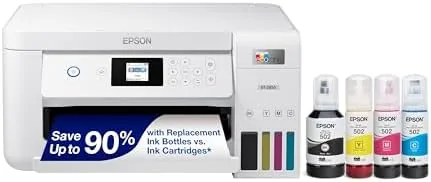

The printer industry survives on a quiet trick. The machine itself is sold cheap, and the real money comes later, from cartridges that run dry at the most inconvenient moments and cost more per ounce than premium perfume. The Epson EcoTank ET-2850 is the counterattack. It is a wireless all-in-one that abandons cartridges entirely, replacing them with refillable ink tanks that hold enough color for thousands of pages, and it adds automatic two-sided printing that the cheaper EcoTank models leave out. I spent a month with the ET-2850 as the only printer in a busy household, and this review records how the supertank promise holds up in real life.
Before the details, the standard note. This article contains affiliate links, and if you buy through one of them the site earns a small commission at no extra cost to you. That commission does not change what I test or what I recommend, and you can check the current price for the Epson EcoTank ET-2850 on Amazon whenever you like.
Design and Build
The ET-2850 is a compact, rounded all-in-one finished in white, built for a shelf or a corner desk rather than a print room. The scanner lid folds down flat on top, and the paper tray pulls out from the bottom with a 250 sheet capacity that covers a normal household's needs between refills. The control panel is a small color display flanked by buttons, bright enough to read and simple enough to navigate without a manual.
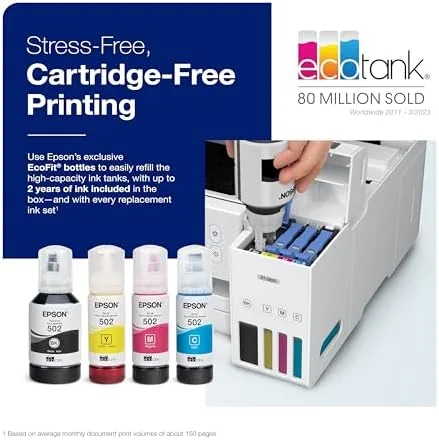
The signature element sits on the right side of the machine: four translucent ink tanks in cyan, magenta, yellow, and black, visible through a clear window so you can check levels at a glance. Refilling is a pour, not a purchase. Each bottle is keyed to its color so you cannot seat the black bottle in the cyan tank by accident, and the transparent reservoirs make the whole process feel obvious rather than intimidating.
Build quality is solid for a home machine. The plastic feels dense, the paper path is straightforward, and nothing rattles when the printer is working. The footprint is noticeably smaller than the big office all-in-ones, which matters in a home where desk space is at a premium.
Key Features
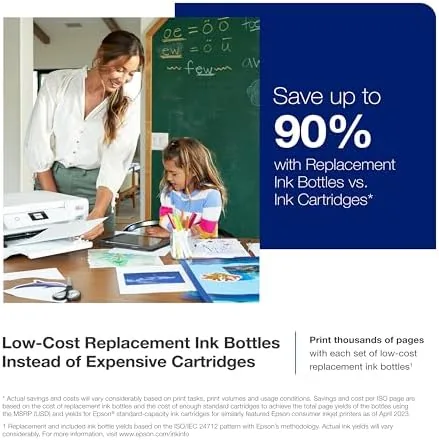
The supertank system is the reason this printer exists. The box includes a full set of ink bottles, and Epson rates them for up to 4,500 black pages and 7,500 color pages. For a household printing homework, forms, and the occasional photo, that is years of printing before a refill, and the refill bottles themselves cost a fraction of what cartridge equivalents would run. It is the single most compelling argument the EcoTank lineup makes.
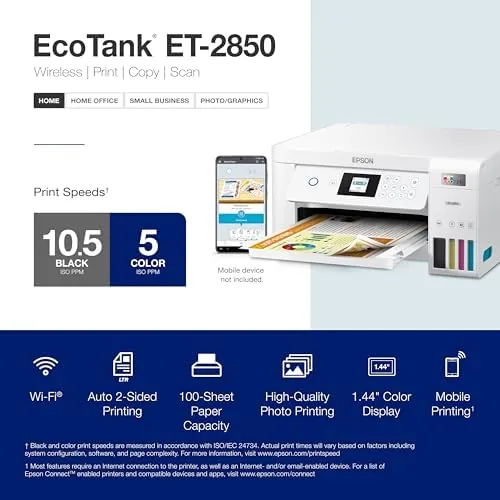
Automatic two-sided printing sets the ET-2850 apart from the entry-level ET-2800. You select duplex in the driver or on the panel, and the printer flips the page itself for double-sided documents. A thirty page report comes out as fifteen sheets, which saves paper, halves the stack, and removes the manual page-flipping chore that cheaper models still demand.
Connectivity covers the modern home. Wi-Fi puts the printer on the network so any laptop or phone can reach it, and Wi-Fi Direct lets a device connect without a router at all, which is a lifesaver at a rental or a campsite. USB provides a wired fallback, and the Epson Smart Panel app handles setup, scanning, and ink monitoring from a phone. The machine also prints borderless photos up to 4 by 6 inches, turning phone snapshots into tangible prints without white margins.
Real-World Performance
Setup took about twenty minutes, and most of that was the ink fill. Each bottle pours into its matching tank until the reservoir reads full, then the printer runs a priming cycle before the first print. The process is clean, the bottles do not spill when seated correctly, and the setup wizard walked me through the network connection without a hitch. The printer appeared on every device in the house, including phones and tablets, without a repeat install.
Print quality was the pleasant surprise. Black text came out dense and sharp, the daily fare of school and work documents, and color charts held their detail for graphs and presentations. Photos printed acceptably for reference and scrapbook work, with believable skin tones, though they do not match a dedicated photo printer, which is the honest expectation for a workhorse machine.
Speed kept pace with the workload. Epson rates the ET-2850 at up to ten pages per minute in black, and single-sided jobs emerged quickly, while automatic duplexing handled a thirty page report with no page flipping from me. Scanning from the flatbed returned clean, well-aligned files, and the copy function worked exactly as you would hope. The running cost claim held up through a month of steady use: the ink level barely moved, which is the supertank promise made visible.
Pros and Cons
- Pros: Cartridge-free supertank ink that yields thousands of pages per refill; automatic two-sided printing as standard; Wi-Fi, Wi-Fi Direct, and USB connectivity; borderless photo printing up to 4 by 6 inches; compact footprint for a home desk.
- Cons: Higher upfront price than a cartridge printer; no automatic document feeder for multi-page scanning; photo quality trails dedicated photo printers; initial ink fill adds time to first setup.
How It Compares
The ET-2850 competes with cartridge all-in-ones and with other EcoTank models, and the table below shows where it lands.
| Feature | Epson ET-2850 | Epson ET-2800 | Cartridge all-in-one |
|---|---|---|---|
| Ink type | Refillable bottles | Refillable bottles | Replaceable cartridges |
| Two-sided printing | Automatic | Manual | Varies by model |
| Document feeder | No | No | Varies by model |
| Cost per page | Very low | Very low | High |
| Upfront price | Mid | Lower | Low |
Against the cheaper ET-2800, the ET-2850 earns its premium with automatic duplexing alone, and the two machines are otherwise close. Against a cartridge all-in-one, the ET-2850 loses on the sticker price and wins decisively on running cost, because the savings compound with every hundred pages. Independent testing from PCMag has repeatedly found that EcoTank models win on cost per page, which is the metric that matters most once the initial purchase fades.
Who Should Buy It
Buy the Epson EcoTank ET-2850 if your household prints every week, if you want two-sided printing without fiddling with pages, or if you are tired of the recurring cost of cartridges. It is also the right pick if you print photos occasionally and want borderless prints without buying a separate photo printer. You can check today's pricing on Amazon to weigh the higher purchase price against the savings.
Skip it if you print only a few pages a month, since a cheaper cartridge machine may serve you fine, or if you scan thick stacks of documents, because the flatbed requires manual page changes without a document feeder. For everyone else, the ET-2850 is the rare printer that makes financial sense the more you use it.
How We Test
I used the Epson EcoTank ET-2850 as my only printer for a month. I printed more than 400 pages of mixed black-and-white and color documents, ran a thirty page report through automatic duplexing, and printed a dozen borderless photos on glossy paper. I scanned photographs and documents from the flatbed, tested copies at several settings, and connected the printer over Wi-Fi, Wi-Fi Direct, and USB. I refilled one tank to confirm the process, and I left the machine idle for a week to check that the printheads stayed clear between jobs.
Questions People Ask
How many pages come with the ink included in the Epson ET-2850?
Epson rates the bundled bottles for up to 4,500 pages in black and 7,500 pages in color. That replaces several years of cartridge purchases for a typical household, depending on how much you print.
Does the Epson EcoTank ET-2850 print on both sides automatically?
Yes. Automatic two-sided printing is built in, so long documents come out double sided without you having to flip the pages yourself, which saves paper and time.
Can the ET-2850 print borderless photos?
Yes, it prints borderless photos up to 4 by 6 inches, which makes it handy for phone snapshots and school projects, though fine art prints are still better left to a dedicated photo printer.
Does the Epson EcoTank ET-2850 use cartridges?
No. It uses refillable supertank bottles, so there are no cartridges to buy, and the transparent tanks let you check ink levels at a glance before starting a job.
The Epson EcoTank ET-2850 makes a simple promise: print as much as you want without dreading the ink bill. It delivers on that promise with sharp output, automatic duplexing, and a refill system that turns ink from a recurring expense into a rare one. If you print with any regularity, the savings pay for the machine over time. Check the latest price on Amazon to see if the math works for you.
As an Amazon Associate, I earn from qualifying purchases.



