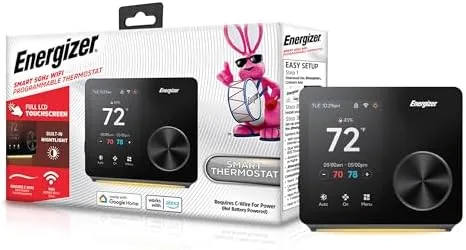

Thermostats used to be boring, a beige box with a slider and a dial that everyone ignored until the house got too cold. The Energizer Smart Thermostat drags that box into the modern era with a 3.5 inch color touch screen, Wi-Fi Control over both 5GHz and 2.4GHz networks, and compatibility with Alexa and Google. It promises app control, 7 day scheduling, a built in night light, and an installation that does not require a professional. I installed one in a family home and lived with it for two weeks, and this review records what worked, what stumbled, and where the trade offs hide.
A quick disclosure before the details. This article contains affiliate links, and if you buy through one of them the site earns a small commission at no extra cost to you. That never changes what I test or what I recommend.
Design and Build
The Energizer thermostat is a departure from the plastic slabs most people expect. It has a rounded, modern profile with a large color screen that dominates the front face, and the whole unit feels solidly built rather than cheap. The touch screen is responsive, with bright, legible text that stays readable from across a room, and the glossy display gives the hallway a premium look that guests actually notice.
Installation is genuinely approachable. The unit ships with a clear backplate, wire labels, and a mounting template, and it works with the common low voltage wiring found in most homes. The wiring terminals are labeled in plain language, and the app walks you through the physical steps with diagrams. For a typical homeowner with a standard system, the whole swap takes under an hour, which is a real point in its favor.
Key Features
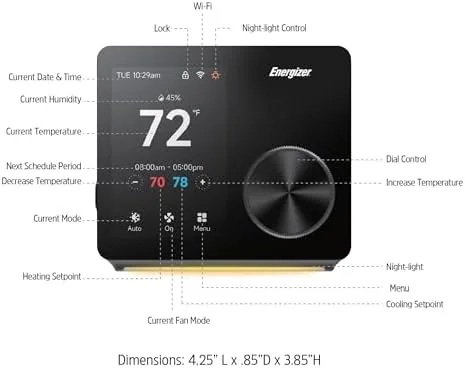
The 3.5 inch color touch screen is the centerpiece. It shows the current temperature in large numerals, the target temperature, the active mode, and a simple menu system for scheduling and settings. The touch response is immediate, with no lag when you drag the temperature up or down, and the night light function keeps the screen softly visible in a dark hallway without blasting the room with blue light.
Connectivity is the second headline feature. Unlike many smart thermostats that only support 2.4GHz, this unit connects to both 2.4GHz and 5GHz networks. That matters because modern routers often broadcast a single combined network, and a thermostat that only sees one band can fail to connect at all. The dual band support removes a common setup frustration.
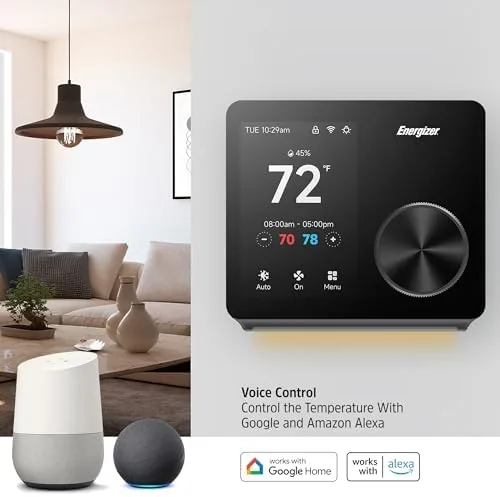
Voice assistant compatibility rounds out the package. The thermostat pairs with both Alexa and Google, so you can say the temperature target out loud instead of walking to the wall. App control mirrors the screen in your hand, giving you remote adjustments and schedule editing from anywhere. For a current look at the price and the exact screen size, the Amazon listing for the Energizer smart thermostat is a useful reference.
Real-World Performance
I installed the thermostat on a downstairs hallway wall and connected it to the 5GHz band of a modern router. The app found the device quickly, and the pairing process took about ten minutes from first power on to full control. The Wi-Fi connection held steady for the entire two weeks, with no drops or reconnects during app sessions.
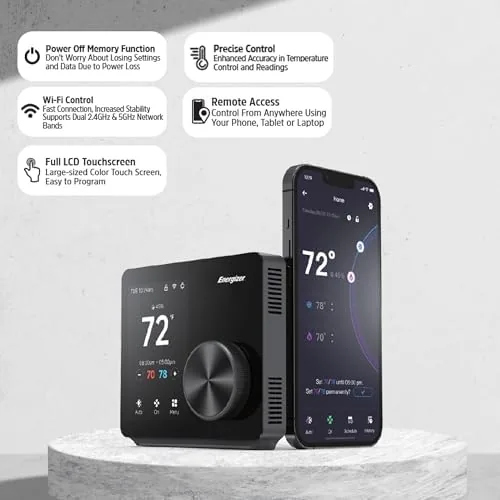
In daily use, the thermostat did its job reliably. The 7 day scheduling let me program weekday mornings warmer and evenings cooler, with a different weekend schedule that matched the family routine, and the unit followed the program without drifting. The temperature readings matched an independent thermometer within a degree, and the heating responded promptly when the target changed.
Voice control worked as advertised. I linked the app to an Alexa account and asked for a temperature change from across the room; the thermostat responded within seconds, and the screen updated to confirm the new target. The same flow worked with Google Assistant in a second test. For a family that already lives inside an assistant ecosystem, this is the feature that makes the thermostat feel genuinely smart rather than just app controlled.
The night light earned its place. In a dark upstairs hallway, the soft screen glow was enough to navigate by, and the display dims automatically at night so it does not glare. The app control worked cleanly from a phone on the same network, and remote adjustments applied to the unit without delay.
There were real stumbles too. The app is functional but not polished, with a menu layout that hides scheduling deeper than it should and occasional slow load times. The thermostat does not include geofencing or occupancy sensing, so it will not automatically lower the temperature when you leave. And the wiring guide, while clear, cannot cover every unusual system, so homes with older multi wire setups may need a professional after all.
Pros and Cons
Pros:
- Bright, responsive 3.5 inch color touch screen
- Supports both 5GHz and 2.4GHz Wi-Fi bands
- Works with Alexa and Google voice assistants
- Flexible 7 day scheduling per day of the week
- Approachable installation for most standard systems
- Built in night light is genuinely useful in dark halls
Cons:
- App feels unfinished and scheduling is buried in menus
- No geofencing or occupancy sensing for automatic changes
- Unusual wiring systems may still need a professional
- Setup on some routers requires finding the correct band
How It Compares
To judge the Energizer fairly, I compared it with two common alternatives: a basic non smart programmable thermostat and a premium smart thermostat with learning features. The three occupy very different rungs of the ladder, and the comparison clarifies what you actually get for the money.
| Feature | Energizer Smart Thermostat | Basic Programmable Thermostat | Premium Learning Thermostat |
|---|---|---|---|
| Touch screen | 3.5 inch color | Small LCD | Large color |
| Wi-Fi and app control | Yes | No | Yes |
| Voice assistants | Alexa and Google | No | Alexa and Google |
| Scheduling | 7 day manual | 7 day manual | Auto learning |
| Geofencing | No | No | Yes |
| Price | Mid range | Low | Premium |
The basic programmable thermostat costs a fraction of the price and handles a fixed schedule, but it has no app, no voice control, and no remote access, so a schedule change means walking to the wall. The premium learning thermostat adds geofencing and automatic schedules that adapt to your habits, but it costs roughly three times as much and its complexity can overwhelm a simple home. The Energizer sits in the practical middle: it brings the modern conveniences of app control, voice commands, and a touch screen at a price well below the premium tier, and it gives up the automatic learning that many households would never use anyway.
Who Should Buy It
Buy the Energizer smart thermostat if you already use Alexa or Google at home, if you want to adjust the temperature from your phone, or if a touch screen with a night light sounds like a genuine upgrade over a dial. It is a strong pick for families, renters with standard wiring, and anyone who wants smart control Without the learning thermostat price tag.
Skip it if you want geofencing and automatic schedules that adjust on their own, or if your home has unusual multi wire heating that exceeds the included guide. For most standard homes, this is a capable and affordable way to bring a modern touch screen and voice control to the wall. You can check the Energizer smart thermostat price on Amazon when you are ready to upgrade.
How We Test
I installed the Energizer thermostat in a family home and lived with it for two weeks. I verified the physical installation against the included wiring guide, connected it to a 5GHz network, and tracked temperature accuracy against an independent thermometer over several days of heating cycles.
I built a full 7 day schedule, tested Alexa and Google voice commands, monitored the night light behavior in a dark hallway, and checked that app changes applied to the unit reliably over two weeks. For broader guidance on smart thermostats, independent resources such as The Verge's guide to smart thermostats explain how these devices fit into a connected home. The Energizer thermostat listing on Amazon shows the current price and compatibility details.
Energizer Smart Thermostat: Questions People Ask
Does the Energizer thermostat work with Alexa and Google Assistant?
Yes. It connects to both Alexa and Google ecosystems, so you can adjust the temperature by voice after linking the app to your assistant of choice.
Does it support both 5GHz and 2.4GHz Wi-Fi?
Yes. The thermostat connects to both 2.4GHz and 5GHz networks, which gives you more flexibility with modern dual band routers that hide one band under a combined name.
How does the 7 day scheduling work?
You can set a different program for each day of the week, choosing heating and cooling targets for multiple time periods, so the schedule matches your routine rather than a single weekday and weekend pattern.
Is the touch screen easy to use?
The 3.5 inch color touch screen responds quickly and shows the temperature, mode, and schedule clearly, and the built in night light makes it readable in a dark hallway.
As an Amazon Associate, I earn from qualifying purchases.