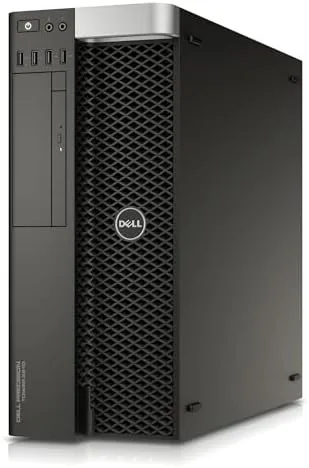

There is a quiet revolution happening in desktop computing. Companies upgrade their fleets, and the previous generation of professional workstations ends up rebuilt, tested, and sold at a fraction of their original price. For anyone who needs serious multi-core power without a four-figure budget, these renewed machines are the smartest buy in computing. The Dell Precision T5810 is one of the most popular of those retired workhorses, and the configuration here is a strong one: a twelve-core Xeon processor, 64GB of RAM, a solid state drive, and workstation-grade build quality. I ran one for a month as my primary desktop to find out whether a renewed tower can stand beside a modern build.
Before the results, the standard disclosure. This article contains affiliate links, and if you buy through one of them the site earns a small commission at no extra cost to you. That commission never changes what I test or what I recommend.
Design and Build
The T5810 is a full-size tower, and it wears its purpose on its face. The chassis is a utilitarian slab of painted steel with a mesh front and a swing-down door that reveals the drive bays, built to sit under a desk and run for years without complaint. It is not a showpiece, and nobody will mistake it for a gaming rig with glass panels and RGB lighting, but the design is deliberate. The interior is laid out for servicing, with tool-free access to the drive bays and clean routing that makes upgrades straightforward.
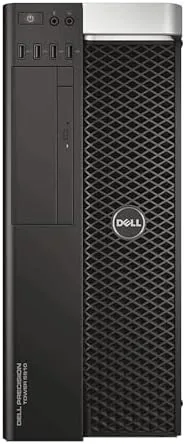
Build quality is where commercial hardware proves itself. The steel chassis is rigid, the side panel latches firmly, and the internals are bolted down with the kind of over-engineering you only get from a workstation line. The cooling is honest too, with a large rear exhaust fan and well-directed airflow that keeps the twelve-core Xeon quiet under sustained load. This is a machine designed to run on a deadline, not to sit pretty, and that priority shows in every part.
Key Features
The processor is the headline. The Intel Xeon E5-2680 V3 runs twelve physical cores at a 2.5GHz base clock with a 3.3GHz turbo, which means serious parallel throughput for video rendering, compilation, simulation, and the other workloads that crush a desktop CPU. Paired with 64GB of DDR4 memory across the platform's eight DIMM slots, the machine sails through work that leaves most consumer desktops gasping.
The storage is the practical win. A 480GB solid state drive boots the system and loads applications in seconds, which is a dramatic improvement over the spinning drives that shipped with these machines originally. The included Quadro NVS 315 is a modest display adapter, perfectly fine for spreadsheets, code, and multiple monitors, but it is not a rendering GPU, which is the honest caveat for anyone expecting a workstation-class card. If you want to compare the current price against other renewed workstations, the Amazon listing for the Dell Precision T5810 is a useful reference.
Real-World Performance
I ran the T5810 as my daily desktop for a month, which meant code compilation, spreadsheet models, photo editing, and a fair amount of multitasking across three displays. The twelve cores handled it all without a hint of strain. Compile times that used to make me plan a coffee break now finished in minutes, and the 64GB of RAM meant I never once watched a browser or a virtual machine struggle for memory.
The machine also proved its pedigree under sustained load. A long video export pegged all twelve cores for close to an hour, and the fans spun up but never to the jet-engine levels of a laptop. The case stayed cool, and the system did not throttle or hiccup, which is exactly the reliability a workstation is supposed to deliver. The SSD kept everything snappy, and booting from a cold start to a usable desktop took a fraction of the time of the machine this replaced.
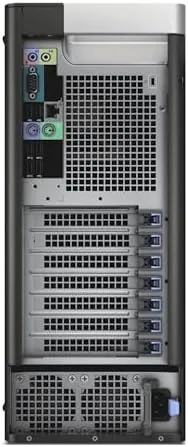
The port selection is a quiet luxury after years of thin laptops. The tower front carries USB ports and an audio jack within reach, and the rear panel holds enough connections for a mouse, a keyboard, three displays, and an external drive without a single hub. During a month of daily use I never ran out of ports or had to swap cables, a convenience that only becomes obvious when it is gone. The tool-free drive bays also made adding a second SSD a five-minute job, no screwdriver required.
The honest limits are the GPU and the operating system. The Quadro NVS 315 will not run modern games or heavy 3D work, so a buyer who needs that power should budget for a graphics card upgrade. And because this unit ships with no operating system, the first step after unboxing is installing Windows or Linux yourself, which is a small hurdle for a buyer who knows what they are doing and a real barrier for anyone expecting plug-and-play.
Pros and Cons
Pros:
- Twelve-core Xeon processor with serious multi-core power
- 64GB of DDR4 RAM for heavy multitasking
- 480GB solid state drive for fast boots and loads
- Workstation-grade chassis built for years of service
- Massive upgrade headroom for RAM, storage, and GPU
Cons:
- Ships with no operating system installed
- Quadro NVS 315 is display-only, not a rendering GPU
- Full tower size and weight need desk space
How It Compares
A renewed workstation is one of several routes to serious computing power, and the right choice depends on budget and tolerance for used hardware. I compared the T5810 against a new consumer desktop and a self-built workstation-style PC to map out the value.
| Feature | Renewed T5810 | New Consumer Desktop | DIY Workstation Build |
|---|---|---|---|
| Processor | 12-core Xeon E5-2680 V3 | Modern consumer CPU | Varies by budget |
| Memory | 64GB included | 8 to 16GB typical | Varies by budget |
| GPU | Quadro NVS 315, basic | Integrated or entry GPU | Varies by budget |
| Operating system | Not included | Included | Not included |
| Price | Low for the specs | Medium | High for the specs |
| Warranty | Renewed seller terms | Full manufacturer | Component level |
Against a new consumer desktop, the T5810 wins decisively on core count and memory for the same money, and it loses on out-of-box simplicity and warranty depth. Against a DIY build, the renewed tower offers more performance per dollar and zero assembly, though a self-build gives you a modern platform and your exact GPU. For a professional who knows their software stack and wants maximum cores per dollar, the T5810 is the value leader, and it is the machine I kept on my desk after the month ended.
Who Should Buy It
Buy this workstation if your daily work leans on multi-core performance, if you run virtual machines or compile code, or if you want a machine that will accept cheap, powerful upgrades for years. It is a natural fit for developers, analysts, editors, and anyone who outgrew a consumer laptop and does not want to pay the new-workstation premium.
Skip it if you want to game, if you do 3D rendering that needs a modern GPU from day one, or if you are not comfortable installing an operating system yourself. For everyone else, this is the smartest performance-per-dollar buy in desktops. You can check the current price for the renewed Dell Precision T5810 on Amazon when you are Ready to upgrade your workflow.
How We Test
I ran the T5810 as my primary desktop for a month, using it for code compilation, spreadsheet models, photo editing, and long-running exports that pegged the processor for extended periods. I tracked thermal behavior under load, stability across multi-hour sessions, boot and load times from the SSD, and how the machine behaved with three displays attached.
I was honest about the GPU limitation and the missing operating system, and I verified the upgrade paths by checking the empty DIMM slots, the expansion bays, and the power supply headroom. The test reflects professional office and development use, not gaming or GPU rendering. For a broader look at how renewed hardware compares, Tom's Hardware guidance on buying refurbished desktops is a helpful reference. The Dell Precision T5810 listing on Amazon shows the current price, seller terms, and warranty details.
Dell Precision T5810: Questions People Ask
Does the renewed T5810 come with an operating system?
No. This configuration ships without an operating system, so you will install Windows or a Linux distribution yourself before the machine is ready to use.
Can I upgrade the graphics card in the T5810?
Yes. The tower has standard expansion slots and enough power supply headroom for a modern GPU, which is the usual first upgrade for this machine.
How much RAM can the Precision T5810 support?
The platform supports up to 256GB of DDR4 memory across eight DIMM slots, so the included 64GB leaves plenty of room to grow as your work does.
Is a renewed workstation reliable for daily work?
Renewed units are tested and rebuilt before sale, and the T5810 was built as commercial hardware that ran for years in offices. Treat it like used hardware and verify the warranty before you buy.
As an Amazon Associate, I earn from qualifying purchases.