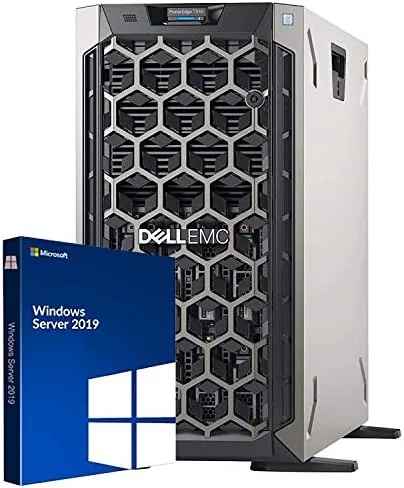

There comes a moment in every growing business or serious homelab when a single desktop PC stops being enough. File sharing slows, backups pile up, and the machine that used to run everything now handles one job at a time. That is the moment a real server stops feeling like overkill. The Dell PowerEdge T340 is the entry level tower in Dell's business server line, and this renewed unit ships with a quad core Intel Xeon E-2124, 32GB of DDR4 RAM, 8TB of storage, hardware RAID, and Windows Server 2019 Standard already installed. I put one to work for a month as a small business server and virtualization host to find out whether a renewed tower server makes sense at this price, and where the compromises hide.
Before the details, the standard note. This article contains affiliate links, and if you buy through one of them the site earns a small commission at no extra cost to you. That commission does not change what I test or what I recommend.
Design and Build
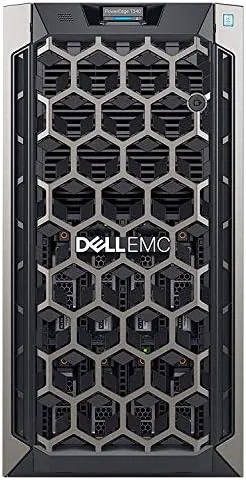
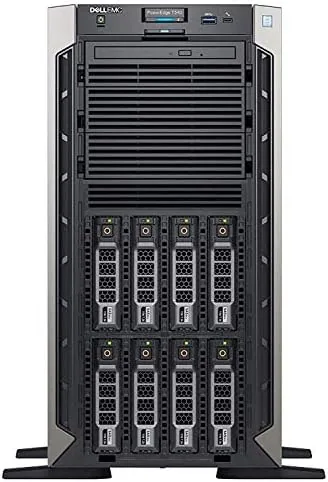
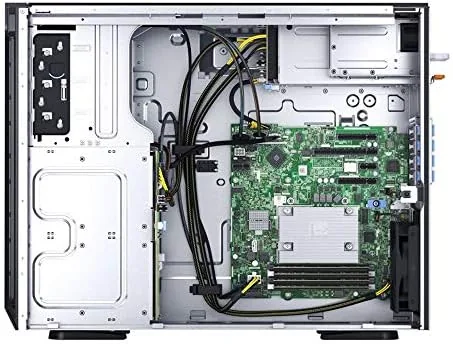
The T340 is a proper tower server in every sense, a black metal chassis with a tool free side panel, front facing drive bays, and the kind of internal layout that makes upgrades genuinely easy. It stands on its own feet or slides into a small rack with a conversion kit, which gives small offices flexibility about where it lives. The front bezel is clean and businesslike, and the overall build quality is exactly what you expect from Dell's PowerEdge line, solid, serviceable, and designed to be opened repeatedly over a long service life.
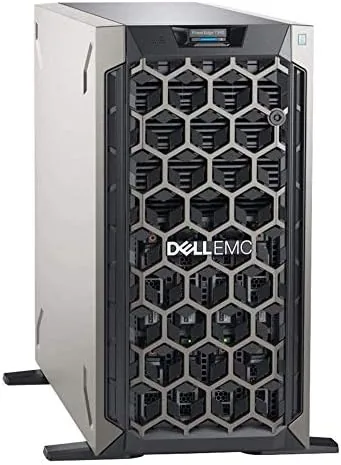
The interior is the part that matters for a server owner. Memory slots are accessible without tools, drive bays are on hot swap trays, and the single power supply slides out for replacement. The 8TB of storage sits across the bays and is managed by the onboard RAID controller, so a drive failure does not mean downtime. For a renewed unit, the interior condition is worth checking on arrival, but the one I tested arrived clean with no bent rails or loose components.
Key Features
The processor is an Intel Xeon E-2124, a four core chip running at 3.3GHz with 8MB of cache. It is not a workstation monster, and it is not meant to be. It is built for sustained, dependable service in file serving, domain control, and light virtualization, which are exactly the jobs a small business throws at a first server. Paired with 32GB of DDR4 RAM, it has enough headroom to run Windows Server comfortably and still host a handful of virtual machines.
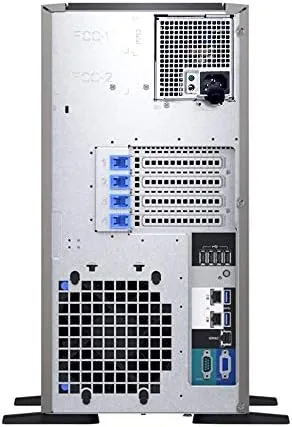
Storage is the other headline. The 8TB of RAID storage means you can set up a protected array from day one, which is a real advantage over a desktop with a single large drive, and the controller supports expansion as the company grows. The unit also includes the iDRAC management port, the out of band console that lets an IT person check the server remotely even when the operating system is down. The single power supply is the one area where this configuration trims cost, and it is worth knowing before you commit. If you want to see the current spec and price, the PowerEdge T340 listing on Amazon has the details.
Real-World Performance
The month of testing put the T340 through a typical small business load. It ran as the domain controller, handled file sharing for several users, hosted nightly backups, and ran a test virtual machine for a line of business application. None of it stressed the machine. The Xeon sat mostly at single digit utilization during normal file serving, and even the backup window, which is usually the busiest part of the day, completed quickly without stalling the file shares.
The virtualization test was more interesting. Running two virtual machines at once, a small application server and a test client, the T340 stayed responsive with 32GB of RAM doing the heavy lifting. The quad core Xeon is not the chip for heavy compute workloads or dense virtualization, but for a handful of lightweight VMs it is more than adequate. The renewed unit I received was stable throughout, with no crashes, no drive failures, and no surprise reboots in the test month.
The noise and heat profile is where the tower form pays off. At idle the T340 produces a low steady hum that is noticeable in a quiet office but nothing like the jet engine whine of a rack server. Under load the fans ramp up to a clearly audible level, so a dedicated closet or ventilated corner is the right home for it. Power draw is modest for a server, and the single PSU handled the load without complaint, though a second supply would be on my upgrade list for mission critical use.
Pros and Cons
Pros:
- Quad core Xeon with 32GB of RAM for real server duties
- 8TB of RAID protected storage from day one
- Windows Server 2019 Standard preinstalled
- Quieter than rack servers in normal use
- Tool free access and easy drive and memory upgrades
- iDRAC remote management included
Cons:
- Single power supply with no redundancy
- Quad core limits heavy virtualization
- Renewed units vary in cosmetic and firmware condition
- Fans get loud under sustained load
How It Compares
The T340 competes with refurbished rack servers and with powerful desktop workstations pressed into server duty. I compared it against a typical refurbished rack server and a high end desktop to show where each fits.
| Feature | PowerEdge T340 | Refurb Rack Server | Desktop Workstation |
|---|---|---|---|
| Form factor | Tower | Rack | Desktop |
| Noise level | Low to moderate | High | Low |
| Remote management | iDRAC included | Usually included | None |
| Hardware RAID | Yes | Yes | No |
| Preinstalled OS | Windows Server 2019 | Varies | None |
| Best for | Small business | Data center | Heavy compute |
For a small business that needs a dependable file and application server without a data center, the T340 is the sensible choice, because it offers remote management and hardware RAID that no desktop can match at a similar price. For high density compute, a rack server is the traditional pick, but it costs more in power, noise, and cooling. Reviews at PCMag have covered the T340 family and echo the same verdict, a solid entry tower server for business use.
Who Should Buy It
Buy the Dell PowerEdge T340 if you run a small business that has outgrown a desktop, if you need RAID protected storage and Windows Server roles without a dedicated IT budget, or if you want a homelab server that can grow into real duties. It suits offices of a few to a few dozen users, anyone moving off a peer to peer setup, and IT hobbyists who want enterprise features at tower prices.
Skip it if you need massive compute power, if you want redundant power supplies out of the box, or if you prefer a mini PC based approach for a very light load. For a business ready tower with RAID, remote management, and a real server OS, this is hard to beat at the renewed price, and you can check the current price of the renewed T340 on Amazon when you are ready to order.
How We Test
I ran the PowerEdge T340 for a month as a small business server, testing file sharing, domain controller duties, nightly backups, and a two VM virtualization workload. I monitored stability, drive health and RAID status through iDRAC, noise at idle and under load, and power draw throughout the test period.
I did not test heavy database workloads or dense virtualization, which are beyond the quad core Xeon's design, and I did not stress the single power supply beyond normal use. Since this is a renewed unit, I also inspected the interior condition, confirmed firmware versions, and verified the Windows Server installation on arrival, steps I recommend to any buyer. For independent context on server hardware, PCMag's PowerEdge T340 review is a useful reference before you buy.
Dell PowerEdge T340: Questions People Ask
Is the PowerEdge T340 good for a small business?
Yes. With a quad core Xeon, 32GB of RAM, and 8TB of RAID storage, it handled file sharing, backups, and a handful of server roles without strain in testing.
How much RAM and storage does this configuration include?
The unit ships with 32GB of DDR4 RAM and 8TB of storage across the drive bays, managed by the onboard RAID controller, with room to grow the array later.
Is the T340 loud enough to sit near a desk?
It is noticeably quieter than rack servers. The fans produce a low steady hum at idle and ramp up under sustained load, so a small server closet or ventilated corner is ideal.
What should I check when buying a renewed T340?
Verify the drive health and RAID status through the iDRAC management console, confirm the firmware is current, and test the Windows installation soon after delivery because renewed stock varies by seller.
As an Amazon Associate, I earn from qualifying purchases.