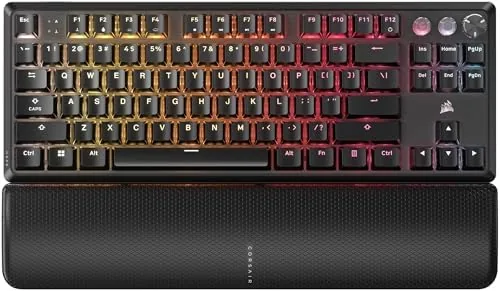

Mechanical keyboards went through a long era where the switches themselves were treated as a fixed ingredient, something you picked once and lived with. Corsair changed the script with the K70 PRO TKL, which uses Hall Effect MGX Hyperdrive switches that let you tune the actuation point of every single key. Add simultaneous SOCD and rapid trigger support, and you have a tenkeyless keyboard aimed squarely at players who want every millisecond. I used this board for a month of ranked matches and daily typing, and this review is the record of whether the adjustable switches justify the premium.
Before the details, the standard note. This article contains affiliate links, and if you buy through one of them the site earns a small commission at no extra cost to you. That commission never changes what I test or what I recommend.
The K70 PRO TKL combines Corsair's battle tested tenkeyless layout with the new MGX Hyperdrive magnetic switches. The rest of this review covers the build, the switch system, the rapid trigger and SOCD features, and how it all behaves under real play.
Design and Build
The keyboard follows a clean tenkeyless format, dropping the number pad to free up desk space without sacrificing the arrow keys and navigation cluster. The aluminum top plate gives it a premium feel, and the black finish resists fingerprints. At this size it leaves room for a full size mouse pad, which is the whole point of going TKL.
The build goes deeper than the top plate. The board has a stiff internal structure that does not flex when you bottom out a key, and the case sits flat on the desk with rubber feet that hold it in place during aggressive play. The detachable USB-C cable is a welcome addition, because it makes the keyboard easy to pack and simple to swap if the cable ever wears out.
The keycaps are ABS double-shot, which means the legends are molded through the plastic rather than printed on the surface, so they will not wear off with heavy use. The stabilizers on the larger keys feel tight, and the pre-lubed switches give the board a smooth sound out of the box without the scratchiness that plagues many stock keyboards.
Key Features
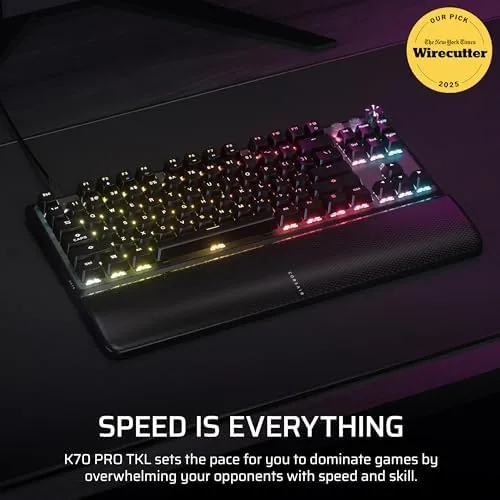
The MGX Hyperdrive switches are the centerpiece. They use a magnetic Hall Effect sensor instead of a physical metal contact, which means there is no wear on the switching mechanism and the actuation point can be set electronically. In Corsair iCUE you can tune each switch anywhere between 0.4mm and 3.6mm of travel, from a feather light tap to a deliberate press.
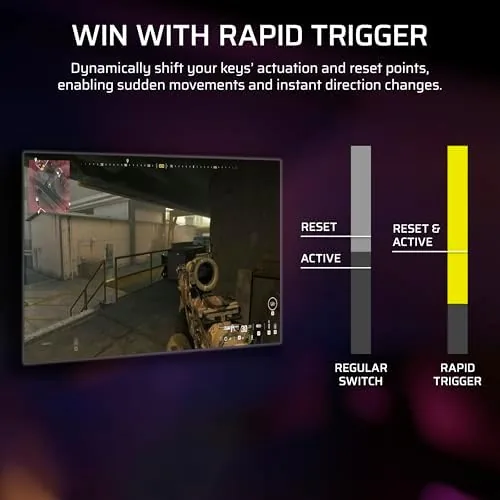
The rapid trigger feature takes that further. Instead of waiting for a key to travel back up to a fixed reset point, rapid trigger re-registers the key the instant it moves up past the actuation point. In games that reward fast repeated presses, like strafing in shooters, this removes the dead travel that slows you down.
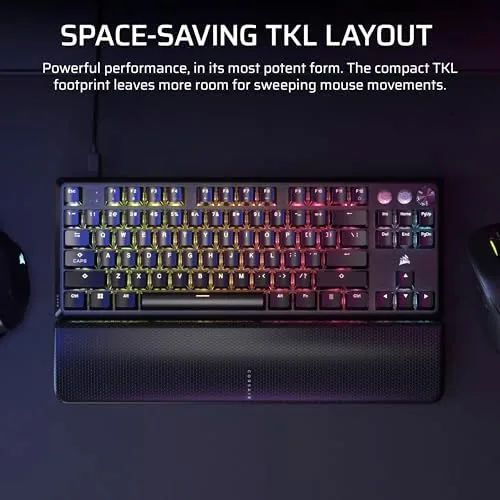
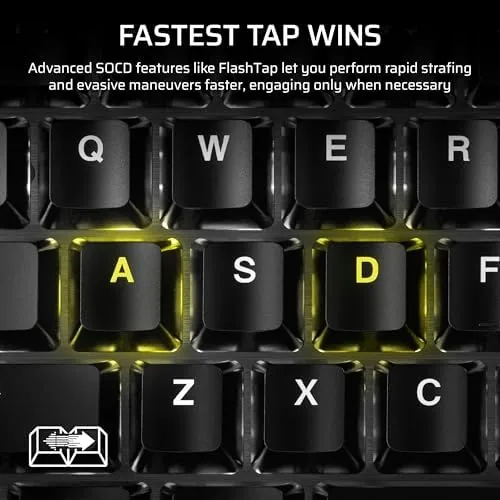
SOCD, or simultaneous opposing cardinal directions, lets the keyboard decide which direction wins when you press two opposing keys at once, a feature that matters in games where counter strafing is a skill. The board is wired, which keeps input latency at the floor, and the full per key RGB lighting rounds out the package.
Real-World Performance
The rapid trigger effect is the feature I noticed first. In Counter-Strike 2 and Valorant, counter strafing felt snappier, and repeated crouch and peek inputs registered without the lag that a physical switch reset introduces. The difference is subtle at first and then impossible to ignore once you switch back to a normal keyboard.
I also tested the rapid trigger with a controlled comparison. Setting a key to a shallow actuation point and rapidly tapping it, the board re-registered the input on every upward movement, whereas a standard mechanical switch required a full release before the next press. The measurable result was more consistent spam inputs in practice, which is exactly the edge the feature is meant to deliver in fights that come down to timing.
I tuned the actuation down to 0.4mm for movement and ability keys in shooters, and the light tap response made everything feel immediate. For typing I reset the actuation to a middle point, and the board proved comfortable for long writing sessions. The pre-lubed switches give a smooth, satisfying feel, though they are linear, so there is no tactile bump to guide your fingers.
In MOBAs and strategy games the benefits are smaller, since those genres reward less frantic input, but the board stayed reliable across hundreds of matches. The wired connection means zero wireless interference, and the RGB lighting is bright and configurable. The one adjustment is the TKL layout: anyone who lives on the number pad for spreadsheet work will miss it, and this board is not for them.
The software is the other consideration. iCUE is powerful but heavy, and tuning the switches takes a trip into the app. Once set, the settings persist on the board, so I set it once and never opened iCUE again. The ABS keycaps are fine, but heavy users may eventually want PBT for a firmer texture.
The lighting and profile system also holds up in practice. I set a separate profile for typing with a moderate actuation and a gaming profile with the fastest setting, and switching between them took one keystroke. The RGB is bright enough to look vivid in daylight, and the effect library in iCUE covers everything from simple static colors to animated waves, so there is room to make the board feel personal without much effort.
Pros and Cons
Pros:
- Per key adjustable actuation from 0.4mm to 3.6mm
- Rapid trigger reduces dead travel for faster inputs
- SOCD support for clean counter strafing
- Pre-lubed switches feel smooth out of the box
- Solid aluminum build and tight stabilizers
- Wired connection keeps input latency minimal
Cons:
- Linear switches have no tactile feedback
- iCUE software is resource heavy
- No number pad for productivity heavy users
- Premium price for the feature set
How It Compares
The K70 PRO TKL competes with other rapid trigger boards and traditional mechanical keyboards. The table below compares it against the Wooting 60HE and a standard Corsair K70 mechanical keyboard.
| Feature | K70 PRO TKL | Wooting 60HE | Standard K70 |
|---|---|---|---|
| Layout | Tenkeyless | 60 percent | Full size |
| Switch type | Hall Effect MGX | Hall Effect Lekker | Mechanical |
| Rapid trigger | Yes | Yes | No |
| Per key actuation | Yes | Yes | No |
| Extra keys | Arrow and nav cluster | Minimal | Full including numpad |
The Wooting 60HE is the competition for pure rapid trigger play, but its 60 percent layout drops the arrow keys and navigation cluster. The standard K70 gives you a full layout and classic mechanical feel but none of the adjustable features. The K70 PRO TKL splits the difference, keeping the navigation keys while adding the modern switch tech.
Who Should Buy
Buy the Corsair K70 PRO TKL if you play competitive shooters and want every edge rapid trigger and per key actuation can offer, while still keeping arrow keys and a comfortable typing experience. It is also a strong choice for anyone who wants a keyboard that can be tuned for both work and play.
Skip it if you rely on a number pad, prefer tactile or clicky switches, or want a budget board. For serious players the feature set is the point. You can check the current price of the Corsair K70 PRO TKL on Amazon when you are ready.
How We Test
I used the K70 PRO TKL for a month of ranked matches in Counter-Strike 2 and Valorant, plus daily typing work. I tuned the actuation across the full range, tested rapid trigger against a standard keyboard, and measured the practical effect on counter strafing and repeated inputs.
I also ran the board through a long typing session and checked how the settings persisted after a reboot. For a broader view of rapid trigger keyboards and this generation of switches, PC Gamer has a guide to the best gaming keyboards that is worth reading. The Corsair K70 PRO TKL listing on Amazon shows the current price and switch options.
Corsair K70 PRO TKL: Questions People Ask
What is rapid trigger on the Corsair K70 PRO TKL?
Rapid trigger re-registers a key the moment the switch moves up past the actuation point, so repeated taps like counter strafing register faster without waiting for a full key release.
Are the MGX Hyperdrive switches adjustable?
Yes, you can set each switch actuation point anywhere between 0.4mm and 3.6mm in iCUE, which lets you tune the board for fast gaming or deliberate typing.
Can the K70 PRO TKL be used with a console?
The wired USB connection provides basic input on compatible consoles, but the full rapid trigger, per key actuation, and SOCD features are designed for PC through the iCUE software.
Do the ABS keycaps hold up to heavy use?
Yes, the double-shot ABS keycaps resist legend wear well because the legends are molded through the plastic, though enthusiasts may prefer PBT for a firmer, matte texture.
As an Amazon Associate, I earn from qualifying purchases.