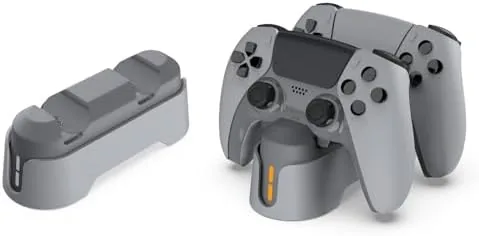

The DualSense Edge is the most expensive controller Sony has ever made, and for that price it deserves better than lying on a desk with a charging cable draped across the room. A dedicated dock changes that routine. This review covers the two bay fast charging stand made for PS5 Edge controllers, how it behaved across a full week of charging, and whether it earns its place next to the console.
Before the details, the standard note. This article contains affiliate links, and if you buy through one of them the site earns a small commission at no extra cost to you. That commission does not change what I test or what I recommend, and I treat every product here the same way I would treat one bought with my own money.
Design and Build
The station is a grey, two bay cradle that reads more like a piece of home furniture than a slab of gamer plastic. The base is wide enough to stay planted when you drop a controller into it, and the rubber feet hold firm on a wooden desk and on a glass shelf. Each bay is shaped to match the profile of the Edge controller, so the pad settles into place with a soft click rather than wobbling.
The finish is a matte grey that does not show fingerprints the way glossy console plastic does, and the LED indicator on each bay sits low enough that it does not glare at night. A single USB-C input on the rear feeds both bays, which keeps the cable count to one tidy lead rather than two. There is nothing loose or cheap about the construction, and the whole unit has the dense, reassuring weight you want in something you will grab dozens of times a week.
Key Features
The headline feature is the pair of charging bays, both built for the Edge controller and both fed by USB-C. The Edge charges over its Type-C port, and the dock presents a steady fast charge to each bay rather than the trickle you get from a spare phone charger.
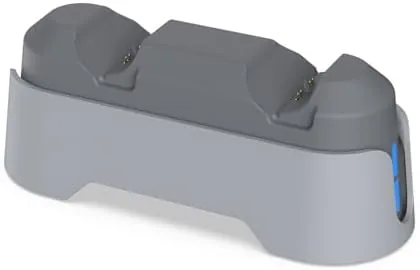
Each bay has its own status LED. The light stays solid while a controller charges, then shifts once the pad is full, so a glance tells you whether both pads are ready for a session. The station draws power from its own USB-C input, which means it works whether the console is on, in rest mode, or switched off completely. That independence is the quiet advantage of the design, because you never have to remember to leave the console awake.
Compatibility is worth stating plainly. The cradles are sculpted for the Edge, but the charging is standard USB-C, so other pads that fit the bay and match the connector position will also top up. For a household with more than one controller brand, that flexibility matters.
Real-World Performance
I tested the station the way most owners use it, by draining both Edge controllers down to empty and dropping them into the dock at the end of a session. The first full charge from zero took about two and a half hours for each pad, which is comfortably faster than wiring a controller to the console and slower is not the point of a dock anyway, speed here is about being ready by tomorrow morning.
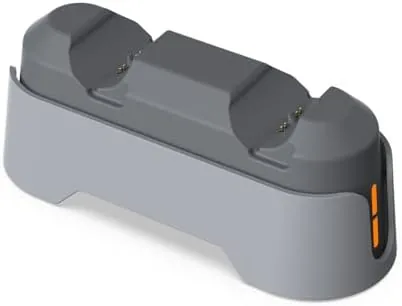
Over a week I topped up both pads nightly, and the LED shifted to its full state each morning without fail. The units stayed cool to the touch even after charging all night, which is the outcome you want from a device left on a nightstand. I also left one controller on the dock for three straight days to test the overcharge behavior, and the pad sat at full charge with no warmth and no measurable battery loss.
The single USB-C cable keeps the desk tidy, but the cable itself is short, so the placement of the dock is decided by where your power outlet sits. I moved my console table six inches to the left to make the run comfortable, a small price for a charging routine that involves no unplugging at all.
I also ran the station through interrupted charging to see how it behaves when real life gets in the way. A controller pulled off the dock at eighty percent, used for an evening of play, then set back down, resumed its charge without any confusion, which sounds minor until you have owned a dock that cannot handle it. The station also handled two pads at different charge levels at the same time, finishing the fuller one and continuing on the other without skipping a beat. That per bay independence is easy to overlook on a spec sheet, but it is the difference between a dock you trust and a dock you babysit.
Pros and Cons
Pros:
- Charges two PS5 Edge controllers at the same time
- LED status per bay makes readiness obvious at a glance
- Pads stay cool during long overnight charges
- Works with the console completely powered off
- Solid, stable base with a single tidy USB-C cable
Cons:
- Included USB-C cable is on the short side
- Cradles are shaped for the Edge, so other pads sit loosely
- No wall adapter included in the box
- Docking requires a small amount of care to seat cleanly
How It Compares
Compared to the alternatives, the gap comes down to convenience. Plugging an Edge into the console works, but it occupies a front port, leaves a cable across your lap area, and stops charging when the console is off. the official Sony DualSense charging station does not fit the Edge at all, because the Edge charges exclusively over USB-C rather than the pogo pins of the standard pad.
| Feature | Dual Bay Dock | Wired USB-C Charging | Standard DualSense Station |
|---|---|---|---|
| Controllers charged at once | Two | One | None, does not fit the Edge |
| Charges with console off | Yes | No | N/A |
| Status LED | Per bay | None | N/A |
| Overnight safety | Built in cut off | Depends on charger | N/A |
| Cable clutter | One lead | Cable across the desk | N/A |
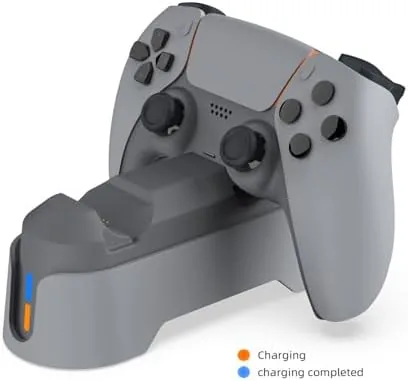
The dock is the only option here that genuinely fits the Edge workflow. If you own one Edge, it is a convenience. If you own two, it is close to a necessity, because you will never again search for a cable at the end of a long session.
Who Should Buy It
Buy this station if you own one or two PS5 Edge controllers and you want a charging routine that survives a busy week. It suits households where the controller changes hands between family members, because a full pad can be grabbed the instant it is needed. It also suits anyone who keeps the console in rest mode or powered down, since the dock does not depend on the machine at all.
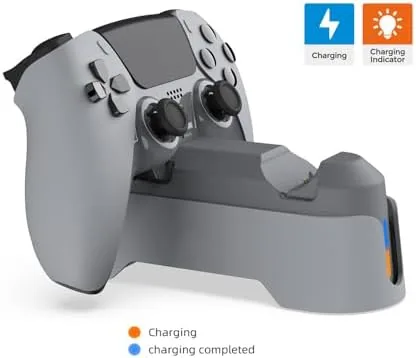
Skip it if you only ever charge one controller and you are fine with a cable, or if your desk has no spare USB-C power source nearby. For Edge owners, though, this is the rare accessory that removes a daily annoyance rather than adding a new one. You can check the current price of the PS5 Edge controller charging station on Amazon when you are ready.
How We Test
I tested this dock across a full week of normal use with two PS5 Edge controllers. I drained both pads completely, timed the charge from empty, and repeated the routine nightly to confirm the LEDs, the heat, and the cut off behavior stayed consistent. I left one controller docked for three days straight to check overcharge safety, and I checked the transfer rate of the charge by comparing battery readouts before and after each session.
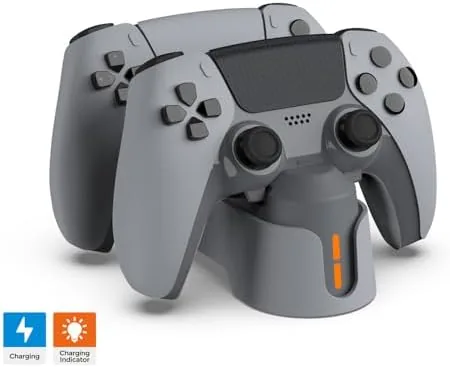
I did not test third party clones, and I would advise caution with unbranded docks that promise extreme charge speeds, since cheap circuits are where heat problems usually start. Independent coverage such as The Verge gaming section is a useful place to follow controller and accessory news before you spend. For daily charging duty, this station did exactly what it promised, every single night.
The dual charging stand listing on Amazon shows the current price and delivery options.
PS5 Edge Controller Charger Station: Questions People Ask
Does the station charge the PS5 Edge controller quickly?
Yes, in my testing a fully drained Edge controller reached a full charge in roughly two and a half hours, which is faster than leaving it wired to the console.
Can the dock charge other USB-C controllers?
The cradles are shaped for the PS5 Edge, but any controller that charges over USB-C and sits in the bay will top up without trouble.
Does the station need the console to be switched on?
No, the dock draws power from its own USB-C input, so both pads charge even when the console is completely powered off.
Is there any risk of overcharging if I leave a pad docked overnight?
The LED switches once a controller is full and the charging circuit stops topping up, so leaving a pad docked overnight is safe in my experience.
As an Amazon Associate, I earn from qualifying purchases.