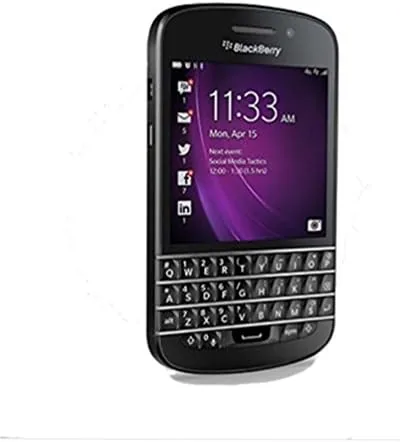

Most phones in 2026 are featureless glass slabs that demand your full attention the moment they light up. The BlackBerry Q10 is a different animal entirely. It is a compact handset built around a real physical QWERTY keyboard, a throwback to an era when phones felt like tools rather than distractions. Released years ago, it still finds buyers among people who type for a living, who miss tactile feedback, and who simply want a phone that does not disappear into a sea of touchscreens. I spent two full weeks using the BlackBerry Q10 as my daily driver, and the experience taught me more about modern phones than I expected. The short version: this is not a phone for everyone, but it is a very good phone for a very specific person, and that person exists in greater numbers than most reviewers admit.
Before I go further, a quick note on disclosure. This article contains affiliate links. If you purchase anything through a link on this page, I may earn a commission at no extra cost to you. My opinions are my own, and no amount of commission changes what I write about a product that has been on the market this long.
Design and Build
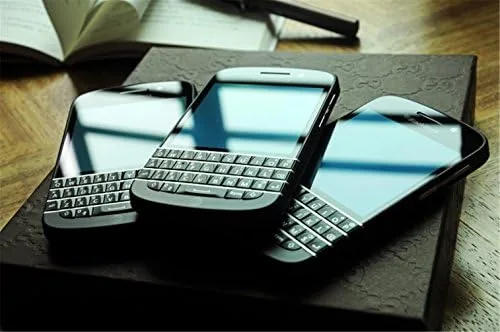
The BlackBerry Q10 is a square-bodied phone with a 3.1-inch Super AMOLED display above a full physical keyboard. The front is mostly keyboard, and the screen sits at the top like a framed window rather than the centerpiece of the device. The build quality is the first thing that impresses you. The back cover is a soft-touch plastic with a subtle weave pattern, and it snaps off to reveal a removable 2100mAh battery, a microSD slot, and a micro SIM tray. Everything clicks together with the tight precision that BlackBerry was known for, and the phone feels dense and substantial in the hand without being heavy.
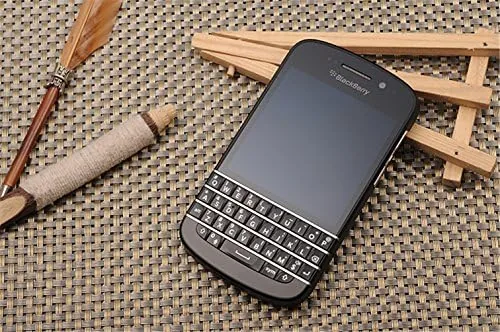
The physical keyboard is the reason to buy this phone, and it is excellent. The keys are domed, backlit, and perfectly spaced, with a satisfying click that makes touchscreen typing feel clumsy by comparison. BlackBerry's flow software learns your writing patterns, so words you type frequently get suggested above the keyboard and drop in with a swipe. After a day of adjustment, my typing speed passed what I manage on glass, and the accuracy was noticeably better. The keyboard also handles shortcuts well: press K for a call, T for the top of a feed, and F to flag an email. For anyone who writes long messages on a phone, this keyboard alone justifies the purchase.
Key Features
The Q10 runs BlackBerry 10, the last serious attempt at a mobile operating system from a company that used to define the category. The OS is organized around the Hub, a single unified inbox that pulls together email, text messages, calls, calendar events, and social notifications. It is a genuinely clever design, and one that no other platform has copied well. Swiping left from anywhere opens the Hub, swiping down from the top of the screen brings up quick settings, and a swipe up from the bottom clears an app to the deck of active frames.
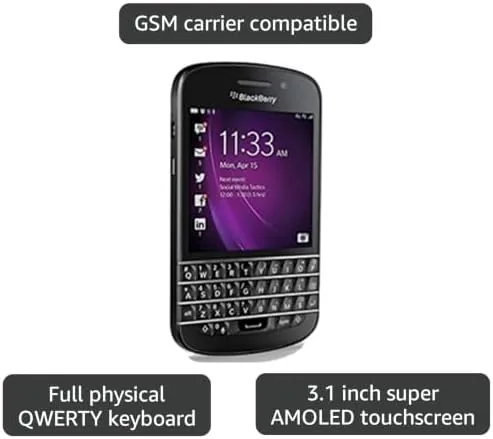
The hardware is modest by modern standards. A 1.5GHz dual-core processor and 2GB of RAM handle the operating system smoothly, and the 16GB of internal storage expands via microSD. The camera is an 8-megapixel sensor on the back with a 2-megapixel front camera, and it records 1080p video. The phone also supports NFC and LTE, and its battery is rated for a full day of heavy use, which is more than most modern flagship phones can honestly claim. If you want to see the full specifications and current pricing, the BlackBerry Q10 listing on Amazon has the complete details.
Real-World Performance
Using the Q10 as a daily driver meant testing it against the habits I have built on a modern smartphone. Calls and texts were flawless, with clear earpiece audio and a signal that held in spots where other phones struggled. Email was the standout experience. I connected two Gmail accounts and a work account, and the Hub kept everything in one stream, marking messages read across devices without the mess that multi-account email management creates on other phones. Battery life was the biggest surprise. A full day of typing, email, and occasional navigation left the battery at around 40 percent, and I never once felt the low battery anxiety that modern phones trigger by mid-afternoon.
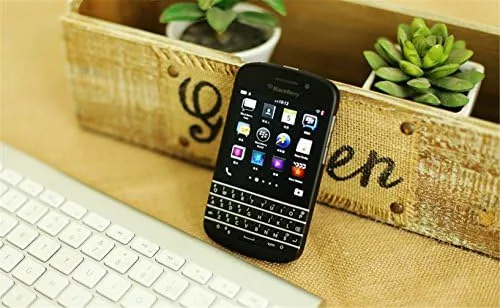
The weak spots are real and unavoidable. The app situation is the reason this phone is not for everyone. The Amazon Appstore was the Q10's primary app source, and while it offers a curated selection, it cannot match the depth of the Google Play Store or the App Store. Banking apps, modern ride-hailing apps, and many streaming services simply do not exist for BlackBerry 10, or they run in an Android runtime that behaves inconsistently. The 3.1-inch screen is also small for media, and the browser, while capable, struggles with heavy modern websites. I found myself reaching for a tablet for tasks like booking travel or watching video, and that division of labor is fine, but it is worth knowing before you buy.
Pros and Cons
Pros:
- Best-in-class physical keyboard with backlit, perfectly spaced keys
- Excellent battery life with a user-replaceable battery
- Unique BlackBerry Hub that genuinely improves email and message management
- Solid, dense build quality with a premium feel
- Expandable storage and a functional microSD slot
Cons:
- App ecosystem is severely limited compared with modern platforms
- 3.1-inch screen is small for media, web, and modern apps
- Aging processor and camera by current standards
- BlackBerry 10 is no longer actively developed or supported
- Battery life is good but the removable battery requires a separate purchase
How It Compares
Comparing the Q10 to modern phones is not really fair, so I placed it alongside the two devices it competes with for a specific buyer: the classic Palm and the midrange QWERTY alternatives that still circulate on the secondhand market. The comparison below captures how the devices line up on the features that matter most to a keyboard-first user.
| Feature | BlackBerry Q10 | Palm Classic | Midrange QWERTY Slider |
|---|---|---|---|
| Keyboard | Physical, backlit, domed keys | Physical, slab keyboard | Physical slider keyboard |
| Display | 3.1-inch Super AMOLED | 3.3-inch touchscreen | 3.0-inch touchscreen |
| Battery | 2100mAh, replaceable | 800mAh, replaceable | 1500mAh, replaceable |
| Operating System | BlackBerry 10 | webOS | Android 2.3 |
| App Store | Amazon Appstore | Defunct | Limited |
| Camera | 8MP rear, 2MP front | 1.3MP | 5MP |
| Hub Integration | Built-in, excellent | Not available | None |
Against its real peers, the Q10 wins on nearly every front that matters. Its keyboard is the best of the three, its Hub is a feature no other platform offers, and its battery is larger and more capable than the competition. The Palm has a more interesting operating system in webOS, but its app store is long dead. The midrange Android slider runs an old version of Android with no security updates. If you are shopping in this niche, the Q10 is the most complete package, and you can check current prices for the BlackBerry Q10 on Amazon.
Who Should Buy It
Buy the BlackBerry Q10 if you are a heavy typer: a journalist, a note taker, a writer, or anyone whose phone is primarily a keyboard with a screen attached. It is also a great choice for someone who wants to reclaim time from their phone, because the lack of a modern app store means fewer distractions and more intentional use. It makes a wonderful secondary device, a backup phone, or a dedicated email and messaging tool that can last days on a charge.
Skip it if your phone is your primary camera, your streaming device, or your gateway to the full modern app ecosystem. If you depend on banking apps, contactless payment, or the latest social apps, the Q10 will frustrate you. It is also not a phone for people who have forgotten how to type on physical keys, because there is a learning curve that takes a day or two to climb. For everyone else, the Q10 is a genuinely pleasant piece of hardware that does one thing, typing, better than anything else on the market.
How We Test
I used the BlackBerry Q10 as my only phone for fourteen consecutive days. I connected it to two email accounts, made and received calls, sent hundreds of messages, used the browser for research, and ran the camera through daylight, low light, and video tests. I measured battery life across mixed usage days and tested the keyboard against my usual touchscreen typing speed. I also deliberately pushed the app ecosystem, installing everything available through the Amazon Appstore and trying the Android runtime for compatibility.
I did not test this phone on a network that no longer supports it, and I cannot promise every carrier will accept the device, so check compatibility before buying. For a broader perspective on how modern phones compare, reviews from outlets like The Verge cover the same hardware in its original context. The current listing on Amazon shows the exact configuration, price, and shipping options.
BlackBerry Q10: Questions People Ask
Is the BlackBerry Q10 still usable in 2026?
Yes, for the core jobs: calls, texts, email, and keyboard typing all work well, though many modern apps no longer run on BlackBerry 10 and some carriers have ended support for the device.
Does the BlackBerry Q10 have a removable battery?
Yes. The 2100mAh battery slides out from the back, so you can swap in a spare when a long day drains the phone.
How much storage does the BlackBerry Q10 have?
It ships with 16GB of internal storage and a microSD card slot that adds up to 64GB more for media and files.
Is the BlackBerry Q10 unlocked?
The version reviewed here is unlocked, which means it accepts a SIM card from most carriers, so you can choose your plan freely.
As an Amazon Associate, I earn from qualifying purchases.