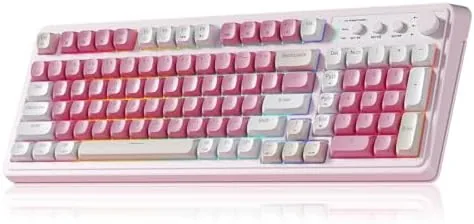

There was a time when a wireless keyboard meant a mushy, laggy board you tolerated until the batteries died. That era is over, and the AULA 99 key wireless keyboard is one of the reasons why. It packs tri-mode connectivity, per-key RGB backlighting, a 2000mAh battery, and a membrane action tuned to feel creamy rather than clacky, all in a pink shell that is clearly aimed at the aesthetic side of the desk. I used this board as my daily driver for a month, switching between a desktop, a laptop, and a tablet, so this review comes from real typing volume and real gaming sessions.
Before the details, the standard note. This article contains affiliate links, and if you buy through one of them the site earns a small commission at no extra cost to you. That commission does not change what I test or what I recommend.
Design and Build
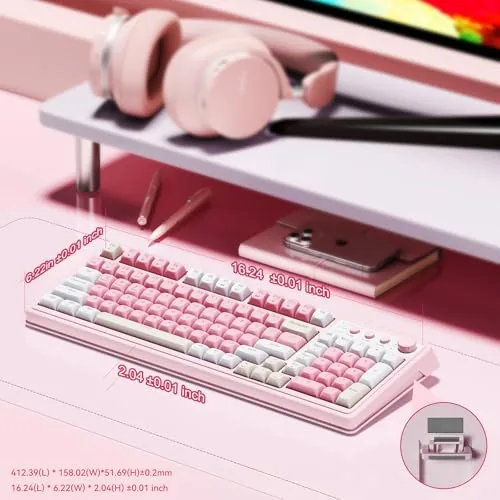
The first thing you notice is the color. The pink shell is a soft pastel that covers the case and the keycaps, and it is executed well enough that it looks designed rather than dipped. The 99 key layout keeps the number pad, which is the compromise that makes a full width board without the full width price. It is a membrane keyboard, so the keycaps sit on a rubber dome layer rather than mechanical switches, but the construction feels tighter than the budget membrane boards of the past.
The frame is sturdy plastic with minimal flex, even when I pressed at the corners during typing. The keycaps are double-shot and hold their legends under the RGB lighting, which is a quality detail at this price. There is a small lip at the rear for a typing angle, and two adjustable feet raise the rear further. The whole unit is light enough to toss in a bag, which makes it a genuine travel option rather than a desk ornament.
Under the hood sits the 2000mAh battery, a capacity that is generous for a membrane board. The underside has the mode switch panel, and the keycaps for Bluetooth, 2.4GHz, and USB-C are clearly marked, so switching is a matter of pressing a button rather than hunting through a manual. For a budget wireless board, the build is a clear step above the flimsy competition.
Key Features
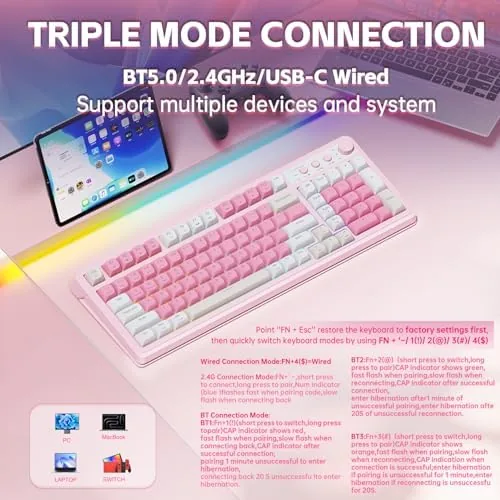
Tri-mode connectivity is the headline. The keyboard talks to three devices at once, one over Bluetooth, one over the 2.4GHz dongle, and one over the USB-C cable, and it switches between them with a button press. In my setup I ran a desktop on the dongle, a laptop on Bluetooth, and a tablet on the cable, and the switch was essentially instant, with no re-pairing required when I bounced back and forth.
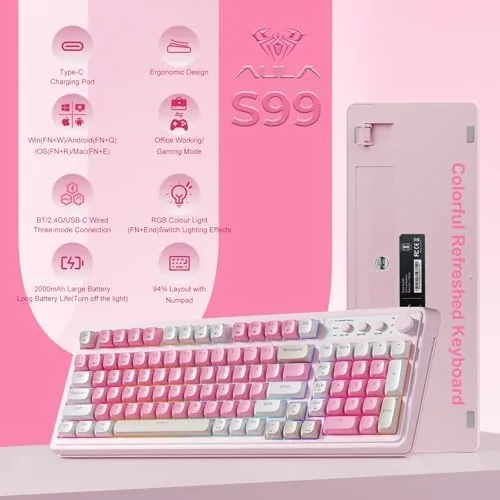
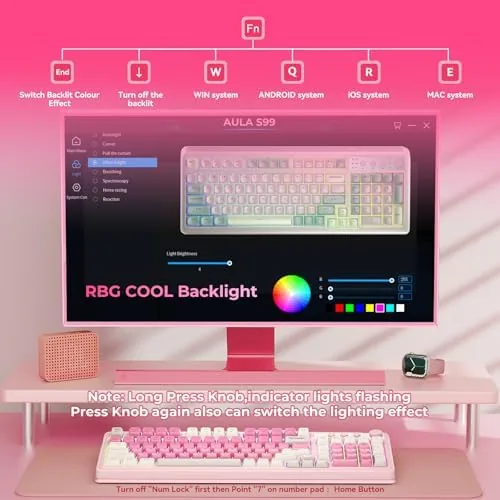
The RGB backlighting is the other crowd pleaser. Per-key lighting cycles through a set of effects, including rainbow waves, breathing, and static colors, all adjustable from the keyboard without software. The lighting is bright enough to see in daylight and genuinely pretty in a dim room, which is what the pink build wants to deliver. For a membrane board, the effect quality is surprisingly good.
The 2000mAh battery powers it all, and the USB-C port handles both charging and wired data. The keyboard works over the cable even when the battery is flat, which removes the worst failure mode of wireless boards. The membrane typing action is marketed with the creamy and thocky descriptors, and the sound profile is softer than clicky switches, more a muffled thock than a sharp clack.
Real-World Performance
Typing was the first test, and the board held up through a full work week. The creamy membrane action is softer than a mechanical linear switch, with a cushioned bottom out that some people will love and some will find too soft. After a day of adjustment I typed at my normal speed with no missed keys, and the thocky sound stayed quiet enough for a shared desk. It will not win over a mechanical diehard, but it is genuinely pleasant for long sessions.
Gaming told a more measured story. On the 2.4GHz dongle, the board handled casual gaming well, with input registering promptly and no noticeable lag in a round of a fast paced action title. The membrane action lacks the crisp tactile feedback that competitive players want, and there is no NKRO guarantee to lean on for simultaneous key presses. For everyday gaming it is fine; for ranked competitive play, a mechanical board remains the better tool.
Device switching was the standout feature in daily use. Pressing the Bluetooth key put the board on the laptop, pressing the 2.4GHz key put it back on the desktop, and the switch happened in about a second with no dropped characters. The battery, with RGB on for daily use, lasted three to four days between charges, and with the lighting off it stretched past a week. The low battery light gave plenty of warning before the cable had to come out.
The RGB effects are fun, but they come with a caveat. Cycling effects at full brightness shorten the battery noticeably, so if you want maximum runtime you either drop to a static color or kill the lighting entirely. That is the standard trade, and AULA at least gives you full control rather than forcing the rainbow.
Pros and Cons
Pros:
- Tri-mode connectivity across Bluetooth, 2.4GHz, and USB-C
- Instant switching between three paired devices
- Bright per-key RGB with effects controllable on the board
- 2000mAh battery with a week of life at moderate lighting
- Soft creamy typing sound that stays quiet in a shared room
Cons:
- Membrane action lacks mechanical switch feedback for serious gamers
- Pink styling limits who will want it on a desk
- Full brightness RGB drains the battery quickly
How It Compares
Against a typical mechanical wireless keyboard and a basic office membrane board, the AULA occupies a useful middle lane. It brings the tri-mode convenience and RGB spectacle of a gaming board, while the membrane feel keeps the price down and the noise down.
| Feature | AULA 99 Key | Mechanical Wireless | Office Membrane |
|---|---|---|---|
| Switch type | Membrane | Mechanical | Membrane |
| Connectivity | BT, 2.4GHz, USB-C | BT, 2.4GHz, USB-C | Usually USB only |
| RGB lighting | Per-key effects | Per-key effects | None or single color |
| Battery | 2000mAh | Varies | None, wired |
| Typing sound | Soft creamy thock | Loud clack | Mushy and quiet |
The mechanical board wins for competitive gaming, with crisp switches and true anti-ghosting, but it costs more and clacks loudly. The office membrane is cheap and quiet but offers no wireless, no RGB, and no multi-device switching. The AULA takes the middle ground: wireless freedom and lighting flair without the mechanical price, at the cost of switch feel. If your gaming is casual and your typing is constant, that trade lands in the AULA's favor.
Who Should Buy It
Buy the AULA 99 key wireless keyboard if you work across a desktop, laptop, and tablet and want one board for all of them, if you want the look of a Gaming Keyboard without the mechanical price, or if you need a quiet typing sound in a shared room. The number pad is a bonus for anyone who enters numbers all day.
Skip it if you are a competitive player who needs mechanical switches and full NKRO, or if pink is not your color and no amount of RGB will change that. For the multi-device worker with an eye for a pretty desk, this board is a strong value. You can check the current AULA keyboard price on Amazon when you are ready.
How We Test
I used the AULA keyboard as my primary input device for a month, covering daily typing, spreadsheet work, casual gaming, and constant device switching between a desktop, a laptop, and a tablet. I tracked battery life with RGB on and off, tested the switch speed between modes, and measured the typing sound against my mechanical reference board.
I played a fast paced action title over the 2.4GHz dongle to check latency, and I typed at length to confirm no missed keys at speed. I did not tear down the board or run laboratory latency measurements, and I did not test every RGB effect preset in depth. For broader keyboard guidance, independent coverage such as PCWorld wireless keyboard coverage is a useful read before you buy.
The AULA 99 key keyboard listing on Amazon shows the current price and color options.
AULA 99 Key Wireless Keyboard: Questions People Ask
How many devices can the AULA keyboard connect to?
It can hold connections across Bluetooth, 2.4GHz, and USB-C, and I switched between a laptop, a tablet, and a desktop with the mode buttons on the board.
How long does the 2000mAh battery last?
With the RGB backlight on, I charged every few days of daily use, and with the lighting off the battery stretches well beyond a week.
Is the keyboard quiet for an office or shared room?
The creamy membrane sound is softer than clicky switches, though the RGB lighting and pink styling make it a better fit for a personal desk than a formal office.
Can the AULA keyboard be used while charging?
Yes, the USB-C port works for data and charging at the same time, so you can keep typing with the cable connected.
As an Amazon Associate, I earn from qualifying purchases.