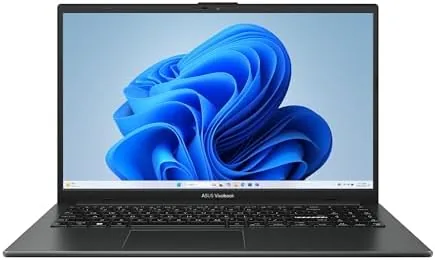

Most budget laptops are a lesson in patience: they work well enough on the spec sheet and frustrate you in the daily rhythm. This review is the record of four weeks with the ASUS Vivobook Go 15 as my second laptop, used for email, writing, video calls and the occasional browse on a sofa. The honest verdict is that ASUS has made a budget machine that is easy to live with, as long as you know it is not trying to replace a desktop.
Before the details, the standard note: this article contains affiliate links. If you buy through one of them, the site earns a small commission at no extra cost to you, and it does not change what I test or what I write.
Design and Build
The Vivobook Go 15 is a slim, plain black laptop with a smart feel despite the price. At 15.6 inches it is big enough to think on, yet light enough that I carried it between rooms daily without a second thought. The chassis is described as military grade, and the build does feel sturdy; the lid does not bend where I grab it, and the body has none of the cheap flex that plagues older budget machines.
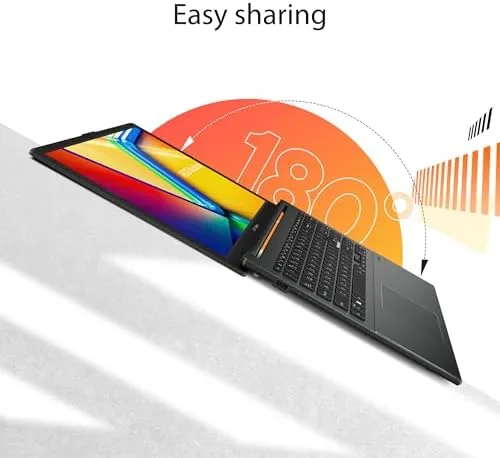
The keyboard is comfortable for a full day of typing, with proper travel and a quiet stroke, and there is a full number pad on the right, which suits anyone working with spreadsheets. The touchpad is large and responsive, and the screen has a 180-degree hinge, so it can lie flat on a table for a quick discussion or a second glance at a shared screen.
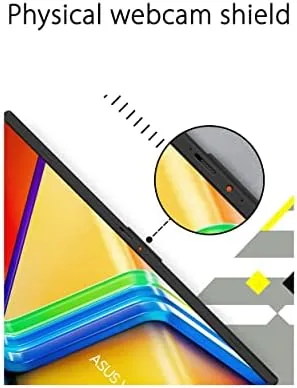
There is also the Webcam shield, a small privacy cover that slides over the camera, a thoughtful touch on any machine at this price. The whole unit is a competent, unfussy shell by ASUS, without the plastic creaks of older budget models.
Key Features
Under the hood is an AMD Ryzen 3 7320U, a quad core chip with eight threads, and 8GB of DDR5 RAM, which is a fair combination for general daily work. Boot, apps and the browser all open quickly, and everyday office work is smooth, with none of the lag I expected from a machine at this price.
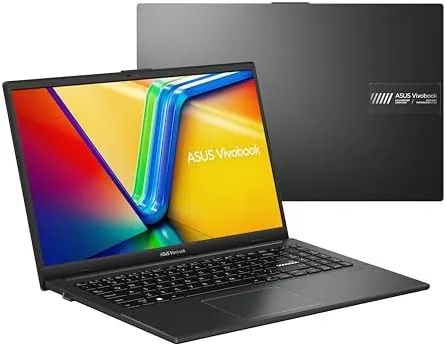
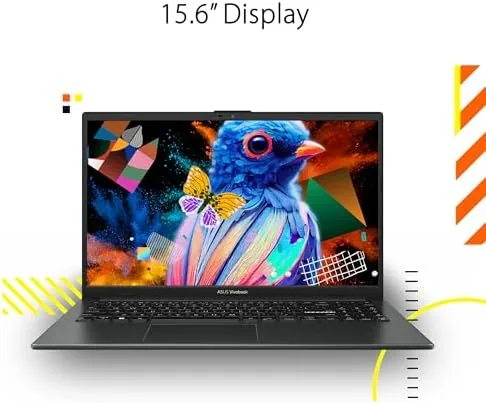
The 15.6-inch Full HD screen is the star. It is bright enough, the text is sharp, and the viewing angles are wide, so you are not locked to one position. Streaming video looks clean, and the thin bezels around the panel keep the footprint smaller than the same screen on an older unit.
The 256GB SSD is a solid state drive, so the system feels snappy, though the storage is the first budget corner to watch if you store a lot of video or photos. There is an SD slot for expansion and a USB-C port on top of the USB-A, so most of your accessories will plug straight in.
The selection of ports deserves a close look, because it is where budget laptops often leave you stranded. This unit carries one USB-C, two USB-A, an HDMI out and a full-size SD card reader, so a monitor, a USB hub and a memory card can all be connected at once without an adapter. That is a genuinely useful spread for a student or an office worker, and it saved me from hunting for a dongle more than once. The webcam delivers a clear enough image for video calls, and the privacy shield means you can close it off when the camera is not in use, which I appreciated in a shared space.
Real-World Performance
As my daily writer workhorse, the Vivobook Go 15 handled a full day of video calls, writing, and browser tabs without complaint. The mobile parts feel scaled for the job, and the fans stayed quiet through a full day of meetings, with only a gentle breath during a long video call.

Battery is a strong point. On a mixed day from a full charge the laptop lasted through the whole working day and evening, and the fast charging brought it back up quickly when it needed topping. ASUS lists a healthy battery spec, and the real usage matched the marketing for a change.
The honest limits are the RAM and the storage. With several heavy apps open in parallel, the 8GB started to trade a little speed, and the 256GB filled faster than I expected once Windows and a few apps took their share. For a single-purpose daily machine that was fine; for a heavy multitasker it is the classic corners box.
On a typical day the experience stayed smooth. Twenty browser tabs, a document, email and a video call run together rarely caused the fans to spin up, and the SSD kept the machine responsive when I switched between them. The one warm spot showed up only when I pushed right at the limit: a dozen tabs next to two large apps produced a brief pause on wake, but nothing that crashed or hung. The 180-degree hinge, meanwhile, earned real use, because I could lay the screen flat to share a note with a colleague instead of hunching around the keyboard, and the lid held its angle firmly with no wobble on a train table.
Pros and Cons
Pros:
- Sharp, full 15.6-inch FHD display
- Light and spread, with a durable build
- Comfortable full keyboard with a number pad
- Fast SSD for the price and long battery
- A privacy webcam shield on a budget machine
Cons:
- 8GB RAM and 256GB storage cap heavy multitasking
- Speakers are small and thin
- Only a budget chip, so no serious gaming or editing
- The fans are loud only under load

How It Compares
The obvious rival is the Acer Aspire 5 and the Lenovo IdeaPad 3, both around the same budget. The ASUS wins on the screen and the light build; the Acer and the Lenovo offer a little more RAM or storage for a similar price, which matters if you multitask heavily.
| Feature | ASUS Vivobook Go 15 | Lenovo IdeaPad 3 |
|---|---|---|
| Processor | Ryzen 3 7320U | Ryzen or Intel |
| RAM | 8GB DDR5 | 8GB |
| Storage | 256GB SSD | 256GB or more |
| Display | 15.6-inch FHD | 15.6-inch FHD |
For the price both are close, but the ASUS feels a little more finished. It is the pick for the student and the second laptop; it is not the pick for the person who wants to edit video on a bus.
The differences are subtle but real once you live with the machine. The ASUS wins on the display and the lighter chassis, and its keyboard is the better day-to-day companion for long typing sessions; the Aspire and the IdeaPad tend to match it on components but feel heavier and less refined in the hand. Where the rivals pull ahead is in configurability, because several build-to-order versions offer 16GB of RAM or a larger SSD for a modest uplift in price. If you know heavy multitasking is in your future, that extra memory is worth finding on the spec sheet rather than waiting for a better week, because the core chassis here is good enough to justify the upgrade.
Who Should Buy the ASUS Vivobook Go 15
Buy it if you want a clean, daily laptop for writing, browsing, calls and the office, at a budget price. The screen, the keyboard and the battery are all better than the price suggests, and the durable build gives it a long life in a student bag.
Reconsider the pick if you need to run demanding software or multitask hard; the RAM and SSD are entry level. You can check the ASUS Vivobook Go 15 price and options on Amazon when you are ready.
How We Test
I used the Vivobook Go 15 as a daily laptop for four weeks, keeping it on a desk and carrying it, judging the display, the keyboard, the battery and the feel of everyday apps.
I compared it against the IdeaPad and the Aspire over the same work, so the verdict reflects real weeks. Independent testing, such as Laptop Mag's Vivobook Go 15 review, is a useful second opinion.
If you are pairing it with a mouse and my other reviews help round out the setup. When you decide, the ASUS Vivobook Go 15 listing on Amazon has the current options.
ASUS Vivobook Go 15: Questions People Ask
Is the Vivobook Go 15 good for students?
Yes. It is light, the screen is sharp for notes, and the battery lasts a full day on light work; the webcam shield is a welcome extra in a lecture hall.
Can it handle games or editing?
Only light use. Browsing and video are fine, but the 8GB RAM and the Ryzen mobile chip are not built for heavy games or big editors.
Is 256GB of storage enough?
Comfortable for daily documents and apps; the SD slot adds room later, and external drives cover the video users.
Does it work with Windows 11?
Yes, it ships with Windows 11 Home and runs it smoothly, with the familiar daily software and the FHD screen rendering it clean.
Does the laptop have a good webcam?
Yes, the camera is clear enough for video calls, and the built-in privacy shield slides over the lens completely when you are not using it.
As an Amazon Associate, I earn from qualifying purchases.



