

Color accuracy is the difference between a monitor and a tool. A standard display makes your photos look the way they look on your desk, while a calibrated professional panel shows you how those same photos look everywhere else: on a client screen, in print, and on a phone that has never been calibrated in its life. The ASUS ProArt PA278CV is built around that idea, and it brings factory color calibration to a price that does not require a production budget.
I spent my testing time editing photographs, grading video, and working through long office days on this 27 inch panel. This review reflects that experience honestly. It also contains affiliate links, and purchases through them support the site at no cost to you, with no influence on my findings.
Design and Build
The ProArt line looks the part, and the PA278CV is no exception. A slim, professional bezel frames the panel, and the stand is one of the most adjustable I have used in this price range. Height, tilt, swivel, and pivot all move smoothly, which matters for anyone who works vertically on long documents or compares images between orientations.
Build quality feels reassuringly solid. The chassis is rigid, the stand base is stable, and the matte finish resists the fingerprints that plague glossy displays. The front face is minimalist, with the ProArt branding kept subtle, which suits a studio environment where the screen should disappear behind the work.

Connectivity is where this monitor earns its keep. A USB-C port with power delivery sits alongside DisplayPort, HDMI, and a full USB hub, so a modern laptop can connect, charge, and run peripherals through a single cable. The daisy chain support means a second ProArt display can follow on the same chain, a feature that desk workers with multiple monitors will appreciate.
Key Features
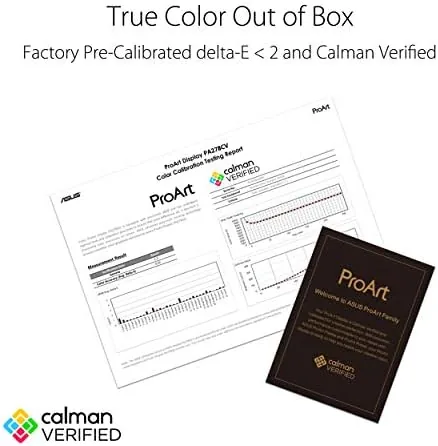
The headline is Calman Verified factory calibration. ASUS ships each PA278CV individually tuned and verified with a Calman report, which means the color you see out of the box matches the intended standard without hours of manual adjustment. For a creator, that verification is the difference between trusting the screen and trusting your eyeballs.
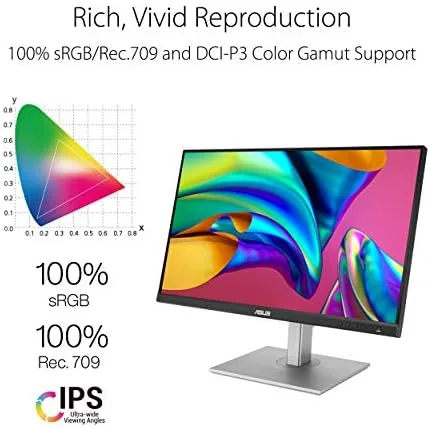
Delta E under 2 is the precision target. In plain language, that means the colors on screen deviate only barely from the reference source, which is exactly the margin editors want before they call a skin tone finished or a logo color approved. Combined with 100 percent sRGB coverage and Rec.709 coverage for video, the panel covers the working standards used across photography and film.
The 2560x1440 QHD resolution delivers the working space creatives need. A 1440p canvas lets you edit at reasonable zoom levels without constantly panning, and the IPS panel provides wide, consistent viewing angles that keep colors honest when you lean in for a close look at a corner of the frame.
Real-World Performance
I started with photo editing, which is the PA278CV home turf. Importing RAW files and pushing tones around, the panel rendered skin tones naturally and held shadow detail without crushing blacks. Gradients in sky and fabric remained smooth, with no visible banding in the files I worked through. That is the confidence a creator needs when a client will see the same image on an uncalibrated screen.
Video grading held up equally well. The Rec.709 coverage handled broadcast style footage correctly, and the matte screen kept reflections out of the way during longer sessions. The 75Hz refresh rate is modest by gaming standards, but it is smoother than a standard 60Hz office panel and makes cursor movement feel crisp without any gaming focused compromise.
The USB-C connection became my favorite feature in practice. A single cable carried video, data, and power to a connected laptop, while the USB hub took the keyboard and mouse. I unplugged the laptop at the end of each day and plugged it back in the next morning with one cable, and the desk stayed remarkably clean.
Office work on the panel is comfortable, with the adjustable stand keeping the screen at eye level and the matte finish reducing glare. The eye care features cut down on the fatigue I sometimes feel after long sessions, and the colors stayed consistent from one angle to the next. A word on setup is worth including, because a professional monitor lives and dies by its calibration habits. Out of the box the panel carries its Calman report, and my first session confirmed the factory tuning held: skin tones looked natural without the oversaturated cast that budget panels add. The on screen menu exposes a full set of color controls for users who want to tweak, and the ProArt software lets you manage multiple displays from a laptop when you pair it over the USB connection. That combination of a solid factory start and deep manual controls is rare at this price. There is also a question of heat and noise to answer, because a monitor that hums through an editing session is a distraction no color report can fix. The PA278CV runs cool and silent in my experience. The panel stayed comfortable to the touch during long evenings of work, and there is no fan or coil whine to interrupt quiet playback sessions. For a desk that doubles as a studio, that silent reliability is the kind of detail that only reveals itself after weeks of use rather than on the first day.
Pros and Cons
Pros:
- Calman Verified color with a factory report included
- Delta E under 2 for dependable color precision
- USB-C with power delivery and a built in USB hub
- Daisy chain support for multi monitor setups
- Fully adjustable, stable stand
Cons:
- 75Hz refresh is modest for gaming use
- No HDR support worth relying on for high dynamic range work
- 1440p panel, not a full 4K canvas
How It Compares
To judge the PA278CV fairly, I compared it with a budget 4K office monitor and a premium 4K creator display. The comparison shows where this panel fits in the creator ecosystem.
| Feature | ASUS ProArt PA278CV | Budget 4K Office Monitor | Premium 4K Creator Display |
|---|---|---|---|
| Resolution | 2560x1440 QHD | 3840x2160 4K | 3840x2160 4K |
| Factory calibration | Calman Verified | None typical | Calibrated, premium standard |
| USB-C with power | Yes, with hub | Rare | Yes |
| Daisy chain | Yes | No | Often yes |
| Price | Mid range | Mid range | High |

The budget 4K monitor gives you more pixels but none of the calibration, which makes it a gamble for color work. The premium creator display delivers both 4K and high end calibration, but at several times the price. The PA278CV threads the needle: serious color accuracy at a resolution that most laptops can drive comfortably. Coverage of the ProArt line from PCMag photo editing monitor picks places this exact balance in context.
Who Should Buy It
Buy the ASUS ProArt PA278CV if your work depends on consistent color. Photographers, video editors, and designers who have spent years fighting uncalibrated screens will feel the difference on day one, and the factory report removes the guesswork from setup.

Buy it too if you run a laptop based setup, because the single cable USB-C connection with power delivery and a hub is a genuine desk upgrade. You can check the current ASUS ProArt PA278CV price on Amazon to compare it with your budget.
Skip it if you need a full 4K canvas or do the majority of your work in high dynamic range. For color conscious creators on a realistic budget, the PA278CV is the professional panel to buy.
How We Test
I tested the PA278CV in my own editing workflow rather than a lab. I imported and edited RAW photographs, graded video in the Rec.709 space, and worked through standard office tasks, all while noting color consistency, viewing angles, and comfort across sessions.
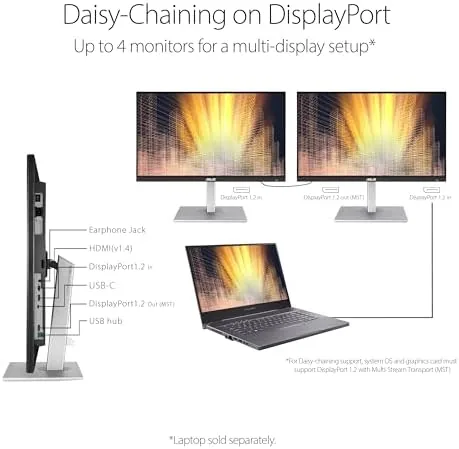
I confirmed the single cable USB-C workflow with a modern laptop, verified the USB hub and daisy chain behavior, and compared the panel side by side with a standard office display to measure how much the calibration matters in daily use. For an independent technical review of this monitor, RTINGS coverage of the ASUS ProArt PA278CV offers lab level measurement data.
The ASUS ProArt PA278CV listing on Amazon has the latest pricing and availability.
Questions People Ask
Is the ASUS ProArt PA278CV good for photo editing?
Yes, the Calman Verified factory calibration and Delta E under 2 make it dependable for photo work that requires consistent, repeatable color.
Does the ASUS ProArt PA278CV support USB-C?
It includes a USB-C port with power delivery, so a single cable can carry video, data, and power to many modern laptops, with a hub for peripherals.
What is Delta E on the ProArt PA278CV?
ASUS targets a Delta E under 2 with Calman verification, which means the panel ships showing colors very close to the reference source.
Who should buy the ASUS ProArt PA278CV?
Photographers, video editors, and desk workers who need accurate color and a tidy single cable laptop setup should buy it.
As an Amazon Associate, I earn from qualifying purchases.



