
There are keyboards that shout, with RGB lighting, clicky switches, and software that wants a whole ecosystem built around it. And there is the Apple Magic Keyboard with Numeric Keypad, which is the opposite: a quiet, low-profile, wireless keyboard that assumes you are there to get work done. It has a full-size layout with a numeric keypad for finance and spreadsheet work, a scissor mechanism that Apple has refined for years, and a built-in rechargeable battery that charges over USB-C. I typed a month of real work on it, across a Mac, an iPad, and an iPhone, to find out whether it earns its premium price or whether a cheaper mechanical board would have done the job.
Before the details, the standard note. This article contains affiliate links, and if you buy through one of them the site earns a small commission at no extra cost to you. That commission never changes what I test or what I recommend.
Design and Build
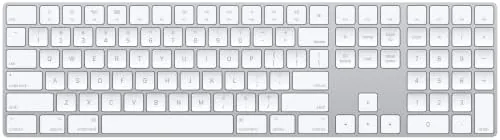
The Magic Keyboard is unmistakably Apple. The white version I tested is a single clean slab of smooth white plastic with flat, low-profile keys that sit almost flush with the surface, and the whole thing has a premium weight that keeps it planted on the desk. The layout is full-size, with a numeric keypad on the right, dedicated function keys along the top, and the arrow keys arranged in the inverted-T that typists prefer.

Build quality is exactly what you expect from Apple. The keys are stable, with no wobble, and the case has no creaks or flex when you type with intent. It is a wedge-shaped board that is thin at the front and slightly taller at the back, which puts the keys at a comfortable angle without needing feet, because there are none. That is a deliberate choice: the board is designed to lie flat and be paired with an iMac or a MacBook on a stand, and it looks right at home in that setup.
Key Features
The scissor mechanism is the feature that defines the feel. Each key uses a scissor-style hinge that gives a short, snappy travel and a crisp tactile response, the signature Apple typing experience that many third-party boards have tried and failed to clone. It is quiet too, a soft tap rather than a clack, which makes it a genuinely good keyboard for shared offices and late-night sessions.

Connectivity is where Apple's ecosystem shows its strength. The keyboard pairs over Bluetooth, and it switches between a Mac, an iPad, and an iPhone with a tap of the globe key, so you can type a long reply on the iPad and then switch back to the Mac without re-pairing anything. The battery is built in and rated for up to a month of use, and it charges over USB-C, so the same cable that charges your Mac tops up the keyboard. If you want to compare the current price against other full-size wireless keyboards, the Amazon listing for the Magic Keyboard with Numeric Keypad is a useful reference.
Real-World Performance
I typed a month of work on the Magic Keyboard, which meant long documents, spreadsheets with heavy number entry, email, and a decent amount of gaming. The numeric keypad proved its worth immediately: entering figures into a spreadsheet flowed at a speed the compact keyboard I normally use could not touch. The typing feel stayed consistent through the whole month, with no keys growing mushy or noisy, which is the mark of a well-made scissor mechanism.

Battery life matched the claim. I charged it once at the start of the month and again near the end, and a USB-C top-up while grabbing coffee brought it back to full without interrupting work. Bluetooth reliability was flawless: the board woke instantly every time, never dropped a keystroke, and switched between the Mac and iPad cleanly when I used the globe key shortcut.
The honest limitations are well known. There is no backlighting, so the flat white keys are hard to read in a dim room, and the full-size model omits the Touch ID sensor that Apple built into the smaller Magic Keyboard, so secure login still depends on your Mac's fingerprint reader. For a board at this price, those omissions feel deliberate, and they are the reasons some people will choose a third-party alternative.
The function row and media keys deserve a word of praise on their own. The top row handles brightness, volume, playback, and the mission control and launchpad shortcuts directly, and every key did exactly what it labeled without any configuration, which is the quiet convenience that defines Apple's approach. I also appreciated how the board handled a gaming evening: the low-profile keys are not designed for competitive play, but for casual titles the quiet action and the stable numeric pad proved pleasant enough that I left it connected rather than reaching for a mechanical board.
Pros and Cons
Pros:
- Full-size layout with a genuinely useful numeric keypad
- Premium scissor mechanism feel with quiet typing
- Rechargeable battery rated for a month, charged over USB-C
- Instant switching between Mac, iPad, and iPhone
- Rock-solid build quality with no flex or key wobble
Cons:
- No backlighting, so low-light typing is a struggle
- No Touch ID on the full-size version
- Fixed typing angle with no adjustable feet
How It Compares
Apple's full-size wireless keyboard competes mainly with the smaller Magic Keyboard and with Logitech's popular MX Keys, so I compared all three to see where the differences actually land for a working professional.
| Feature | Magic Keyboard Numeric | Magic Keyboard Standard | Logitech MX Keys |
|---|---|---|---|
| Layout | Full size with keypad | Compact, no keypad | Full size with keypad |
| Backlighting | No | No | Yes, auto |
| Touch ID | No | Yes | No |
| Charging | USB-C | USB-C | USB-C |
| Device switching | Up to 3 Apple devices | Up to 3 Apple devices | Up to 3, any OS |
| Typing feel | Crisp scissor | Crisp scissor | Soft membrane |
The smaller Magic Keyboard gains Touch ID but loses the numeric keypad, which matters if you do any serious number work. The MX Keys wins outright on backlighting and multi-device support across different operating systems, and it is the smarter buy if you mix Windows with a Mac. But for a user who lives inside Apple's ecosystem and does not need a backlight, the full-size Magic Keyboard offers the tightest integration and the most satisfying feel of the three.
Who Should Buy It
Buy the Magic Keyboard with Numeric Keypad if you are an Apple user who types for a living, if a spreadsheet or financial software is a daily tool, or if you want the cleanest, most integrated wireless keyboard experience money can buy. It is ideal for anyone who pairs a MacBook with an external display and wants the Apple typing feel without the clutter of a third-party board.
Skip it if you need backlighting for dark rooms, if Touch ID on the keyboard matters to you, or if you switch between Windows and Mac, where the MX Keys is the better tool. For everyone else, this is the quiet professional's keyboard, and it does its one job flawlessly. You can check the current price for the Apple Magic Keyboard with Numeric Keypad on Amazon when you are ready to buy.
How We Test
I used the Magic Keyboard as my primary typing surface for a month, which meant full workdays of documents, email, and spreadsheets. I tested the numeric keypad against heavy data entry, ran battery life over the full month with a single recharge, and switched the board between a Mac, an iPad, and an iPhone to stress the multi-device pairing.
I also typed in a darkened room to document the lack of backlighting, checked key feel at speed, and left the board in sleep for days to confirm it wakes without a reconnect dance. I did not test it with Windows or Android, because Apple does not guarantee that support. For an independent breakdown of the Magic Keyboard lineup, MacRumors' guide to the Magic Keyboard is a thorough external reference. The Apple Magic Keyboard with Numeric Keypad listing on Amazon shows the current price and shipping details.
Apple Magic Keyboard with Numeric Keypad: Questions People Ask
Does the Magic Keyboard with Numeric Keypad have Touch ID?
No. The full-size keyboard with the numeric keypad does not include the Touch ID sensor found on the smaller Magic Keyboard, so secure login stays on the Mac itself.
Can it connect to an iPhone or iPad?
Yes. The keyboard pairs over Bluetooth with an iPad, an iPhone, and Macs, and it switches between paired devices with the globe key.
How long does the battery last on the Magic Keyboard?
Apple rates the internal rechargeable battery for up to a month between charges, and a quick USB-C top-up brings it back for a full day in a couple of minutes.
Is the Magic Keyboard backlit?
No. The low-profile design has no backlighting, so it is best used in a well-lit room, which is a notable omission for a keyboard at this price.
As an Amazon Associate, I earn from qualifying purchases.