
Video game subscriptions have a way of sounding better in the advert than they feel after the first week, but Xbox Game Pass has earned its reputation with a rotating library that most players find genuinely hard to exhaust. This product is not a console or a controller; it is a single digital code that delivers one month of Game Pass Premium across console, PC, and cloud gaming devices. For anyone curious about the service but reluctant to commit, a one month code is the smallest possible risk. I redeemed one, played through the month, and tracked exactly what the money buys.
A quick note before the details. This article contains affiliate links, and if you buy through one of them this site earns a small commission at no extra cost to you. That commission does not change the verdict, and the code reviewed here is a standard retail digital code available on Amazon.
A subscription code is easy to dismiss as a product because there is no hardware to hold, but the value is entirely in what unlocks. The rest of this review covers the library, the day one releases, and the cloud play that makes the membership feel bigger than any single console.
Design and Build
As a digital product, the Game Pass code has no physical build to examine, but the delivery format still matters. The code arrives in a retail box with a scratch off panel that reveals a 25 character redemption key, and it requires no credit card to activate. That is a meaningful design decision, because it means the month starts cleanly and ends cleanly, with no surprise autorenewal waiting in the settings. For someone testing the service, that is the friendliest possible structure.
The redemption itself is the closest thing to a setup process, and it is frictionless. You sign in with a Microsoft account on a console, a PC, or the Microsoft Store website, paste the code into the redeem field, and the month appears on the account instantly. The membership then attaches to the account rather than a specific device, which is what makes the console, PC, and cloud split possible in the first place.
Key Features
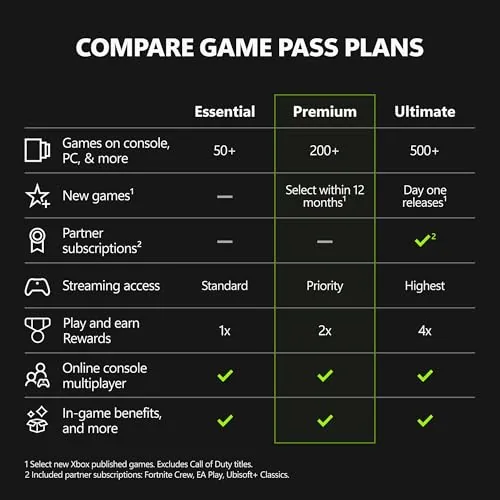
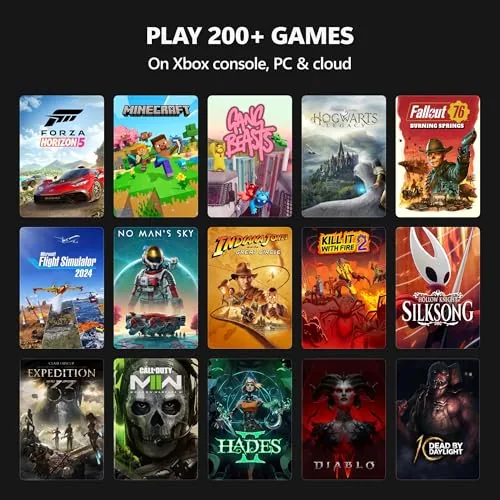
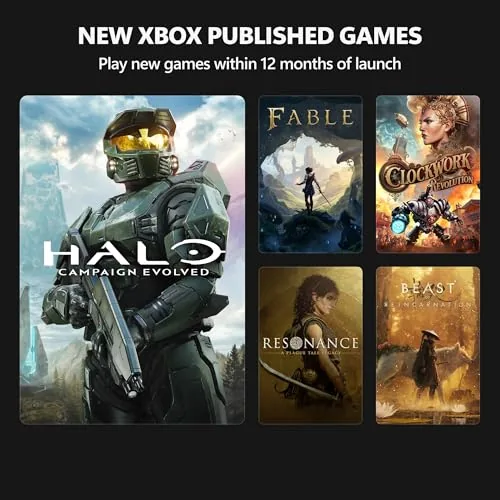
The library is the product, and it is the deepest thing in gaming subscriptions. Game Pass Premium includes hundreds of games across genres, with major third party titles joining and leaving on a rotation while Microsoft first party releases stay in the service permanently. The standout feature is day one access: new releases from Xbox Game Studios appear in the library on launch day, which means a single month can cover a brand new flagship title that would otherwise cost the price of three months by itself.
The Premium tier bundles everything the service offers into one membership. That includes the online multiplayer that Game Pass Core provides, the full library on console and PC, EA Play titles, and cloud gaming on phones, tablets, and browsers. The breadth is the feature: one code covers the living room console, the PC at the desk, and the phone on the train, with saves that carry across all three.
Real-World Performance
Redemption took about three minutes from opening the box to seeing the month appear on the account. I redeemed on a console, and the same code would have worked from the Microsoft Store website, which makes the process forgiving for buyers who are less comfortable with menus. Within seconds of redemption, the full library was available, and the first download started immediately without any further account gymnastics. The code stayed securely attached to the account, so a system reset mid month did not cost me any remaining time.
The month itself delivered the value that the marketing promises. I played a day one first party release that would have cost more than the membership alone, worked through a pair of older titles I had always meant to try, and sampled a handful of indies that I would never have purchased individually. The rotating library kept things fresh, and the removal notices gave plenty of warning to finish anything important before it left. The download speeds were quick on a wired console connection, and new installs started in the background while I played something else. For a single month of casual to moderate play, the sheer volume of what the code unlocked was easy to justify.
Cloud gaming was the sleeper feature. Streaming a supported game to a tablet on the sofa worked impressively well, with responsive controls and minimal visual degradation on a decent connection. The feature extends the membership beyond any single screen, and it was the part of the month that most changed my perception of the service. Being able to check a quick session on a phone during a lunch break and then continue on the living room console later in the evening made the library feel always available rather than tied to one room. The one honest caveat is that cloud quality depends on your connection, and on a weak network the experience degrades quickly, so the feature is only as good as the internet feeding it.
Pros and Cons
Pros:
- Hundreds of games across console, PC, and cloud
- Day one releases from first party studios included
- Online multiplayer bundled into the Premium tier
- Cloud gaming on phones, tablets, and browsers
- No credit card required to activate the code
- One code covers console, PC, and cloud devices
Cons:
- Library titles rotate out over time
- Cloud quality depends heavily on connection speed
- Games stop working when the month ends
How It Compares
The one month code competes against other ways of buying game access. The table below lays out the options.
| Feature | Game Pass 1 Month | Buying Games Direct | Rival Subscription |
|---|---|---|---|
| Up front cost | One month price | Full price per game | Subscription price |
| Library size | Hundreds of titles | What you buy | Rotating catalog |
| Day one releases | Included | Paid separately | Varies |
| Cloud gaming | Included | Not included | Varies |
| Commitment | One month | None | Monthly or annual |
| Best for | Testing the service | Owning favorites | Multi platform players |
Buying games directly means you own them forever, but it costs full price per title and you miss the surprise of discovering something new. A rival subscription might fit your platform better, but it rarely includes day one releases or the same console, PC, and cloud coverage. The one month code is the lowest commitment way to experience the strongest parts of Game Pass, and for the curious player it is the rational first step.
Who Should Buy It
Buy this code if you have been curious about Game Pass and want to try it without a long term commitment, if you want to play a specific day one release at launch, or if you travel and want cloud gaming on your phone or tablet. It is also a sensible gift for a gamer who has everything, because a month of new games is easy to appreciate.
Skip it if you only play a handful of games and prefer to own them, if your internet is too weak for cloud play, or if you already have an active Game Pass membership. For everyone else, the one month code is the cheapest possible taste of the service. You can check the current price of this Xbox Game Pass 1 month code on Amazon when you are ready.

How We Test
I redeemed the code on a console and verified the same code could activate from the Microsoft Store website. Over the month I played a day one release, older catalog titles, and indies, and I used cloud gaming on a tablet across several sessions to judge the streaming experience.
I also confirmed that no payment method was required and that the membership simply ended at the term. For a full guide to how Game Pass works across devices, PCMag covers the best games on Xbox Game Pass. The Xbox Game Pass Premium 1 month listing on Amazon shows the current price and delivery details.
Xbox Game Pass Premium 1 Month: Questions People Ask
How do I redeem the digital code?
Log in with your Microsoft account on your console, PC, or the Microsoft Store website, go to the redeem section, and enter the 25 character code.
Does Game Pass Premium include online multiplayer?
Yes, the Premium tier bundles the online multiplayer of Game Pass Core together with the full game library, cloud gaming, and day one releases.
Can I play on console, PC, and cloud with one code?
One membership covers all three, so you can start a game on console, continue on a PC, and stream it to a phone or tablet through cloud gaming.
Do I need a credit card to use the code?
No, redeeming the code activates the month without a payment method on file, and you can let it lapse at the end without being charged.
As an Amazon Associate, I earn from qualifying purchases.