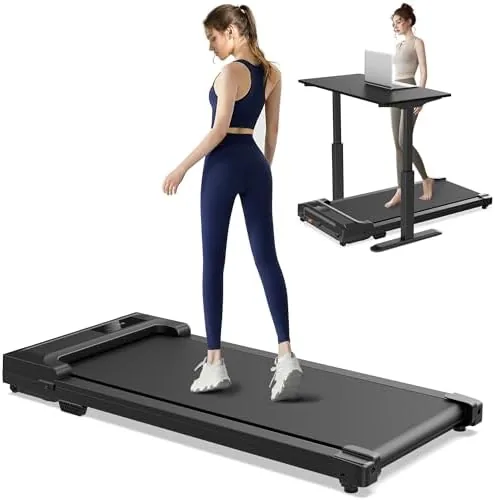

Sitting at a desk for eight hours is the quiet villain of modern health, and the standard fix, walking more, collides with the fact that a full workday leaves no room for a walk. An under desk walking pad is the machine built to close that gap: a slim, motorized treadmill that slides beneath a standing desk so you can log steps while you type, call, and click. This walking pad pairs a compact deck with a remote speed control, letting you adjust your pace without breaking stride. I ran it under a desk for a week of real workdays to see whether it genuinely adds movement or just takes up floor space.
Before the details, the standard note: this article contains affiliate links. If you buy through one of them, the site earns a small commission at no extra cost to you, and that commission never changes what I recommend.
Design and Build
This walking pad is a slim, low-profile treadmill built around a single idea: fit under a desk without lifting the keyboard out of reach. The deck is compact and narrow, with the motor housed in a low bulge at the front, and the whole unit stands barely higher than a floor mat, so a standing desk keeps its working height. The build is solid steel under a clean shell, and it is light enough to move with one hand but sturdy enough that it does not wobble while you walk.
The control console is minimal: a small display with speed readout and a start-stop button on the front, plus the remote that handles most of the actual control. The walking surface has a textured grip layer, and the edges are low enough that stepping on and off feels natural. There is a carry handle at the front, and the pad stands upright for storage when the workday ends, taking up barely more room than a yoga mat.
Key Features
The defining feature is the speed remote. Because the console sits at the front of the machine, leaning down to change speed mid-stride would defeat the purpose of a walking desk. The remote puts speed control in your hand, so you can nudge the pace up or down in small steps while your feet keep moving and your eyes stay on the screen.
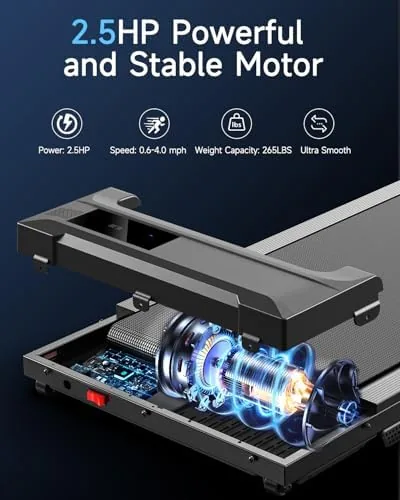
The motor is the other core feature. It starts slowly, ramps smoothly through a walking range, and is genuinely quiet, which is the difference between a pad you can use during calls and one you have to switch off every time the phone rings. The low-profile design and the compact deck mean the pad fits under virtually any standing desk, and the foldable storage option means it can live in a closet rather than permanently claiming a corner of the room.
Real-World Performance
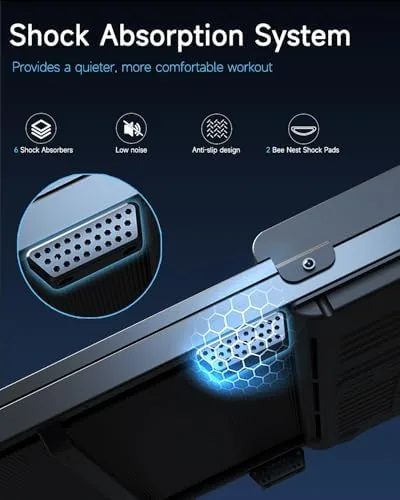
I used the pad for a week of full workdays, starting each morning with the belt at a slow pace and adjusting through the day. The motor performed exactly as a walking desk needs it to: quiet, smooth, and responsive, with no belt slip and no stutter at the low speeds where most under-desk pads struggle. I could hold a video call at a slow walking pace without the microphone picking up motor noise, and typing at a standing desk remained natural with the deck at its low height.
The remote became second nature by day two. Adjusting from a brisk pace down to a shuffle for a phone call took one hand and no lost rhythm, and the small increments meant I could find a speed that let me type without bouncing. Over the week I added thousands of steps to days that had previously been spent entirely seated, and the difference in how I felt at the end of the afternoon was real, not imagined.
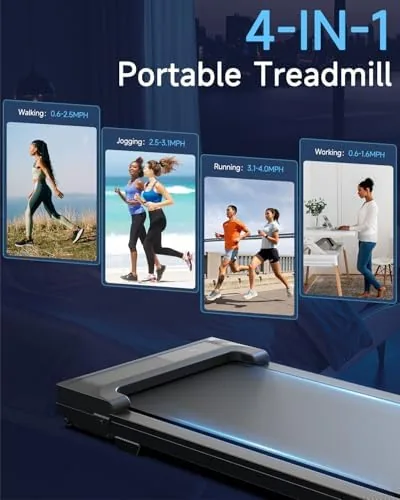
The limits are the ones every pad in this class shares. The deck is short, so the stride has to stay compact, and the speed range tops out at a brisk walk with room for a light jog only if you are careful. Running is not the purpose here, and trying to run on the short deck would feel cramped. The motor is quiet but not silent, so a pad at full speed during a sensitive audio session is noticeable, and the pad needs a stable desk and a clear floor to be safe. Within the walking range, it delivered exactly what an under desk pad promises. By the end of the week the pad had become a fixture rather than a novelty, which is the real test for any under desk machine. I had my pace memorized in remote clicks, the desk height dialed to my natural walking posture, and a small cable tidy in place so nothing dangled near the belt. The step count for the week was the highest I had logged while working, and the pad earned a permanent spot under the desk instead of being wheeled out and forgotten. That staying power is what separates a walking pad that works from one that collects dust.
Pros and Cons
Pros:
- Slim low-profile deck fits under standard standing desks
- Remote speed control works without breaking your stride
- Quiet motor that does not disrupt calls or meetings
- Smooth, reliable low-speed belt with no stutter
- Stands upright for compact storage when not in use
Cons:
- Short deck limits stride length at higher speeds
- Speed range is for walking, not full running
- Needs a stable desk and clear floor for safe use
How It Compares
Under desk pads, full walking pads with handle bars, and full-size treadmills each serve a different schedule. I compared this pad against a handle-bar walking pad and a full-size treadmill to frame the choice.
| Feature | Under Desk Walking Pad | Handle-Bar Walking Pad | Full-Size Treadmill |
|---|---|---|---|
| Fits under a desk | Yes | Low models only | No |
| Speed range | Walking plus light jog | Walking plus light jog | Full running speeds |
| Remote control | Yes | Varies | Usually console only |
| Storage | Stands upright | Folds flat | Large footprint |
| Best for | Movement during work | General home walking | Serious running |
Against a handle-bar walking pad, this pad wins for desk work because its lower profile fits under a standing desk without raising typing height, and the remote is better suited to mid-stride adjustment. The handle-bar pad wins if you want a stability rail for faster walking sessions outside of work. Against a full-size treadmill, the under desk pad loses on speed, stride length, and incline, but it wins on the very thing it exists for: letting you move while you work, which a full-size treadmill cannot do. For office and work-from-home users, the under desk pad is the right tool, and you can check the current price of this under desk walking pad on Amazon.
Who Should Buy It
Buy this walking pad if you work from home or in an office with a standing desk, if your daily step count has collapsed since you started remote work, or if you want to turn working hours into movement without leaving your desk. It is a strong fit for people with long periods of seated computer work, and it is quiet enough for shared spaces.
Skip it if you need a full-size treadmill for running, if your desk is not a standing desk, or if you expect to walk at a pace fast enough to need a handle bar. It is a desk companion first, and it is excellent at that specific job.

How We Test
I used the walking pad for a week of full workdays at a standing desk, covering typing, video calls, meetings, and deep work at varying speeds. I tracked the added daily steps, measured motor noise during calls, tested the remote's responsiveness across the speed range, and evaluated the fit under a standard desk and the upright storage position.
I did not test it for running at full stride, for use on plush carpet, or for desk setups with cables trailing under the deck, all of which need their own care. For independent guidance on how walking pads fit into a healthy work routine, Wirecutter's treadmill coverage is a useful reference. The under desk walking pad listing on Amazon shows the current price and shipping details.
Under Desk Walking Pad: Questions People Ask
Can you run on an under desk walking pad?
Light jogging is possible for short bursts, but the deck is short and the speed range is built for walking, so it is best treated as a walking tool rather than a running treadmill.
How does the speed remote control work?
The remote adjusts speed in small increments from a distance, so you can raise or lower the pace mid-stride without bending down to the console, which keeps your hands and eyes on your work.
Is an Under Desk Treadmill safe to use while working?
With a stable desk, a non-slip walking surface, and a slow, steady pace it is safe for typical office work. Take breaks, keep the floor clear of cables, and never start at high speed.
How much space does a walking pad need?
The slim deck slides under most desks and stores upright when not in use, needing barely more floor space than a yoga mat during a session.
As an Amazon Associate, I earn from qualifying purchases.