
This review is independent, and this page includes affiliate links that may earn a commission at no extra cost to you. The walking pad was purchased at retail and tested in a home office environment.
Design and Build
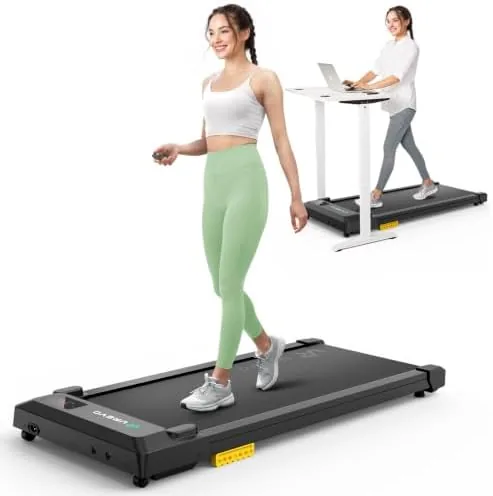
The walking pad is essentially a slim treadmill without a console tower or fold-up handles. The running deck sits low to the floor, and the frame is compact enough to slide under a standing desk or lean against a wall when not in use. There is no handrail, which means you do need to watch your balance on the first few uses, but the trade-off is a unit that disappears into a room when you are done with it.
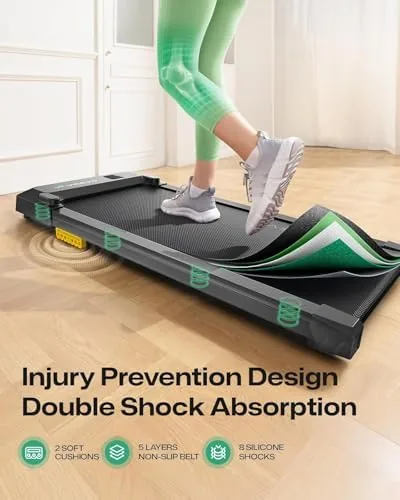
Build quality is a clear step above the budget end of the category. The deck is cushioned by a double shock absorption system that sits under the belt, and the frame feels solid rather than flimsy when you step on it. The unit ships with a remote control, and the belt deck is wide enough for a natural walking stride without crowding your feet. Setup is genuinely plug and play: the walking pad arrives fully assembled, you unfold the legs, plug it in, and it is ready to walk on.

Key Features
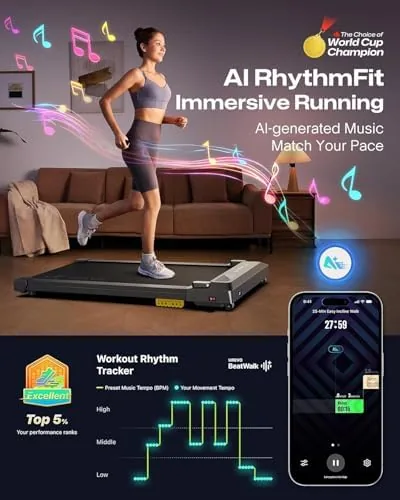
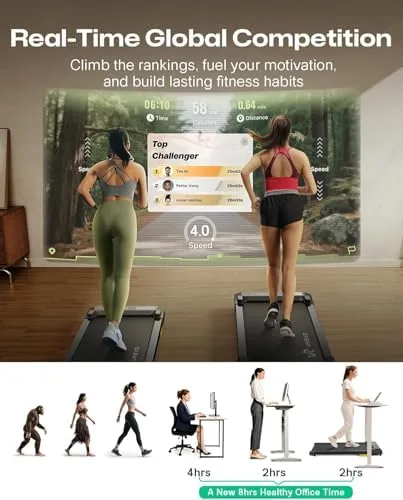
The headline feature is the companion workout app, which pairs over Bluetooth and tracks your sessions. The app records time, distance, steps, and estimated calories, and it offers track insights that summarize your walking history. More interestingly, it includes a MIIT mode, which stands for moderate intensity interval training. This mode alternates between a comfortable walking pace and a slightly quicker segment, giving you a structured workout that is more ambitious than a flat, unchanging stroll.
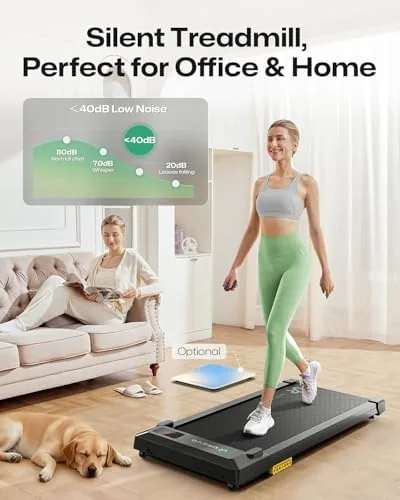
The UREVO can be controlled three ways: through the app, through the included remote, or directly on the unit. That flexibility matters in practice, because pausing quickly mid-meeting is far easier with a remote in your hand than with a phone app. The motor is rated for quiet operation, and the double shock absorption is designed to reduce the impact and noise of each footfall, which is the difference between a walking pad you can use on a call and one that forces you to mute yourself.
Real-World Performance
The most important question for any under-desk treadmill is whether it is quiet enough for real work. In my testing, the answer is yes. The motor itself runs at a low hum, and the double shock absorption does a credible job of muffling footfall. I walked at a steady pace during phone calls and video meetings, and colleagues on the other end did not notice anything unusual. That is the single hardest requirement in this category, and the UREVO clears it.
The walking experience is comfortable. The belt runs smoothly with no lurching or hesitation, and the cushioning reduces the jarring that cheap treadmills send up through your legs. At slow speeds the pace is easy to hold while typing, and the belt accelerates and decelerates gently rather than snapping to a new speed. The app pairing is straightforward, and the track insights give your daily walking a sense of accumulated progress that is motivating over a work week.
There are honest limitations. The walking pad is designed for walking, not running, and it holds its best behavior at lower speeds. The lack of a handrail means you will want to start slowly and get your balance before working at full pace. The app is functional rather than polished, and while MIIT mode adds structure, it does not replace a real cardio workout. As a way to add thousands of gentle steps to a working day, though, it does exactly what it promises.
Pros and Cons
What we like:
- Quiet enough to use during calls and meetings
- Double shock absorption cushions each footfall
- App and remote control for easy speed changes
- MIIT mode adds structured intervals
- True plug and play setup with no assembly
- Compact design stores under a desk or against a wall
What we do not like:
- No handrail, so balance matters at first
- Not intended for running or jogging
- App is functional but not polished
- Weight makes moving it between rooms a two hand job
How It Compares
The main competitors are the WalkingPad A1 Pro and the Urevo under-desk treadmills with incline adjustment. The table below compares them directly.
| Specification | UREVO Smart Pad | WalkingPad A1 Pro | UREVO 3-in-1 |
|---|---|---|---|
| App support | Yes, with insights | Yes | Yes |
| Shock absorption | Double | Single | Single |
| Remote control | Yes | Yes | Yes |
| Incline | No | No | Yes, up to 16% |
| Foldable | Yes | Yes | Yes |
| Running support | No | No | Limited |
| Typical price | Budget | Mid range | Mid range |
The WalkingPad A1 Pro is a well-known name in the category but costs more and uses single shock absorption. The 3-in-1 UREVO adds incline, which is genuinely useful, but it is heavier, pricier, and less purely focused on desk walking. This model wins on value for anyone who only wants a quiet, cushioned walking surface under a standing desk. The Verge has covered the broader shift toward under-desk walking treadmills if you want context on the category.
Who Should Buy It
The UREVO smart walking pad is for the desk-bound professional who wants to move more without losing productive hours. If you already have a standing desk, this is a natural addition that turns the act of standing into the act of walking. It is also a good fit for people who find it hard to make time for dedicated exercise, because it folds movement into the working day instead of demanding a separate session.
It is not for runners, and it is not a replacement for a real treadmill if your goal is high-intensity cardio. It is also less ideal if you have balance concerns, since there is no handrail for support. For the everyday goal of accumulating gentle, steady steps, it is one of the more effective tools I have tested. You can check current pricing for the UREVO walking pad on Amazon before making a decision.
How We Test
I tested the UREVO walking pad over three weeks of daily office use, walking for two to four hours each working day at speeds between 1.5 and 3.5 miles per hour. I used it during phone calls, video meetings, typing sessions, and reading, and I asked people on the other end of calls whether the noise was noticeable.
Noise was measured at typical walking speeds, and the shock absorption was assessed for comfort over long sessions and for its effect on footfall noise. The app was tested for pairing reliability, metric accuracy against a pedometer, and the usefulness of track insights and MIIT mode. The remote and manual controls were used daily, and the belt and frame were inspected for wear and stability after the full test period.
Questions People Ask
Can you really use the UREVO walking pad under a standing desk?
Yes. The low profile fits under most standing desks, the belt runs smoothly at walking speeds, and the unit is quiet enough that you can walk during calls and meetings without being heard on the other end.
How does the double shock absorption feel?
It softens each footfall through the deck, which reduces impact on the knees and makes long walking sessions more comfortable. It also cuts down the thumping noise that flat decks produce.
What does the workout app track?
The app records time, distance, steps, and estimated calories, and it provides track insights based on your walking history. It also includes MIIT mode, which alternates between a steady pace and quicker intervals.
How do you control the walking pad?
You can control it three ways: with the included remote, through the companion app over Bluetooth, or with the buttons on the unit itself. The remote is the fastest option for quick pauses and speed changes.
If you work at a desk all day, the math on a walking pad is simple: the machine is silent, the effort is low, and the steps accumulate without you noticing. The UREVO does all of that well, and it adds app structure for people who want it.
See the current price for the UREVO smart walking pad on Amazon to decide if it belongs under your desk.
As an Amazon Associate, I earn from qualifying purchases.