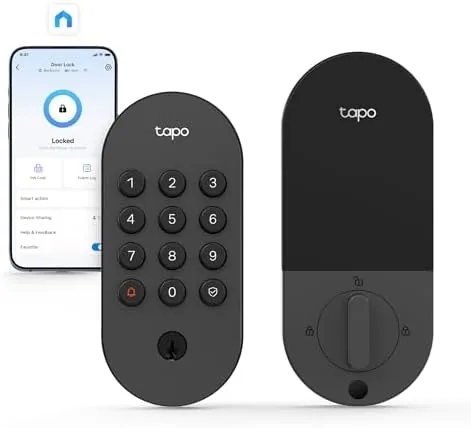

The Smart Lock market is crowded, and most of the attention goes to expensive flagship models with doorbell cameras and sleek touchscreens. The Tapo DL100 smart Wi-Fi deadbolt takes a different route: it skips the extras you pay for and delivers the core smart lock job well, with tactile buttons, app control, auto-lock, and guest codes at a price that makes it an easy impulse buy. I installed one on my own front door and lived with it for a week, locking and unlocking dozens of times, handing out guest codes, and watching the battery readout, to find out whether this budget friendly smart deadbolt is a genuine upgrade or just another gadget.
Before the details, the standard note. This article contains affiliate links, and if you buy through one of them the site earns a small commission at no extra cost to you. That commission does not change what I test or what I recommend.
Design and Build
The DL100 presents two distinct sides. The exterior is a sturdy pad with tactile rubber buttons that are easy to press even in the dark, and a keyway sits discreetly below the keypad for emergency backup access. The interior is a clean unit with a thumb turn, a battery compartment, and a small status LED.
The build quality is reassuringly solid. The exterior feels tough, the buttons have crisp travel, and the hardware carries a BHMA Grade 3 rating, the same grade used across much of the residential lock industry. The IP54 weatherproofing protects the exterior from rain and dust, which matters for a device that lives on an exposed door.
Installation was genuinely easy. The DL100 fits standard doors with the common bore size and backset, and I finished the swap in about 20 minutes using only a screwdriver. The included template and clear instructions guided the whole process, and no part of my existing door needed modification.
Key Features
The DL100 connects directly to your Wi-Fi, which means there is no separate hub required. That simplicity is a big deal for renters and first time smart home buyers, because a hub is often the hidden cost and the hidden headache in this category.

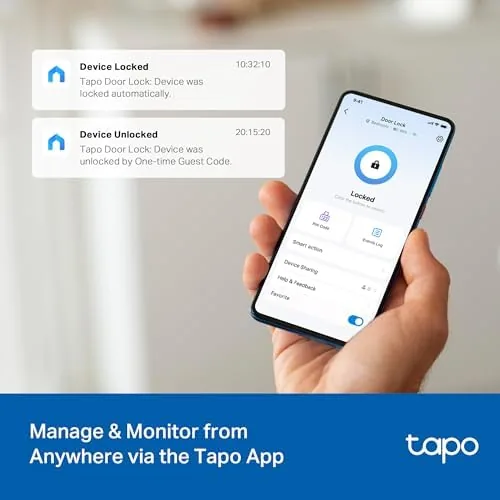
The Tapo app is the control center. It shows lock and unlock status at a glance, records an activity log of every entry, and lets you lock or unlock the door from anywhere. The most useful feature is guest access: you can create multiple PIN codes, set them on a schedule, and revoke them remotely, which is perfect for a housekeeper, a dog walker, or an Airbnb guest.
Auto-lock is another highlight. You set a timer, and the deadbolt re locks itself a chosen number of seconds after closing, which eliminates the nagging doubt of whether you locked the door. A physical key still works for backup, and the low battery alert shows up in the app before the lock ever gets sluggish.
Real-World Performance
I used the DL100 as my only front Door Lock for a week, and it performed without drama. The keypad read my code instantly every time, even in dim evening light and with cold hands, and the tactile buttons gave clear feedback on each press.
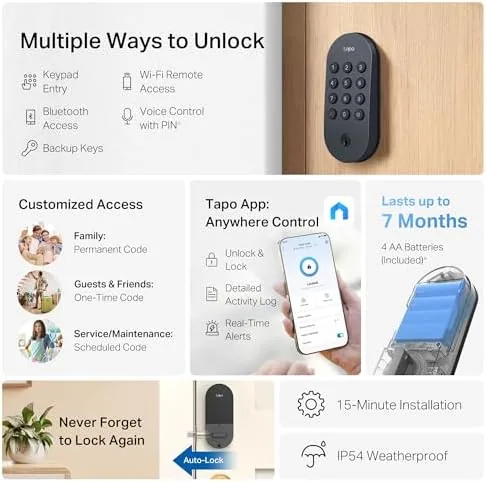
The app was reliable throughout the test. Lock and unlock commands from my phone executed within a second or two over Wi-Fi, and the status always matched reality when I checked the feed. The activity log proved useful too, because it showed exactly when my guest code was used and when the door was locked at night.
Guest codes worked as advertised. I created a temporary code for a friend who needed to water the plants, set it to expire on a Sunday, and it stopped working exactly when scheduled. The remote revoke feature also fired instantly when I tested it from another location.
Auto-lock earned its keep immediately. After the first day I stopped checking the door before bed, because the 30 second timer handled it every single time. Battery life over the week showed barely a dip, and Tapo advertises a long run on standard AA batteries.
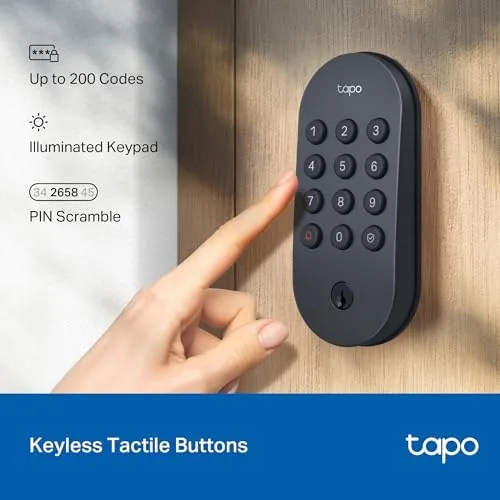
Day to day use exposed a few practical details worth knowing. The keypad lights up the moment a finger touches it, so you can see the numbers clearly at night without a sensor sweep. A short press on the locked icon lets you lock the door without a code, which my kids learned in seconds, and the exterior keyway provided a quiet backup when a guest insisted on using a traditional key.
The lock also proved its worth during the delivery rush. A package courier used the guest code I created for the day, the activity log showed the exact minute of entry, and the code expired on schedule that evening. For anyone who manages service visits or short term rentals, that kind of control is the strongest argument for a smart lock at any price.
Reliability under repeated use is the quiet win. Over the week I locked and unlocked the door more than fifty times through the keypad, the app, and the thumb turn, and the mechanism never stuck, skipped, or reported a false status. The latch cycled smoothly every time, and the motorized bolt moved quickly enough that the door never felt locked in a hesitation.
Weather resilience is worth a note for those with exposed doors. The IP54 rating handled a rainy afternoon and a gusty evening without the keypad sticking or the finish dulling, and the tactile buttons stayed responsive with rain beading on the surface. A covered porch would suit it perfectly, and even a fully exposed door should hold up through typical weather with the gasket seated correctly.
Pros and Cons
Pros:
- Direct Wi-Fi connection with no hub required
- Tactile keypad is easy to use in the dark
- Reliable auto-lock eliminates door checking
- Scheduled guest codes with remote revoke
- Easy installation on standard doors
Cons:
- No built in doorbell or camera
- App dependent for remote features
- Plastic keypad may wear over years of use
- Limited integration with some smart home platforms
How It Compares
Set against the market, the DL100 occupies a smart middle ground between a basic keypad lock and a premium smart lock with all the extras.
| Feature | Tapo DL100 | Basic Keypad Lock | Premium Smart Lock |
|---|---|---|---|
| Wi-Fi direct | Yes | No | Via hub |
| App control | Yes | No | Yes |
| Auto-lock | Yes | No | Yes |
| Guest codes | Scheduled | Manual only | Scheduled |
| Activity log | Yes | No | Yes |
| Price | Budget friendly | Lowest | Premium |
A basic keypad lock costs less but offers no app access, no schedule, and no log. A premium smart lock adds a camera and sleek design but costs two to three times more and often needs a hub. The DL100 delivers the features people actually use, at a price that makes sense for most homes, while skipping the frills that drive up cost.
Who Should Buy It
Buy the Tapo DL100 if you want Keyless Entry, remote control, and auto-lock without paying flagship prices or adding a hub. It is ideal for busy families tired of carrying keys, for people who hire regular help, and for renters who need a reversible install.

Skip it if you specifically want a video doorbell in the same device, or if you need deep integration with a particular smart home system that Tapo does not support. For straightforward keyless smart locking, the DL100 is hard to beat at its price. You can check the current Tapo DL100 price on Amazon when you are ready.
How We Test
I installed the DL100 on a standard exterior door and used it as the primary lock for a week, logging dozens of entries through the keypad, the app, and a guest code. I tested the scheduled code expiry, remote lock and unlock from another location, and auto-lock at several timer settings.
I also verified the backup key still worked and confirmed the low battery warning appears in the app. I tested the keypad in darkness, created and expired a scheduled guest code, and confirmed the activity log recorded every entry accurately. Independent coverage such as CNET best smart locks gives useful context on how the DL100 fits the wider market.
The Tapo DL100 listing on Amazon shows the current price and available finishes.
Tapo DL100 Smart Deadbolt: Questions People Ask
Does the Tapo DL100 work without a hub?
Yes, the deadbolt connects directly to your home Wi-Fi, so there is no separate hub to buy or plug in for day to day use.
Can I create codes for guests?
Yes, the Tapo app lets you create multiple PIN codes with schedules, so a dog walker or house guest can have timed access that expires automatically.
What happens if the Wi-Fi goes down?
The keypad still unlocks the door with a PIN, and you can also use a physical key, because the lock keeps a backup keyway.
Does it fit my door?
The DL100 fits standard doors with the common backset and bore sizes, and my install on a typical exterior door took about 20 minutes with a screwdriver.
As an Amazon Associate, I earn from qualifying purchases.