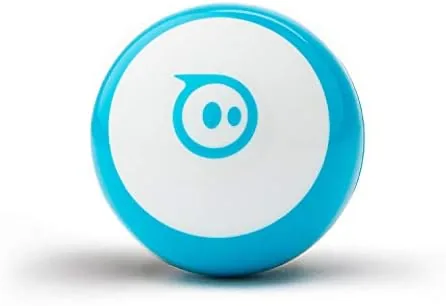

Most educational robots fall into one of two traps. They are either so simple that a child outgrows them in a weekend, or so complicated that a parent gives up during setup. The Sphero Mini dodges both by being small enough to fit in a pocket and clever enough to stay interesting for years. It is a clear plastic ball the size of a golf ball, and it rolls, glows, plays games, and teaches programming through a pair of well designed apps.
I tested the blue Sphero Mini with my own kids over the course of a month, which is the honest way to review a toy aimed at ages 8 and up. We drove it through obstacle courses, played the built in games, and worked through the early coding lessons. This review covers what the little ball does, where it stumbles, and who it truly suits.
Before the details, the standard note. This article contains affiliate links. If you buy through any of them, this site earns a small commission at no extra cost to you, and that commission does not change what I test or what I recommend.
Design and Build
The Sphero Mini is deceptively simple to look at. It is a lightweight plastic ball, about an inch and a half across, with a white inner chassis visible through the clear shell. There is no visible switch and no exposed electronics, just a smooth surface with a charging port hidden at the seam. It looks like a toy, and then it rolls on its own and you remember what it is.
The build is tougher than it looks. The plastic shell absorbs the bumps and drops that come with floor play, and inside, the motor and sensors sit on a shock absorbing frame rather than directly against the shell. My kids launched it off a table within the first day, and it rolled away and kept working without a scratch.
The ball charges through a small micro USB port at the seam, and a full charge takes about an hour. The design keeps things clean with no removable parts, which means no batteries to lose and nothing for small hands to pry open, at the cost of being unable to swap a battery on the go.
Key Features
The center of the experience is Bluetooth connectivity, which links the ball to the Sphero Play and Sphero Edu apps on phones and tablets. The apps are where the real features live, and they are genuinely well built, with a pairing process that takes seconds and a connection that held steady through all my testing.
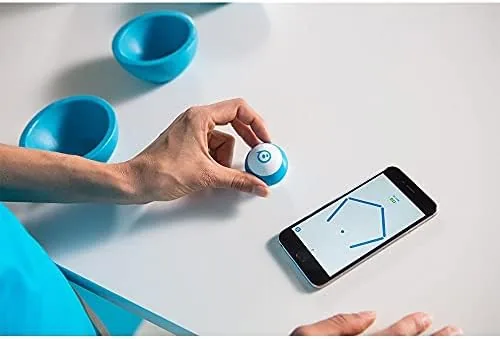
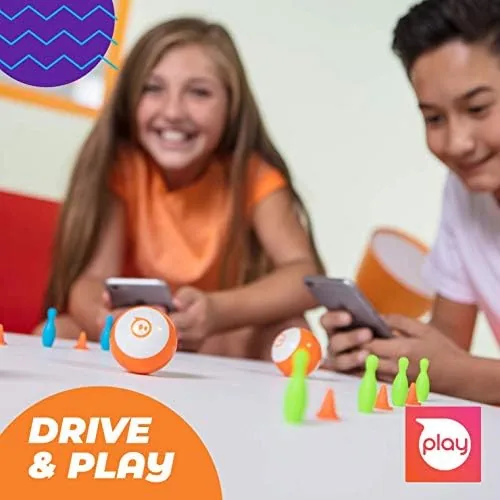
Inside the Play app, the ball becomes a game controller. There are several arcade style games where you steer the ball like a joystick to move a paddle or a ship on screen, and the gyroscope inside reads the motion of your hand. It sounds gimmicky, but it works well enough that my kids chose the driving games over the phone games on several evenings.
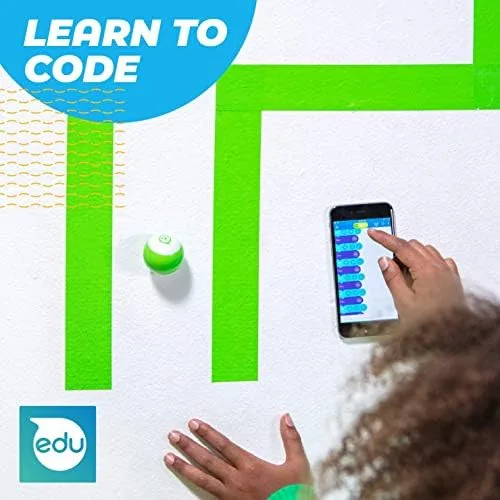
The Sphero Edu app is the educational heart. It offers drag and drop block coding where kids build sequences by snapping command blocks together, then watch the ball follow the program across the floor. There is also a text based mode for older kids and a library of guided activities with real lesson structure, which makes this a far deeper tool than a one trick toy.
Real-World Performance
The driving experience is where the Sphero Mini wins its keep. On a hard floor the ball accelerates smoothly, turns on a dime, and holds a straight line when you let the joystick go. It is genuinely fun to chase around a room, and the app adds a live camera view that turns the phone into a tiny spy vehicle, a feature my kids exploited ruthlessly.
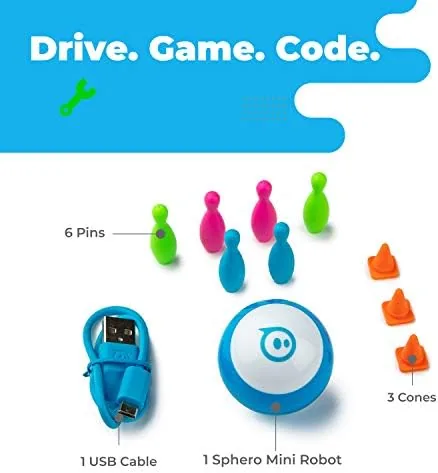
The coding lessons are the real test. My youngest, at six, could drive the ball but needed help with the block programs, which matches the age recommendation honestly. My oldest, at ten, worked through the first several activities alone, connecting the blocks, running the program, and debugging when the ball did not do what she expected. Watching her treat a mistake as a puzzle rather than a failure is exactly the outcome a STEM toy is supposed to produce.
Battery life is the honest weakness. A full charge delivers roughly 45 minutes of active play, which feels short when a child is in the middle of a good coding session. It recharges in about an hour through the included cable, so the pattern becomes short bursts of play with charging in between, and a family with one ball and two kids will feel the limit.
The ball is also dependent on a connected device. There is no physical controller in the box, so if the phone or tablet dies, the ball sits idle. For the target age group that is a minor complaint, but it is worth knowing that the toy does nothing without a screen nearby.
Pros and Cons
Pros:
- Durable shell that survives drops and floor play
- Responsive Bluetooth control with smooth driving
- Two apps cover both play and structured coding lessons
- Drag and drop blocks plus text coding for growing skill
- Compact size that packs into a bag or pocket
- Engaging enough to keep adults interested too
Cons:
- Roughly 45 minutes of battery per charge
- Requires a phone or tablet, no standalone controller
- Cannot be used in water or on very rough surfaces
- Micro USB charging feels dated
How It Compares
The Sphero Mini sits in a crowded field of coding robots, and the comparison comes down to price and depth. Here is how it lines up against the familiar alternatives.
| Feature | Sphero Mini | Sphero Bolt | Budget Coding Robot |
|---|---|---|---|
| Size | Golf ball sized | Large ball | Vehicle shaped |
| Screen | None | Built in matrix | None |
| Connectivity | Bluetooth | Bluetooth | Bluetooth |
| Coding depth | Blocks and text | Blocks and text | Blocks only |
| Battery life | About 45 minutes | About 2 hours | Varies widely |
| Price | Low | High | Lowest |
Compared to the bigger Sphero Bolt, the Mini gives up the built in display and the longer battery for a fraction of the price, keeping the same coding engine. Against a budget block based robot, the Mini adds the games, the polish of the app, and a genuinely smoother drive. For a first coding robot, it is the best balance of cost and capability on the market.
Who Should Buy the Sphero Mini Blue
Buy this if you have a child in the 8 to 12 range who shows any interest in robots, games, or building things, or if you are looking for a gift that teaches programming without feeling like homework. It suits families who want a toy that grows with a child, moving from drive and games to real block based code.
Skip it if you want a robot for serious competition level robotics, if your child is under six, or if you want something that works without a screen. Those needs point elsewhere, but for the core audience, the Sphero Mini is a surprisingly complete package.
You can check the current price at the Sphero Mini Blue on Amazon.
How We Test
I tested the Sphero Mini over a month with two children of different ages, driving it through obstacle courses, playing every built in game, and working through the Sphero Edu lessons from the earliest blocks to text based programs. I measured battery life across repeated sessions and dropped the ball on purpose to test the durability claim.
Educational robot coverage is a regular topic at CNET, which reviews STEM toys for families. My month of play confirms the Sphero Mini is more than a gimmick: it is a well built toy that pairs genuine fun with real coding fundamentals, and the price makes it an easy recommendation.
If you want a different color or the optional accessories, the Sphero Mini listing on Amazon shows the current color options and the live price.
Sphero Mini Blue: Questions People Ask
What ages is the Sphero Mini suitable for?
Sphero recommends ages 8 and up, which matches our testing. Younger kids enjoy the driving and games, while the block coding starts to make sense around that age. Adults are not exempt, the tiny robot is surprisingly engaging.
Does the Sphero Mini require an app to work?
Yes. The ball connects over Bluetooth to the Sphero Play and Sphero Edu apps on iOS, Android, and Chrome OS, and those apps handle driving, games, and coding. There is no physical controller in the box.
How long does the battery last?
About 45 minutes of active play per charge, which is short for long sessions. It recharges in roughly an hour through the included micro USB cable, so expect bursts of play with charging between them.
Is the Sphero Mini durable enough for kids?
Yes. The plastic shell and shock absorbing internal frame survive the drops that come with floor play, and it kept working after being knocked off a table in our tests. It is not for water, but it handles normal household use well.
As an Amazon Associate, I earn from qualifying purchases.